


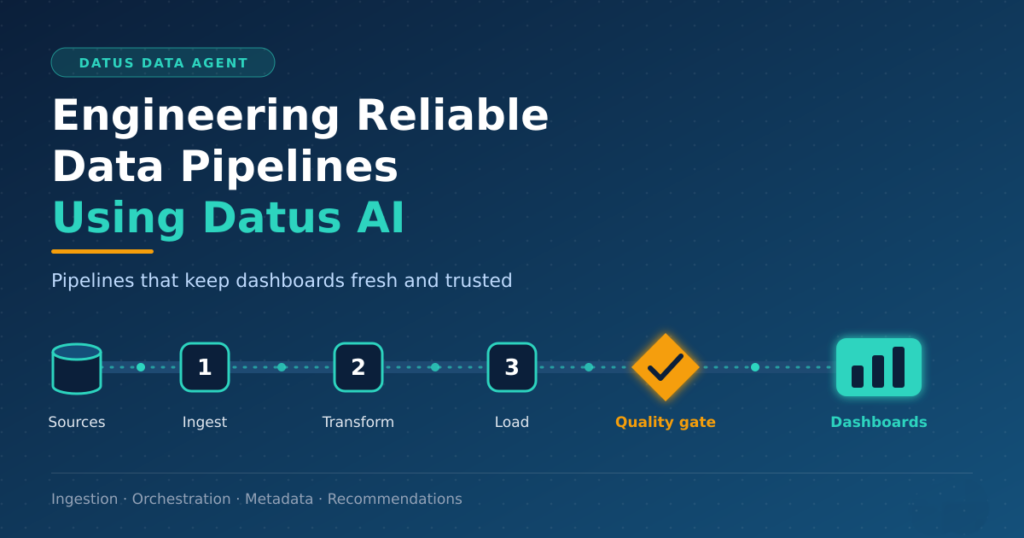
A good architecture on paper does not move a single row of data. Pipelines do that work. When pipelines fail, dashboards go stale, trust drops, and teams spend their days firefighting instead of building.
In earlier articles, we covered why analytics projects fail before they begin, how Datus creates a unified data engineering operating model, and how AI-assisted planning turns requirements into delivery plans. Now it is time to build.
This article shows how to engineer reliable data pipelines with Datus. We will cover ingestion challenges, batch versus streaming, orchestration, metadata, and automated recommendations. Finally, we will pull everything together in an end-to-end example.
Data Ingestion Challenges
Ingestion looks simple. Copy data from a source to a target. In practice, it is where most pipelines break.
Consider the school analytics scenario from our earlier posts. A school board wants a performance card for every school. The data arrives as public files from several sources. Each source has its own habits.
| Challenge | Example | Impact if ignored |
|---|---|---|
| Schema drift | A column is renamed in the new annual file | Pipeline fails or loads wrong data |
| Inconsistent formats | Dates as 2025-06-01 in one file, 06/01/25 in another | Wrong joins and filters |
| Duplicates | The same file is delivered twice | Inflated counts |
| Late or missing data | A file arrives a week after the schedule | Stale reports |
| Hidden values | Small groups appear as * instead of numbers | Silent type errors, wrong averages |
| Changing identifiers | Schools open, close, or merge | Broken history |
These issues share one trait. They are predictable, yet teams often find them only after go-live.
Datus helps by profiling sources before any pipeline exists. For example, it can compare a new file against the last known layout:
EXPECTED = {"cds_code", "student_group", "chronic_absent_count", "eligible_enrollment"}

def check_schema(columns: set[str]) -> None:
    missing = EXPECTED - columns
    extra = columns - EXPECTED
    if missing:
        raise ValueError(f"Schema drift: missing columns {sorted(missing)}")
    if extra:
        print(f"Warning: new columns detected {sorted(extra)}")
This small check turns a silent failure into a clear, early error.
Batch vs Streaming
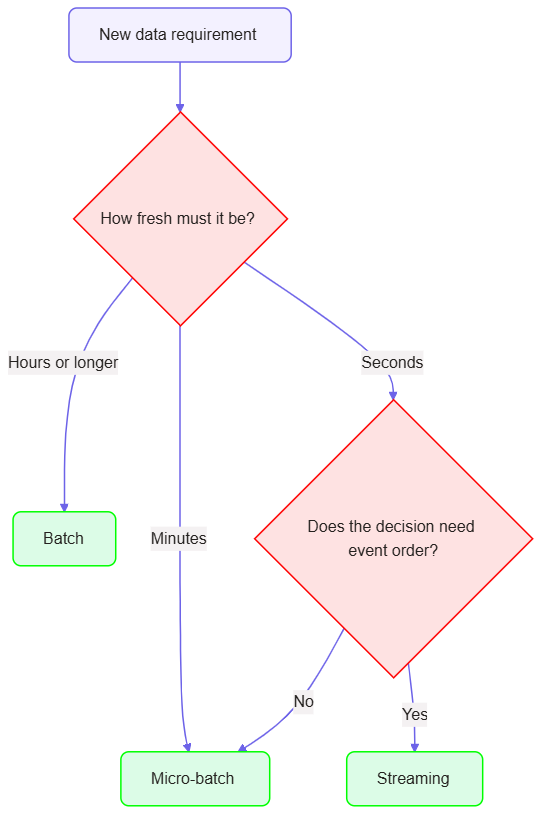
Teams often ask the same question. Should we use batch or streaming? The honest answer is that it depends on the business need, not on the technology trend.
Batch processes data in scheduled groups. Streaming processes events continuously as they arrive. A third option, micro-batch, sits in between and runs small batches every few minutes.
| Factor | Batch | Micro-batch | Streaming |
|---|---|---|---|
| Freshness needed | Hours to days | Minutes | Seconds |
| Typical cost | Lower | Medium | Higher |
| Complexity | Lower | Medium | Higher |
| Ordering and late data | Simple | Moderate | Hard |
| Example | Annual school results | Daily attendance roll-up | Real-time fraud alerts |
In short, streaming earns its extra complexity only when the business decision cannot wait.
Datus makes this choice explicit. It takes the requirement and recommends a mode with reasons:
pipeline: assessment_results
freshness_required: annual
source_behaviour: file release once per year
recommendation: batch
reasons:
  - Source changes once a year
  - No decision depends on intra-day data
  - Batch is cheaper and easier to replay
rejected:
  - streaming: no business value for added complexity
Now compare a different requirement from the same school board. They also want same-day alerts for sudden attendance drops. Datus would recommend micro-batch there, because administrators act on daily trends, not second-by-second events.
Pipeline Orchestration
Once the mode is clear, orchestration decides how the pieces run together. An orchestrator schedules tasks, manages dependencies, retries failures, and raises alerts.
Reliable orchestration follows a few simple principles:
- Make every task idempotent, running it twice gives the same result.
- Declare dependencies explicitly, quality checks run before publishing.
- Retry with limits, transient errors heal themselves, and permanent errors alert a person.
- Parameterize runs, a school year or date range should be an input, not a hardcoded value.
- Support backfills, we can reprocess history without editing code.
The following example uses Apache Airflow style syntax. Datus can generate a similar definition for the orchestrator your team already uses.
from datetime import datetime, timedelta
from airflow.decorators import dag, task

@dag(
    dag_id="school_card_load",
    schedule=None,  # triggered after each annual data release
    start_date=datetime(2026, 1, 1),
    catchup=False,
    default_args={"retries": 3, "retry_delay": timedelta(minutes=10)},
)
def school_card_load(school_year: str = "2024-25"):

    @task
    def ingest(school_year: str):
        ...  # land raw files, validate schema

    @task
    def standardize(school_year: str):
        ...  # raw -> cleansed

    @task
    def load_curated(school_year: str):
        ...  # idempotent MERGE into curated tables

    @task
    def quality_checks(school_year: str):
        ...  # fail the run on any breach

    @task
    def publish(school_year: str):
        ...  # refresh semantic layer

    ingest(school_year) >> standardize(school_year) >> load_curated(school_year) \
        >> quality_checks(school_year) >> publish(school_year)

school_card_load()
Notice the quality gate. If checks fail, nothing reaches the dashboard. Bad data stays out, and the right person gets alerted.
Metadata Generation
Pipelines move data. Metadata explains it. Without metadata, nobody knows what a column means, who owns it, or where it came from.
Many teams write documentation last, so it never gets written. Datus generates metadata as part of the build, so it exists from day one. There are four types:
| Metadata type | What it answers | Example |
|---|---|---|
| Technical | What does the structure look like? | Column names, types, keys |
| Business | What does it mean? | “Chronic absenteeism rate” definition |
| Operational | How does it run? | Schedule, owner, freshness target |
| Lineage | Where did it come from? | Source file to curated table |
Here is an illustrative dataset specification that Datus could produce for the attendance data:
dataset: curated.fact_attendance
description: Chronic absenteeism counts by school, student group, and year
owner: Research and Accountability team
classification: public
refresh: annual
primary_key: [cds_code, student_group, school_year]
columns:
  - name: cds_code
    type: string
    description: 14-digit County-District-School identifier
  - name: chronic_absent_count
    type: integer
    nullable: true
    description: Students chronically absent. Null when suppressed.
  - name: is_suppressed
    type: boolean
    description: True when the source hid the value for privacy
lineage:
  upstream: [raw.chronic_absenteeism]
  downstream: [semantic.school_card]
This single file doubles as documentation, a data contract, and input for quality checks. Consequently, teams stop maintaining three separate documents that drift apart.
Automated Data Engineering Recommendations
Writing pipelines is one task. Knowing whether they are well designed is another. Datus reviews designs and code, then recommends improvements before problems reach production.
Here is an illustrative review of our school pipeline:
review: school_card_load
findings:
  - severity: high
    area: idempotency
    issue: Load step uses INSERT only
    recommendation: Use MERGE on (cds_code, student_group, school_year)
  - severity: high
    area: data_quality
    issue: Suppressed values ('*') are cast directly to integers
    recommendation: Convert to NULL and add an is_suppressed flag
  - severity: medium
    area: schema_drift
    issue: No column check before standardization
    recommendation: Add schema validation at ingestion
  - severity: medium
    area: performance
    issue: Full reload of all years on every run
    recommendation: Partition by school_year and reload only the new year
  - severity: low
    area: observability
    issue: No freshness alert
    recommendation: Alert if no new data after the expected release window
These recommendations follow a clear pattern. Each one names the area, the issue, and a concrete fix. As a result, engineers can review, accept, or reject each item in minutes.
However, people stay in control. Datus proposes, and the team decides. This keeps accountability clear while removing repetitive review work.
End-to-End Example: School Performance Card
Let’s tie everything together. The goal is to load chronic absenteeism data for a new school year and make it available to the School Performance Card.

Step 1: Ingest and validate. Datus detects the new file, checks the schema against the last known layout, and lands it unchanged in the raw layer. Source file name and load time are stored with every row.
Step 2: Standardize. Datus generates the transformation that renames columns, fixes types, and handles suppressed values:
CREATE OR REPLACE VIEW cleansed.attendance AS
SELECT
    cds_code,
    student_group,
    school_year,
    CASE WHEN chronic_absent_count = '*' THEN NULL
         ELSE CAST(chronic_absent_count AS INT) END AS chronic_absent_count,
    CASE WHEN chronic_absent_count = '*' THEN TRUE ELSE FALSE END AS is_suppressed,
    CAST(eligible_enrollment AS INT) AS eligible_enrollment
FROM raw.chronic_absenteeism;
Step 3: Load safely. The load uses MERGE, so reruns never create duplicates:
MERGE INTO curated.fact_attendance AS t
USING cleansed.attendance AS s
   ON t.cds_code = s.cds_code
  AND t.student_group = s.student_group
  AND t.school_year = s.school_year
WHEN MATCHED THEN UPDATE SET
     chronic_absent_count = s.chronic_absent_count,
     is_suppressed = s.is_suppressed,
     eligible_enrollment = s.eligible_enrollment
WHEN NOT MATCHED THEN INSERT
     (cds_code, student_group, school_year,
      chronic_absent_count, is_suppressed, eligible_enrollment)
VALUES
     (s.cds_code, s.student_group, s.school_year,
      s.chronic_absent_count, s.is_suppressed, s.eligible_enrollment);
Step 4: Check quality. The pipeline stops if any rule fails:
-- Duplicate keys: must return zero rows
SELECT cds_code, student_group, school_year, COUNT(*) AS n
FROM curated.fact_attendance
GROUP BY cds_code, student_group, school_year
HAVING COUNT(*) > 1;

-- Counts cannot exceed enrollment: must return zero rows
SELECT *
FROM curated.fact_attendance
WHERE chronic_absent_count > eligible_enrollment;
Step 5: Publish and document. After checks pass, the semantic layer refreshes. Datus updates lineage and the data dictionary automatically.
Step 6: Review. Datus produces a short run summary and a list of recommendations for the next release, such as new columns it noticed in the source file.
The outcome is a pipeline that is repeatable, observable, and documented. Moreover, the same pattern works for every other dataset on the card.
Practical Tips for Reliable Pipelines
A few habits make the biggest difference:
- Keep raw data unchanged, we can always reprocess from it.
- Fail loudly, a stopped pipeline beats a silent wrong answer.
- Never guess missing values, flag them instead.
- Version your schemas, source layouts change.
- Test with bad data, include duplicates, missing columns, and late files.
In-Summary
Reliable data pipelines are not built by accident. They come from clear ingestion rules, the right processing mode, disciplined orchestration, and metadata that stays current.
Datus supports each step. It profiles sources, recommends batch or streaming, helps generate orchestrated workflows, produces metadata, and reviews designs before they fail in production. As a result, teams spend less time fixing pipelines and more time delivering insight.
In the next article, we will look at governing data and keeping it trustworthy as your platform grows.