


Artificial intelligence assistants have been evolving rapidly in recent years, but OpenClaw has captured the tech world’s imagination in a way few tools have. What started as a quirky open-source side project quickly became a viral sensation — sparking excitement, controversy, and debate about the future of personal automation.
1. What Is OpenClaw & Why It Went Viral
OpenClaw — originally called Moltbot or Clawdbot — is an open-source AI agent that runs locally on your own machine but acts like a truly autonomous assistant. Unlike typical AI chatbots like ChatGPT that just respond when you ask questions, OpenClaw can take action on your behalf, connecting with messaging platforms like WhatsApp, Telegram, Signal, Slack, and even iMessage to automate tasks you’d normally do yourself.
The bot went viral for several reasons:
- Local autonomy: It runs on your device, meaning it can directly access files, calendars, emails, apps, and services and perform tasks for you rather than just suggest what to do.
- Early adopter hype: The project gained tens of thousands of stars on GitHub in a matter of days — one of the fastest growth rates ever for an open-source AI tool.
- Naming drama: The original name Clawdbot had to be changed to Moltbot after AI company Anthropic raised trademark concerns around its Claude branding — a story that itself became viral news. Then finally is OpenClaw.
People began sharing screenshots and videos of Moltbot booking meetings, replying to messages, writing code, managing calendars, and even sending proactive reminders — all through simple text messages — which helped the buzz spread quickly across social platforms and developer forums.
2. OpenClaw Architecture
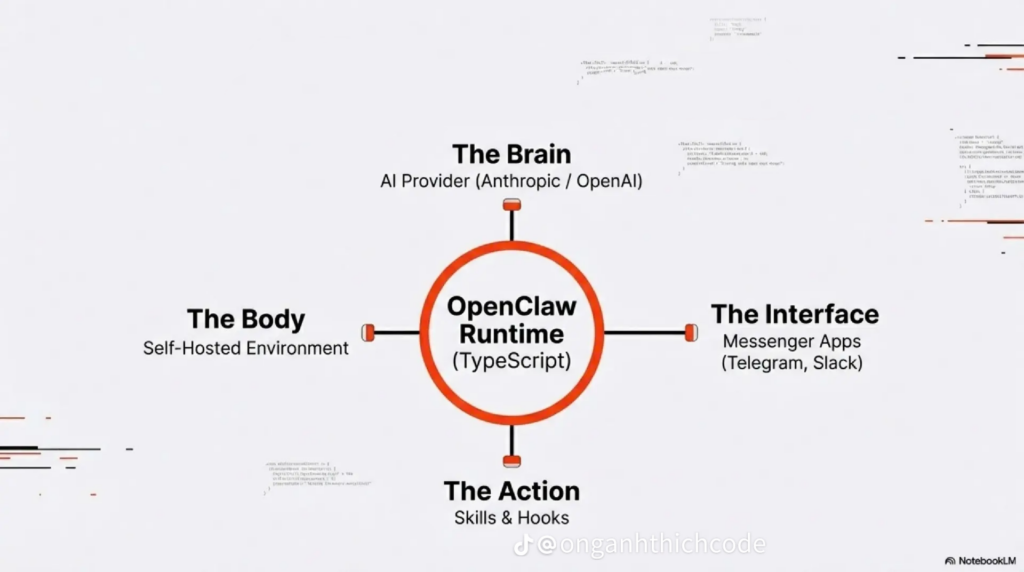
OpenClaw Runtime (The Core)
At the center is the OpenClaw Runtime, written in TypeScript.
This runtime is the orchestrator of the system. It:
- Receives messages from users
- Sends context to the AI model
- Decides which actions to execute
- Manages memory, tools, and workflows
The Brain – AI Provider
The Brain represents the AI model that provides reasoning and language understanding.
- This can be a cloud model (Anthropic, OpenAI, Google Gemini, …)
- Or a local model (depending on configuration)
- The AI does not run the system
- It only decides what should be done
For example: “Summarize today’s tasks and remind me tomorrow”
The brain interprets this request and breaks it into steps, but it cannot directly send messages or access files. That responsibility stays with the runtime.
The Body – Self-Hosted Environment
The Body is where OpenClaw physically exists.
This is the machine you control:
- Your laptop
- A server
- A VPS
- A Docker container
The body:
- Executes scripts
- Accesses files
- Stores memory
- Runs scheduled jobs
Because Moltbot is self-hosted, your data stays with you, not on a third-party platform.
The Interface
The Interface is how humans talk to Moltbot. Examples include: Telegram, Slack, CLI, Discord, Zalo,…
From the user’s perspective, Moltbot feels like a normal chat bot:
“What did I do today?”
“Remind me about this tomorrow.”
Behind the scenes, messages flow through the runtime, into the brain, and back out through the same interface.
The Action – Skills & Hooks
This is where OpenClaw becomes powerful. The Action layer contains:
- Skills (predefined capabilities)
- Hooks (event-based triggers)
- Tool integrations (files, APIs, scripts)
Examples:
- Write to a task list
- Send a message
- Read a file
- Run a script
- Trigger a scheduled reminder
The AI chooses an action, but the runtime executes it — ensuring actions are explicit, traceable, and configurable.
3. Real Use Cases
One thing that truly excited users about Moltbot is that it does things instead of just talking about them. Here are some real-world scenarios where people have used it:
📅 Productivity & Personal Organization
🔹 Managing emails and calendar events
You can ask the bot: “Sort my inbox, archive newsletters, and schedule my meetings for tomorrow.”
Moltbot can automatically categorize messages, generate replies, and add events to your calendar without you having to lift a finger.
🔹 Daily briefings and reminders
Users can receive daily summaries of tasks and appointments directly through their messaging app each morning — a lightweight personal assistant that helps you start the day prepared.
🧑💻 Developer & Technical Tasks
🔹 Code generation and fixes
Developers have experimented with prompts like: “Fix bugs in this repository and draft a pull request.”
With the right setup, Moltbot can help automate code corrections and prepare updates — a hands-off way to streamline development workflows.
🔹 Routine task automation
Because Moltbot can call external tools and scripts, it can run repeatable tasks like building projects, auto-deploying updates, or analyzing logs — giving developers more time for creative work.
💡 Smart Integrations
🔹 Messaging alerts & remote commands
You can instruct Moltbot via WhatsApp or Telegram to:
- Notify you when certain emails arrive
- Alert you if a website goes down
- Remind you about important deadlines
This gives you a kind of virtual assistant that’s reachable from everyday chat apps — useful for people who don’t want to hop into a separate app or dashboard to manage tasks.
4. How to Install and Use OpenClaw
🛠️ Step-by-Step Installation
Before you begin, make sure you have:
- Node.js (v22 or higher) installed
- An AI model API key (from OpenAI, Anthropic, Google Gemini… or a local model setup like Ollama)
- A messaging platform account (e.g., WhatsApp, Telegram,…) to interact with Moltbot
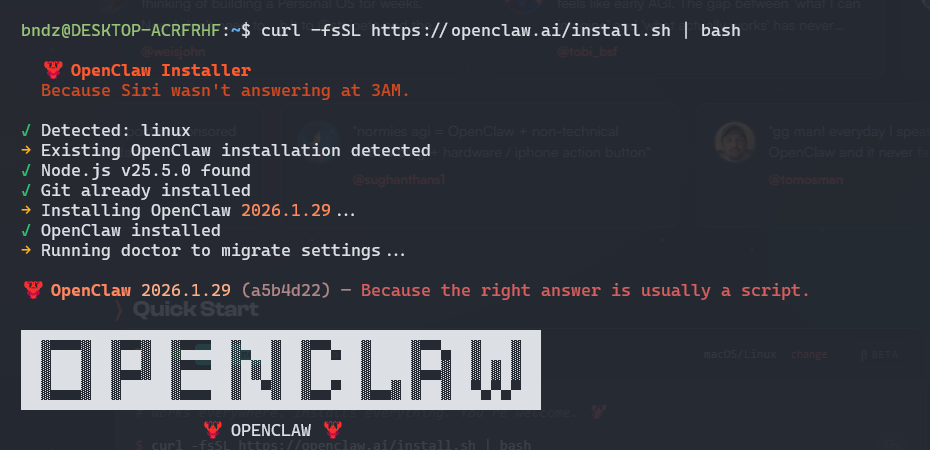
Step 1.Run the Official Installer Script
Open your command terminal and run:
curl -fsSL https://openclaw.ai/install.sh | bashThis command automatically installs Moltbot and detects your operating system (macOS, Linux, or Windows via WSL2)
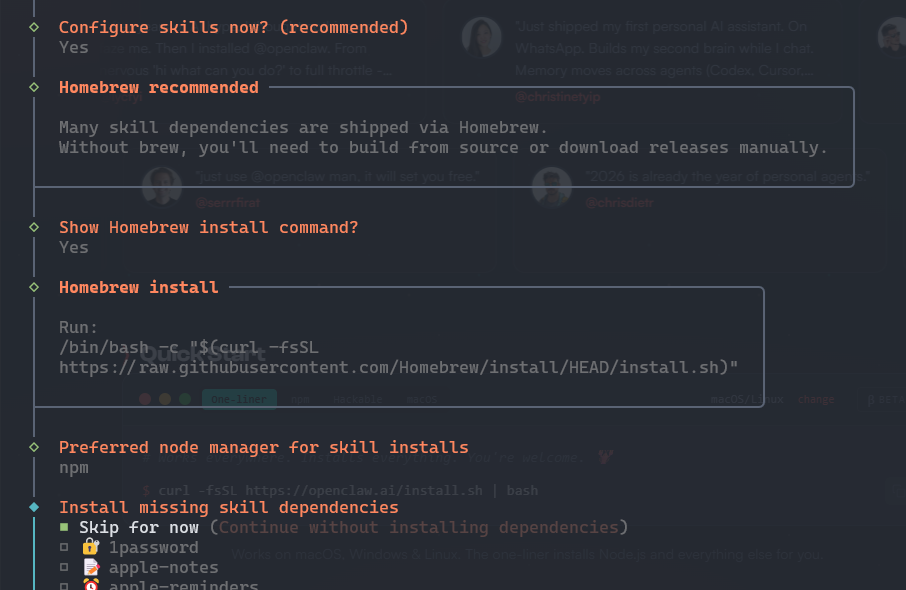
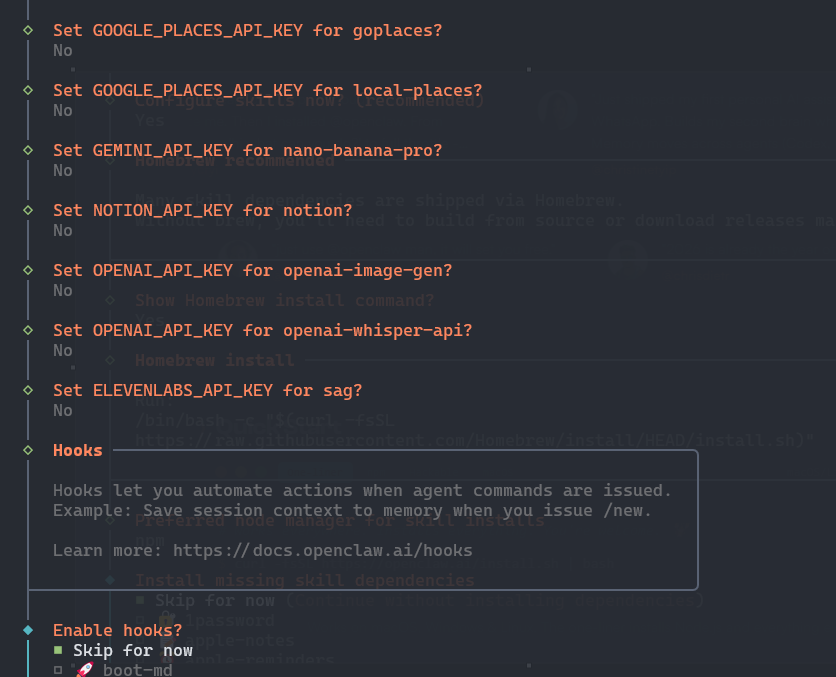
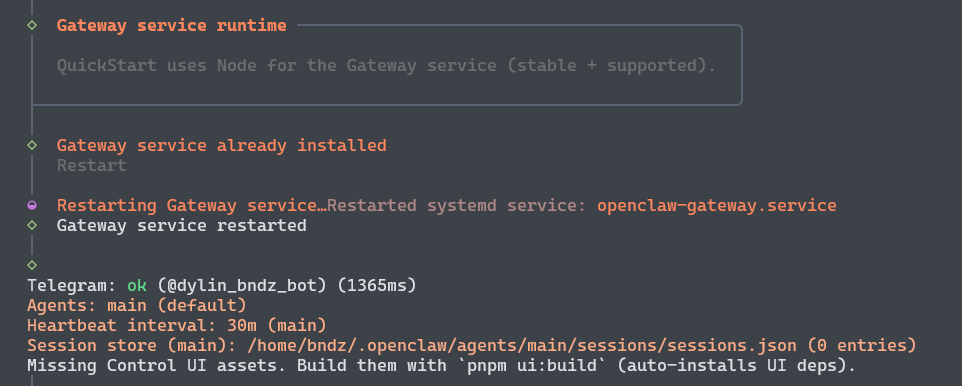
Step 2: Start the Interactive Setup Wizard
After installation, launch the configuration wizard:
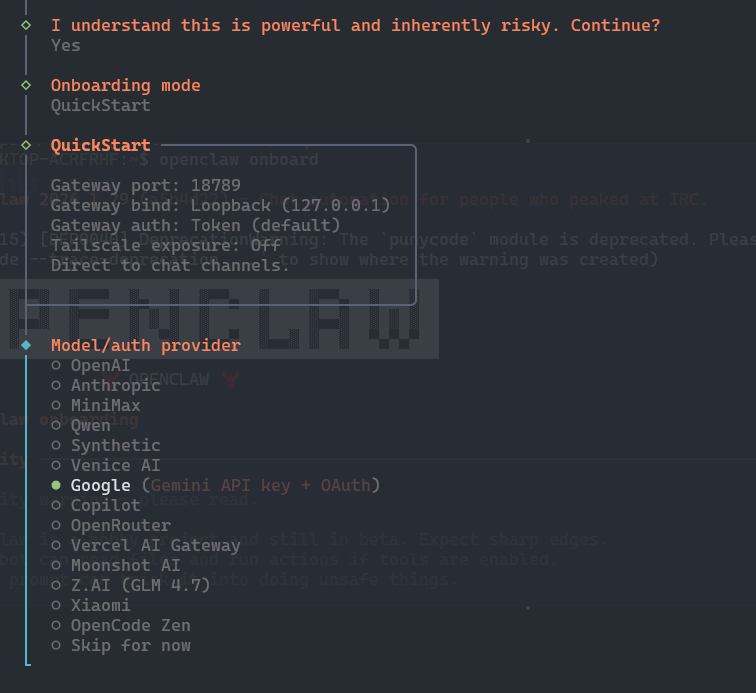
openclaw onboard --install-daemonAnd following this configurations
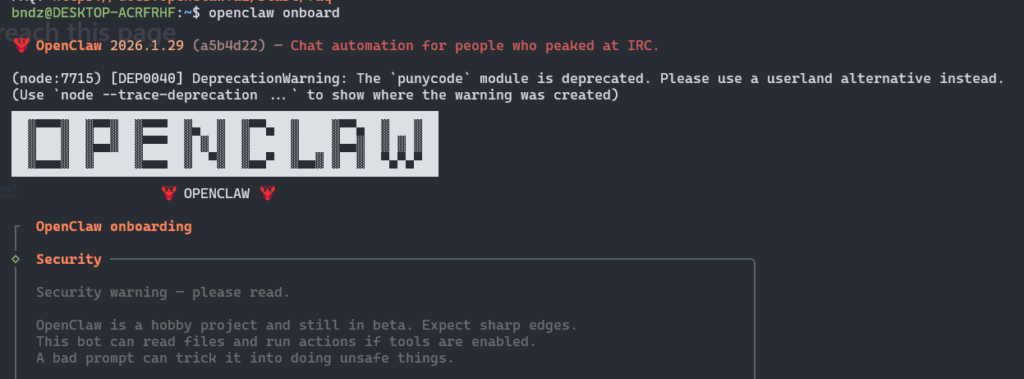
In this step, I will pick Google for Model/auth provider
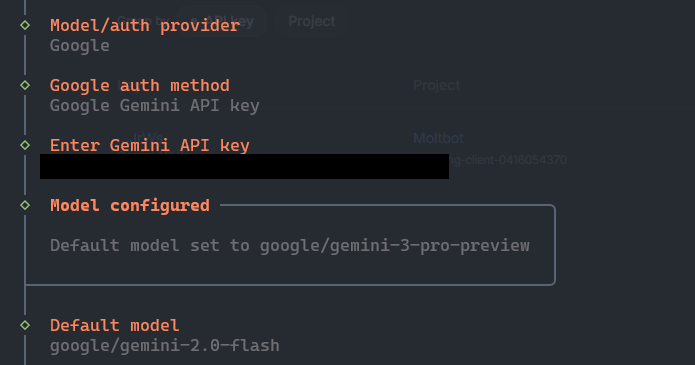
Then choose the model
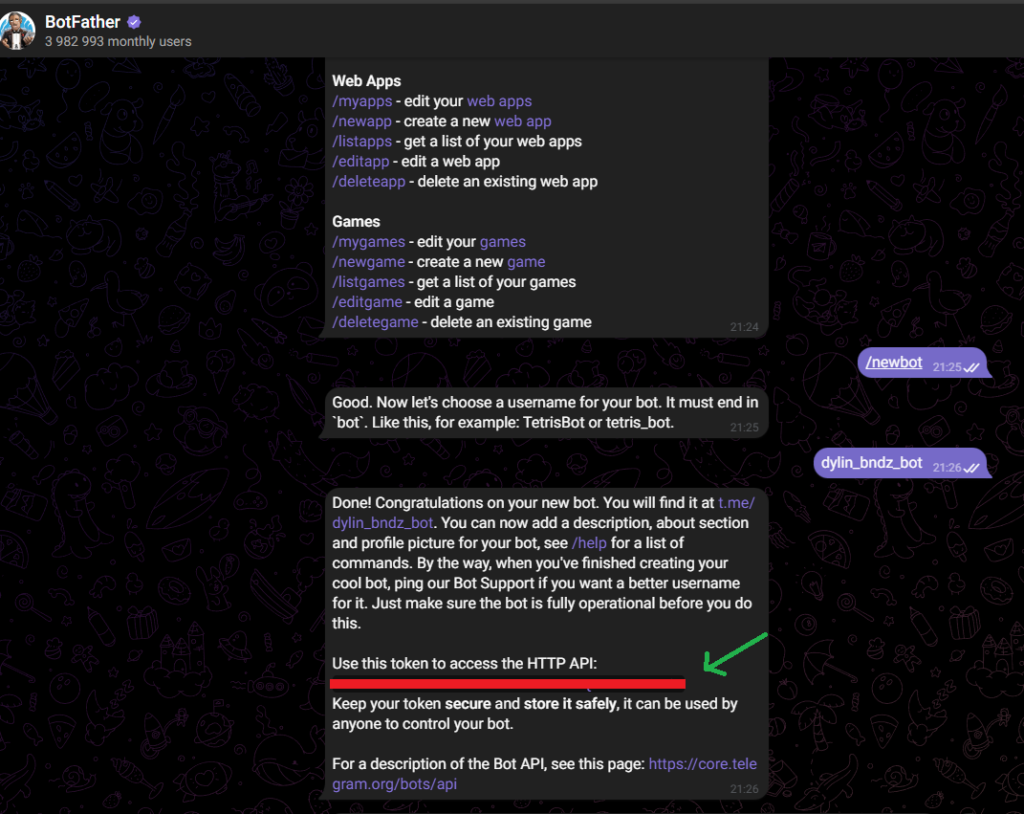
Now create a new telegram bot
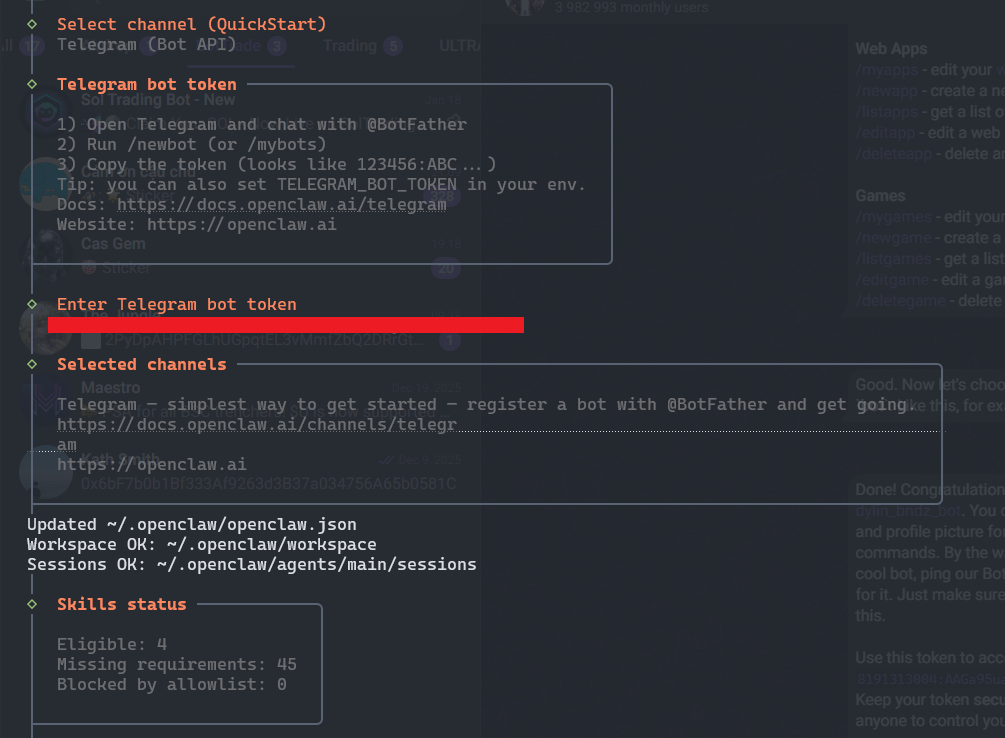
Copy then paste telegram bot token
Choose open the Web UI
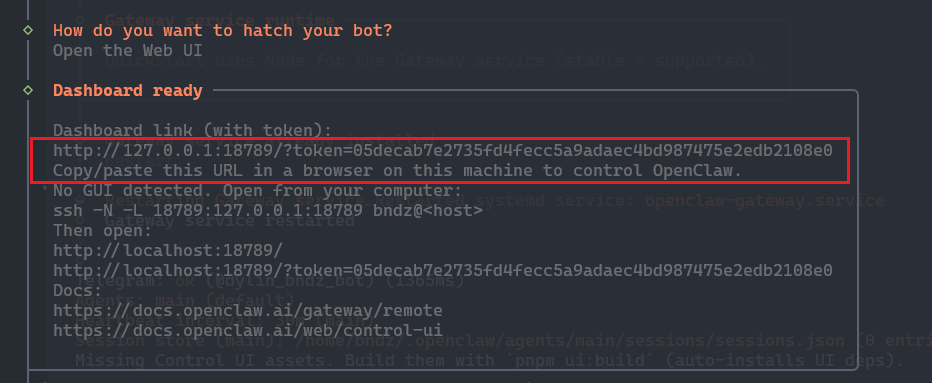
Now go to this link: http://localhost:18789/
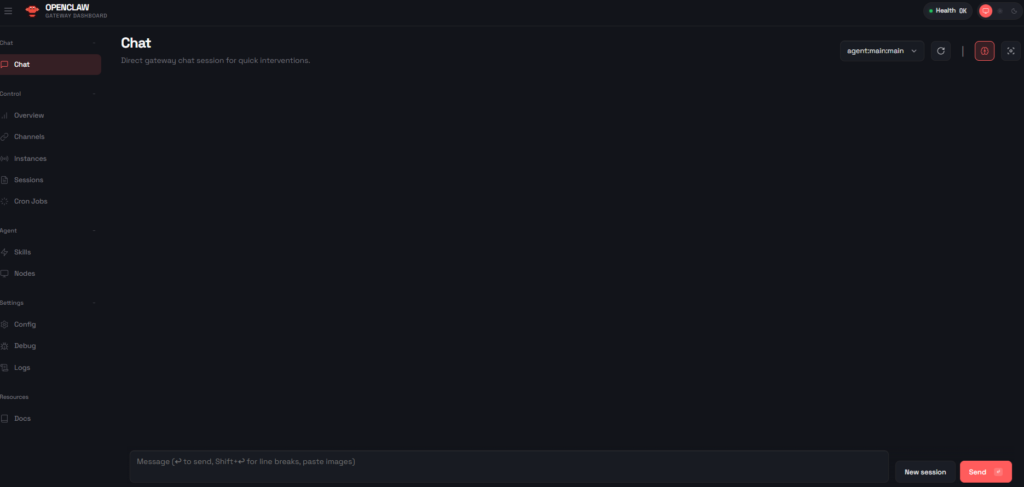
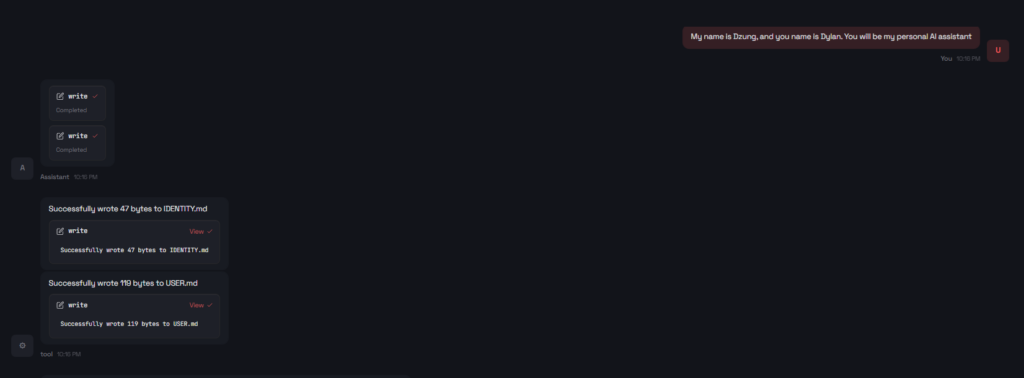
Start some chat, I will set a name for my OpenClaw bot
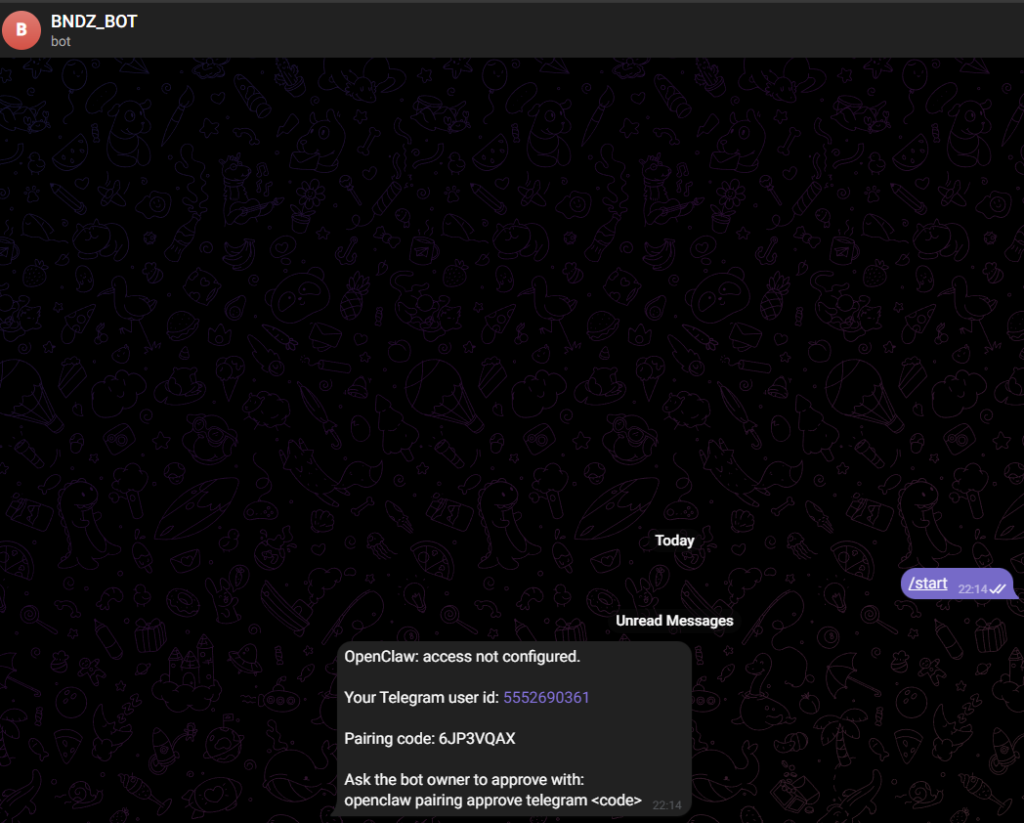
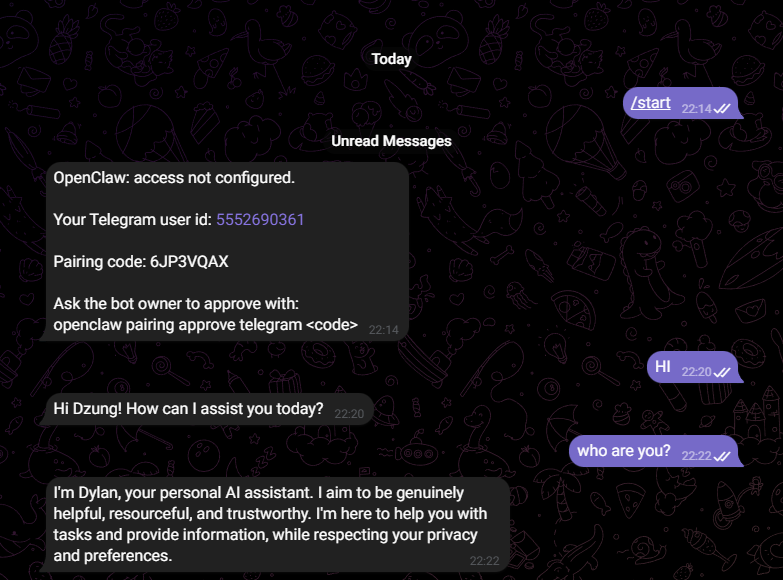
Now back to telegram bot we created before and type /start to get user id
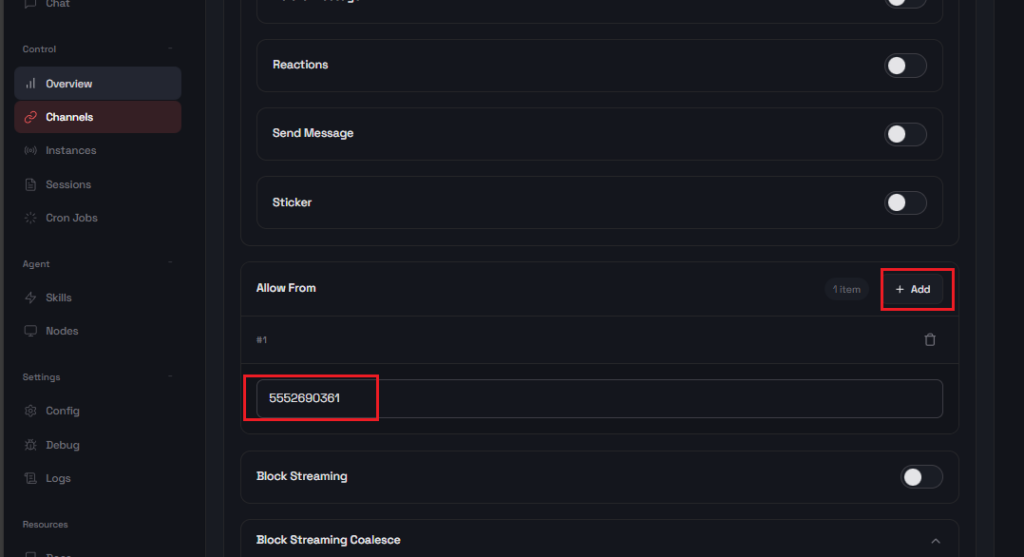
Next go to Channels tab in OpenClaw UI -> Click Add in AllowFrom Section -> Enter user id above -> Click Save
When all that done, we can chat with OpenClaw through Telegram Bot
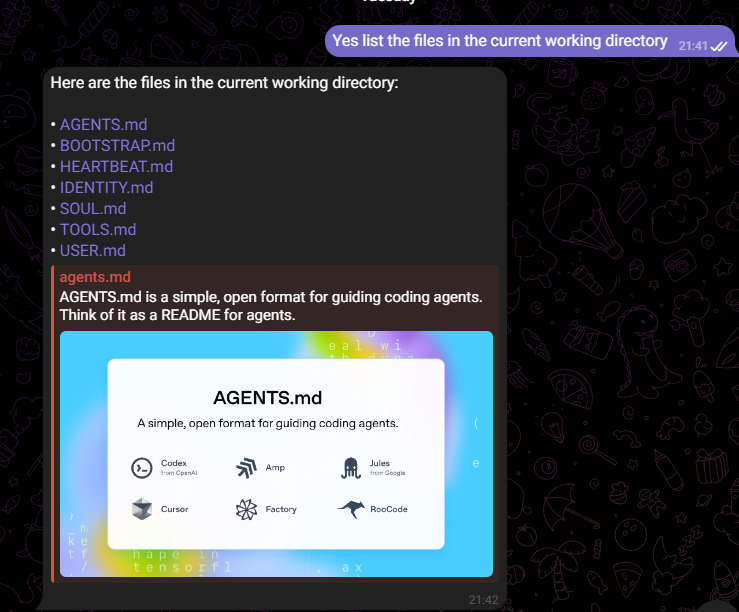
Now we can ask a simple task for Openclaw like list all files in current working directory
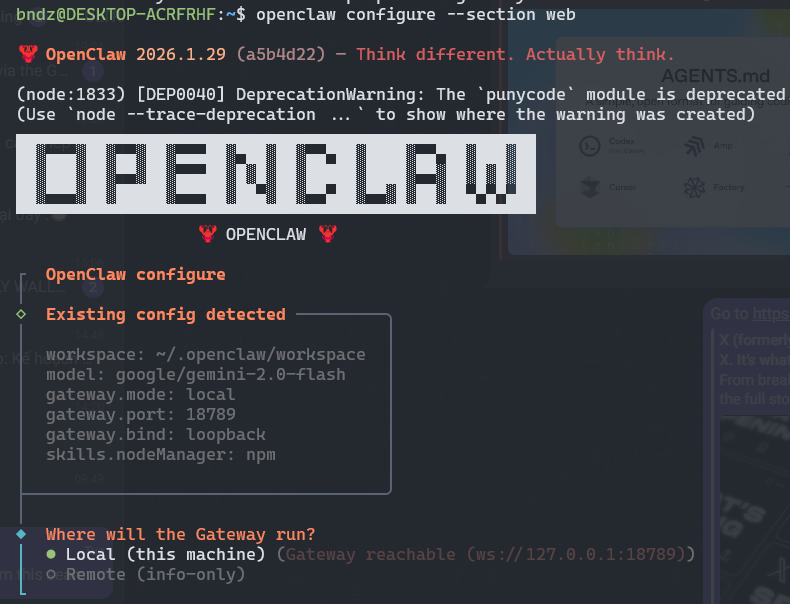
We can set up Openclaw to do some web search
Run command: openclaw configure –section web -> Choose local
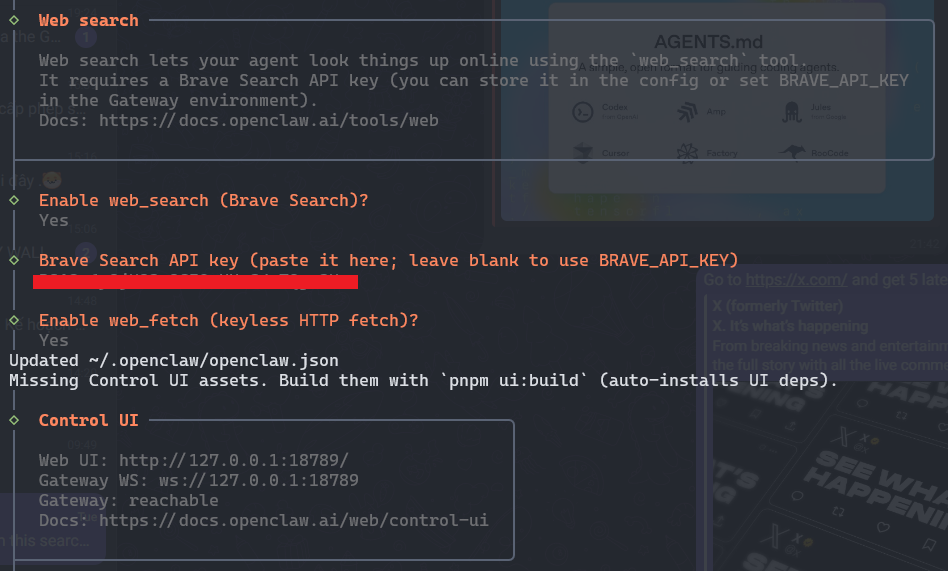
Enter BRAVE_API_KEY
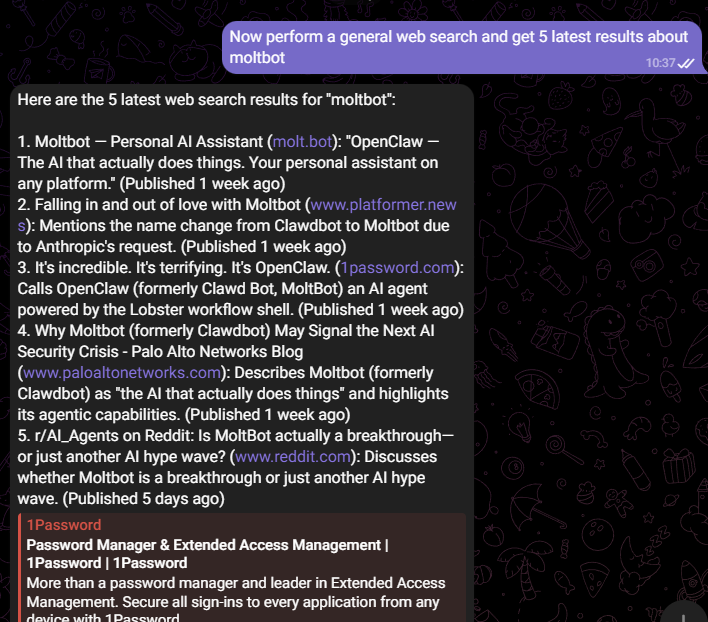
Now ask Openclaw to perform a web search
5. Advantages and Disadvantages
As powerful as OpenClaw is, it’s not perfect. Below we break down what makes it exciting — and what makes many experts cautious.
🌟 Advantages:
✔ Truly autonomous action
Moltbot doesn’t just suggest — it executes. That’s a huge leap beyond conversational AI to action-oriented AI.
✔ Personalized and persistent memory
Unlike many chatbots that forget past interactions, Moltbot stores memories, preferences, and character settings locally, making conversations feel continuous and personalized.
✔ Flexible & open-source
Developers can customize it, integrate new skills from the community, and extend its capabilities far beyond basic commands.
⚠ Disadvantages & Risks:
🔒 Security Concerns
Giving an AI agent broad access to your files, messages, and system tools can be dangerous. Several security researchers have pointed out that improperly configured Moltbot instances can expose API keys, chat histories, OAuth tokens, and other confidential data if left open or misconfigured.
Prompt injection attacks — where hidden instructions in emails or documents cause the agent to run unwanted commands — are also a significant risk for setups that automatically process incoming content.
🧠 Technical complexity
Getting Moltbot set up isn’t beginner-friendly: you need command-line skills, understanding of network security, and careful configuration of access tokens for AI providers and messaging services.
💰 Operational costs
Because Moltbot often relies on cloud AI models for reasoning (like those from Anthropic or OpenAI), API usage can get expensive — users have reported substantial token usage costs if the bot runs complex workflows constantly.
⚠ Malware & Fake Tools
There have even been attempts to distribute fake “OpenClaw” extensions through code marketplaces that contain malware — a reminder to always verify your sources and be cautious about third-party add-ons.
6. Conclusion
OpenClaw represents a bold step forward in the evolution of personal AI assistants. It has captured the imagination of developers and AI enthusiasts by demonstrating what a proactive, autonomous agent can do — from managing your email to handling routine coding tasks and alerting you through familiar chat apps.
But with great power comes great responsibility. Its strong capabilities come with real risks: security vulnerabilities, high configuration complexity, and cost concerns make it a tool best approached with caution and technical understanding.
If you’re excited by the idea of having a digital assistant that actually works for you, Moltbot is worth exploring — but make sure to secure your setup, limit its access to sensitive systems, and start in a controlled environment before letting it manage anything mission-critical.
References:
GitHub – openclaw/openclaw: Your own personal AI assistant. Any OS. Any Platform.
Clawdbot (Now Moltbot) Explained: What is It and Why is It Going Viral? | Gadgets 360