


What is Google Cloud Identity and Access Management?
Google Cloud Identity and Access Management is a web service. It gives cloud administrators the authority to decide “Who can do What on Which resources”. Individual members have the below types
Who – It defines a member who accesses the resources in Google Cloud. The accesses and permissions are given to the Member. It can be an individual or a group.
Types of Individual Members :
- Google Account – The user who having the Google account,
- Service Account – Service Account is an account for an application. It is a special type of Google account. Which need to be verified. That authorized for accessing the Google API’s.
There are three types of groups in IAM :
- Google Group
- G-Suite domain
- Cloud Identity Domain
What – It defines a role to be assigned to the member to access the resources.
There are three types of roles in IAM :
- Basic/Primitive Roles : This includes the Owner, Editor and Viewer role. If we assigned this roles that are accessible within the project.
- Predefined Roles : This provides granular access for a specific Google Cloud service. Like, Compute Admin, Storage Object Viewer, etc.
- Custom Roles : This provides the facility to assign the different permissions as a bundle. Here, we are not assigning the permissions directly to the member. Assign the necessary permissions to the particular member.
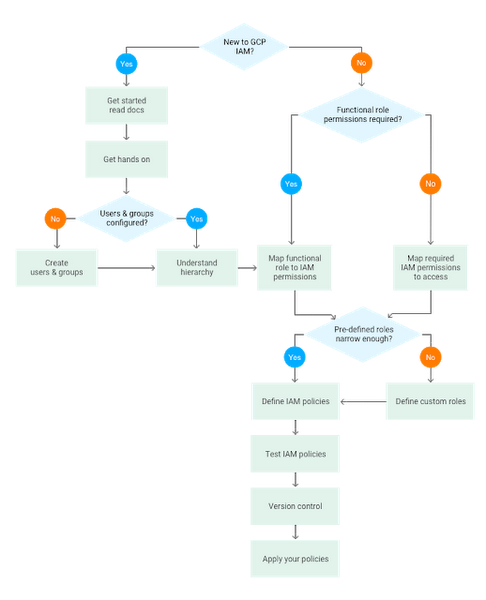
Which – This part will include all the available Google Cloud resources.
Features for Google Cloud Identity and Access Management:
In this paragraph, we are going to see the features of GCP IAM.
- IAM can map the job functions into groups and roles.
- With IAM users get only the limited accesses.
- It allows you to grant access to cloud resources from project-levels to fine-grained levels access.
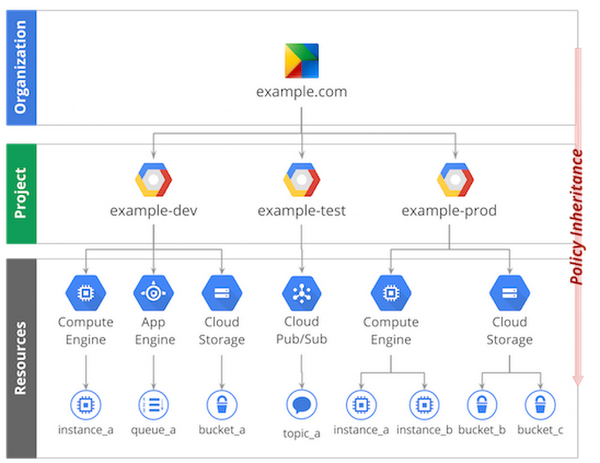
- IAM follows the below Level hierarchy –
- Organization level – The organization resource will represent your company. IAM roles granted to this level are inherited by all the resources available under the organization.
- Folder level – Folders contain projects/other folders/combinations of both. Roles which are granted to this level are inherited by the projects, or other folders that are contained in the parent folder.
- Project level – Projects are the level using which the resources can be accessed. IAM roles granted to this level are inherited by all the resources within the project.
- Resource level – This level grants certain users permission to a single resource within the project.
Define Google Cloud Identity and Access Management policy :
You can grant roles to users by creating a Cloud IAM policy, which is a collection of statements that define who has what type of access. Those policies consist of a set of bindings of members (who has access) to one or more IAM roles.
For example,
{"bindings": [{"role": "roles/owner","members": ["user:alice@example.com","group:admins@example.com","domain:google.com","serviceAccount:my-other-app@appspot.gserviceaccount.com"]},{"role": "roles/viewer","members": ["user:bob@example.com"]}]}
For defining the groups we can use the member. Those are easily readable.
Best Practices :
Below we are going to see the Best practice rules for GCP Identity and Access Management (IAM).
- Check for IAM Members with Service Roles at the Project Level – Check for IAM members with service roles at the project level.
- Configure Google Cloud Audit Logs to Track All Activities – Required to configure the Google Cloud Audit logs feature. To track the all activites realted to the Project.
- Corporate Login Credentials In Use – Don’t use the personal account credentials. Use the Corporate login crentials only.
- Delete Google Cloud API Keys – Ensure that there are no API keys present with your Google Cloud Platform (GCP) projects.
- Delete User-Managed Service Account Keys – Ensure that there are no user-managed keys present with your GCP service accounts.
- Enable Multi-Factor Authentication for User Accounts – Must enable the Multi-Factor authentication for the all GCP user accounts.
- Enable Security Key Enforcement for Admin Accounts – Enforce the use of security keys to help prevent Google Cloud account hijacking.
- Enforce Separation of Duties for Service-Account Related Roles – Essential seperation of Duties for Service-Account Related Roles.
- Minimize the Use of Primitive Roles – Reduce the use of the primitive roles.
- Restrict Administrator Access for Service Accounts – Ensure that user-managed service accounts are not using administrator-based roles.
- Rotate User-Managed Service Account Keys – Check either the User-managed service account Keys are rotate periodically.
References :
https://cloud.google.com/blog/products/gcp/getting-to-know-cloud-iam