



Introduction
Hello readers! In this blog we will be going through .NET features and its importance. We will be covering what is .NET, its features and how we can set up our application in it. So, lets get started.
What is .NET?
.NET is a free, open source development framework which is created by microsoft. It is a secure and a reliable platform for building applications. In .NET, we use C# language which is strongly typed and type safe. It supports multiple types of applications, including web, mobile, desktop, cloud, IoT, and gaming.
Features of .NET
- Cross Platform: It can run on windows, linux and macOS as well.
- Peformance: .NET provides better response times than any other framework. And it also supports features like Just in time compilation(JIT) and Ahead of time compilation(AOT)
- Secure and Scalable: It is officially supported by Microsoft who handles security seriously. In addition to this, it also provides built in features like authorization and authentication.
- Extensive Libraries: .NET supports a wide range of libraries called as NuGet packages and developer tools like Visual Studio, VS Code.
- Open source: It is open source, allowing developers to contribute and improve the framework.
Setting up Development Environment
To start working with .NET, you will first need to install the .NET SDK. Go to the downloads page on .NET official website and download the SDK for your operating system. After downloading, run the installer.
Once you are done with this, verify the installation with the following command:
dotnet --versionBefore proceeding, make sure you have the IDE installed (You can use the Visual Studio 2022 or Visual studio code).
Creating first application
.NET supports different types of applications, each for different purpose. Here are some of them with their use cases:
- Console: It is a simple command line program for scripting
- Webapi: It is used for building RESTful webapis.
- Blazor: It provides full stack development with C#
- Xamarin: It is used for building mobile apps for iOS and android.
- Azure functions: Serverless computing for event driven applications.
- Microservices: It is used to create independent, scalable microservices architecture.
- Unity: It is the most popular game engine using .NET
- .NET for IoT: It supports IoT devices using sensors and connectivity.
These are some of the applications you can create with .NET.
Creating a Console app
To begin with, we will create a simple console application. To create a console application, run the following command in your terminal:
dotnet new console -n MyAppThis will create a new console application with the name MyApp. Firstly, let us understand it and then go through them one by one.
The first one is the Program.cs file. This is the entry point for your application. You will create your Main method in this file. As of now, you will only see Console.WriteLine, which prints output to the console.
Then we have the Project file (.csproj).
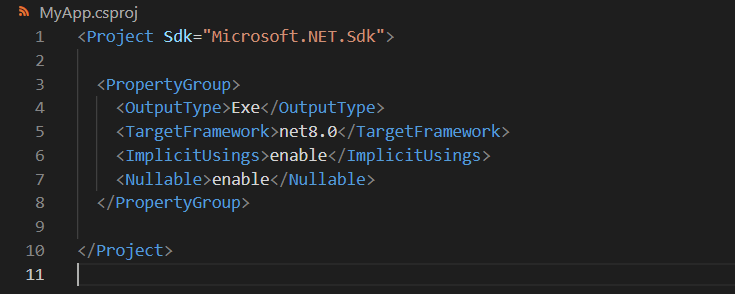
This file will include all the metadata for your application like the framework version, all the dependencies and build settings. <TargetFramework>net8.0</TargetFramework> specifies the version.
<OutputType>Exe</OutputType> defines the output type, for windows we have exe, for linux we have binary.
The <Nullable> setting in a .csproj file is used to enable or disable nullable reference types in C#. It helps detect potential null reference issues at compile time, improving code safety.
Apart from these files, there will be a obj directory. This directory contains temporary files created during compilation. Where as the bin directory contains the files created after building your application. You will find the executable file (.exe) in this directory.
To build a application, we can use the below command
dotnet buildAfter navigating to the MyApp directory, you can run the application with the following command:
dotnet runThis will start running your application and in the terminal, you will be able to see ‘Hello, World!’
Conclusion
.NET is a powerful, versatile, and modern development platform that enables developers to build a wide range of applications, from web and mobile to desktop, cloud, and IoT. Not only .NET provides strong performance, but also cross-platform capabilities, and extensive libraries, adds to its solid foundation for scalable and efficient software development.
Whether you are a beginner exploring C# or an experienced developer working on enterprise applications, .NET offers the flexibility, security, and productivity needed to build high-quality solutions. As the ecosystem continues to evolve, embracing .NET ensures you stay ahead with cutting-edge technologies and industry best practices.
Thank you for reading the blog. Hope you find it useful.
Stay tuned for more such blogs.