


Introduction
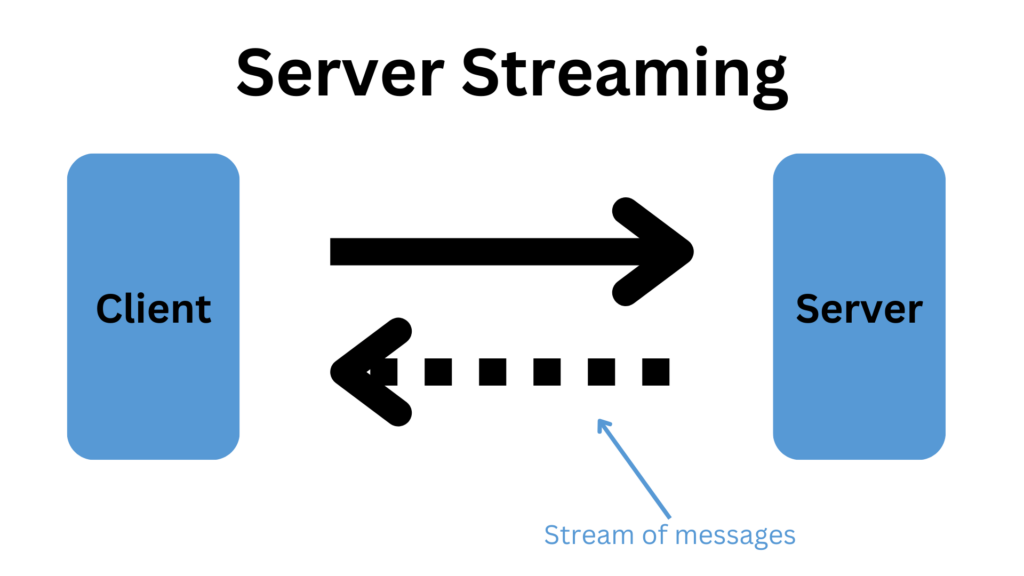
In this article, we’ll explore the server streaming implementation using gRPC in .NET. Server streaming allows the server to send multiple responses for a single client request, which enables the efficient transmission of large sets of data or real-time updates. We will create a simple weather service that streams weather updates for a specific city to the client.
Prerequisites
- .NET SDK (version 8 or higher)
- gRPC tools and dependencies
- Basic understanding of gRPC and protocol buffers
Setting Up the Project
To get started, we’ll set up a new .NET gRPC project. Follow these steps:
- Create a new gRPC project:
dotnet new grpc -o GrpcServerStreamingExample
cd GrpcServerStreamingExample
2. Add a new client application:
dotnet new console -o WeatherClient
cd WeatherClient
dotnet add package Grpc.Net.Client
Folder structure to follow:
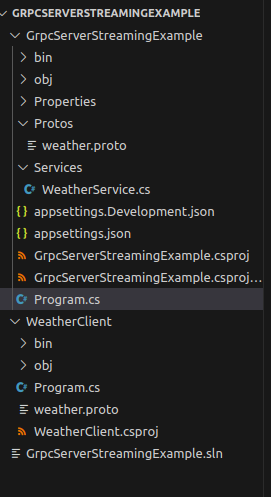
You can find the code of this tutorial from here: Link
With the projects set up, we can proceed to implement the server streaming functionality.
Server Implementation
Step 1: Define the Protocol Buffers (proto) File
The first step is to define the service and message types in a .proto file. This file will specify the gRPC service, request, and response messages.
weather.proto
syntax = "proto3";

option csharp_namespace = "GrpcServerStreamingExample";

service Weather {
  rpc GetWeatherUpdates(WeatherRequest) returns (stream WeatherResponse);
}

message WeatherRequest {
  string city = 1;
}

message WeatherResponse {
  string city = 1;
  string description = 2;
  int32 temperature = 3;
  string timestamp = 4;
}
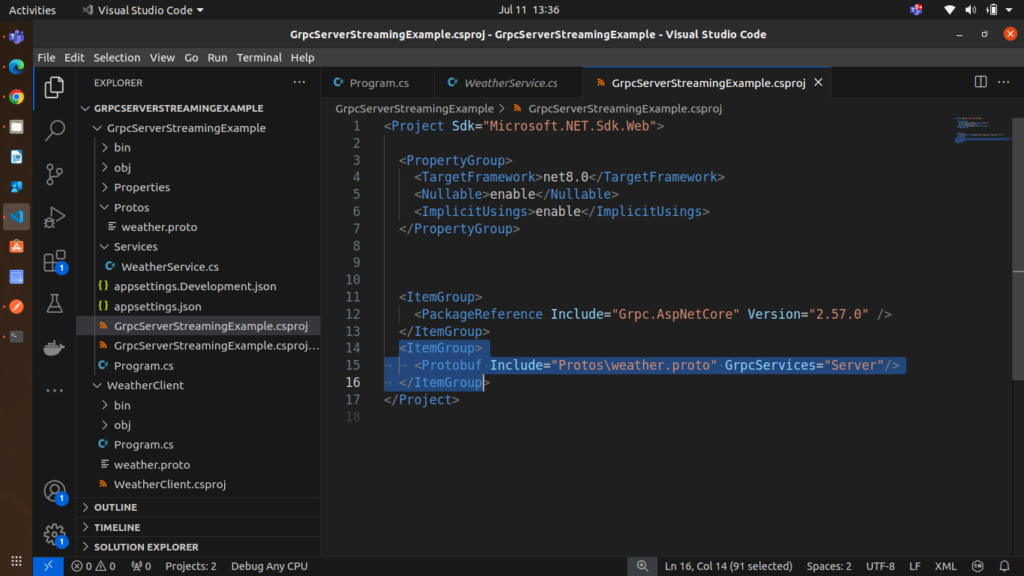
please make sure to add Proto file reference in your .csproj file, by doing this, project will recognize the proto file
Step 2: Implement the gRPC Service
Next, we’ll implement the server-side logic for the Weather service. This involves creating a service that inherits from the generated base class and overrides the GetWeatherUpdates method to stream weather data.
WeatherService.cs
using Grpc.Core;
using System.Threading.Tasks;
using System.Collections.Generic;
using GrpcServerStreamingExample;

namespace GrpcServerStreamingExample.Services
{
    public class WeatherService : Weather.WeatherBase
    {
        // mimicing the weather data
        private readonly List<WeatherResponse> _weatherData = new List<WeatherResponse>
        {
            new WeatherResponse { City = "New York", Description = "Sunny", Temperature = 25, Timestamp = "2024-07-01T10:00:00Z" },
            new WeatherResponse { City = "New York", Description = "Cloudy", Temperature = 23, Timestamp = "2024-07-01T11:00:00Z" },
            new WeatherResponse { City = "New York", Description = "Rainy", Temperature = 21, Timestamp = "2024-07-01T12:00:00Z" },
            new WeatherResponse { City = "New York", Description = "Sunny", Temperature = 29, Timestamp = "2024-07-01T8:00:00Z" },
            new WeatherResponse { City = "New York", Description = "Rainy", Temperature = 21, Timestamp = "2024-07-01T9:00:00Z" },


        };

        public override async Task GetWeatherUpdates(WeatherRequest request, IServerStreamWriter<WeatherResponse> responseStream, ServerCallContext context)
        {
            foreach (var weather in _weatherData)
            {
                // Check for cancellation
                if (context.CancellationToken.IsCancellationRequested)
                {
                    break;
                }

                // Simulate delay
                await Task.Delay(5000);

                // Send the weather update
                await responseStream.WriteAsync(weather);
            }
        }
    }
}
Step 3: Configure the gRPC Server
In this step, we’ll configure the gRPC server in the ASP.NET Core application. This involves setting up the server to use the WeatherService.
Program.cs
using GrpcServerStreamingExample.Services;

var builder = WebApplication.CreateBuilder(args);

// Add services to the container.
builder.Services.AddGrpc();

var app = builder.Build();

// Configure the HTTP request pipeline.
app.MapGrpcService<WeatherService>();
app.MapGet("/", () => "Communication with gRPC endpoints must be made through a gRPC client. To learn how to create a client, visit: https://go.microsoft.com/fwlink/?linkid=2086909");

app.Run();
Implement the gRPC Client
Now, we’ll implement a client application that connects to the gRPC server and requests weather updates for a specific city. The client will process and display each weather update received from the server stream, but before make sure that you gave server and proto file reference in your client project, as shown below.
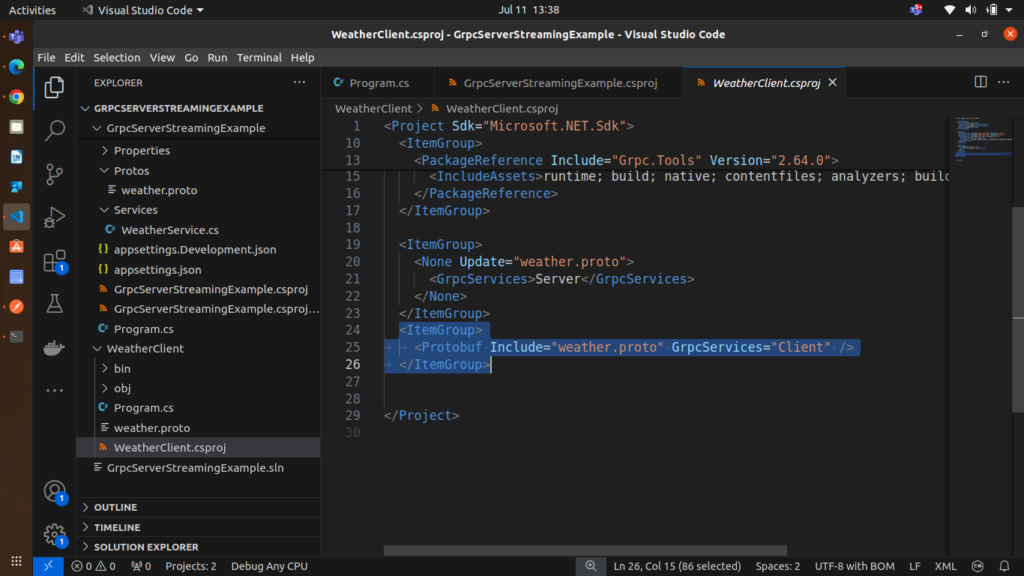
and then add the code in Program.cs file.
Program.cs (Client)
using System;
using System.Threading.Tasks;
using Grpc.Core;
using Grpc.Net.Client;
using GrpcServerStreamingExample;

class Program
{
    static async Task Main(string[] args)
    {
        // The address of the gRPC server, change the address accordingly on which your server is running
        var serverAddress = "http://localhost:5289";

        // Create a gRPC channel to communicate with the server
        using var channel = GrpcChannel.ForAddress(serverAddress);

        // Create a client for the Weather service
        var client = new Weather.WeatherClient(channel);

        // Create a request for weather updates for a specific city
        var request = new WeatherRequest { City = "New York" };

        Console.WriteLine($"Requesting weather updates for {request.City}...");

        // Call the GetWeatherUpdates method on the client
        using var streamingCall = client.GetWeatherUpdates(request);

        try
        {
            // Read and process each response from the server stream
            await foreach (var update in streamingCall.ResponseStream.ReadAllAsync())
            {
                Console.WriteLine($"Weather Update: {update.Description}, " +
                                  $"Temperature: {update.Temperature}, " +
                                  $"Timestamp: {update.Timestamp}");
            }
        }
        catch (RpcException ex) when (ex.StatusCode == Grpc.Core.StatusCode.Cancelled)
        {
            Console.WriteLine("Weather updates cancelled.");
        }
        catch (RpcException ex)
        {
            Console.WriteLine($"An error occurred: {ex.Status}");
        }
        Console.ReadLine();
    }
}
Explanation of the Code
- weather.proto:
- Defines the
Weatherservice with a server streaming RPC methodGetWeatherUpdates. - Specifies the
WeatherRequestandWeatherResponsemessage types.
- Defines the
- WeatherService.cs:
- Implements the
WeatherServiceclass, which inherits fromWeather.WeatherBase. - Simulates weather data and streams updates to the client with a delay between each update.
- Implements the
- Program.cs (Server) and Startup.cs:
- Configures the gRPC server to host the
WeatherService.
- Configures the gRPC server to host the
- Program.cs (Client):
- Creates a gRPC channel and client to connect to the server.
- Sends a weather request and processes the streaming responses.
Running the Application
- Start the Server:
- Navigate to the server project directory and run the server using
dotnet run2. Start the Client:
- Navigate to the client project directory and run the client using.
dotnet runThe client will request weather updates for “New York” and display each update as it is received from the server.
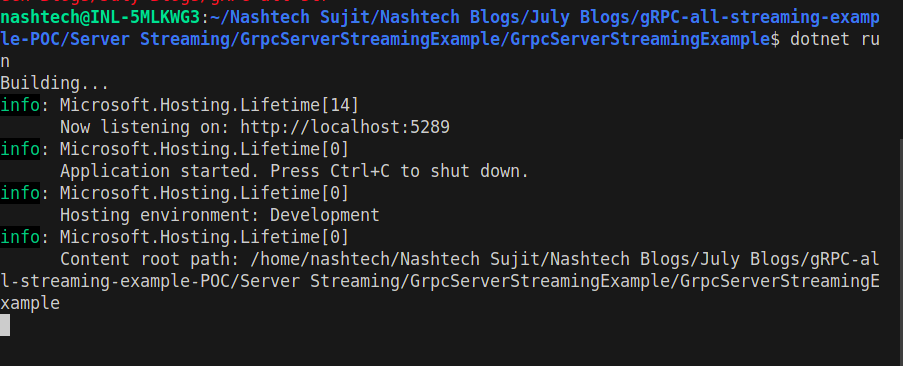
Server Output:
Client Output:
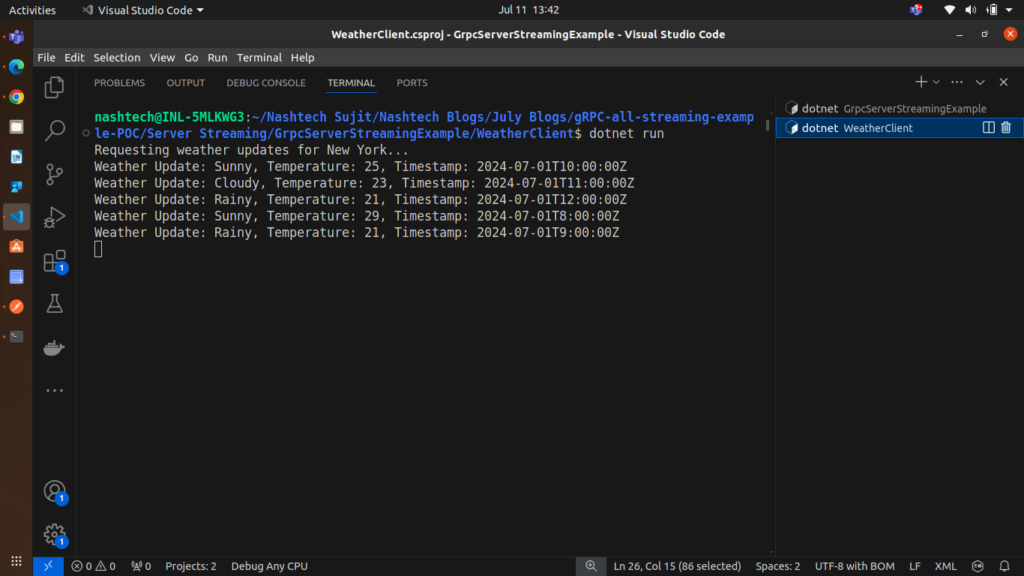
You can see in above output, server is sending data in stream and client is able to show the data.
Conclusion
In this article, we covered the implementation of server streaming in gRPC using .NET. We defined the proto file, implemented the server-side streaming logic, configured the gRPC server, and created a client to consume the streamed data. Server streaming is useful for scenarios where the server needs to push multiple pieces of data to the client in response to a single request, such as real-time updates or large datasets.
This example demonstrates how gRPC can efficiently handle streaming data and provides a foundation for building more complex streaming applications.