


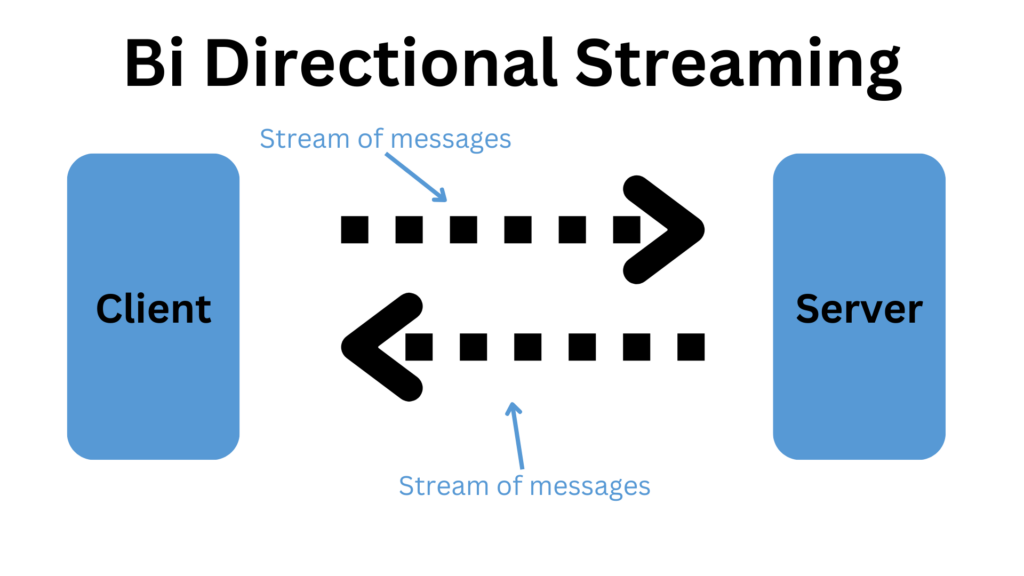
In this article, we will explore the implementation of bidirectional streaming with gRPC in .NET. Bidirectional streaming allows both the client and server to send a sequence of messages using a single stream. This communication pattern is beneficial when you need real-time updates and continuous data exchange between the client and server.
We’ll go through the following steps:
- Setting up the gRPC service and project structure
- Defining the protobuf messages and service
- Implementing the server-side logic
- Implementing the client-side logic
- Running and testing the application
folder structure to follow in this project
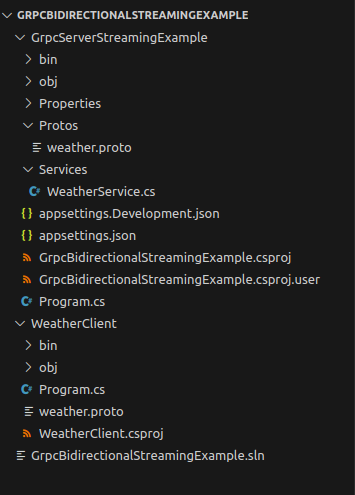
You can find the code of this tutorial from here: Link
1. Setting up the gRPC Server
First, create a new ASP.NET Core gRPC project. You can use the .NET CLI or Visual Studio to set up your project.
Using the .NET CLI
dotnet new grpc -o GrpcBidirectionalStreamingExample
cd GrpcBidirectionalStreamingExample
Using Visual Studio
- Open Visual Studio and create a new project.
- Select “ASP.NET Core gRPC Service” and click “Next.”
- Name your project “GrpcBidirectionalStreamingExample” and click “Create.”
2. Defining the Protobuf Messages and Service
Create a new file named weather.proto in the Protos folder of your project. Define the protobuf messages and the gRPC service in this file:
syntax = "proto3";

option csharp_namespace = "GrpcBidirectionalStreamingExample";

service Weather {
  rpc GetWeatherUpdates(stream WeatherRequest) returns (stream WeatherResponse);
}

message WeatherRequest {
  string city = 1;
}

message WeatherResponse {
  string city = 1;
  float temperature = 2;
  string timestamp = 3;
}
This proto file defines a Weather service with a GetWeatherUpdates RPC method that uses bidirectional streaming. The method takes a stream of WeatherRequest messages and returns a stream of WeatherResponse messages.
3. Implementing the Server-Side Logic
Create a new file named WeatherService.cs in the Services folder of your project and implement the WeatherService class:
WeatherService.cs
using Grpc.Core;
using System.Collections.Generic;
using System.Linq;
using System.Threading.Tasks;
using Microsoft.Extensions.Logging;

namespace GrpcBidirectionalStreamingExample
{
    public class WeatherService : Weather.WeatherBase
    {
        private readonly ILogger<WeatherService> _logger;

        public WeatherService(ILogger<WeatherService> logger)
        {
            _logger = logger;
        }

        public override async Task GetWeatherUpdates(IAsyncStreamReader<WeatherRequest> requestStream, IServerStreamWriter<WeatherResponse> responseStream, ServerCallContext context)
        {
            var tasks = new List<Task>();

            try
            {
                await foreach (var request in requestStream.ReadAllAsync())
                {
                    _logger.LogInformation($"Received request for weather update in {request.City}");

                    // Simulate generating weather updates
                    tasks.Add(Task.Run(async () =>
                    {
                        var rnd = new Random();
                        for (int i = 0; i < 5; i++)
                        {
                            var temperature = rnd.Next(10, 30) + rnd.NextDouble();
                            var timestamp = DateTime.UtcNow.ToString("yyyy-MM-ddTHH:mm:ssZ");

                            await responseStream.WriteAsync(new WeatherResponse
                            {
                                City = request.City,
                                Temperature = (float)temperature,
                                Timestamp = timestamp
                            });

                            await Task.Delay(rnd.Next(1000, 3000));
                        }
                    }));
                }

                await Task.WhenAll(tasks);
            }
            catch (Exception ex)
            {
                _logger.LogError(ex, "Error processing weather updates");
                throw;
            }
        }
    }
}
In the GetWeatherUpdates method, we read requests from the client stream and generate simulated weather updates. Each update is sent back to the client as a WeatherResponse.
4. Implementing the Client-Side Logic
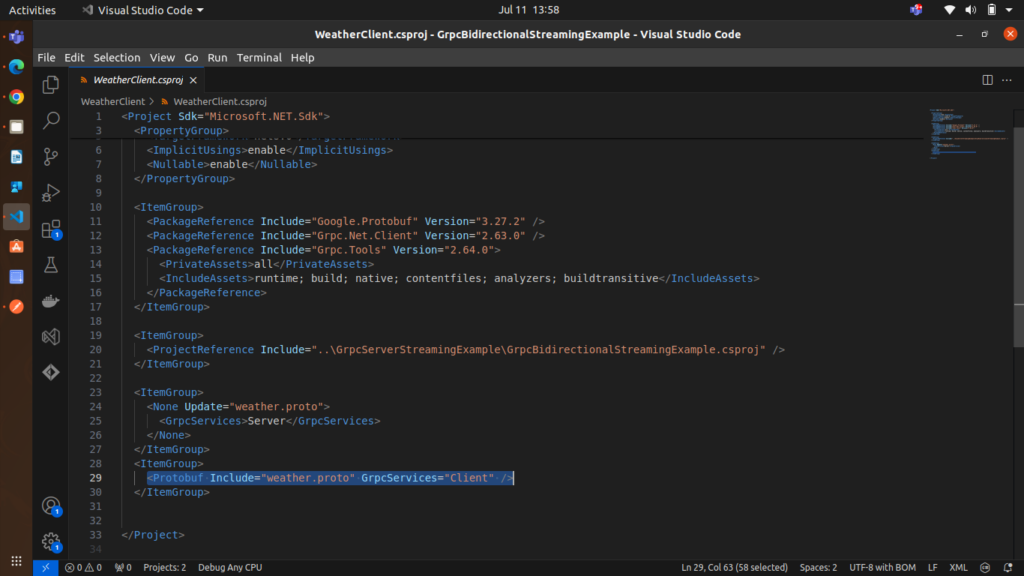
Create a new console application project within the same solution named WeatherClient. Add a reference to the gRPC service project and the necessary NuGet packages:
dotnet add package Grpc.Net.Client
dotnet add package Grpc.Tools
dotnet add reference ../GrpcBidirectionalStreamingExample/GrpcBidirectionalStreamingExample.csproj
after that, your csproj file will look like this:
Create a new file named Program.cs in the console application project and implement the client logic:
using Grpc.Core;
using Grpc.Net.Client;
using GrpcBidirectionalStreamingExample;
using System;
using System.Threading.Tasks;

namespace GrpcBidirectionalStreamingExample
{
    class Program
    {
        static async Task Main(string[] args)
        {
            // For development, trust all certificates (e.g., self-signed)
            AppContext.SetSwitch("System.Net.Http.SocketsHttpHandler.Http2UnencryptedSupport", true);

            var handler = new HttpClientHandler();
            handler.ServerCertificateCustomValidationCallback = HttpClientHandler.DangerousAcceptAnyServerCertificateValidator;

             //change the localhost port as per your server
            using var channel = GrpcChannel.ForAddress("http://localhost:5289", new GrpcChannelOptions
            {
                HttpHandler = handler
            });

            var client = new Weather.WeatherClient(channel);

            // Example of bidirectional streaming
            using var streamingCall = client.GetWeatherUpdates();

            // Background task to read responses from the server
            _ = Task.Run(async () =>
            {
                try
                {
                    await foreach (var response in streamingCall.ResponseStream.ReadAllAsync())
                    {
                        Console.WriteLine($"Received weather update for {response.City}: {response.Temperature}°C at {response.Timestamp}");
                    }
                }
                catch (RpcException ex) when (ex.StatusCode == StatusCode.Cancelled)
                {
                    Console.WriteLine("Stream cancelled.");
                }
                catch (Exception ex)
                {
                    Console.WriteLine("Error reading response: " + ex);
                }
            });

            // Send requests through request stream
            foreach (var city in new[] { "New York", "London", "Tokyo" })
            {
                Console.WriteLine($"Requesting weather updates for {city}...");
                await streamingCall.RequestStream.WriteAsync(new WeatherRequest { City = city });
                await Task.Delay(1500); // Mimic delay in sending requests
            }

            Console.WriteLine("Completing request stream");
            await streamingCall.RequestStream.CompleteAsync();
            Console.WriteLine("Request stream completed");

            // Keep the console application running to continue receiving responses
            await Task.Delay(Timeout.Infinite);
        }
    }
}
In the client-side implementation, we create a WeatherClient and initiate a bidirectional streaming call using GetWeatherUpdates. We then send a series of WeatherRequest messages and asynchronously read the responses from the server.
5. Running and Testing the Application
To run the application:
- Start the gRPC service project.
dotnet run2. Run the console application to initiate the client.
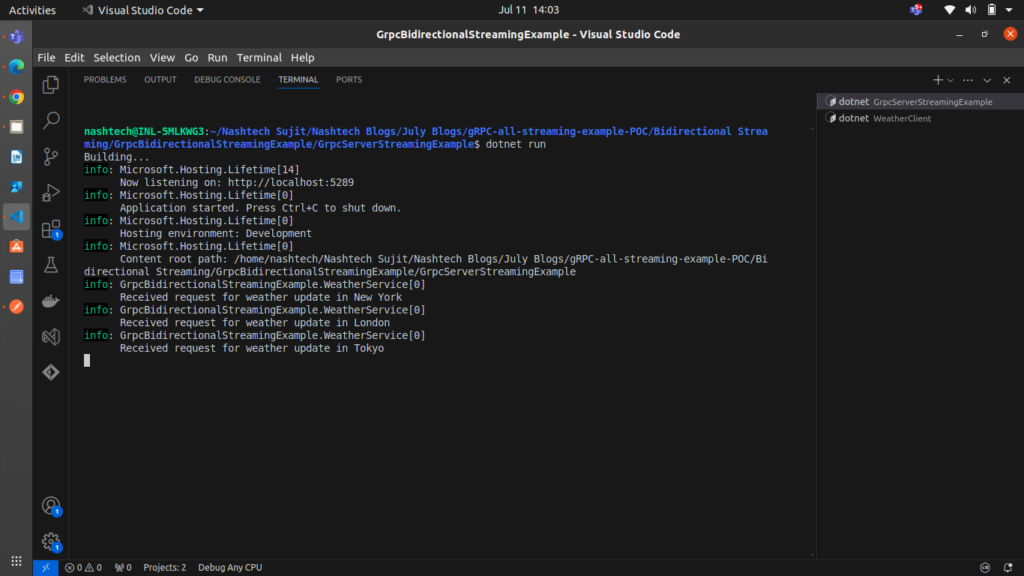
dotnet runYou should see the client sending requests for weather updates and receiving simulated responses from the server
Server Output
Client Output
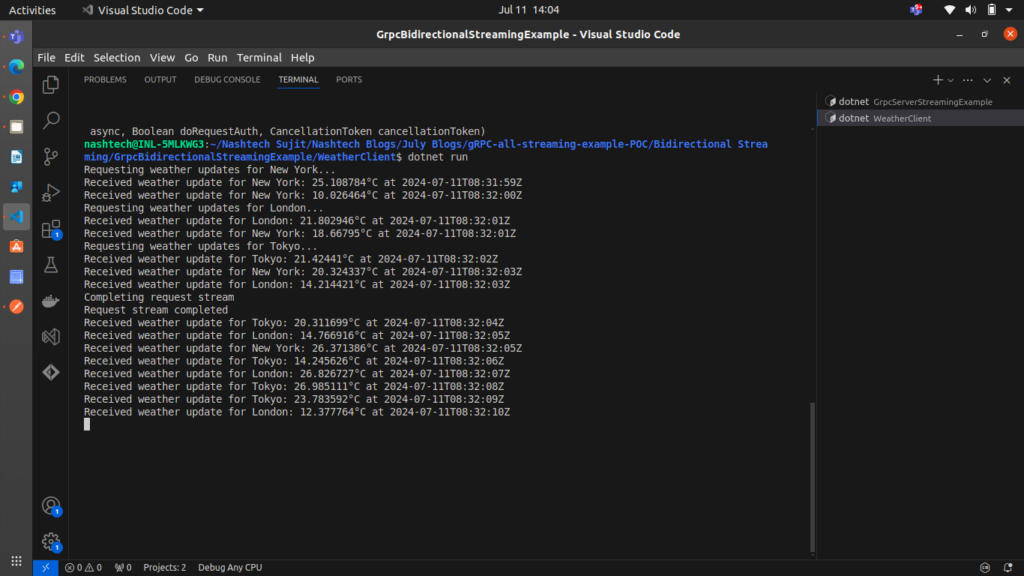
as you can see both the client and server sending sequence of messages using a single stream
This demonstrates the bidirectional streaming capability of gRPC, where both client and server can send and receive a continuous stream of messages.
Conclusion
In this article, we’ve covered the implementation of bidirectional streaming with gRPC in .NET. This powerful communication pattern allows for real-time updates and continuous data exchange, making it ideal for scenarios such as live data feeds and interactive applications.