


Introduction
“Autogen” can refer to various concepts depending on the context, but generally, it is a shorthand for “autogeneration” or “automatic generation.”
Autogen is revolutionizing software development by introducing automation tools that significantly enhance efficiency and quality. By utilizing artificial intelligence and machine learning, Autogen automates repetitive and complex tasks, leading to faster development cycles, fewer errors, and overall improved software quality.
Impact of Autogen on Software Development
Streamlining Code Generation
Autogen’s ability to streamline code generation is transformative. Traditionally, developers spend considerable time writing extensive lines of code, which can be tedious and error prone. Autogen automates this process, generating boilerplate code, configuring environments, and creating entire modules based on predefined templates. This not only saves time but also ensures consistency and adherence to coding standards.
Enhancing Testing and Quality Assurance
Quality assurance is a crucial phase in software development, often requiring substantial resources. Autogen automates the generation of test cases, scripts, and environments, allowing for comprehensive and early detection of potential issues. This proactive approach reduces the likelihood of critical bugs reaching production, thereby enhancing the overall quality of the software.
Accelerating Development Cycles
Autogen accelerates development cycles by streamlining workflows from initial planning to deployment. Automated tools facilitate continuous integration and continuous deployment (CI/CD), enabling rapid iterations and updates. This agility allows development teams to swiftly respond to market changes and customer feedback, maintaining a competitive edge.
Reducing Costs and Resource Allocation
By automating labour-intensive tasks, Autogen significantly lowers development costs. Resources can be reallocated to focus on strategic and creative aspects, such as innovation and user experience. The reduction in manual errors and enhanced efficiency also contribute to lower maintenance costs and quicker time-to-market for new features and products.
Fostering Innovation and Creativity
With mundane tasks handled by Autogen, developers have more time to dedicate to innovation. This freedom allows them to experiment with new ideas, explore advanced technologies, and push the boundaries of software capabilities. This shift not only leads to the creation of more sophisticated and innovative solutions but also boosts job satisfaction and morale within development teams.
Code Generation: How Autogen Assists in Writing Code in .NET
Autogen simplifies .NET development by automating repetitive tasks. Here’s how it helps:
1. Generating Boilerplate Code
Autogen automatically creates standard, repetitive code, saving time and ensuring consistency.
Example:
For an ASP.NET Core Web API, instead of manually writing controller code:
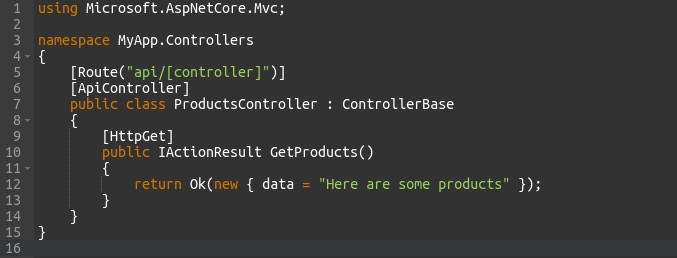
Autogen can generate this setup, letting developers focus on core functionality.
2. Creating Standard Functions and Methods
Autogen can create common CRUD (Create, Read, Update, Delete) operations automatically.
Example:
For an entity like Product:
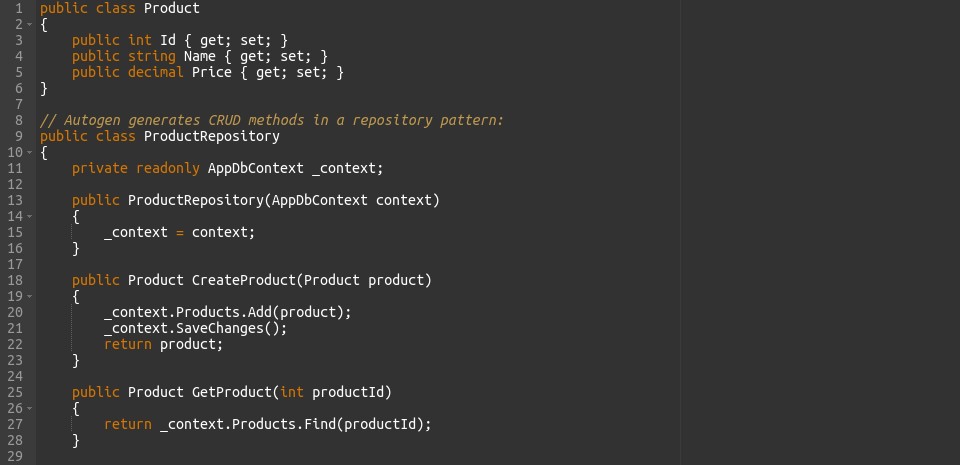
3. Setting Up Project Structure
Autogen sets up the project structure, ensuring it’s well-organized and follows best practices.
Example:
For a new ASP.NET Core MVC project, Autogen creates the entire structure:
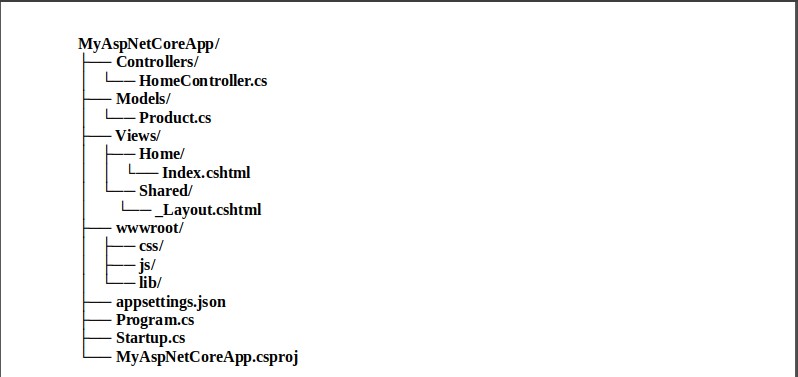
4. Generating Configuration Files
Autogen creates essential configuration files automatically, ensuring proper setup.
Example:
For a new .NET Core project, Autogen generates appsettings.json:
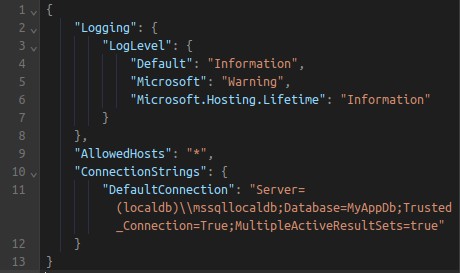
Debugging Assistance: Describe how AI helps in debugging and fixing code
AI-powered tools are transforming the debugging process by providing advanced assistance in identifying and resolving issues in the code.
1. Automated Error Detection
AI can automatically detect errors and anomalies in the code, which might be missed by human developers. By analysing the code’s structure and behaviour, AI can identify potential issues and highlight them for the developer.
Example:
AI tools can scan the code and identify syntax errors, logical flaws, and potential runtime issues. For instance, an AI tool might detect an uninitialized variable or a mismatched data type that could lead to a crash.
2. Providing Debugging Insights
AI can provide deeper insights into the root cause of a bug by analysing the code execution flow and data state at the time of the error. This helps developers understand why the error occurred and how to prevent it.
Example:
AI tools can analyse the call stack and variable states to pinpoint the exact line of code and conditions that led to an error. This helps in understanding complex bugs that are not immediately apparent.
3. Predictive Debugging
AI can predict potential bugs before they occur by analysing patterns and code usage. By learning from historical data and common bug patterns, AI can warn developers about code segments that are likely to contain bugs.
Example:
If a certain coding pattern has historically led to memory leaks, the AI can alert the developer when a similar pattern is detected in the current codebase.
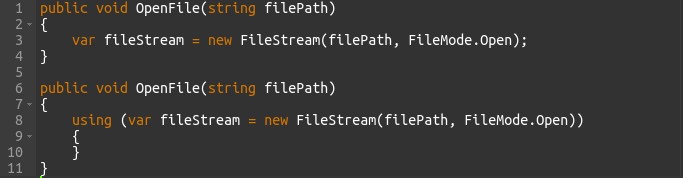
4. Automated Testing and Validation
AI can automate the creation and execution of test cases, ensuring comprehensive coverage and validation of the code. This helps in identifying bugs early in the development process and reduces the time spent on manual testing.
Example:
AI can generate unit tests based on the code logic and expected outcomes. It can also run these tests automatically and report any failures.

Automated Testing: the role of Autogen in automating software testing
Autogen simplifies and speeds up software testing by automating several key tasks. Here’s a brief overview with easy examples:
1. Generating Test Cases
Autogen automatically creates test cases based on the application’s code and specifications, identifying critical paths and edge cases that need testing.
Example:
For a method calculating total prices in a shopping cart, Autogen generates test cases for different scenarios like empty carts, multiple items, and discounts.
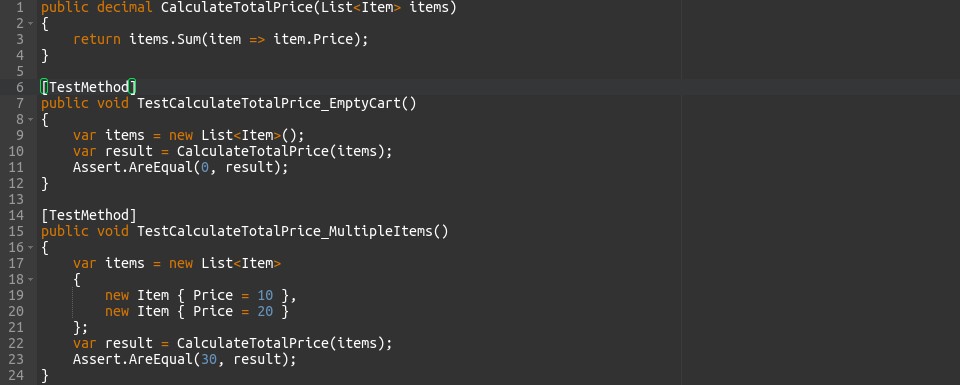
2. Creating Test Scripts
Autogen generates automated test scripts for frameworks like NUnit, xUnit, and MSTest, enabling unit, integration, and end-to-end tests.
Example:
For an ASP.NET Core application, Autogen generates MSTest scripts to test API endpoints.
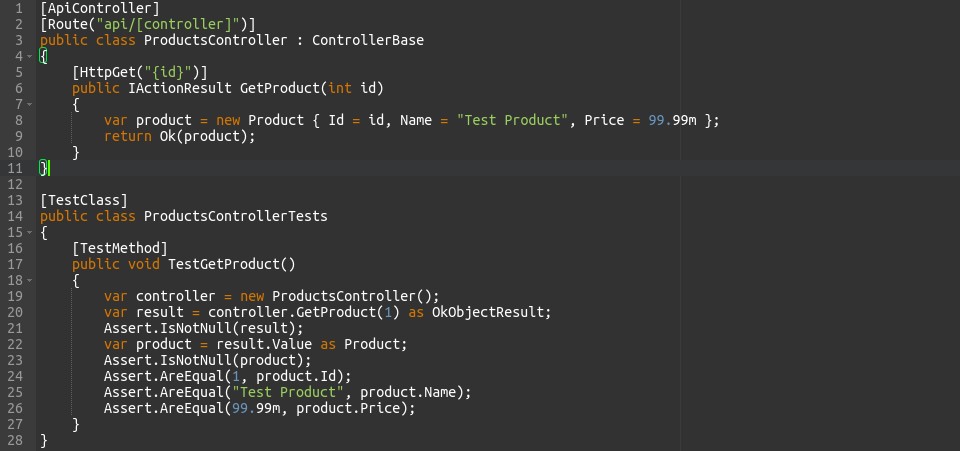
3. Setting Up Test Environments
Autogen automates the setup of consistent and isolated test environments, configuring databases, services, and other dependencies.
Example:
Setting up an in-memory database for unit tests in an ASP.NET Core application.
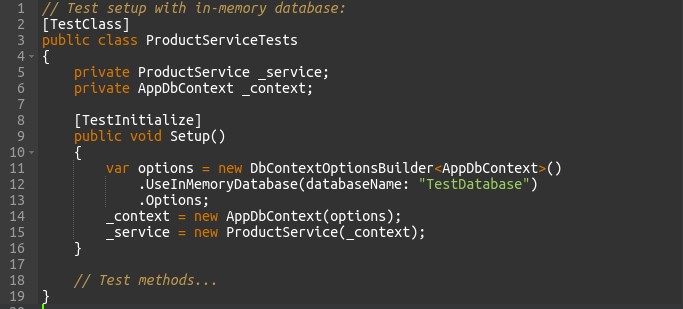
4. CI/CD Integration
Autogen integrates with CI/CD pipelines to automate test execution whenever new code is committed, ensuring stability and preventing new changes from breaking existing functionality.
Example:
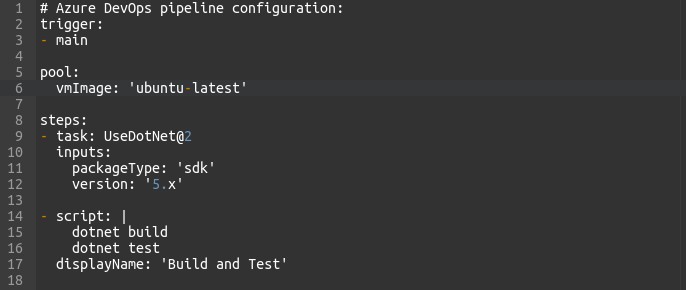
Configuring a CI/CD pipeline in Azure DevOps to run tests and deploy the application if all tests pass.
5. Generating Test Reports and Metrics
Autogen generates detailed test reports and metrics, providing insights into test coverage, pass/fail rates, and areas needing improvement.
Example:
A report showing test results, code coverage, and failed tests with detailed messages.

Popular Autogen tools for developers
list of some popular autogen tools for developers, below here :-
1. GitHub Copilot
Description: Developed by GitHub in collaboration with OpenAI, GitHub Copilot is an AI-powered code completion tool that provides real-time suggestions and code snippets directly within your editor, such as VS Code. It helps with writing code, documentation, tests, and more by understanding the context of your project and codebase.
2. Tabnine
Description: Tabnine is an AI code completion tool that integrates with various code editors and IDEs. It predicts and suggests the next lines of code using machine learning, significantly speeding up the coding process and reducing manual typing. Tabnine supports multiple programming languages and can be customized to fit specific coding styles and practices.
3. Kite
Description: Kite is an AI-powered code completion tool that integrates with multiple editors. It provides line-of-code completions, function signatures, and documentation to help developers write code faster and with fewer errors. Kite uses machine learning models to offer relevant suggestions based on the context of the code.
4. PyCharm’s IntelliCode
Description: IntelliCode is a feature of JetBrains’ PyCharm and other JetBrains IDEs that uses AI to provide intelligent code completions, code style recommendations, and refactoring suggestions. It learns from your code patterns and the coding practices of thousands of open-source projects to give tailored recommendations.
5. IntelliCode for Visual Studio
Description: IntelliCode for Visual Studio offers AI-assisted code completions and suggestions, enhancing the standard IntelliSense with machine learning-based insights. It helps developers by suggesting the most likely correct completions based on the context of their code and patterns from open-source repositories.
6. Amazon CodeWhisperer
Description: Amazon CodeWhisperer is an AI-powered code companion for AWS developers. It assists in writing code by providing real-time suggestions based on best practices, project context, and code patterns. CodeWhisperer is designed to help developers build applications faster and with fewer errors.
7. Codota
Description: Codota is an AI-powered code completion tool that integrates with various IDEs and supports multiple programming languages. It provides intelligent code suggestions and completions to help developers write code more efficiently. Codota uses a combination of public code patterns and the developer’s own code to offer relevant suggestions.
8. Codeium
Description: Codeium is an AI-powered code generation and completion tool that integrates with popular code editors. It offers context-aware suggestions and completions, making it easier for developers to write code quickly and accurately. Codeium supports multiple programming languages and aims to improve developer productivity through intelligent assistance.
Case Studies: Projects that have successfully implemented Autogen
Case Study 1: GitHub and GitHub Copilot
Background: GitHub, a top platform for developers, wanted to boost coding efficiency. They created GitHub Copilot with OpenAI, an AI tool that suggests code as you type.
Implementation: Copilot was added to popular editors like VS Code. It uses AI trained on lots of code to predict what developers need next.
Impact:
- Faster Coding: Developers could write code quicker with accurate suggestions from Copilot, focusing more on solving problems rather than typing.
- Better Code: Copilot helped maintain high-quality code by offering best practice suggestions, reducing bugs and errors.
- Positive Feedback: Early users loved Copilot, leading to its broad adoption and integration into many workflows.
Case Study 2: Shopify and Tabnine
Background: Shopify, a major e-commerce platform, aimed to make their developers more efficient. They used Tabnine, an AI tool that provides smart code suggestions.
Implementation: Tabnine was integrated into Shopify’s coding environment, customized to match their coding standards.
Impact:
- Speedy Development: Developers wrote code faster with Tabnine’s help, which was crucial during busy times like holiday sales.
- Consistent Code: Tabnine ensured code followed Shopify’s standards, reducing errors and making the code easier to maintain.
- Happier Developers: Developers enjoyed using Tabnine, which made their work easier and more satisfying, helping Shopify retain top talent.
Conclusion
Autogen tools are transforming software development by greatly enhancing efficiency and productivity. These AI-powered tools assist developers in writing code by offering intelligent suggestions and auto-completions, reducing manual effort and speeding up the coding process. Examples like GitHub Copilot and Tabnine demonstrate how developers can create higher-quality code more quickly and consistently.
Beyond code generation, Autogen tools play a vital role in debugging and fixing code. AI-driven insights help identify bugs and suggest fixes, streamlining the debugging process and saving time. This leads to more robust and reliable software.
Automated testing is another significant area where Autogen tools excel. By automating the creation and execution of test cases, these tools ensure comprehensive test coverage and faster feedback cycles, enhancing overall software quality.
Popular Autogen tools, such as GitHub Copilot, Tabnine, Kite, PyCharm’s IntelliCode, and Amazon CodeWhisperer, are already making a substantial impact on development workflows. Case studies from industry leaders like GitHub and Shopify highlight the tangible benefits of these tools, including faster development cycles, improved code quality, and higher developer satisfaction.
Autogen tools are reshaping the landscape of software development. By automating routine tasks, aiding in debugging, and ensuring thorough testing, these tools enable developers to work more efficiently and creatively. Consequently, software development becomes faster, more reliable, and more innovative.