


In today’s fast-paced and dynamic IT landscape, automating infrastructure provisioning and management is essential for maintaining agility, scalability, and efficiency. Terraform, an open-source infrastructure-as-code (IaC) tool, empowers organizations to automate the creation, modification, and versioning of infrastructure resources across various cloud platforms. In this step-by-step tutorial, we will explore how to automate infrastructure with Terraform, enabling you to embrace the benefits of infrastructure automation.
Step 1: Install and Configure Terraform
Begin by installing Terraform on your local machine. Visit the official Terraform website and download the appropriate binary for your operating system. Once installed, add the Terraform executable to your system’s PATH environment variable. Next, configure Terraform to authenticate with your cloud provider(s) by setting up the necessary credentials, such as access keys or service account credentials.
Step 2: Define Infrastructure as Code
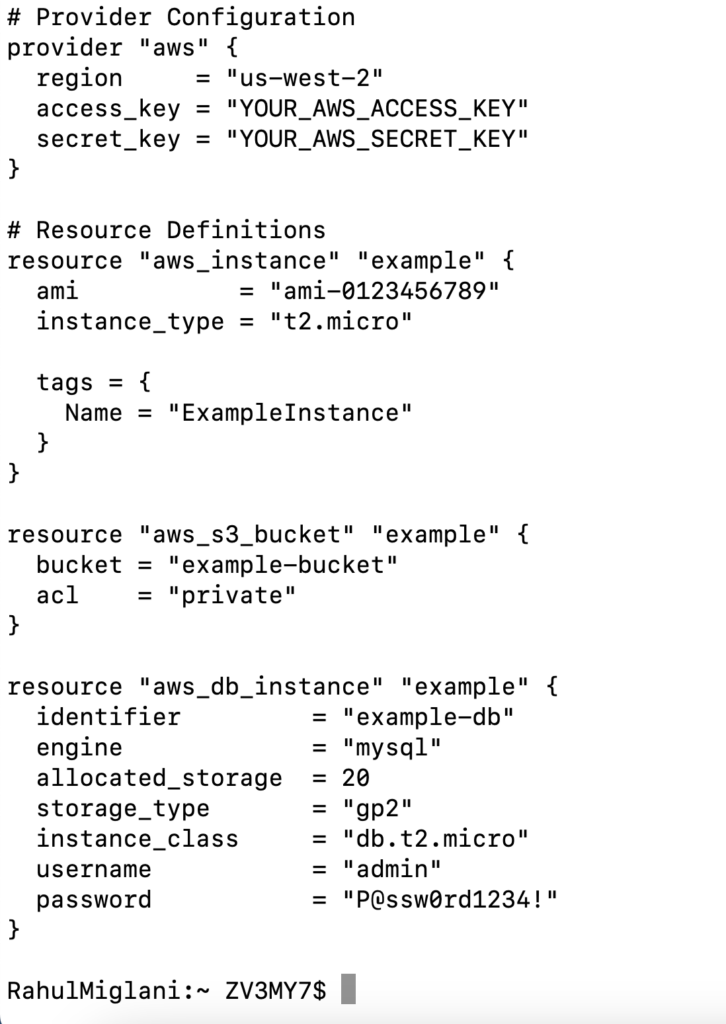
Start by creating a new directory for your Terraform project. Inside this directory, create a new Terraform configuration file with a .tf extension, such as main.tf. In this file, define your infrastructure resources using Terraform’s declarative language. Specify the desired state of your infrastructure by declaring resource blocks for each component, such as virtual machines, databases, or networking resources. Set the necessary parameters and attributes for each resource.
Step 3: Initialize the Terraform Project
Before you can start working with your Terraform configuration, initialize the project by running the terraform init command. This command initializes the Terraform working directory, downloads the necessary provider plugins, and sets up the backend configuration for storing the Terraform state file.
Step 4: Plan and Apply Changes
To preview the changes that Terraform will make to your infrastructure, use the terraform plan command. This command analyzes your Terraform configuration and displays a summary of the resources that will be created, modified, or deleted. Review the plan output to ensure it aligns with your intentions.
Once you are satisfied with the plan, apply the changes by running the terraform apply command. Terraform will create or modify the specified resources according to your configuration. You will be prompted to confirm the changes before they are applied. Once confirmed, Terraform will provision the resources and update the state file.
Step 5: Manage Infrastructure State
Terraform maintains a state file that represents the current state of your infrastructure. It tracks the resources managed by Terraform and their configuration. It is crucial to manage this state file properly to maintain the integrity and consistency of your infrastructure. Consider storing the state file remotely, such as in an S3 bucket or using Terraform Cloud, to enable collaboration and version control.
Example Terraform Code Snippet:
Conclusion:
Automating infrastructure with Terraform brings numerous benefits, including increased efficiency, reproducibility, and scalability. By following this step-by-step tutorial, you have learned how to install and configure Terraform, define infrastructure as code, initialize your project, plan and apply changes, and manage infrastructure state.
Harness the power of Terraform to automate your infrastructure provisioning and management workflows. Embrace the principles of infrastructure as code and unlock the potential of automation to drive your organization’s success in the rapidly evolving world of IT.