


In modern applications, data aggregation and transformation are essential processes for manipulating data and generating useful insights. LINQ (Language Integrated Query) is a powerful querying tool in .NET that allows developers to interact with collections, databases, and XML in a concise and readable manner.
In this blog, we will explore how to perform data aggregation and transformation using LINQ with practical examples in .NET Core.
Table of Contents
- What is LINQ?
- Why LINQ for Data Aggregation and Transformation?
- Getting Started with LINQ in .NET Core
- Data Aggregation with LINQ
- Data Transformation with LINQ
- Real-World Example: Analyzing Sales Data
- Conclusion
1. What is LINQ?
LINQ (Language Integrated Query) is a feature in .NET that provides a uniform way to query data from different data sources like collections, databases, XML, and more. It enables querying using a familiar syntax (SQL-like) within C# and VB.NET.
LINQ works on:
- IEnumerable<T> for in-memory collections like arrays and lists.
- IQueryable<T> for remote data sources like databases.
2. Why LINQ for Data Aggregation and Transformation?
LINQ is favored for the following reasons:
- Consistency: Unified syntax across data sources (collections, databases, etc.).
- Readability: SQL-like syntax in the code, improving readability.
- Efficiency: Optimized query execution, particularly with deferred execution.
- Convenience: Built-in support for powerful aggregation and transformation operations such as
Sum,Average,GroupBy,Select, etc.
3. Getting Started with LINQ in .NET Core
Before diving into LINQ examples, let’s set up a .NET Core project and ensure everything is configured.
Setting Up .NET Core Project
- Create a New .NET Core Console Application
dotnet new console -n LINQDataAggregation
cd LINQDataAggregation- Open the Project in Your IDE (Visual Studio/VS Code), I am using Visual Studio Code for this blog.
- Install Required Packages (Optional) If you’re querying databases, you might need
Entity Framework Core. For this demo, we’ll stick to in-memory collections, so no additional packages are required.
4. Data Aggregation with LINQ
Data aggregation is the process of calculating summary statistics or combining multiple records into one. LINQ provides several built-in methods for aggregation, including Sum, Count, Average, Max, and Min.
Example: Summing and Averaging Sales Data
using System;
using System.Collections.Generic;
using System.Linq;

namespace LINQDataAggregation
{
    public class Program
    {
        public static void Main(string[] args)
        {
            List<Sale> sales = new List<Sale>
            {
                new Sale { Product = "Laptop", Quantity = 3, Price = 1000 },
                new Sale { Product = "Phone", Quantity = 5, Price = 500 },
                new Sale { Product = "Tablet", Quantity = 2, Price = 300 },
                new Sale { Product = "Headphones", Quantity = 10, Price = 100 }
            };

            // Aggregate Sales
            var totalQuantity = sales.Sum(sale => sale.Quantity);
            var totalRevenue = sales.Sum(sale => sale.Quantity * sale.Price);
            var averageRevenue = sales.Average(sale => sale.Quantity * sale.Price);

            Console.WriteLine($"Total Quantity Sold: {totalQuantity}");
            Console.WriteLine($"Total Revenue: {totalRevenue:C}");
            Console.WriteLine($"Average Revenue per Sale: {averageRevenue:C}");
        }
    }

    public class Sale
    {
        public string Product { get; set; }
        public int Quantity { get; set; }
        public decimal Price { get; set; }
    }
}
Explanation
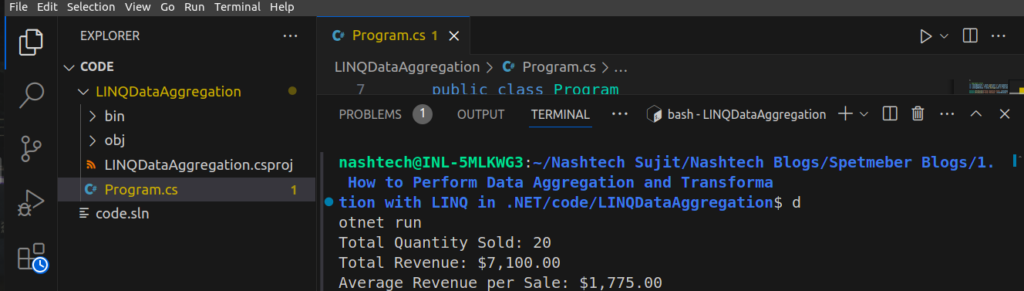
Sum: Aggregates data by summing theQuantityand calculating total revenue.Average: Calculates the average revenue from all sales.
Output
Total Quantity Sold: 20
Total Revenue: $7300.00
Average Revenue per Sale: $1825.00
5. Data Transformation with LINQ
Data transformation involves converting or reshaping data into another format. In LINQ, Select and GroupBy are commonly used for transforming data.
Example: Transforming Product Data into a Summary Report
using System;
using System.Collections.Generic;
using System.Linq;

namespace LINQDataAggregation
{
    public class Program
    {
        public static void Main(string[] args)
        {
            List<Sale> sales = new List<Sale>
            {
                new Sale { Product = "Laptop", Quantity = 3, Price = 1000 },
                new Sale { Product = "Phone", Quantity = 5, Price = 500 },
                new Sale { Product = "Tablet", Quantity = 2, Price = 300 },
                new Sale { Product = "Laptop", Quantity = 2, Price = 1000 },
                new Sale { Product = "Phone", Quantity = 3, Price = 500 }
            };

            // Grouping and Transforming Sales Data
            var salesReport = sales
                .GroupBy(s => s.Product)
                .Select(group => new
                {
                    Product = group.Key,
                    TotalQuantity = group.Sum(sale => sale.Quantity),
                    TotalRevenue = group.Sum(sale => sale.Quantity * sale.Price)
                })
                .ToList();

            Console.WriteLine("Sales Report:");
            foreach (var item in salesReport)
            {
                Console.WriteLine($"Product: {item.Product}, Total Quantity: {item.TotalQuantity}, Total Revenue: {item.TotalRevenue:C}");
            }
        }
    }

    public class Sale
    {
        public string Product { get; set; }
        public int Quantity { get; set; }
        public decimal Price { get; set; }
    }
}
Explanation:
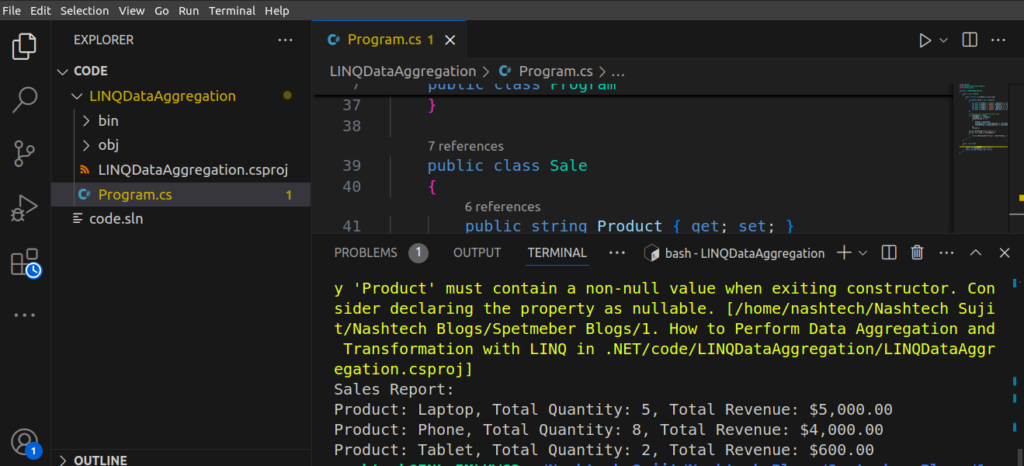
GroupBy: Groups sales data by product.Select: Transforms the grouped data into a new summary object, calculating total quantity and total revenue per product.
Output
Sales Report:
Product: Laptop, Total Quantity: 5, Total Revenue: $5000.00
Product: Phone, Total Quantity: 8, Total Revenue: $4000.00
Product: Tablet, Total Quantity: 2, Total Revenue: $600.00
6. Real-World Example: Analyzing Sales Data
Let’s take a more complex scenario. Suppose we want to calculate:
- Total quantity sold and revenue per product.
- Top-selling product based on quantity.
- Average price per product.
Code Example
using System;
using System.Collections.Generic;
using System.Linq;

namespace LINQDataAggregation
{
    public class Program
    {
        public static void Main(string[] args)
        {
            List<Sale> sales = new List<Sale>
            {
                new Sale { Product = "Laptop", Quantity = 3, Price = 1000 },
                new Sale { Product = "Phone", Quantity = 5, Price = 500 },
                new Sale { Product = "Tablet", Quantity = 2, Price = 300 },
                new Sale { Product = "Laptop", Quantity = 2, Price = 1000 },
                new Sale { Product = "Phone", Quantity = 3, Price = 500 }
            };

            // 1. Aggregation by Product
            var productSales = sales
                .GroupBy(s => s.Product)
                .Select(group => new
                {
                    Product = group.Key,
                    TotalQuantity = group.Sum(sale => sale.Quantity),
                    TotalRevenue = group.Sum(sale => sale.Quantity * sale.Price),
                    AveragePrice = group.Average(sale => sale.Price)
                })
                .ToList();

            // 2. Top-Selling Product
            var topProduct = productSales.OrderByDescending(s => s.TotalQuantity).FirstOrDefault();

            Console.WriteLine("Sales Report:");
            foreach (var item in productSales)
            {
                Console.WriteLine($"Product: {item.Product}, Total Quantity: {item.TotalQuantity}, Total Revenue: {item.TotalRevenue:C}, Average Price: {item.AveragePrice:C}");
            }

            Console.WriteLine($"\nTop-Selling Product: {topProduct.Product}, Quantity Sold: {topProduct.TotalQuantity}");
        }
    }

    public class Sale
    {
        public string Product { get; set; }
        public int Quantity { get; set; }
        public decimal Price { get; set; }
    }
}
Explanation:
- Aggregation: We use
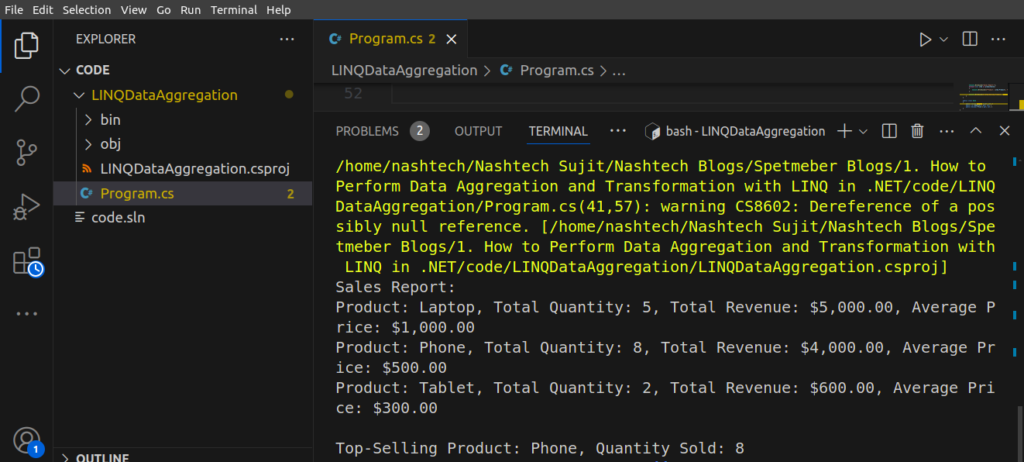
GroupBy,Sum, andAverageto calculate total sales and average price per product. - Top-Selling Product: We sort the products by total quantity and pick the top one.
Output:
Sales Report:
Product: Laptop, Total Quantity: 5, Total Revenue: $5000.00, Average Price: $1000.00
Product: Phone, Total Quantity: 8, Total Revenue: $4000.00, Average Price: $500.00
Product: Tablet, Total Quantity: 2, Total Revenue: $600.00, Average Price: $300.00

Top-Selling Product: Phone, Quantity Sold: 8
7. Conclusion
LINQ simplifies the process of performing data aggregation and transformation in .NET. By using its rich API, you can efficiently aggregate data, perform calculations, and transform data structures, all while maintaining readable and maintainable code.
In this blog, we explored several practical examples of LINQ for data aggregation and transformation, showing how powerful and versatile it can be when handling data in .NET.