



Introduction
In the realm of modern software development, the CQRS (Command Query Responsibility Segregation) pattern has emerged as a powerful approach to building scalable and maintainable applications. By separating the responsibilities of handling commands (write operations) and queries (read operations), CQRS enables developers to design systems that are optimized for specific tasks and can better accommodate complex business logic. In this blog post, we’ll explore how to implement CQRS in ASP.NET Core.
Understanding CQRS
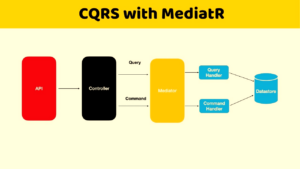
At its core, CQRS divides the application’s data model into separate models for reading and writing. This segregation allows each model to be optimized for its respective task, leading to improved performance, scalability, and flexibility. The key components of CQRS include:
- Commands: Actions that change the state of the system. Commands are used to perform operations such as creating, updating, or deleting data.
- Queries: Operations that retrieve data from the system without modifying its state. Queries are used to fetch information for display or analysis purposes.
- Command Handlers: Components responsible for executing commands and updating the application state accordingly.
- Query Handlers: Components responsible for executing queries and retrieving data from the appropriate data source.
Why CQRS in .NET?
- Scalability: By segregating read and write operations, CQRS enables scaling these aspects independently. This flexibility is particularly advantageous in .NET applications, where workloads may vary greatly.
- Performance Optimization: Separating queries from commands allows for optimizing data retrieval paths independently, leading to improved performance. In .NET, leveraging specific frameworks and libraries can further enhance these optimizations.
- Maintainability: With distinct models for reading and writing data, developers can encapsulate business logic more effectively, leading to cleaner, more maintainable codebases.
- Flexibility and Extensibility: CQRS encourages a more modular architecture, making it easier to introduce new features or modify existing ones without impacting other parts of the system. In the rapidly evolving .NET landscape, this adaptability is invaluable.
Steps to Implement CQRS in ASP .NET Core
Step 1: Install MediatR
First, install the MediatR NuGet package in your ASP.NET Core project:
dotnet add package MediatR
Step 2: Define Commands and Queries
Design separate models for commands and queries. Command models should encapsulate the data required to perform a specific action, while query models should define the shape of the data returned by queries.
public class CreateProductCommand : IRequest<int>
{
   public string Name { get; set; }
   public decimal Price { get; set; }
}
public class GetProductQuery : IRequest<Product>
{
   public int Id { get; set; }
}
CreateProductCommand
The CreateProductCommand encapsulates the data required to create a new product.
GetProductQuery
The GetProductQuery defines the data needed to retrieve an existing product by its Id.
Step 3: Implement Command and Query Handlers
Create handlers for commands and queries. Command handlers execute actions based on incoming commands, while query handlers retrieve data based on queries. These handlers should encapsulate the logic necessary to perform their respective operations.
public class CreateProductCommandHandler : IRequestHandler<CreateProductCommand, int>
{
   private readonly DbContext _dbContext;

   public CreateProductCommandHandler(DbContext dbContext)
   {
      _dbContext = dbContext;
   }

   public async Task<int> Handle(CreateProductCommand request, CancellationToken cancellationToken)
   {
      var product = new Product { Name = request.Name, Price = request.Price };
      _dbContext.Products.Add(product);
      await _dbContext.SaveChangesAsync();
      return product.Id;
   }
}
public class GetProductQueryHandler : IRequestHandler<GetProductQuery, Product>
{
   private readonly DbContext _dbContext;

   public GetProductQueryHandler(DbContext dbContext)
   {
      _dbContext = dbContext;
   }

   public async Task<Product> Handle(GetProductQuery request, CancellationToken cancellationToken)
   {
      return await _dbContext.Products.FindAsync(request.Id);
   }
}
CreateProductCommandHandler
- It implements IRequestHandler<CreateProductCommand, int>, indicating that it handles the CreateProductCommand and returns an integer representing the ID of the newly created product.
- The constructor injects an instance of DbContext, presumably representing your Entity Framework database context.
- In the Handle method, it creates a new Product object using data from the CreateProductCommand, adds it to the database context, saves changes asynchronously, and returns the Id of the newly created product.
GetProductQueryHandler
- It implements IRequestHandler<GetProductQuery, Product>, indicating that it handles the GetProductQuery and returns a Product object.
- Like CreateProductCommandHandler, the constructor injects an instance of DbContext.
- In the Handle method, it uses Entity Framework’s FindAsync method to retrieve the product with the specified ID from the database.
Step 4: Register Dependencies
Register your command and query handlers with the ASP.NET Core dependency injection container:
builder.Services.AddMediatR(Assembly.GetExecutingAssembly()););
Step 5: Dispatch Commands and Queries
Finally, dispatch your commands and queries from your ASP.NET Core controllers or services:
[ApiController]
[Route("[controller]")]
public class ProductController : ControllerBase
{
   private readonly IMediator _mediator;

   public ProductController(IMediator mediator)
   {
      _mediator = mediator;
   }

   [HttpPost]
   public async Task<IActionResult> CreateProduct(CreateProductCommand command)
   {
      var productId = await _mediator.Send(command);
      return Ok(productId);
   }

   [HttpGet("{id}")]
   public async Task<IActionResult> GetProduct(int id)
   {
      var query = new GetProductQuery { Id = id };
      var product = await _mediator.Send(query);
      return Ok(product);
   }
}
CreateProduct(CreateProductCommand command)
This method handles the creation of a product. It accepts a CreateProductCommand object as input, which likely contains the data necessary to create a new product. Inside the method, it sends the command to the mediator and returns the resulting product ID as an HTTP response.
GetProduct(int id)
This method handles the retrieval of a product by its Id. It accepts the id parameter from the route and creates a GetProductQuery object with this Id. Then, it sends the query to the mediator and returns the resulting product as an HTTP response.
Conclusion
In this blog post, we’ve explored how to implement the CQRS pattern in ASP.NET Core using MediatR. By segregating commands and queries and employing dedicated handlers for each, you can build applications that are more scalable, maintainable, and flexible. While this example provides a basic introduction to CQRS, the pattern can be further extended and customized to suit the specific requirements of your project.