


Test data is frequently mentioned in test case development. Whenever it comes to preparation of test cases, we might have heard of this term a lot, so today we are going to see what test data means in a quick definition.
What is Test Data in Software Testing?
Test Data in Software Testing is the input given to a software program during test execution. It represents data that affects or affected by software execution while testing. Test data is used for both positive testing to verify that functions produce expected results for given inputs and for negative testing to test software ability to handle unusual, exceptional or unexpected inputs.
Most effective techniques for API Testing with different data types?
- Choose the right tools
The first step is to choose the right tools that supports the data types and formats that our API uses.
There are many tools available for API testing, including Postman, SoapUI, Rest-Assured, and JMeter. Tools like SoapUI are tailored for XML, while Rest-Assured is optimized for JSON. Versatile tools like Postman and JMeter can manage various data types.
We should consider the features, functionalities that the tool offers, such as data-driven testing, parameterization, assertions, reporting, or mocking, to ensure it meets our testing needs.
- Define the data schema
After selecting the right tools, create API’s data schema, which specifies the structure and types of data that the API expects and returns.
The data schema can help us validate the data format, avoid data inconsistencies, and document our API contract. We can use a standard schema language, such as JSON Schema or XML Schema to define data schema. We can also use tools that generate or validate the data schema automatically, such as Swagger or OpenAPI.
- Use realistic data
When testing an application, certain fields may need to be validated. These fields are basically usernames, passwords, email addresses, phone numbers, cities, states,.. We need specific realistic data to validate these features when we test them.
For example when it comes to name it includes only characters. When it comes to phone number, it includes only digits and up to 10 digits only. And when it comes to email address, it is different and so on.
Remember, the key is to simulate real-world scenarios as closely as possible to uncover any potential issues before they reach production.
We can populate realistic data manually or using tools, but doing it manually may take a lot of time. For API testing, you can use Mockaroo tool, which generates valid test data automatically.
- Test different scenarios
Testing APIs with complex data types, such as nested objects, arrays, or custom formats, can be challenging and error-prone.
We need to test different scenarios, which means different combinations of inputs, outputs, and parameters. Testing different scenarios can help us verify the behavior and logic of our API, as well as check how our API handles edge cases and exceptions.
How to Prepare Data That Will Ensure Maximum Test Coverage
Design data considering the following categories:
1) No data: Run test cases on blank or default data. See if proper error messages are generated.
2) Valid data set: Create it to check if the application is functioning as per requirements and valid input data is properly saved in database or files.
3) Invalid data set: Prepare invalid data set to check application behavior for negative values and alphanumeric string inputs.
4) Illegal data format: Make one data set of illegal data formats. The system should not accept data in an invalid or illegal format. Also, check if proper error messages are generated.
5) Boundary Condition dataset: Dataset containing out of range data. Identify application boundary cases and prepare a data set that will cover lower as well as upper boundary conditions.
6) Dataset for performance, load and stress testing: This data set should be large in volume.
This way, creating separate datasets for each test condition will ensure complete test coverage.
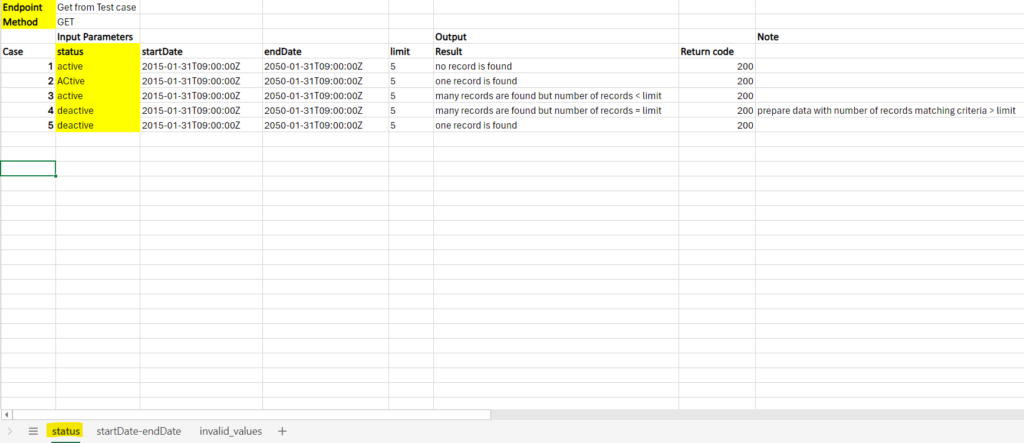
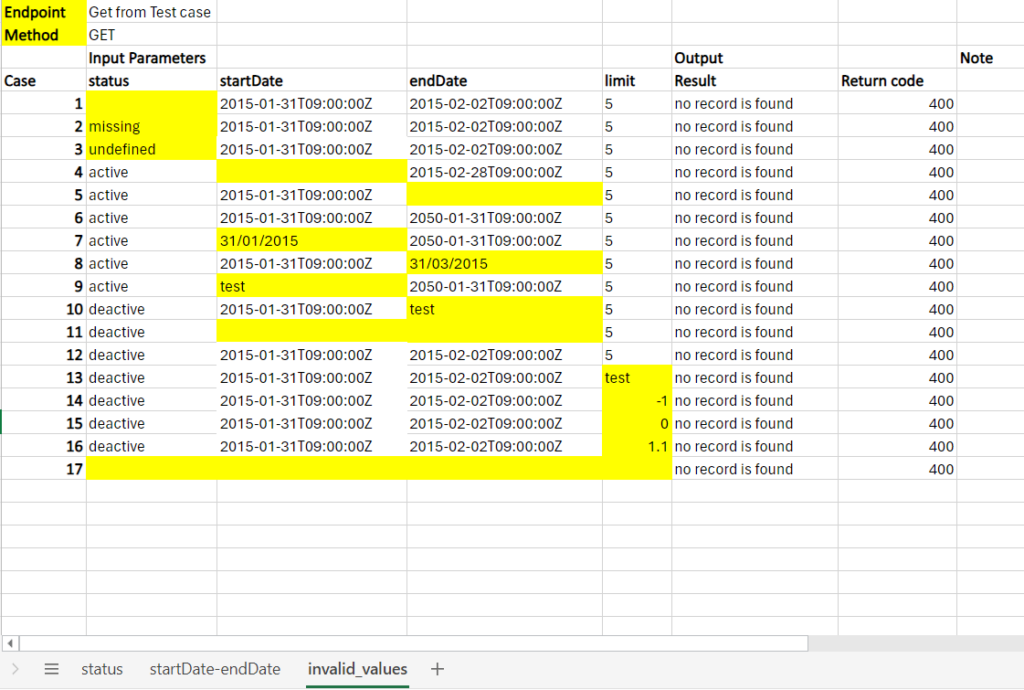
Now let’s look at an example of preparing test data for REST API with the GET method with parameters: status, startDate, endDate, limit below:
Whenever we test a particular method, we ensure that we are testing it with valid and invalid data sets.
The only purpose of doing this both is to make sure that the valid is accepted by the application and the invalid is rejected.
- Valid data sets for status parameter:
- Valid data sets for startDate-endDate parameter:

- Invalid data sets for all parameters:
Thank you for reading. Happy testing!
References
https://www.softwaretestinghelp.com/tips-to-design-test-data-before-executing-your-test-cases/