Introduction:
Benefits of Integrating Cucumber with Report Portal:
- Centralized Test Reporting: By integrating your test findings into Report Portal, you establish a centralized location whereas stakeholders can access and analyze essential data, supporting transparency along with educated decision-making.
- Advanced Analysis Capabilities: Report Portal’s robust analytics complement Cucumber’s test execution prowess, enabling teams to uncover trends, correlations, and anomalies for proactive quality assurance. Furthermore, Report Portal’s robust analytics complement Cucumber’s test execution prowess, enabling teams to uncover trends, correlations, and anomalies for proactive quality assurance.
- Real-time Monitoring: Witness test results unfold in real-time, empowering teams to swiftly address failures and optimize test execution for maximum efficiency.
- Customizable Dashboards: Tailor-made dashboards offer a visually captivating insight into key metrics, ensuring stakeholders focus on the most pertinent aspects of test performance.
- Integration with CI/CD Pipelines: Seamlessly integrate Cucumber tests into your CI/CD workflows, enabling automatic updates and visibility across the deployment pipeline. Additionally, this integration facilitates smoother transitions between different stages of the development process.
Best Practices for Integrating Cucumber with Report Portal:
- Configure Cucumber Output: Ensure that Cucumber generates Report Portal-compatible output, streamlining the integration process and ensuring seamless data ingestion. Additionally, this step facilitates smooth communication between the two platforms, enhancing overall efficiency.
- Establish Clear Naming Conventions: Standardize test and feature names for consistent reporting, facilitating easy searchability and analysis within Report Portal. By implementing clear naming conventions, teams can streamline the organization of test data, making it more accessible for stakeholders.
- Regularly Review and Analyse Test Results: Leverage Report Portal’s analytical prowess to delve into test results, identifying patterns and opportunities for optimization. Moreover, consistent review and analysis enable teams to stay proactive in addressing issues and enhancing test effectiveness.
- Collaborate Across Teams: Foster a culture of collaboration by sharing dashboards and insights, enabling cross-functional teams to collectively drive quality improvements. Additionally, collaboration fosters synergy among team members, leading to more effective problem-solving and decision-making.
- Continuously Improve Testing Strategy: Harness the insights gleaned from Report Portal to refine your testing strategy iteratively, maximizing the efficacy of your test automation efforts. Furthermore, continuous improvement ensures that testing processes evolve in line with changing requirements and industry best practices.
How you can integrate Cucumber with Report Portal using Java and Maven:
- First, ensure you have the necessary dependencies in your Maven
pom.xmlfile:
Cucumber Dependencies
<dependencies>
<dependency>
<groupId>io.cucumber</groupId>
<artifactId>cucumber-java</artifactId>
<version>7.2.0</version>
</dependency>
<dependency>
<groupId>io.cucumber</groupId>
<artifactId>cucumber-junit</artifactId>
<version>7.2.0</version>
<scope>test</scope>
</dependency>Report Portal Dependency
<dependency>
<groupId>com.epam.reportportal</groupId>
<artifactId>agent-java-cucumber4</artifactId>
<version>5.0.3</version>
<scope>test</scope>
</dependency>
</dependencies>
2. Create a Cucumber feature file (sample.feature) and add the following:
Feature: Sample Feature for Test Automation Integration
As a user
I want to perform a sample test
So that I can verify the functionalityScenario: Sample Scenario for Test Automation Integration
Given I have a sample test
When I execute the test
Then I verify the test result
3. Create a Cucumber step definition file (SampleSteps.java) and add the following:
import io.cucumber.java.en.Given , Then, When.
public class SampleSteps {
@Given(“I have a sample test for test automation integration”)
public void iHaveASampleTest() {
// Write your code for setting up the test
}@When(“I execute the test for test automation integration”)
public void iExecuteTheTest() {
// Write your code for executing the test
}@Then(“I verify the test result for test automation integration”)
public void iVerifyTheTestResult() {
// Write your code for verifying the test result
}
}
4. Create a Cucumber runner class (SampleTestRunner.java) and add the following:
import io.cucumber.junit.Cucumber, CucumberOptions,RunWith;
@RunWith(Cucumber.class)
@CucumberOptions(
features = “src/test/resources/features”,
glue = “your.package.name”,
plugin = {“com.epam.reportportal.cucumber.StepReporter”}
)
public class SampleTestRunner {
}
5. Ensure that your Report Portal configuration is set up correctly, including the Report Portal server URL and authentication details.
6. Run your Cucumber tests using Maven:
mvn clean test
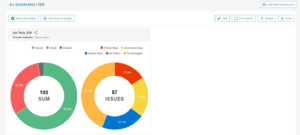
Output of test report: