




Exploring Azure Storage
Azure Storage, a cloud storage solution from Microsoft Azure, provides various storage services tailored to diverse needs.
Azure Storage, known for its robust storage solutions, stands out in the realm of cloud computing. Understanding Azure Storage is crucial for developers, IT professionals, and business owners alike to effectively leverage the power of the cloud. Let’s explore its key components and features, making it a go-to solution for data storage and management in the cloud.
Unravelling Azure Storage Components
Azure Storage offers a diverse array of services tailored to different data storage needs:
Blob Storage
Blob Storage, also referred to as Binary Large Object Storage, emerges as a cloud storage service provided by platforms like Microsoft Azure, Amazon Web Services (AWS), and Google Cloud Platform (GCP). It’s primarily engineered to accommodate extensive amounts of unstructured data, encompassing documents, images, videos, backups, and logs.
Within Blob Storage, data is structured into containers, acting as logical entities for grouping blobs. These containers offer the flexibility of being either public or private, granting meticulous control over data access.
A pivotal characteristic of Blob Storage lies in its scalability and durability, rendering it suitable for diverse applications such as data backup, content delivery, archiving, and big data analytics. Furthermore, Blob Storage incorporates essential functionalities like replication, encryption, and versioning to uphold data integrity and ensure availability.
File Storage
File Storage, a cloud service customized for streamlined file management, stands apart from Blob Storage, which specializes in unstructured binary data. Unlike Blob Storage, File Storage is structured to organize files and directories hierarchically, akin to traditional file systems.
Within File Storage, users have the capability to arrange files into directories and subdirectories, thereby facilitating efficient data management and retrieval. This hierarchical arrangement caters to organizational needs and is well-suited for diverse purposes such as document management, file sharing, and application data storage.
File Storage services typically provide features such as access control, versioning, and file locking to uphold data security and integrity. Additionally, they boast scalability, empowering users to seamlessly adjust storage capacity without disrupting ongoing operations.
In essence, File Storage presents a multifaceted solution for cloud-based file management, bridging the familiarity of traditional file systems with the scalability and adaptability of cloud computing.
Table Storage
Table Storage, a NoSQL database service provided by cloud providers like Microsoft Azure, is crafted to house structured data within tables. It proves ideal for scenarios demanding extensive storage of semi-structured or structured data at a reasonable cost.
Within Table Storage, data is structured into tables, each representing a collection of entities. Every entity encompasses a distinct set of properties, resembling rows and columns in conventional relational databases. Unlike relational databases, Table Storage doesn’t mandate a fixed schema, allowing entities with varying property sets to coexist within the same table.
Suited for applications necessitating swift and adaptable access to extensive data volumes, such as IoT (Internet of Things) applications and telemetry data storage, Table Storage incorporates features like automatic indexing, partitioning, and replication to ensure optimal performance and availability.
Moreover, Table Storage seamlessly scales storage capacity and throughput as applications expand, eliminating the need for intricate database administration tasks.
Queue Storage
Queue Storage, available as a cloud service on platforms such as Microsoft Azure, Amazon Web Services (AWS), and Google Cloud Platform (GCP), delivers scalable and dependable message queuing functionality. It facilitates asynchronous communication among distributed application components, thereby promoting decoupling and scalability.
Within Queue Storage, messages reside in queues, serving as temporary data repositories for asynchronous processing. This method streamlines communication between application segments without direct interaction, empowering components to enqueue messages for processing at their preferred pace.
Commonly utilized in scenarios like task scheduling, workload balancing, and asynchronous processing, Queue Storage enriches application responsiveness, fault tolerance, and scalability by enabling asynchronous communication and efficient handling of peak loads.
Queue Storage offerings typically encompass features such as message visibility timeout, message expiration, and message prioritization, which govern message processing and ensure dependable delivery.
In essence, Queue Storage emerges as a valuable asset for constructing scalable and robust distributed systems, fostering efficient communication and coordination among cloud-based application components.
Disk Storage
Disk Storage, a crucial element in computing systems, entails the allocation of digital data on physical storage devices such as hard disk drives (HDDs) or solid-state drives (SSDs). It serves as a foundational component for storing operating systems, applications, user data, and a variety of file types.
Data in disk storage is magnetically stored on spinning platters in HDDs or electronically stored in non-volatile memory chips in SSDs. These storage devices, spanning capacities from gigabytes to petabytes, cater to diverse storage needs.
Disk storage can either be internal, directly integrated into a computer or server, or external, connected via interfaces like USB, Thunderbolt, or network connections.
Widely employed in personal computers, servers, data centers, and cloud computing environments, disk storage provides persistent storage, ensuring data integrity even during system downtime. While HDDs offer affordability and high capacities, SSDs deliver superior performance, lower power consumption, and heightened durability.
Both types of disk storage possess distinct advantages, selected based on considerations such as performance requirements, budget constraints, and specific use cases.
Data Lake Storage
Data Lake Storage, functioning as a centralized repository, adeptly accommodates all structured and unstructured data at any scale. It’s meticulously designed to store raw, unprocessed data, thereby facilitating analytics, machine learning, and other processing tasks on a myriad of datasets without necessitating data transformation or schema modifications.
Within Data Lake Storage, data retains its original format, ensuring the preservation of its structure and integrity. This unique approach fosters flexibility, allowing data storage without the need for upfront schema design, thereby simplifying the ingestion and analysis of diverse data sources.
Furthermore, Data Lake Storage systems boast features such as scalable storage, high availability, and robust security controls. Supporting an array of data formats, encompassing text, images, videos, and documents, they aptly cater to various use cases, ranging from business intelligence and analytics to machine learning and data exploration.
Moreover, Data Lake Storage seamlessly integrates with data processing frameworks like Apache Hadoop, Apache Spark, and Apache Flink, facilitating intricate data processing tasks within the storage environment.
In essence, Data Lake Storage stands as a central hub for storing and managing diverse datasets, thereby empowering organizations to extract valuable insights while upholding flexibility and scalability.
Storage Explorer
Storage Explorer, a graphical user interface (GUI) tool, empowers users to efficiently manage and interact with various storage services offered by cloud platforms. It streamlines the management and monitoring of cloud storage resources, making it indispensable for developers, IT administrators, and professionals engaged in cloud-based storage solutions.
With Storage Explorer, users can:
1. Seamlessly browse and view storage resources, navigating through different storage accounts, containers, blobs, queues, tables, and file shares.
2. Facilitate effortless transfer between cloud storage accounts by uploading and downloading files.
3. Take charge of storage resources by creating, deleting, and modifying containers, blobs, queues, tables, and file shares.
4. Keep track of storage activity by monitoring metrics, logs, and diagnostic information associated with storage resources.
5. Fine-tune storage settings, tweaking access control, encryption, replication, and other parameters to suit specific storage requirements.
Some Code Examples of Azure Storage Components
Blob Storage
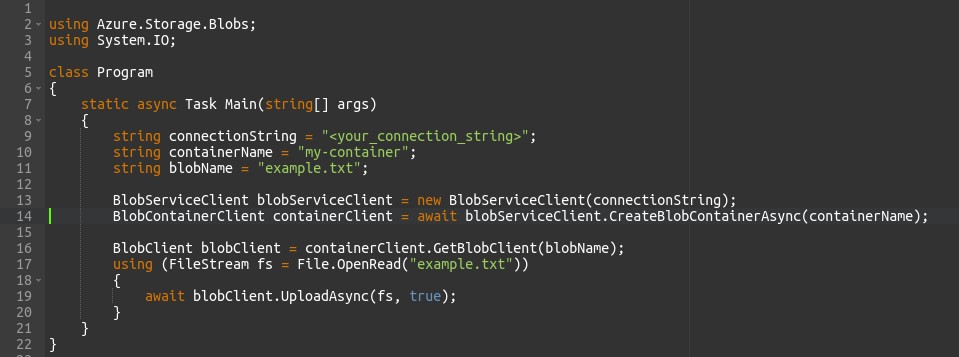
- BlobServiceClient: Represents the client to interact with the Blob service.
- BlobContainerClient: Represents a container within the Blob service.
- BlobClient: Represents a blob within a container.
- await blobServiceClient.CreateBlobContainerAsync(containerName): Creates a new blob container if it doesn’t exist.
- containerClient.GetBlobClient(blobName): Gets a reference to a blob within the container.
- blobClient.UploadAsync(fs, true): Uploads a file stream to the blob, overwriting it if it already exists.
File Storage
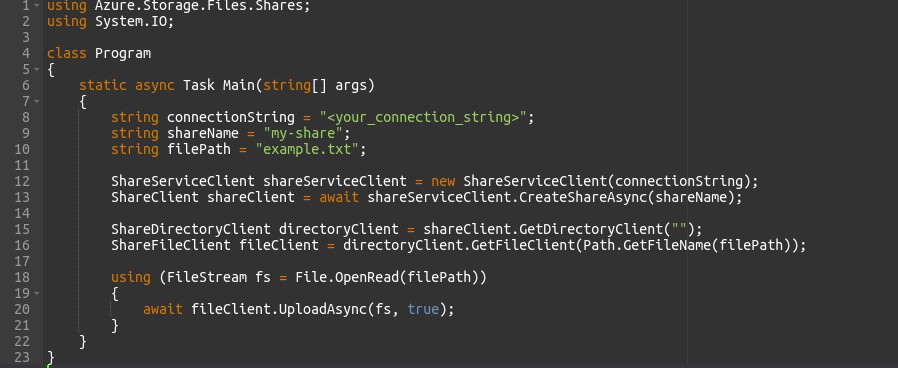
- ShareServiceClient: Represents the client to interact with the File service.
- ShareClient: Represents a file share within the File service.
- ShareDirectoryClient: Represents a directory within a file share.
- ShareFileClient: Represents a file within a directory.
- await shareServiceClient.CreateShareAsync(shareName): Creates a new file share if it doesn’t exist.
- fileClient.UploadAsync(fs, true): Uploads a file stream to the file share, overwriting it if it already exists.
Table Storage
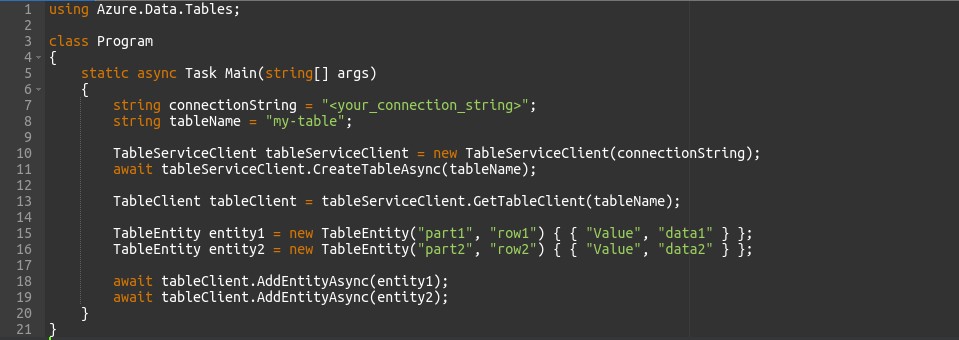
- TableServiceClient: Represents the client to interact with the Table service.
- await tableServiceClient.CreateTableAsync(tableName): Creates a new table if it doesn’t exist.
- TableClient: Represents a table within the Table service.
- TableEntity: Represents an entity (row) within a table.
- await tableClient.AddEntityAsync(entity1): Adds an entity to the table.
Queue Storage
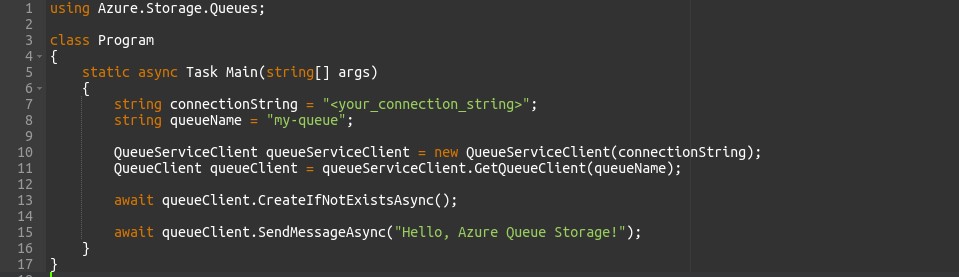
- QueueServiceClient: Represents the client to interact with the Queue service.
- await queueClient.CreateIfNotExistsAsync(): Creates a new queue if it doesn’t exist.
- await queueClient.SendMessageAsync(“Hello, Azure Queue Storage!”): Sends a message to the queue.
Conclusion
In summary, Azure Storage is a comprehensive cloud storage solution offered by Microsoft Azure. It provides a range of services including Blob Storage for unstructured data, File Storage for file shares, Table Storage for structured data, and Queue Storage for messaging. These services are scalable, flexible, and accessible, catering to diverse storage needs. With tools like Storage Explorer, managing storage resources is intuitive. Azure Storage empowers organizations to innovate and succeed in today’s data-driven world, offering a foundation for seamless data management and utilization in the cloud.