


Image from Internet
Have you ever tried opening a website on different browsers, looking at things differently?
Have you ever encountered an error on your website just because you’re in the old version?
One major challenge you’ll face is ensuring that your web app works continuously on various web browsers. This is where cross-browser testing comes into play.
Cross-browser testing is an important aspect of web development. It helps to identify issues, fix them promptly, and continuously improve the user experience.
Let me share an overview and some insights based on my knowledge.
Introduction to Cross-Browser Testing and how it’s Important
This testing simply tests your website or web application in multiple browsers, ensures it works consistently and correctly across different web browsers and their various versions.
Image from Internet
Let me give an example to visualize clearly:
A site doesn’t need to deliver the exact same experience on all browsers and devices, if the core functionality is accessible in some way. A modern browser might have something animated, 3D and shiny, while older browsers might just show a flat graphic with the same information.
Also, it’s just about impossible for a website to work on ALL browsers and devices, so a web developer should come to an agreement with the site owner on the range of browsers and devices where the code will work.
The following risks if we don’t perform this testing:
- Some website’s features may not work/be broken on some browsers
- Some browsers do not support the latest web technologies that the website you’re using.
- Web page load speed or security issues
- Layout and Design Inconsistencies
Therefore, Cross-browser testing ensures that your customers get the same experience regardless of which platform they use. So, now that we know what cross-browser testing is and why it’s important, let’s discuss the main issues to look for during cross-browser testing.
What to look for when testing
These are the main issues we should look for while testing: 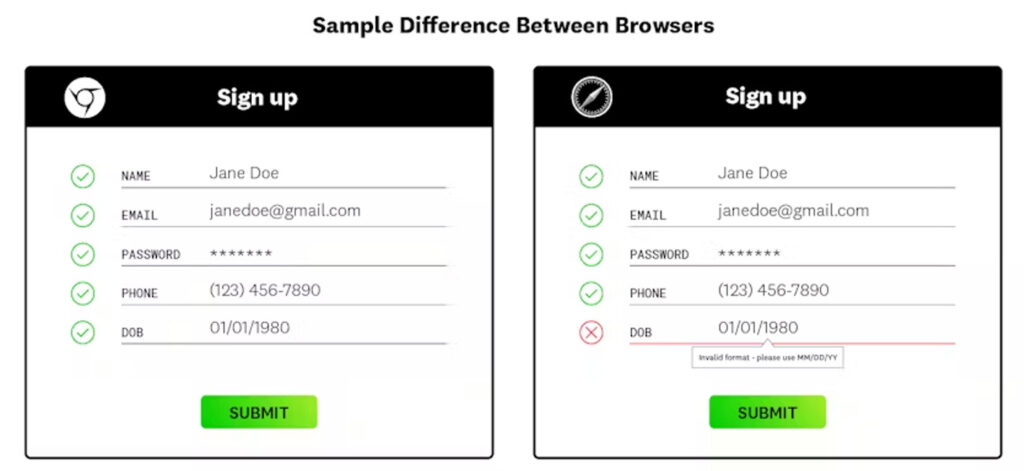
Image from Internet
- Design of the web application: In some cases, when the same application is accessed from different browsers, the design is different. Examples of such cases are stretching of images, font faults if a browser doesn’t support a particular font style, and the location of elements. You must ensure the application’s design is intact across browsers.
- Functionality of the application: The application’s functionality should not be affected when accessed from different browsers. In some cases, certain functionalities such as modals, data handling, cookie handling, and buttons do not work as expected. This can be because of how the browser is programmed. You have to make sure that changing the browser doesn’t affect the functionality of your application.
- Device-specific functions: During cross-browser testing, you also must take care of certain device-specific functions. For example, when using a laptop, the user can right-click on an element. But when using a mobile, they can’t right-click. An alternative to that would be to long-press on the element. You have to test your application for such cases as well.
So, how do we do it?
How to Go About Testing
 Image from Internet
It’s performed in two ways.
Cross-browser testing can be done manually. But it is time-consuming. This is because you need to test your application from different browsers and operating systems.
To manually test a website, we must install several browsers and operating systems on various desktops and mobile devices. Then, we must manually perform the same test cases in each chosen environment. This takes time and is exhausting for testers.
Therefore, cross-browser testing automation is required to complete testing activities quickly. Using automation tools, Cross-Browser testing can be completed in no time.
Cross-browser testing is basically running the same set of test cases multiple times on different browsers. This kind of repeated task is best suited for automation. Thus, it’s more cost and time effective to perform this testing by using tools.
Lots of tools are available on the market to make this easier.
Best tools for Cross-Browser testing: BrowserStack, LambdaTest, etc.
Deciding things in Pre-condition for Cross-Browser Testing
- Choose critical scenarios: choose the essential scenarios (depending on the business criticality of functionality and UI usage) to test first, and then we can test the rest.
- Choose the environments and compare execute the same test cases on different platforms and browser combinations to ensure the functionality is fixed and stable. In case of inconsistencies, the QC team raises defects, and the development team makes the fixes.
- Operating system: need to know our users will primarily use which operating systems from Windows, Android, iOS, macOS, etc.
- Devices: need to check on which platform our user will be accessing our application- desktop, mobile, etc.
Cross Browser Testing Checklist
Pre-conditions for Cross Browser testing to ensure the below conditions are met before starting cross-browser testing:
- Define the scope of testing- How much testing will be carried out, what is the deadline for testing, and how much functionality will be covered?
- Create a cross-browser testing strategy- Which browsers (and their versions) will be used, and which OS and devices will be used? Will all combinations be tested?
- Choose the right tool- Choose the perfect automation cross-browser testing tool from the available ones.
Conclusion
So, how do we ensure end-users get a great experience from all their browsers? We test!
Each type of testing helps in improving the quality of the application and so does the cross-browser test too. It helps in creating a good impression on the users by providing them a consistent experience throughout the application irrespective of the browser or Operating system.
This testing helps in improving our business which in turn results in Happy Customers, Happy You!!