



Introduction
Object-Relational Mapping (ORM) frameworks play a crucial role in simplifying database interactions and reducing the amount of boilerplate code developers need to write. Dapper.NET has gained considerable popularity as a lightweight and efficient option among the various ORM frameworks available.
What is Dapper.NET?
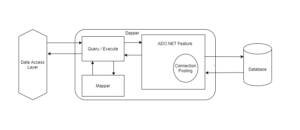
Dapper.NET is an open-source, lightweight, and high-performance ORM framework for .NET applications. It was developed by the Stack Overflow team and is designed to provide a fast and efficient way to map database queries to .NET objects. Dapper focuses on raw performance, making it an excellent choice for applications that require rapid data access and manipulation.
Key Features of Dapper.NET
- Speed and Performance
- Lightweight and Minimalistic
- Raw SQL Support
- Object Mapping
- Support for Dynamic Parameters
- Multiple Result Sets
- Stored Procedure Support
- Extensibility
Advantages of Using Dapper.NET
- Performance: Dapper.NET’s emphasis on performance makes it an excellent choice for applications that require high-speed data access and manipulation. It is especially well-suited for read-heavy scenarios.
- Minimal Learning Curve: The simplicity of Dapper.NET means that developers can get up and running quickly without spending a lot of time on configuration and setup.
- Full Control over Queries: Dapper.NET allows you to write raw SQL queries, giving you complete control over the queries you execute. This is particularly helpful when working with complex queries or when performance optimizations are required.
- Compatibility: Dapper.NET is compatible with various database providers, including SQL Server, MySQL, Oracle, and more. This flexibility ensures that you can use Dapper.NET regardless of the database system you’re working with.
Getting Started with Dapper.NET
Steps:
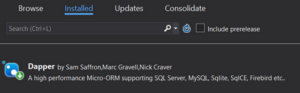
- Install the “Dapper” NuGet package using the package manager console or the Visual Studio NuGet package manager.
- Create Connection: Establish a database connection using your preferred ADO.NET provider.
- Write Queries: Use Dapper’s `Query` or `QueryAsync` methods to execute queries and map the results to objects. Utilize Dapper’s additional methods for various situations, including `Execute`, `QueryMultiple`, and beyond.
- Map Results: Define classes that match the structure of the query results. Dapper will automatically map the query results to these classes.
- Execute Queries: Execute the queries and retrieve the mapped objects. Dapper takes care of the object mapping for you.
Example to Write Query and Retrieve Data:
using System;
using System.Data.SqlClient;
using Dapper;

class Program
{
    static void Main()
    {
        string connectionString = "your_connection_string";

        using (var connection = new SqlConnection(connectionString))
        {
            connection.Open();
            var products = connection.Query<Product>("SELECT * FROM Products");

            foreach (var product in products)
            {
                Console.WriteLine($"{product.ProductId}: {product.ProductName} - ${product.Price}");
            }
        }
    }
}

class Product
{
    public int ProductId { get; set; }
    public string ProductName { get; set; }
    public decimal Price { get; set; }
}
Example for Parameterized Query:
Let’s retrieve products within a certain price range using a parameterized query.
using System;
using System.Data.SqlClient;
using Dapper;

class Program
{
    static void Main()
    {
        string connectionString = "your_connection_string";

        using (var connection = new SqlConnection(connectionString))
        {
            connection.Open();

            decimal minPrice = 20.0M;
            decimal maxPrice = 50.0M;

            var products = connection.Query<Product>(
                "SELECT * FROM Products WHERE Price BETWEEN @MinPrice AND @MaxPrice",
                new { MinPrice = minPrice, MaxPrice = maxPrice });

            foreach (var product in products)
            {
                Console.WriteLine($"{product.ProductId}: {product.ProductName} - ${product.Price}");
            }
        }
    }
}
Example while Working with Stored Procedures
Dapper.NET shines when it comes to interacting with stored procedures. Suppose we have a stored procedure named GetProductsByCategory that retrieves products based on a given category.
using System;
using System.Data;
using System.Data.SqlClient;
using Dapper;

class Program
{
    static void Main()
    {
        string connectionString = "your_connection_string";

        using (var connection = new SqlConnection(connectionString))
        {
            connection.Open();

            string category = "Electronics";

            var products = connection.Query<Product>(
                "GetProductsByCategory", // Stored procedure name
                new { Category = category },
                commandType: CommandType.StoredProcedure);

            foreach (var product in products)
            {
                Console.WriteLine($"{product.ProductId}: {product.ProductName} - ${product.Price}");
            }
        }
    }
}

class Product
{
    public int ProductId { get; set; }
    public string ProductName { get; set; }
    public decimal Price { get; set; }
}
Conclusion
Dapper.NET is a powerful and efficient ORM framework that strikes a balance between performance and simplicity. Its minimalistic approach and emphasis on raw performance make it a great choice for applications that require fast data access. If you are developing a small application or a large-scale system, Dapper.NET can assist you in optimizing your data access code and retaining control over your queries.
By leveraging Dapper .NET’s features, you can create applications that interact with databases efficiently, reducing the time spent on writing and optimizing data access code.