


Introduction to Kafka


Apache Kafka is an open-source distributed event streaming platform used for building real-time data pipelines and streaming applications. It is designed to handle high volumes of data and provides fault tolerance and scalability. Kafka enables applications to publish, subscribe to, store, and process streams of records in real time. It’s widely used for various purposes, including real-time analytics, log aggregation, messaging, and monitoring. Kafka is a distributed event store and stream-processing platform, The primary purpose to designed Kafka by Apache foundation is to handle real-time data feeds and provide high throughput and low latency platforms. Kafka has many capabilities to publish (write) and subscribe to (read) streams of events from a different system. Also, to store and process events durably as long as we want, by default Kafka store event 7 days of the time period but we can increase that as per need and requirement.
Supported Protocols:
Kafka has distributed system which has servers and clients that can primarily communicate via TCP protocol. However, it also supports integration with other protocols like: HTTP, HTTPS, SSL/TLS. In the Kafka world, a producer sends messages to the Kafka broker. The messages will get stored inside the topics and the consumer subscribes to that topic to consume messages sent by the producer.
Kafka Architecture:
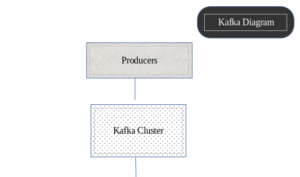
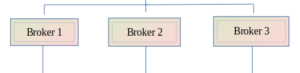
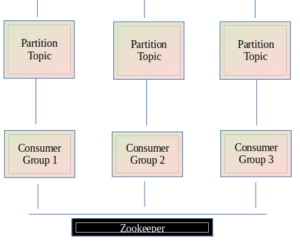
Concepts and foundation of Kafka:
Events:
An event or record is the message that we read and write to the Kafka server; we do this in the form of events in our business world, and it contains key, value, timestamp, and other metadata headers.
Key: “MQ”
Value: “Booked BMW”
Event Timestamp: “Jun. 6, 2024, at 12:00 p.m.”
Producer:
The producer is a client application that sends messages to the Kafka Broker. Producers create and transmit records, which are essentially messages, to the Kafka system. They can send data to specific topics and, within those topics, to specific partitions.
Broker:
These are the individual servers within the Kafka cluster. Each broker stores and manages some of the data. Brokers are responsible for handling read and write requests from producers and consumers, storing data in partitions, and replicating data across multiple brokers for fault tolerance.
Topics:
Kafka is a pub-sub model, Topic is a message category or, you can say, a logical channel. A topic in Kafka is like a channel or a category for organizing messages. It’s where producers send their data, and consumers subscribe to read that data. You can think of topics as folders in an email inbox or channels in a messaging app.
Partitions:
Topics are partitions, meaning the topic is spread over multiple partitions that we created inside the topic. When the producer sends some event to the topic, it will store it inside the particular partitions, and then the consumer can read the event from the corresponding topic partition in sequence and facilitate efficient load balancing among consumers.
Consumer:
Consumers are client applications that read data from Kafka topics. They subscribe to one or more topics and process the records as they become available. Consumers can be part of a consumer group, where multiple consumers work together to read data from partitions, allowing for load balancing and parallel processing.
Zookeeper:
ZooKeeper is a centralized service used by distributed systems to maintain configuration information, naming, synchronization, and group services. In the context of Kafka, ZooKeeper manages and coordinates the Kafka brokers
How Kafka Works
Here’s a simplified flow of how data moves through Kafka:
- Producers send records to a specific topic in the Kafka cluster.
- The records are distributed across partitions within the topic. Each partition is stored in multiple brokers for redundancy.
- Consumers subscribe to the topic and read records from the partitions, either in real-time or as needed.
Real-World Use Cases
Here are a few real-world scenarios where Kafka using by:
As the birthplace of Kafka, LinkedIn uses Kafka extensively for activity stream data and operational metrics. It powers LinkedIn’s data pipeline, handling billions of messages per day.
Netflix
Netflix employs Kafka for real-time monitoring and event processing, allowing it to manage and analize user activities across its platform instantly.
Uber
Uber relies on Kafka to collect and process data from its vast network of drivers and riders. Kafka helps in tracking locations, managing logistics, and optimizing routes in real-time.
Spotify
Spotify uses Kafka to stream and analize data on music playback, user preferences, and recommendation systems, ensuring a seamless experience for millions of listeners.
Key Features of Kafka
- Durability: Kafka writes data to disk and replicates it across multiple servers, ensuring data is safe even in the case of failures.
- Scalability: Kafka can handle thousands of partitions and petabytes of data, scaling horizontally by adding more brokers.
- Performance: With its efficient storage format and streamlined processing, Kafka can handle millions of messages per second with low latency.
- Flexibility: Kafka supports a wide range of use cases, from simple message queuing to complex real-time data processing.
Getting Started with Kafka
To start using Kafka, you’ll need to set up a Kafka cluster, which typically involves:
Guide to install Kafka in Linux device:
//Update the packages:

sudo apt update

//Install Java:

sudo apt install default-jdk -y

//Verify installation:

java -version

//Download kafka: (using wget/curl)

wget https://downloads.apache.org/kafka/3.7.0/kafka_2.12-3.7.0.tgz

//Create folder:

mkdir kafka

//Move to appropriate path (created in previous step):

sudo mv kafka_2.12-3.7.0.tgz kafka

//Extract the downloaded .tgz file ():
tar -xzf kafka_2.12-3.7.0.tgz

//Verify kafka installation:

ls -l kafka/kafka_2.12-3.7.0/bin/zookeeper-server-start.sh

//Check kafka directory contents:

ls -l kafka/kafka_2.12-3.7.0/bin

//Start Zookeeper:

sudo kafka/kafka_2.12-3.7.0/bin/zookeeper-server-start.sh kafka/kafka_2.12-3.7.0/config/zookeeper.properties

//Start Kafka:

sudo kafka/kafka_2.12-3.7.0/bin/kafka-server-start.sh kafka/kafka_2.12-3.7.0/config/server.properties
- Edit configuration files depending on your needs
- server.properties adjust setting for the kafka broker, such as ‘log.dirs’, ‘zookeeper.connect’, and replication factor.
- To Fine-tune producer and consumer configurations ‘producer.properties’ and ‘consumer.properties‘
- Set up Topics: Create topics to organize your data streams.
- Use the kafka command to create topic:
bin/kafka-topics.sh --create --topic monitoring-events --bootstrap-server localhost:9092 --partitions 3 --replication-factor 2
- Develop Producers and Consumers: Build app that will produce and consume data streams.
- Integrate with Monitoring Tools: Use kafka ecosystem and third-party tool such as Elasticsearch to enhance monitoring capabilities.
- Security and Reliability: Ensure Kafka setup is secure and reliable for production and for secure communication and access control. Set replication factors for topics to ensure data durability and proper retention policies to manage data storage by adjusting ‘server.properties’.
For detailed installation and configuration instructions, refer to the Kafka Quickstart Guide.
Summarize:
Apache Kafka is a powerful platform that enables real-time data streaming and processing. Its ability to handle large volumes of data with low latency and high reliability makes it an essential tool for modern data-driven applications. Whether you’re building a simple message queue or a complex event-driven architecture, Kafka provides the foundation you need to succeed.