


In recent years, machine learning has transformed how we approach problem-solving in various domains, from healthcare to finance to entertainment. With the rise of AI-driven applications, developers are increasingly seeking ways to integrate machine learning capabilities into software solutions. Fortunately, Microsoft’s ML.NET framework offers us a straightforward path for .NET developers to harness the power of machine learning within their applications. Here, we’ll explore the fundamentals of machine learning with ML.NET and demonstrate how we can leverage the framework to build our intelligent applications.
Initialize the Model
Choose Algorithm
We need to select an appropriate machine learning algorithm based on the nature of our problem (e.g., classification, regression, clustering) and the characteristics of our data.
Configure Pipeline
Define a data processing pipeline using ML.NET’s Pipeline API, which includes data loading, preprocessing, feature engineering, and model training stages.
Hyperparameter Tuning
Experiment with different hyperparameters for the chosen algorithm to optimize model performance. You can use techniques like grid search or random search for hyperparameter tuning.
Train
Initialize Trainer
Instantiate the chosen machine learning algorithm’s trainer class (e.g., BinaryClassification.Trainers.SdcaLogisticRegression for binary classification).
Train Model
Use the Fit() method to train the model on the training dataset. Pass the input features and target labels to the trainer to learn the underlying patterns in the data.
Evaluate Model
Assess the model’s performance on the testing/validation dataset using evaluation metrics relevant to the task (e.g., accuracy, precision, recall, F1-score for classification).
Model Evaluation and Validation
Evaluate Performance
We will compute evaluation metrics (e.g., confusion matrix, ROC curve) to assess the model’s performance on unseen data. Use metrics to identify areas for improvement and refine the model.
Cross-Validation
Optionally, perform k-fold cross-validation to assess the model’s stability and generalization ability across different subsets of the data.
Code
Step 1 : Create a console application
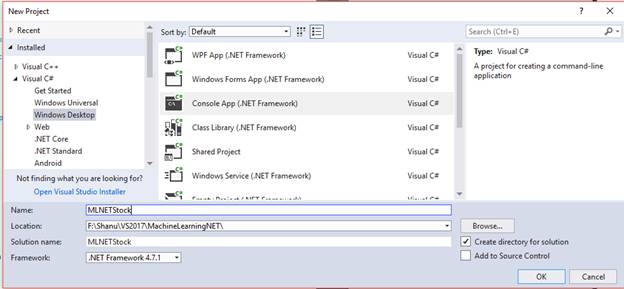
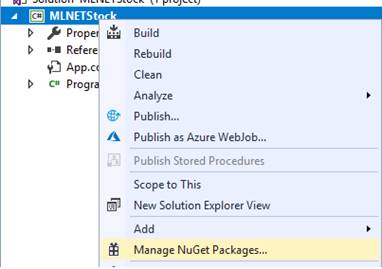
Step 2 : Add Microsoft ML package
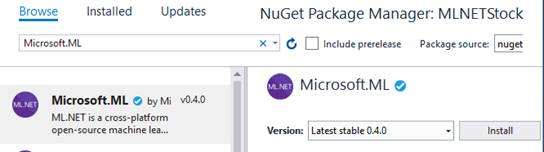
Select the Browse tab and search for Microsoft.ML
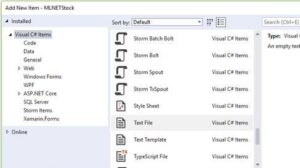
Step 3 : Right-click the Solution and click on Add >> New Item >> select the text file and name it as “customer_data.csv”
Step 4 : Save Data in customer_data.csv file like below
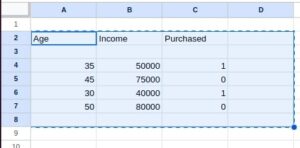
Age,Income,Purchased
35,50000,1
45,75000,0
30,40000,1
50,80000,0
We can add on more data like below. Add 100 records atleast..
Example
using System;
using System.IO;
using Microsoft.ML;
using Microsoft.ML.Data;

namespace MLNetExample
{
class Program
{
// Define the input data class
public class CustomerData
{
[LoadColumn(0)]
public float Age { get; set; }

[LoadColumn(1)]
public float Income { get; set; }

[LoadColumn(2), ColumnName("Label")]
public bool Purchased { get; set; }
}

// Define the prediction class
public class CustomerPrediction
{
[ColumnName("PredictedLabel")]
public bool Prediction { get; set; }
}

static void Main(string[] args)
{
// Initialize ML.NET context
var context = new MLContext();

// Load data
var dataPath = Path.Combine(Environment.CurrentDirectory, "customer_data.csv");
var dataView = context.Data.LoadFromTextFile<CustomerData>(dataPath, separatorChar: ',');

// Define data preprocessing pipeline
var dataProcessPipeline = context.Transforms.Concatenate("Features", new[] { "Age", "Income" })
.Append(context.Transforms.NormalizeMinMax("Features"));

// Define algorithm and training pipeline
var trainer = context.BinaryClassification.Trainers.SdcaLogisticRegression();
var trainingPipeline = dataProcessPipeline.Append(trainer);

// Train the model
var model = trainingPipeline.Fit(dataView);

// Evaluate the model
var predictions = model.Transform(dataView);
var metrics = context.BinaryClassification.Evaluate(predictions);

Console.WriteLine($"Accuracy: {metrics.Accuracy:P2}");
Console.WriteLine($"AUC: {metrics.AreaUnderRocCurve:P2}");

// Save the model
var modelPath = Path.Combine(Environment.CurrentDirectory, "customer_model.zip");
context.Model.Save(model, dataView.Schema, modelPath);

Console.WriteLine("Model saved successfully.");
}
}
}
In this example,
We have customer_data.csv file with data like below
The algorithm used in the provided code is Stochastic Dual Coordinate Ascent (SDCA) logistic regression.
var trainer = context.BinaryClassification.Trainers.SdcaLogisticRegression();Our data is saved in “customer_model.zip”
var modelPath = Path.Combine(Environment.CurrentDirectory, “customer_model.zip”);
We’re initializing the SDCA logistic regression trainer using SdcaLogisticRegression() method from the BinaryClassificationTrainers class in ML.NET. This trainer is suitable for binary classification tasks, where you have two classes to predict, such as whether a customer purchased a product or not, which aligns with our dataset’s structure.
Breakdown of above code
- We define classes to represent the input data (CustomerData) and the prediction (CustomerPrediction).
- We load a CSV file containing customer data, where each row represents a customer’s age, income, and whether they purchased a product.
- We define a data preprocessing pipeline to concatenate features and normalize them.
- We choose the SDCA logistic regression algorithm as our binary classification trainer.
- We train the model using the training pipeline.
- We evaluate the model’s performance using binary classification evaluation metrics such as accuracy and AUC (Area Under the ROC Curve).
- Finally, we save the trained model to a file for later use.
We’ll need to replace “customer_data.csv” with the path to our dataset file in CSV format. This example serves as a basic template for training and building models using ML.NET, which we can extend and customize for our specific machine learning tasks and datasets.
Conclusion
In conclusion, ML.NET offers .NET developers a powerful toolkit for incorporating machine learning capabilities into their applications. By mastering the fundamentals of machine learning with ML.NET and following best practices, developers can build intelligent, data-driven solutions that empower users and drive business value. Whether you’re a beginner exploring the world of machine learning or an experienced developer seeking to enhance the applications, ML.NET provides the tools and resources we need to succeed.