


Introduction
.NET MAUI is an evaluation of Xamarin.Forms, extended from mobile to desktop scenarios and rebuilt UI controls from the base level to improve the performance. It is quite similar to Xamarin Forms and another framework for creating cross-platform apps using a single codebase.

What is .NET MAUI?
.NET MAUI (Multi-platform App UI) is an open source and cross platform framework. It is used to create native mobile and desktop apps using C# and XAML. Using this multi-platform UI, one can develop apps that run on
- Android
- iOS
- MacOS
- Windows
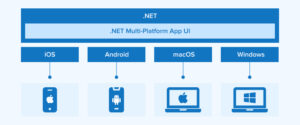
The primary goal of .NET MAUI is to help you to develop as much of your app’s functionality and UI layout as possible in a single project. The .NET MAUI is suitable for the developers who want to
- Use single codebase to develop app for android, iOS, and desktop with C# and Xamarin.Forms.
- Share Code, tests, and logic across all platforms.
- Share common UI layout and design across all platforms.
How does .NET MAUI Work?
.NET MAUI is a unified solution for developing mobile and desktop app user interfaces. With it, developers can deploy an app to all supported platforms using a single code base, and also provide unique access to every aspect of each platform.
The Windows UI 3 (WinUI 3) library, along with its counterparts for Android, iOS, and macOS, are all part of the .NET 6 and later family of .NET frameworks for app development. The .NET Base Class Library (BCL) is shared by all of these frameworks. This library hides platform specifics from your program code. The .NET runtime is essential to the BCL because it provides a setting in which your code will be executed. Mono, a representation of the .NET runtime, provides the environment implementation for Android, iOS, and macOS. On Windows, the .NET CoreCLR serves as the execution runtime.
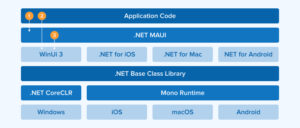
.NET MAUI allows developers to create native app packages that can be compiled from code written on either a PC or a Mac.
- When an Android app is developed with .NET MAUI, C# is translated into an intermediate language (IL), and during runtime, the IL is JIT-converted into a native assembler.
- Apps for iOS developed with .NET MAUI are converted from C# into native ARM assembly code.
- For macOS, this MAUI apps employ Mac Catalyst, an Apple technology that ports your UIKit-based iOS app to the desktop and enhances it with extra AppKit and platform APIs.
- Native Windows desktop programs developed with .NET MAUI are created with the help of the Windows User Interface 3 (WinUI 3) library.
What’s Similar between .NET MAUI & Xamarin Forms?
The community is still developing apps with XAML and C#. To separate our logic from the view specification, we can use Model-View-Viewer (MVVM), Reactive User Interface (UI), or Model-View-Update, so that we can create apps for:
- Windows Desktop
- iOs & macOS
- Android
It is easy to relate with .NET MAUI if you have prior experience with Xamarin. While the project configuration may shift, the code you write daily should seem like an old hat.
What is Unique about .NET MAUI?
Microsoft is enhancing its foundation to enhance Xamarin. Forms, which enhanced speed, unified architectural systems, and expanded beyond mobile to desktop, played a significant role. Key advancements in MAUI:
- Single Project Experience.
- .NET Hot Reload
- Cross-Platform APIs for Device Features
How to Build Your First App Using .NET MAUI?
Step 1: To get started with .NET MAUI development, you’ll need to set up your development environment. Ensure you have the following prerequisites installed:
- Installation of the .NET Multi-platform App UI workload in Visual Studio 2022 version 17.3 or later is required.
- .NET 6 SDK or later.
Step 2: Once your environment is set up, you can create a new .NET MAUI project using the following steps.
- Startup Visual Studio 2022. To initiate a fresh project, select the “Create a new project” option.
- Select MAUI from the “All project types” – menu, then choose the “.NET MAUI App” template and press the “Next” icon in the “Create a new project” window.
- Give your project a name, select a location, and then press the “Next” button in the window labeled “Configure your new project”.
- Press the “Create” button after selecting the desired version of .NET in the “Additional information” window.
- Hold off until the project is built, and its dependencies are restored.
- Choose Framework, and then the “.net 7.0-windows” option, from the “Debug” menu in Visual Studio’s toolbar:
- To compile and launch the application, click the “Windows Machine” icon in Visual Studio’s toolbar.
- Visual Studio will ask you to switch on Developer Mode if you haven’t already. This can be done via Settings of your device. Click “settings for developers” from VS code and on the “Developer Mode”. Also accept the disclaimer.
- To test this, open the app and run.
Example of .NET MAUI: we define a simple .NET MAUI application with a single page containing a label that displays the welcome message.
using Microsoft.Maui;
using Microsoft.Maui.Controls;

namespace MauiApp
{
    public partial class App : Application
    {
        public App()
        {
            InitializeComponent();
            MainPage = new NavigationPage(new MainPage());
        }
    }

    public class MainPage : ContentPage
    {
        public MainPage()
        {
            Content = new StackLayout
            {
                Children = {
                   new Label {
                       Text = "Welcome to .NET MAUI!",
                       HorizontalOptions = LayoutOptions.Center,
                       VerticalOptions = LayoutOptions.CenterAndExpand
                    }
                }
            };
        }
    }
}
Why .NET MAUI?
- Accessibility: .NET MAUI supports multiple approaches for accessibility experience. Semantic Properties (most recommended one.) and Automation Properties (Xamarin.Forms approach).
- APIs to Access Services.
- Global Using Statements and Field-Scoped Namespaces.
- Use Blazor for Desktop and Mobile.
- Optimized for Speed.
Native UI
The Windows App SDK includes WinUI 3, an exceptional native UI component that fully supports .NET MAUI on Windows. By utilizing .NET MAUI native UI, you gain the ability to:
- Create your apps using a library of more than 40 controls, layouts, and pages using C# and XAML.
- Built upon the solid foundation of Xamarin’s mobile controls, it extends them to include things like navigation bars, multiple windows, improved animation, and enhanced support for gradients, shadows, and other visual effects.
Conclusion
.NET MAUI represents a significant step forward in multi-platform app development, offering developers a powerful and efficient way to build native applications for various platforms using a single codebase. By leveraging the flexibility and productivity of .NET, developers can create high-performance applications with a consistent user experience across devices.