



Introduction
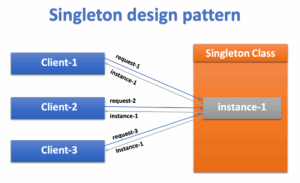
The Singleton design pattern is a widely used creational pattern in software development. It ensures that a class has only one instance and provides a global point of access to that instance. In ASP.NET applications, employing the Singleton pattern can help manage resources efficiently and maintain state across multiple requests. Let’s delve into how to implement the Singleton pattern in ASP.NET.
Understanding the Singleton Pattern
The Singleton pattern involves a class that is responsible for instantiating itself and ensuring that only one instance exists throughout the application’s lifecycle. It typically involves a private constructor to prevent external instantiation and a static method to provide access to the single instance.
The Singleton pattern follows a few key principles:
- Single Instance: There’s only one instance of the class throughout the application’s lifecycle.
- Global Access Point: The instance is globally accessible, allowing components to access it from anywhere within the application.
- Lazy Initialization (Optional): The Singleton instance can be created when it’s first requested, rather than eagerly at application startup, to improve performance.
Steps to Implement Singleton Pattern
Step 1: Create a Singleton Class
public sealed class Singleton
{
   private static int counter = 0;
   private static Singleton instance = null;
   private Singleton()
   {
      counter++
      Console.WriteLine("Counter Value" + counter.ToString());
   }

   public static Singleton GetInstance
   {
      get
      {
         if (instance == null)
         {
            instance = new Singleton();
         }
         return instance;
      }
   }

   public void PrintDetails(string message)
   {
      Console.WriteLine(message);
   }
}
In this class:
- We define a private constructor to prevent external instantiation.
- We declare a static variable counter which will be incremented when a new instance of Singleton class is created.
- We declare a static variable instance to hold the single instance of the class.
- We provide a static property GetInstance to access the singleton instance. If the instance is null, it creates a new instance; otherwise, it returns the existing one.
Step 2: Accessing the Singleton Instance
Once your Singleton class is defined, you can access its instance from anywhere in your ASP.NET application by using the static Instance property.
class Program
{
   static void Main(string[] args)
   {
      Singleton fromEmployee = Singleton.GetInstance;
      fromEmployee.PrintDetails("From Employee");

      Singleton fromStudent = Singleton.GetInstance;
      fromStudent.PrintDetails("From Student");
   }
}
Step 3: Start the Application
Build and run your application. A single instance of the Singleton class will be created.
Counter Value 1
From Employee
From Student
Benefits of Singleton Pattern
- Global State Management: Singleton ensures that there is only one instance of a class, making it ideal for managing global state and shared resources across the application.
- Resource Optimization: By maintaining a single instance of a resource-intensive class (e.g., database connection, configuration manager), Singleton reduces memory consumption and improves performance.
- Simplified Access: Accessing shared resources becomes straightforward with Singleton, as it provides a centralized point of access throughout the application.
Conclusion
Implementing the Singleton pattern in ASP.NET provides a convenient way to manage shared resources and global state within your application. However, it’s essential to use it judiciously and consider potential drawbacks such as tight coupling and limited testability. When applied appropriately, the Singleton pattern can be a valuable tool for improving the structure and efficiency of your ASP.NET projects.