


Keeping a React Editor in Sync While Waiting for Gemini
Explore the WriteBetter AI source code on GitHub
Building an AI-Powered Writing Assistant from Scratch, Part 2 of 2
I typed “Yesterday I go to the office and meet my team.” into WriteBetter AI, an English writing assistant I built with React, Next.js and Gemini. After 11.32 seconds, the editor offered “Yesterday I went to the office and met my team.” The grammar correction was fine. The interesting engineering question was what should happen if I spent those eleven seconds writing my next sentence, or fixing the first one myself.
The two edits look identical to a textarea. Both fire an input event and produce a new string. To a writer, they mean different things. Starting a new sentence leaves the first one available for review. Changing “She are ready.” to “She was ready.” makes a pending suggestion of “She is ready.” actively unhelpful: accepting it would change the tense I just chose.
I tested both edits in Chrome, then tried two identical sentences. The duplicate case exposed a bug that survived all eleven automated tests.
Pick the two events before starting the clock
Starting a timer inside the server route would miss the pause that the editor deliberately inserts. Stopping at the first byte of a response would miss the work needed to produce a complete suggestion. Our user can act only after the card displays the proposed sentence.
I used a real Chrome browser, the local Next.js application, a configured Gemini key and one English sentence with two tense errors. I typed the words, attached a one-shot input listener, then pressed the final period. The listener captured the browser’s monotonic clock. After the editor rendered the suggestion, I read the same clock again. The browser’s resource timing entry for /api/review-sentence supplied a separate duration for the request to the application.
The following is a compact reproduction of the measurement for this specific input. It assumes a Playwright page on the running editor. It waits for the expected suggestion element, so a quota error or an unchanged sentence will time out rather than count as a successful correction.
const draft = page.getByLabel("Your draft")
await draft.pressSequentially("Yesterday I go to the office and meet my team")

await page.evaluate(() => {
  document.querySelector("textarea").addEventListener("input", () => {
    performance.mark("period-entered")
  }, { once: true })
})
await draft.press(".")
await page.waitForFunction(() => document.querySelector("article strong")?.textContent)
const sample = await page.evaluate(() => ({
  elapsed: performance.measure("suggestion-observed", "period-entered").duration,
  request: performance.getEntriesByType("resource")
    .filter(entry => entry.name.endsWith("/api/review-sentence")).at(-1)?.duration,
  suggestion: document.querySelector("article strong").textContent
}))
This measures when the browser test observes the rendered element. Polling and test scheduling contribute a small amount of overhead. If you repeat it, start each trial with a fresh page: the editor reuses reviews for identical sentences within a session.
One trace, three useful numbers
| Measurement | Observed in the live run |
|---|---|
| Final period to observed suggestion | 11,318.3 ms |
| Browser request to the application endpoint | 10,799.1 ms |
| Difference between the two durations | 519.2 ms |
The returned sentence was “Yesterday I went to the office and met my team.” The 519.2 ms difference is consistent with the configured 500 ms delay plus dispatch, rendering and observation overhead. The 10,799.1 ms includes the path to the application, its server-side work and the upstream provider request. This trace provides no separate measure of Gemini’s generation time.
Those numbers change the first optimization I would test. Suppose removing the entire intentional delay had saved exactly 500 ms in this run and everything else had stayed equal. The suggestion would still have taken about 10.82 seconds to appear. Shortening the delay might be perceptible, but it would leave most of this writer’s wait intact. It might also send more sentences that the writer immediately revises.
The live trace tells us how much time the writer had to change the draft. To study what the editor does with those changes, I needed control over the order of events. I used a real textarea and held its network reply until the test had made the intended edit.
Make the request depend on the sentence being reviewed
The editor stores the draft as plain text. On each edit, it uses Intl.Segmenter to find English sentence boundaries, keeps completed sentences and records their current positions. A sentence ending in punctuation or a line break can become eligible for review. The component picks the first eligible sentence within its 2,400-code-unit input limit whose text has no cached review. Here is the selection logic from the application, with line breaks added for readability:
const sentences = useMemo(() => completedSentences(draft), [draft])
const next = sentences.find(
  item => item.text.length <= maximumSentenceLength && !reviews.has(item.text)
)?.text
The React effect that sends the request depends on [next, error]. That first dependency is a string. When I append “ More text” after “She are ready.”, React renders again, but next still equals “She are ready.”. The original request continues. Finishing a second sentence puts it in line for review. The editor processes one at a time, so a slow first review can also delay the second.
Now suppose I edit the first sentence. Its wording changes, so React runs the effect’s cleanup. The cleanup clears the timer and calls controller.abort(). An edit during the initial half-second can prevent dispatch entirely. For an in-flight request, the component passes the abort signal to fetch and checks it again before recording the reply:
if (!controller.signal.aborted) {
  setReviews(previous => new Map(previous).set(next, result.replacement))
}
The server sends one sentence to Gemini and requests a structured response. The browser receives a replacement string and stores it under the submitted wording. On every render, the editor looks up reviews for sentences present in the current draft. A completed review of “She are ready.” can therefore remain in memory without appearing beside “She was ready.”. This also covers an edit made just after the old reply has already been stored. Cancellation alone could never handle that ordering. React effect dependencies and cleanup
Accepting an edit also means preserving the cursor
Imagine this draft, with the cursor after the final letter of “text”:
She are ready. More text|
The writer presses Tab to accept “She is ready.”. Replacing the whole textarea with an earlier snapshot would discard the second phrase. Searching for the first matching sentence would introduce another problem as soon as the same wording appeared twice.
The application derives each occurrence’s start position from the current draft. When the writer accepts a suggestion, it checks the substring at that position:
const replacement = reviews.get(item.text)
if (!replacement || draft.slice(item.start, item.start + item.text.length) !== item.text) return
const end = item.start + item.text.length
The update itself is a splice expressed with two slices:
setDraft(draft.slice(0, item.start) + replacement + draft.slice(end))
That preserves the suffix, including its leading space. The component also reads the textarea’s selection end before updating React state. For a cursor beyond the corrected range, it adds the difference between the new and old sentence lengths, then restores the cursor on the next animation frame. Here “are” becomes “is”, so the cursor moves from offset 24 to 23. The strongest assertion is to type one more character. An exclamation mark should produce She is ready. More text!.
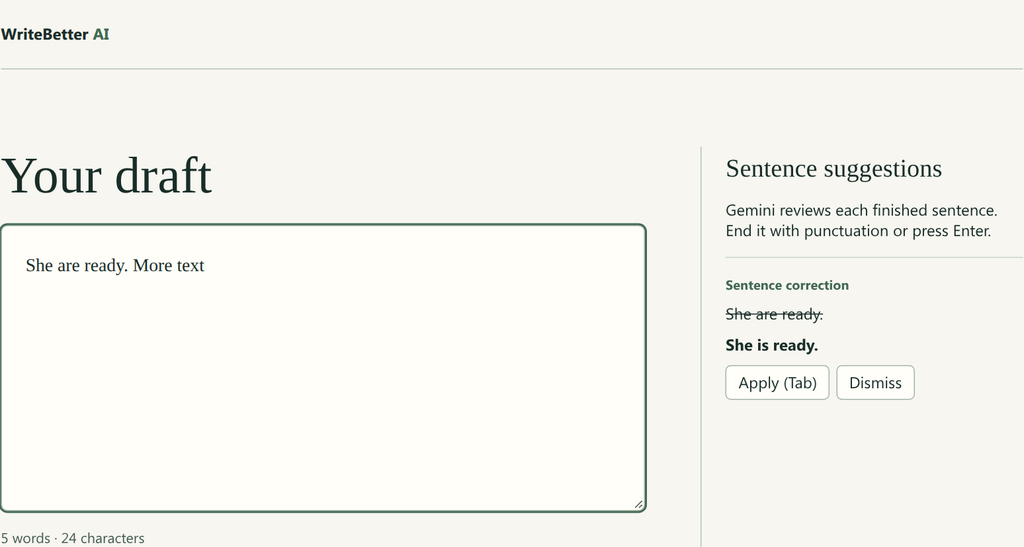
Before Tab. The suggestion belongs to the first sentence. The draft already contains the next phrase.
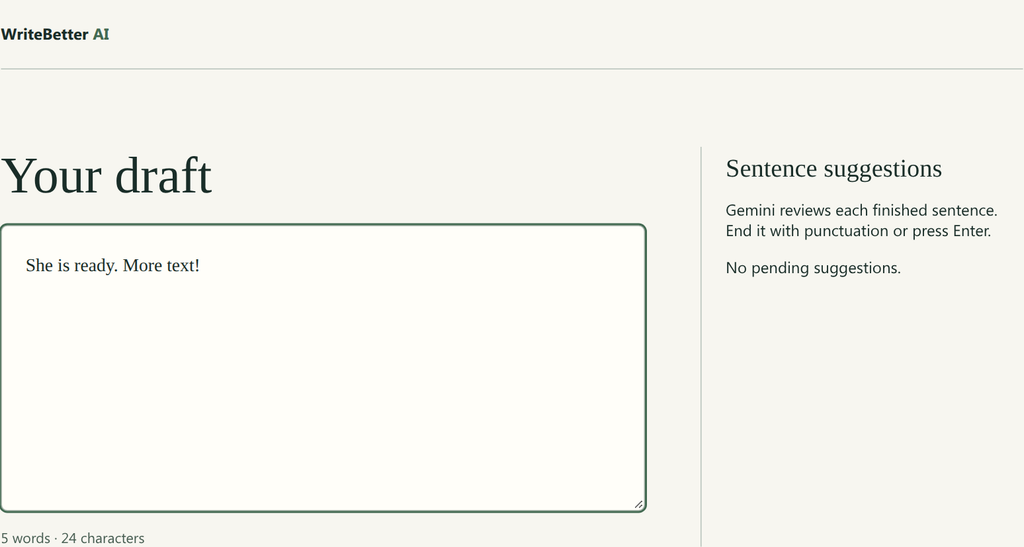
After Tab. The first sentence changes, and the next keystroke lands after “More text”.
A browser experiment with a response I could hold
I ran WriteBetter AI 0.3.0 at revision d904fd9 in Chrome 157.0.8103.78. For the interaction tests, Playwright intercepted the browser’s request to /api/review-sentence. The actual editor, React effects, textarea and keyboard handlers all ran. The intercepted endpoint returned a fixed correction so that model variability could not change the outcome.
This is the gate used in the browser experiment. The test waits until the first request has started, edits the draft and then calls release(). This ordering gives the test a pending review even on a fast machine.
const requests = []
let release
const gate = new Promise(resolve => { release = resolve })

await page.route("**/api/review-sentence", async route => {
  const { sentence } = route.request().postDataJSON()
  requests.push(sentence)
  if (requests.length === 1) await gate
  await route.fulfill({
    json: { replacement: sentence.replace("She are", "She is") }
  })
})
To reproduce the append case, open the Gemini editor with the interception installed and run the following against that page. Registering the request listener before filling the textarea keeps the test from missing the event.
const draft = page.getByLabel("Your draft")
const sent = page.waitForRequest("**/api/review-sentence")
await draft.fill("She are ready.")
await sent
await draft.press("End")
await draft.pressSequentially(" More text")
release()
await page.getByRole("button", { name: "Apply (Tab)" }).waitFor()
await draft.press("Tab")
await page.waitForFunction(() => document.activeElement?.selectionEnd === 23)
await draft.pressSequentially("!")
assert.equal(await draft.inputValue(), "She is ready. More text!")
I recorded the submitted sentences as well as the resulting text. A correct final string alone could hide repeated requests on every keystroke.
| Browser scenario | Requests observed | Result |
|---|---|---|
| Append “ More text” during review, accept with Tab, then type “!” | One, for “She are ready.” | The draft ended as “She is ready. More text!”. Later typing and cursor placement were preserved. |
| Change “She are ready.” to “She was ready.” before releasing the first reply | Two, one for each wording | The draft stayed “She was ready.” and the settled editor showed zero suggestion cards. |
| Enter “She are ready. She are ready.” and apply the second card | One, shared by both occurrences | The draft became “She are ready. She is ready.”. Only the selected occurrence changed. |
The eleven existing tests also passed on this revision. They cover parts such as sentence segmentation and provider-response handling. The browser checks exercise a separate question: what happens when those pieces meet a writer who is still typing?
The duplicate-sentence bug
The third result looked promising, so I tried a fourth sequence. I entered the same sentence twice, dismissed the first suggestion and confirmed that one card remained. Then I rewrote only the first sentence as “She was ready.”. I expected one card for the untouched second sentence. The editor showed zero.
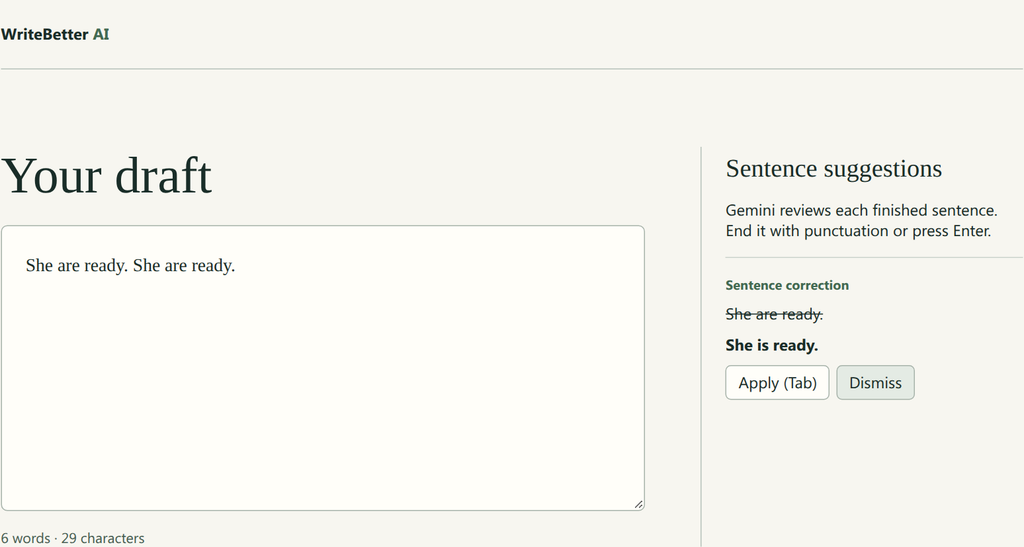
After dismissing the first card, one suggestion remains for the second occurrence.
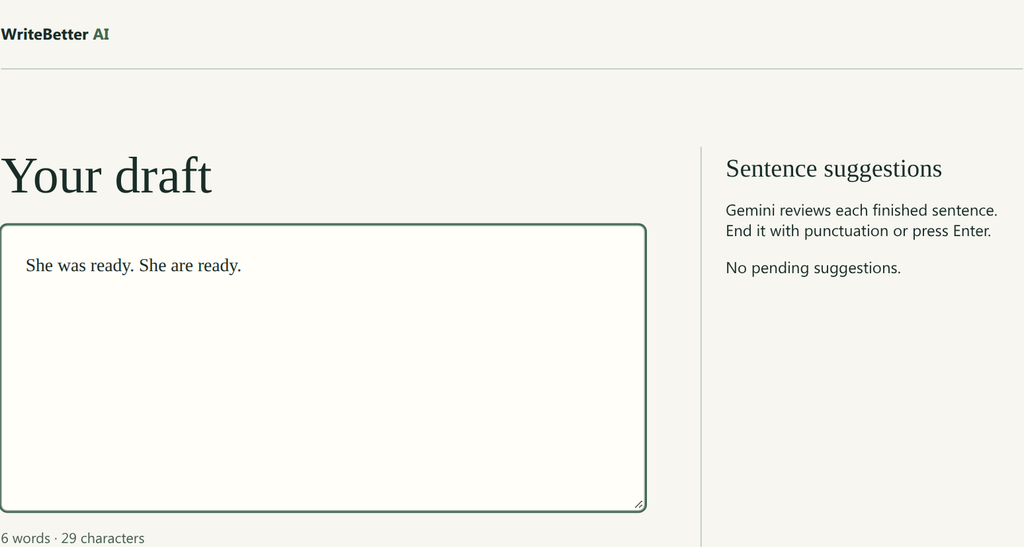
After editing only the first sentence, the untouched second sentence loses its suggestion.
The implementation gives each occurrence an identity derived from its text and the number of preceding identical sentences:
const occurrence = occurrences.get(text) ?? 0
occurrences.set(text, occurrence + 1)
sentences.push({
  text,
  start: index + segment.indexOf(text),
  identity: JSON.stringify([text, occurrence])
})
Initially, the two sentences have occurrence numbers 0 and 1. Dismissing the first records the identity for occurrence 0. When I change the wording of the first sentence, the second becomes the only occurrence of the original wording. On the next render it receives occurrence number 0 and inherits the earlier dismissal. Its text survives, but its suggestion disappears.
This is where review reuse and user intent need different lifetimes. Sharing a grammar review between identical strings is reasonable here because Gemini sees only one sentence per request. A dismissal belongs to the particular passage where the writer clicked. If persistent dismissal matters, I would give occurrences stable identities that survive neighboring edits, then keep this four-step sequence as a regression test. If the editor later sends surrounding sentences to Gemini, the review cache would also need to account for that context.
What I would change first
The duplicate dismissal is a reproducible correctness issue, so I would fix it first and retain the four-step sequence as a regression test. To investigate speed, I would instrument the server’s call to Gemini, then repeat the period-to-suggestion measurement over a fixed set of sentences. Correct sentences need their own completion marker because they produce no card. Quota failures need their own count because a fast error does nothing for the writer.
The simplest end-to-end check still fits in one line: finish a sentence, start another, accept a correction to the first, then type one character. Its position tells us whether the user could actually keep writing while Gemini worked.
React editor at the tested revision · Previous article: From a Browser Spell Checker to AI Sentence Suggestions