


Introduction
An ExternalName service plays an important role when you have multiple resources that use single external resources. In today’s blog, I will try to explain what an ExternalName service type is, its use cases, and where to use it. So let’s begin to understand the Kubernetes ExternalName service type.
What is Kubernetes ExternalName Service type?
So first, let’s understand the use of Kubernetes service. In simple terms, when you want to expose your resources to other users, you use a service. An ExternalName is a type of service that maps a service to a DNS name. You can think of it as a normal service that provides connectivity to other resources, and you can also link it to other services.
Use cases of ExternalName service type
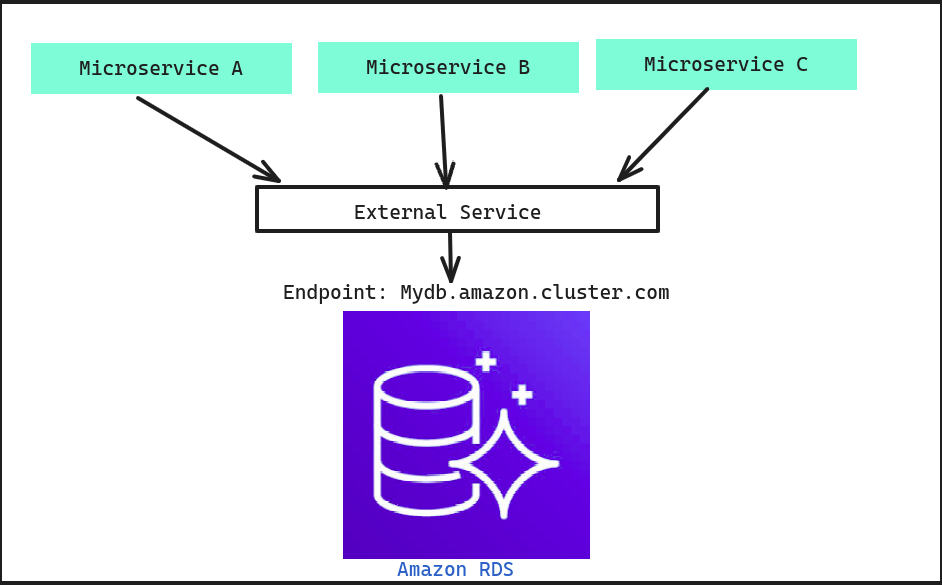
So, the very first use case is, let’s suppose you have an external database service like RDS, and there are multiple microservices using that database. Now, suppose there emerges a need to change the endpoint for your database. To do that, you need to change the endpoint in all the microservices one by one. You can understand it in the diagram below.
As shown in the diagram, we have three different microservices, but they are all connected to the same RDS with the same endpoint. Now, the problem arises when we need to change the endpoint from Mydb.amazon.cluster.com to Mydb1.amazon.cluster.com. This requires changing it in every microservice individually, which can be time-consuming. Now, let’s suppose we create an external service to connect with Amazon as shown below.
Now, as you can see, the external service is playing the role of a mediator. The microservices will connect with the external service, and the external service will then connect them to the actual endpoint. Now, even if the endpoints get changed, we only need to modify the endpoint inside the external service.
Importance of external service
- Time-saving
- Reduce code complexity
- Provide security
Where not to use ExternalName service type
Just to make sure that the ExternalName service type does not work with the IP address if you try to provide an IP instead of a DNS name then it will not work, So you should avoid it when you have a resource IP however you can configure a domain for that IP and then that domain to map with the service.
Demo:
1. Setup an ExternalName service type (service.yaml)
apiVersion: v1
kind: Service
metadata:
  name: db-service
spec:
  type: ExternalName
  externalName: My.amazon.cluster.com
2. Passing ExternalName service name using an environment variable(deployment.yaml)
apiVersion: apps/v1
kind: Deployment
metadata:
name: microservice A
spec:
  replicas: 1
  selector:
    matchLabels:
       service: microserviceA
template:
   metadata:
      labels:
         service: microserviceA
spec:
   containers:
   - image: nginx #replace this with your image name
     name: microservice-container
   ports:
   - containerPort: 80
     name: http
   env:
   - name: DB_URL
     value: db-service
Now deploy both the manifests and then you can use the environment variable DB_URL inside your code to connect to database.