


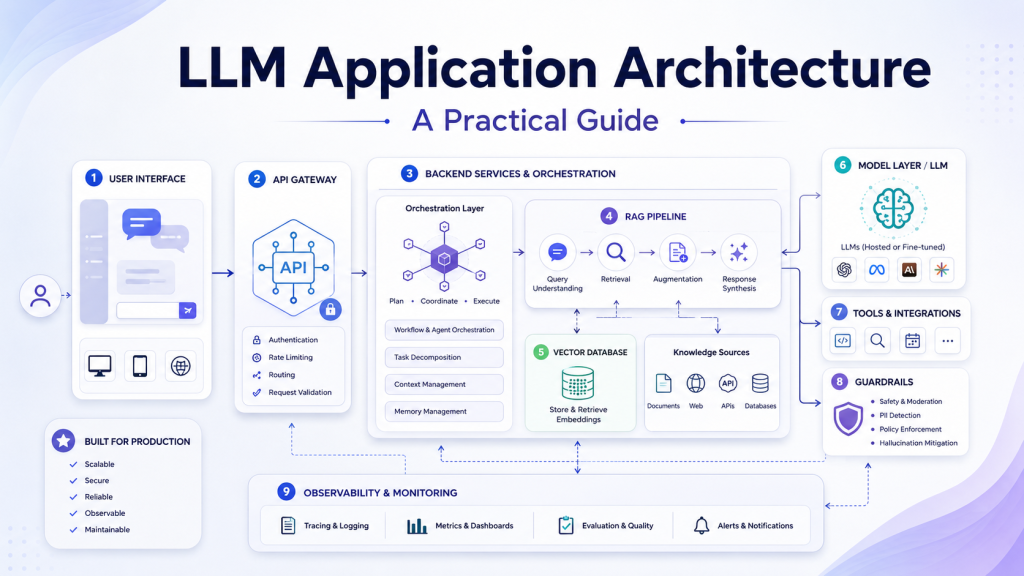
A production LLM application is not just a prompt connected to a model API. It is a complete software system that must understand user requests, retrieve reliable context, call external tools, validate generated outputs, protect sensitive data, and monitor real-world behavior. This is why LLM Application Architecture has become an important topic for software engineers, AI architects, and technical teams building production AI systems.
A simple prototype can work with only a user input, a prompt, and an LLM response. However, production systems need more structure. They must handle authentication, context retrieval, prompt management, tool execution, guardrails, evaluation, observability, and cost control. Without these layers, an LLM application may produce inconsistent answers, expose private data, become difficult to debug, or fail silently in business-critical workflows.
In this guide, we define a practical and standard LLM Application Architecture. The goal is not to describe the internal neural network design of an LLM. Instead, this article explains how to design the surrounding application system that uses LLMs safely, reliably, and efficiently.
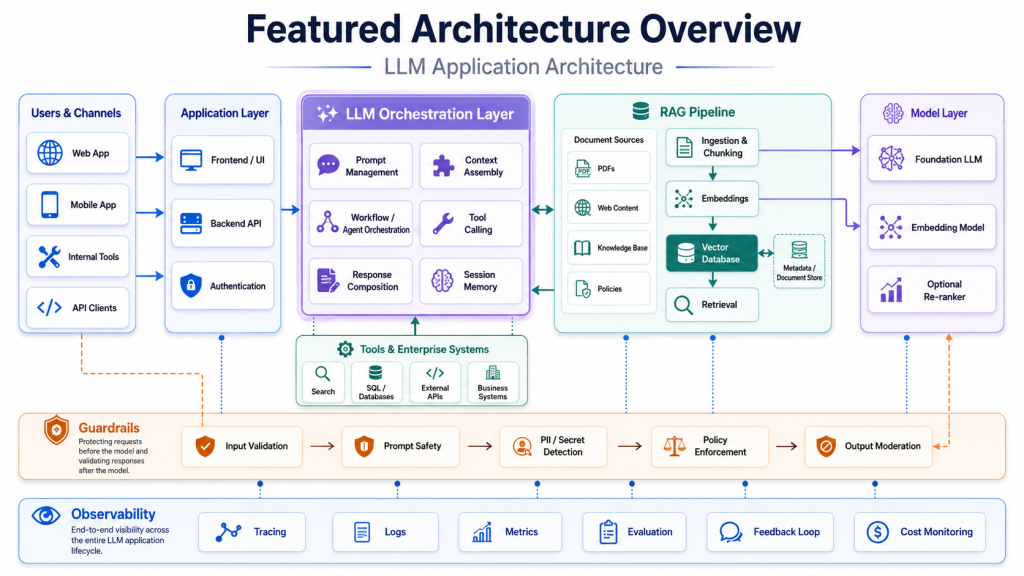
What Is LLM Application Architecture?
LLM Application Architecture is the design of all software components required to build an application powered by a large language model. It defines how the system receives input, prepares context, calls the model, executes tools, validates output, and records operational signals.
This architecture is different from LLM model architecture. Model architecture refers to how the language model works internally, such as Transformer layers, attention mechanisms, embeddings, and parameters. In contrast, LLM Application Architecture focuses on how a software system uses the model to complete real tasks.
For example, a customer support assistant may need to authenticate the user, retrieve policy documents, search previous tickets, call a CRM API, generate a response, check the answer for safety, and log the interaction. The LLM generates language, but the application architecture controls the workflow.
A good LLM Application Architecture usually answers several important questions:
- How does the system identify the user?
- Where does trusted context come from?
- How are prompts created and versioned?
- Which model should handle each task?
- When can the LLM call external tools?
- How are outputs validated before users see them?
- How are quality, latency, cost, and errors monitored?
When these questions are answered clearly, the application becomes easier to maintain and scale.
Core Layers of LLM Application Architecture
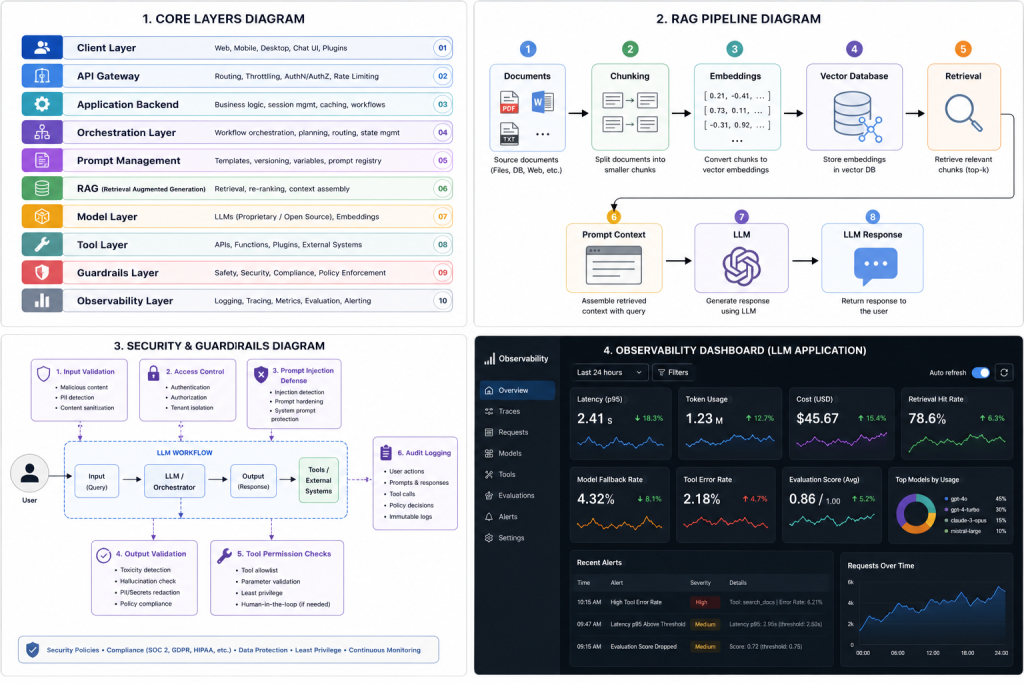
A standard LLM Application Architecture usually contains several layers. Each layer has a specific responsibility, and together they create a reliable production system.
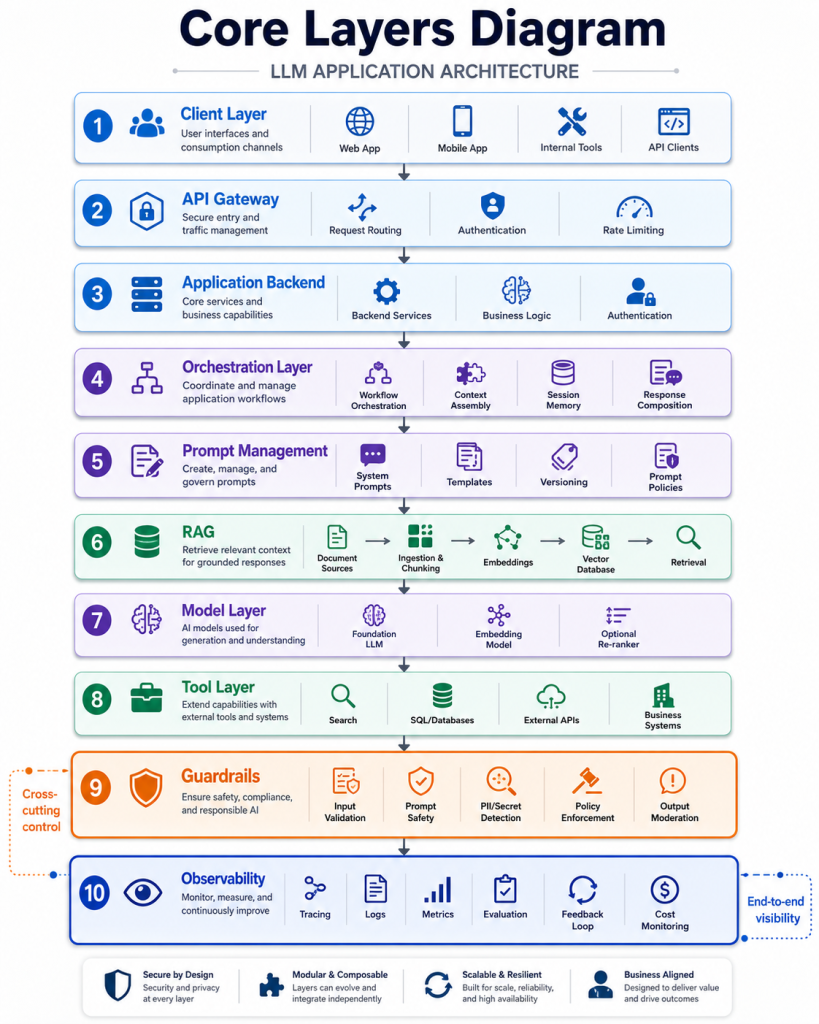
Client and API Layer
The client layer is where users interact with the system. It may be a web application, mobile app, chatbot, internal dashboard, browser extension, or API client. This layer collects user input and displays the final response.
However, the client should not directly manage sensitive prompt logic, retrieval rules, or tool execution. Those responsibilities belong in the backend. This separation keeps the system more secure and easier to modify.
The API layer handles authentication, authorization, request validation, rate limiting, and routing. It also creates a controlled boundary between the user interface and the internal LLM workflow. In enterprise systems, this layer often integrates with identity providers, access control systems, and audit logging tools.
Orchestration and Prompt Management
The orchestration layer coordinates the LLM workflow. It decides whether the application should retrieve documents, call a tool, ask the model to classify a request, generate a response, or apply validation rules.
This layer is important because production LLM applications rarely follow a single-step process. A request may require multiple actions before the final answer is ready. For example, the system may classify the user intent, retrieve context from a vector database, call an internal API, generate a draft response, and then validate the result.
Prompt management is closely related to orchestration. Prompts should not be hidden inside random scripts or copied across different services. Instead, system prompts, task instructions, templates, and prompt variables should be versioned and tested.
Good prompt management helps teams understand which prompt version produced a specific output. It also makes rollback easier when a new prompt causes lower-quality responses.
RAG and Vector Database
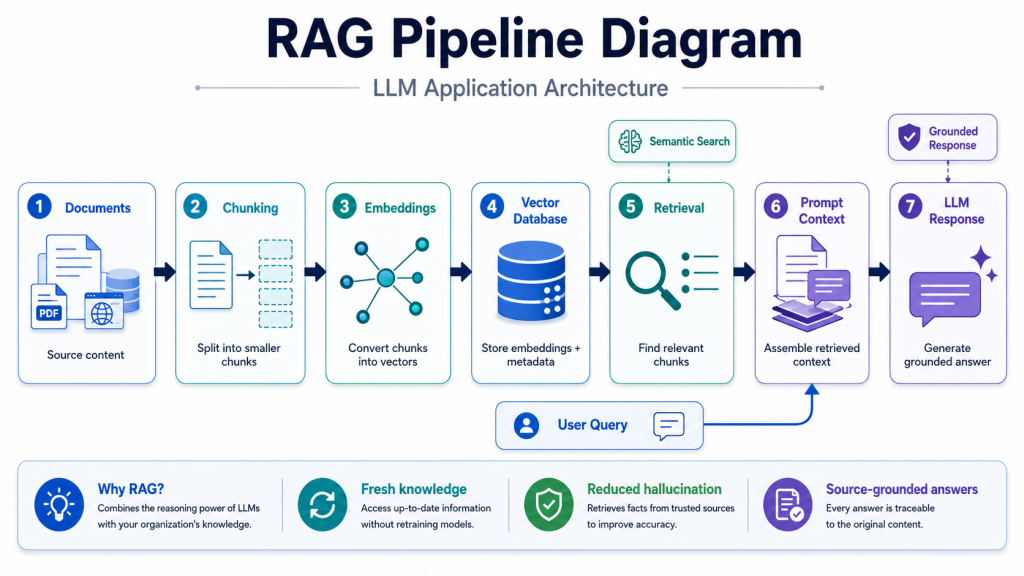
Retrieval-Augmented Generation, or RAG, is one of the most common patterns in LLM Application Architecture. RAG allows the application to retrieve trusted information before asking the model to generate an answer.
The process usually starts with document ingestion. The system collects documents from sources such as internal wikis, PDFs, product documentation, support tickets, databases, or websites. These documents are cleaned, split into chunks, enriched with metadata, and converted into embeddings.
Embeddings are numerical representations of text meaning. A vector database stores these embeddings and allows the system to find semantically relevant content based on a user query. When the user asks a question, the application retrieves related chunks and adds them to the prompt as context.
This design helps the LLM produce more grounded answers. Instead of relying only on the model’s internal knowledge, the application can guide the response using current and domain-specific information.
Model Access and Tool Integration
The model access layer manages communication with hosted LLM APIs or self-hosted models. It handles authentication, request formatting, retry logic, timeouts, and response parsing.
Some applications use one model for every task. However, more advanced systems may use a model router. A model router sends simple tasks to smaller, cheaper models and complex reasoning tasks to larger models. This improves cost control while maintaining quality.
Tool integration extends what the LLM application can do. Instead of only generating text, the system can call external tools such as databases, search APIs, calculators, ticketing systems, code execution environments, or business applications.
For example, an IT assistant may search documentation, check a server status API, create an incident ticket, and then summarize the result for the user. The LLM helps decide and communicate, but the application controls which tools are available and how they are executed.
Tool execution must be restricted and validated. The system should check permissions, validate tool arguments, limit side effects, and log every important action.
Guardrails and Output Validation
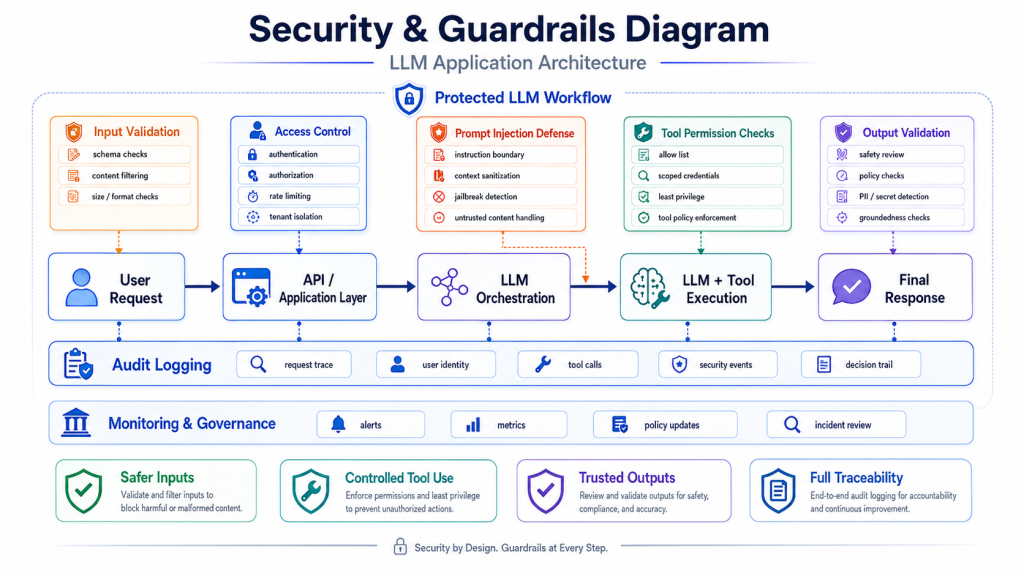
Guardrails protect the LLM application from unsafe or unreliable behavior. They can operate before the model call, during orchestration, after generation, or before tool execution.
Input guardrails may detect prompt injection attempts, malicious instructions, unsupported requests, or sensitive data. Output guardrails may check whether the generated answer follows policy rules, matches a required format, or contains restricted information.
Output validation is especially important when the LLM response is used by another system. For example, if the model returns JSON, the backend should validate the schema before using it. If the model suggests a tool call, the application should verify that the action is allowed.
Guardrails do not make LLM systems perfect, but they reduce risk. They are part of a layered security strategy that also includes access control, data minimization, logging, and human review for high-impact actions.
Evaluation, Observability, and Cost Control
Evaluation measures whether the LLM application performs well. It should happen before deployment and continue after release.
Offline evaluation uses test cases, expected answers, scenario-based tests, and regression checks. These tests help teams detect quality problems before changes reach production. For example, a team can test whether a new prompt improves answer accuracy or accidentally reduces response quality.
Online evaluation uses production signals. These may include user feedback, conversation outcomes, escalation rates, latency, token usage, tool errors, and human review results. These signals help teams improve prompts, retrieval, model routing, and guardrails over time.
Observability makes the system easier to debug. A production LLM application should track prompts, retrieved context, model calls, tool calls, validation results, latency, token consumption, errors, and cost. Tracing is especially useful because one user request may pass through many steps before the final response.
Cost control is also part of architecture. Long prompts, unnecessary context, repeated model calls, and poor routing can make an LLM application expensive. Teams can reduce cost through caching, context pruning, prompt compression, model routing, and token budgeting.
Reference LLM Application Architecture Flow
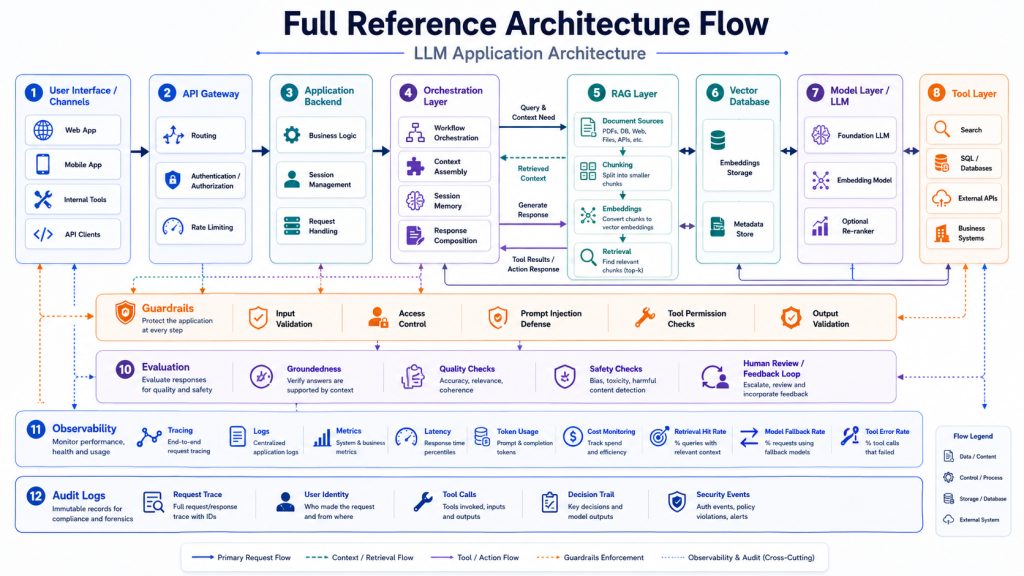
A practical LLM Application Architecture can be represented as the following flow:
User Interface
→ API Gateway
→ Application Backend
→ Orchestration Layer
→ Prompt Management
→ Retrieval Pipeline
→ Vector Database
→ LLM Provider or Self-Hosted Model
→ Tool Layer
→ Guardrails
→ Evaluation
→ Observability
→ Audit Logs
This flow shows that the LLM is not the whole application. It is one part of a larger system.
The user interface collects input. The API gateway validates access. The backend prepares the request. The orchestration layer decides the workflow. The retrieval pipeline gathers trusted context when needed. The model generates an answer or requests a tool call. The guardrail layer validates the output. Finally, observability and audit logs record what happened.
Common Mistakes to Avoid
A common mistake is treating the LLM as the entire application. A strong model can generate fluent responses, but it does not automatically provide secure access control, reliable retrieval, output validation, observability, or cost management.
Another mistake is putting too much responsibility inside the prompt. Prompts are important, but deterministic rules should remain in code. Access control, schema validation, calculations, and business logic should not depend only on natural language instructions.
Teams also often ignore evaluation until the application is already in production. This creates risk because prompt changes, model upgrades, and retrieval updates can break behavior in subtle ways. Even a small evaluation set can help detect regressions early.
Poor retrieval design is another major issue. If documents are chunked badly, metadata is missing, or stale content remains indexed, the application may generate confident but incorrect answers. RAG requires continuous maintenance, not just one-time setup.
Finally, many teams forget observability. Without traces, logs, and metrics, it becomes difficult to understand why an answer was wrong, why latency increased, or why costs suddenly changed.
Best Practices for Production LLM Applications
A good LLM Application Architecture should start with clear task boundaries. The team should define what the application can do, what it should refuse, which data sources it can use, and which actions require human approval.
The architecture should separate responsibilities across layers. The client handles interaction. The backend handles access control. The orchestration layer manages workflow. The RAG pipeline provides trusted context. The model generates or reasons. The tool layer executes controlled actions. Guardrails validate behavior. Observability records system activity.
For knowledge-heavy applications, RAG should be designed carefully. Teams should pay attention to document quality, chunking strategy, metadata, retrieval accuracy, re-ranking, and source tracking.
Security should also be designed early. The system should reduce exposure to prompt injection, restrict tool access, avoid sending unnecessary sensitive data to the model, and validate outputs before they affect users or downstream systems.
Evaluation should become part of the development lifecycle. Before changing prompts, models, retrieval settings, or tools, teams should run tests. After deployment, they should monitor quality, cost, latency, and failure cases.
Finally, teams should design the architecture for change. LLM providers, models, frameworks, and best practices evolve quickly. A modular architecture makes it easier to replace components without rebuilding the full system.
Conclusion
LLM Application Architecture defines how large language models fit into real software systems. It includes much more than a prompt and a model API. A production-ready architecture needs client interfaces, backend services, orchestration, prompt management, RAG, vector databases, model access, tool integration, guardrails, evaluation, observability, and audit logging.
The most reliable LLM applications treat the model as one component within a controlled architecture. This approach improves security, accuracy, maintainability, scalability, and cost efficiency.
By using a clear LLM Application Architecture, technical teams can move beyond simple prototypes and build AI systems that are practical, observable, and ready for production environments.
References
https://developers.openai.com/api/docs/guides/function-calling
https://genai.owasp.org/llmrisk/llm01-prompt-injection
https://opentelemetry.io/docs/concepts/observability-primer
Real-time Agentic AI with Node.js: A Step-by-Step Guide – NashTech Blog