


What is Luisa?
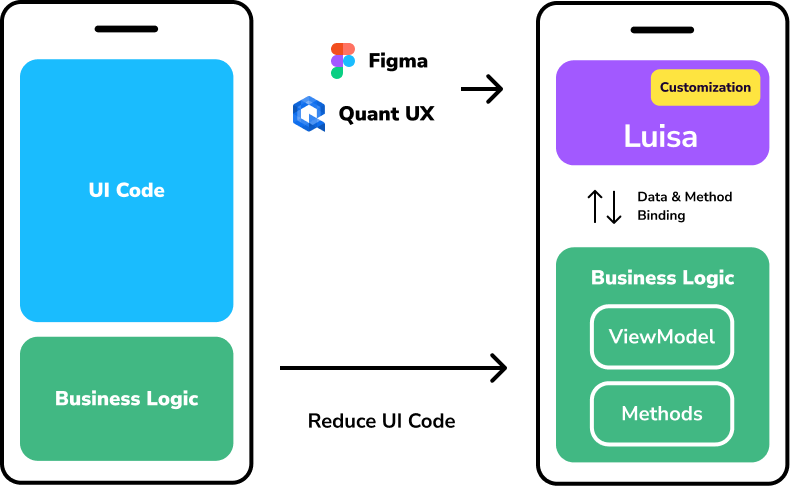
Luisa is a powerful low-code JavaScript framework designed to seamlessly integrate Figma or Quant-UX designs directly into your Vue applications. With Luisa, you can extend your designs with custom CSS and JavaScript to add business logic, ensuring that your design remains the single source of truth without the need for rewrites. This innovative approach allows for efficient updates and consistent design implementation, making it an ideal choice for developers looking to streamline their workflow and maintain design integrity.
Key Features
Design Integration: Luisa allows you to embed Figma or Quant-UX designs directly into your Vue applications. This ensures that your design remains the single source of truth, eliminating the need for rewrites when updates are made.
Low-Code Framework: As a low-code framework, Luisa simplifies the development process by allowing you to extend your designs with custom CSS and JavaScript. This means you can add business logic without extensive coding.
Seamless Updates: With Luisa, design updates do not require rewrites. This feature ensures that your application stays up-to-date with the latest design changes effortlessly.
Customizability: You can extend your designs with your own CSS and JavaScript, providing the flexibility to tailor the application to your specific needs.
Efficiency: By maintaining the design as the single source of truth, Luisa helps in reducing the time and effort required for design-to-development handoffs, making the workflow more efficient.
How does it work?
Luisa works by bridging the gap between design and development, allowing you to integrate and extend your designs directly within your Vue applications. Here’s a breakdown of how it works:
1. Design Integration:
- Embed Designs: Luisa allows you to embed designs from Figma or Quant-UX directly into your Vue components. This is done using Luisa’s components, which take the design ID as a parameter.
- Single Source of Truth: By embedding the design, Luisa ensures that the design remains the single source of truth. Any updates made to the design in Figma or Quant-UX are automatically reflected in your Vue application without the need for manual updates or rewrites.
2. Low-Code Framework:
- Custom CSS and JavaScript: Luisa provides the flexibility to extend your embedded designs with custom CSS and JavaScript. This means you can add business logic and custom styles directly within your Vue components.
- Simplified Development: As a low-code framework, Luisa simplifies the development process by reducing the amount of code you need to write. You can focus on adding functionality and styling without worrying about the underlying integration details.
3. Seamless Updates:
- Automatic Updates: When you update your designs in Figma or Quant-UX, those changes are automatically reflected in your Vue application. This eliminates the need for manual updates and ensures that your application always stays in sync with the latest design changes.
4. Customizability and Efficiency:
- Tailored Extensions: You can extend your designs with custom logic and styles to meet your specific needs. This allows for a high degree of customization while maintaining the integrity of the original design.
- Efficient Workflow: By maintaining the design as the single source of truth and automating updates, Luisa streamlines the workflow between designers and developers, making the process more efficient and reducing the potential for errors.
Step-by-step guide to implementing a project with Luisa.Cloud
Step 1: Design in Figma
- Create Your Design: Start by designing your application in Figma. Ensure all UI elements are well-defined.
- Use Figma-Low-Code Plugin: Install and use the Figma-Low-Code Plugin to mark which elements will be interactive. This plugin helps in defining the elements that will be rendered as real input elements in the browser.
Step 2: Set Up Your Vue Project
- Create a Vue Project: If you don’t have a Vue project yet, create one using Vue CLI:
vue create my-project - Install Luisa Package: Add the
luisa-vuepackage to your project:npm install luisa-vue
Step 3: Integrate Luisa in Your Project
- Import Luisa Component: In your Vue component, import and use the
<Luisa>component:
<template>
  <div id="app">
    <Luisa :design="designUrl" />
  </div>
</template>

<script>
import Luisa from 'luisa-vue';

export default {
  components: {
    Luisa
  },
  data() {
    return {
      designUrl: 'URL_TO_YOUR_FIGMA_DESIGN'
    };
  }
};
</script>
Step 4: Add Business Logic
- Define View Model: Create a view model to manage your application’s state and logic. Bind this model to the Figma elements to show dynamic data and read user input.
export default {
  data() {
    return {
      viewModel: {
        name: '',
        email: ''
      }
    };
  },
  methods: {
    submitForm() {
      console.log(this.viewModel);
    }
  }
};
Conclusion
Luisa.Cloud is a transformative low-code JavaScript framework that bridges the gap between design and development. Here’s a concise conclusion about its benefits and capabilities:
- Seamless Design Integration: Converts Figma designs directly into Vue.js applications, ensuring that the design remains the single source of truth.
- Efficiency and Speed: Significantly reduces front-end development time, making it ideal for rapid prototyping and MVPs.
- Customizable Business Logic: Allows embedding of custom JavaScript to add necessary business logic and backend services, making prototypes fully functional.
- Responsive Design: Supports responsive design through CSS Grid, Flexbox, and custom CSS, ensuring applications look great on all devices.
- Real-Time Iteration: Facilitates quick iterations and real-time updates, enhancing collaboration between designers and developers.
Overall, Luisa.Cloud is an excellent tool for teams looking to streamline their development workflow, quickly bring design concepts to life, and efficiently manage the transition from design to a fully functional application.