



Introduction
Hello readers. In the previous blog, we have seen what is ag grid and how we can integrate that in Angular. In this blog, we will see how we can manage the column’s state of the table with the help of ag-grid in angular.
Column State in ag-grid
Ag grid provides multiple functions and properties for managing your exact requirements. Column Definitions contain both stateful (like changing the sort order of any column) and non-stateful (for example changing the header name of any column) attributes.
Once you have defined all the column definitions and you have dragged some columns then we can use the ag-grid function to get the same state again as we have in the initial column definitions. To understand this, we will use the same previous example and add some functions to it.
Here are the changes that we need to make in the ag-grid tag.
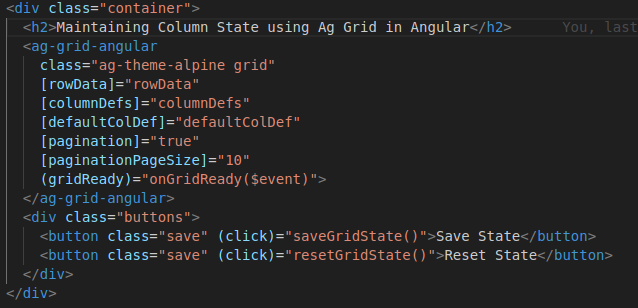
We have passed the row data for the table and all the column definitions in columnDef.
Here we have the gridReady event and two buttons for managing state. Now let us check their functionality
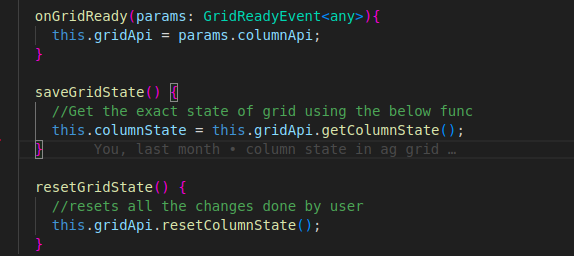
Once the onGridReady is called, all the columnApi functions we can access through the gridApi variable.
As you can see, both the getColumnState and resetColumnState are already available in the grid API which makes our task very easy. You need not write any extra code. Just use the grid API and access the functions.
Now you can run your app.
Initially, all the columns will be in the same order as column definitions.
Try dragging some columns and saving the state by the save state button.
This will update the state of the grid and now if you want the initial order of the columns then you can use the reset button and it will load all the columns in the initial state.
Partial State
Partial state is the state where you want to access only certain columns or certain attributes instead of all columns while getting/setting the column state of a grid. This allows fine-grained control over the Column State, e.g. pinning some columns to the right, without impacting any other state attribute. You can learn more about partial state here
Conclusion
We learned more about grid API in this blog and saving and resetting the column state of a grid. You should explore more functions provided by the grid API here and most of your requirements will be fulfilled. The code of the above columns states example is available here if you want to go through it.
Finally, for more such posts like this, please follow our LinkedIn page- FrontEnd Competency.
Thanks for reading!