


In terms of managing and optimizing traffic flow in web servers and networking, reverse proxies play a key role. Nginx, with its versatility and performance-oriented web server abilities, gives users an option to act as a reverse proxy server in efficient handling of incoming requests, enhance security, and improve performance. In the following comprehensive guide, we will explore how to set up and configure a Nginx reverse proxy server, including basic setup and advanced optimization techniques.
Understanding Reverse Proxy
Let us first clear our doubts on a reverse proxy. Unlike a forward proxy, which sits between clients and the Internet, a reverse proxy acts as an intermediary between clients and backend servers. When a client attempts to access a web resource, the reverse proxy intercepts the request and passes it through to the appropriate backend server. This is being done for several benefits like load balancing, SSL termination, caching, and security improvement.

Basic Nginx Reverse Proxy Configuration
To configure Nginx as a reverse proxy, you need to define server blocks in your Nginx configuration file (nginx.conf). Each server block represents a virtual host and specifies the proxy pass directive to forward requests to the backend server. Here’s a basic example of a reverse proxy configuration:

Let’s see what do we have in this configuration:
- listen 80: It specifies that Nginx should listen for incoming HTTP requests on port 80.
- server_name example.com: It defines the domain name associated with the server block.
- location / { … }: This location block specifies the URL path to match, in this case, the root path (“/”).
- proxy_pass http://backend_server: It directs requests to the backend server specified by the URL http://backend_server.
- proxy_set_header: These directives are used to pass additional HTTP headers to the backend server to preserve client information.
SSL Termination and HTTPS Configuration
To enable SSL termination and serve content over HTTPS, you can configure Nginx to handle SSL/TLS encryption and decryption. Additionally, you can enforce HTTPS redirection to ensure secure communication between clients and the server. Let’s tweak the current configuration that we have to ensure that we serve the users with a HTTPS connection and here’s how you can configure SSL termination in Nginx:

You might not see much of a difference here as we have just added a few more directives here and that’s just enough to enable secure communication over SSL. Let’s see what are the directives that we have added to enable this secure connection over SSL:
- listen 443 ssl: This directive instructs Nginx to listen for incoming HTTPS requests on port 443 and enables SSL/TLS encryption.
- ssl_certificate and ssl_certificate_key directives specify the paths to the SSL certificate and private key files.
Load Balancing with Reverse Proxy
One of the key advantages of using a reverse proxy is load balancing, which distributes incoming requests across multiple backend servers to improve performance and reliability. Nginx offers various load balancing algorithms, including round-robin, least connections, and IP hash. You can read more about these load balancing algorithms here.
Here, we define the upstream servers where the traffic should be redirected. We have the ability to group multiple upstream servers together to achieve load balancing and here’s how you can configure load balancing with Nginx:

Let’s see what we have here in the updated configuration:
- upstream backend_servers { … } block defines a group of backend servers.
- proxy_pass http://backend_servers: Directs requests to the upstream group, enabling load balancing across multiple servers.
To keep things organised and your nginx configuration modularised, you can also create a upstream.conf file in your Nginx configuration directory. That is /etc/nginx in most of the cases.
Security Enhancements
Beyond improving performance, a reverse proxy can enhance security by acting as a barrier between clients and backend servers, filtering malicious requests, and implementing access controls. Nginx provides several security features, including request limiting, rate limiting, and IP address whitelisting/blacklisting. Here’s a short example on how you can enhance security with Nginx:
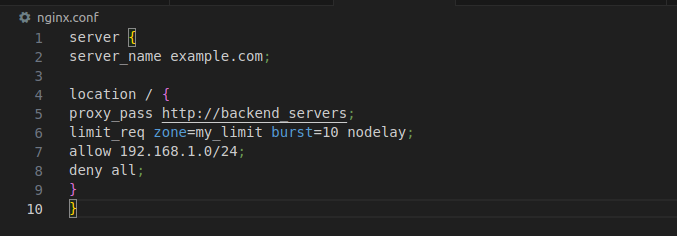
I want your attention to be in the location block here. We have added some additional directives in the location block to enhance the security. Let’s have a look at them individually:
- limit_req directive imposes request rate limiting to mitigate DDoS attacks.
- allow and deny directives restrict access based on IP address, allowing only specified IP ranges while denying all others.
Here we are using allow directive to allow traffic only from the 192.168.1.0/24 subnet.
Conclusion
Configuring Nginx as a reverse proxy offers a load of benefits, from load balancing and SSL termination to security enhancements. By following the steps outlined in this guide and experimenting with various configuration options, you can harness the full power of Nginx to optimize traffic flow, improve performance, and bolster security in your web infrastructure.
If you want to have a nginx reverse proxy configuration that you can use with minimal changes, you can have a look at the techhub template that we have at NashTech labs here. It includes all the essential configuration that are needed to setup a reverse proxy server with nginx. Just make sure to tweak it with your requirements.
Remember to comprehensively test the configurations, monitor Nginx logs and performance metrics, and ensure optimal operation of your web infrastructure. With Nginx as your reverse proxy, you will handle all incoming requests, protect backend servers, and deliver a seamless and secure experience to your users.