



Introduction
In the world of software development, ensuring the reliability and correctness of your code is paramount. Unit testing is a fundamental practice that allows developers to verify the behaviour of individual components or units of code in isolation. Among the various unit testing frameworks available, xUnit stands out as a popular choice for its simplicity, extensibility, and robust features. In this guide, we’ll explore the principles of unit testing with xUnit and provide a comprehensive overview of its usage, best practices, and advanced techniques.
Understanding Unit Testing
Unit testing is a software testing technique where individual units or components of a program are tested in isolation to ensure they perform as expected. These tests validate the behaviour of functions, methods, or classes under different conditions, helping to detect bugs, regressions, and design flaws early in the development process. Unit tests are typically automated, repeatable, and focused on a specific aspect of the code, making them an essential tool for maintaining code quality and facilitating refactoring.
Introducing xUnit
xUnit is an open-source unit testing framework for the .NET ecosystem, inspired by JUnit and NUnit. It follows the principles of simplicity, consistency, and extensibility, making it easy to write, organize, and execute tests. xUnit provides a rich set of features, including parameterized tests, test fixtures, assertions, and test discovery, to support a wide range of testing scenarios.
Key Features of xUnit
xUnit offers several key features that make it a powerful tool for unit testing:
- Test Classes and Methods: Define test classes and methods using attributes such as
[Fact]and[Theory], which indicate that a method is a test and should be executed by the test runner. - Assertions: Use built-in assertion methods like
Assert.Equal,Assert.True, andAssert.Throwsto verify expected outcomes and behaviours in your tests. - Test Fixtures: Group related tests and share setup and teardown logic using test fixtures, which are defined with the
[Collection]and[ClassFixture]attributes. - Parameterized Tests: Write parameterized tests to execute the same test logic with different input values, improving test coverage and reducing code duplication.
- Test Discovery and Execution: Discover and execute tests automatically using tools like Visual Studio, .NET CLI, or test runners like ReSharper and xUnit.net Console Runner.
Getting Started with xUnit
To begin unit testing with xUnit, follow these steps:
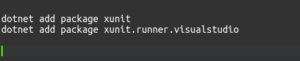
- Install xUnit NuGet Package: Add the
xunitandxunit.runner.visualstudioNuGet packages to your test project using your preferred package manager (e.g., NuGet Package Manager or .NET CLI).
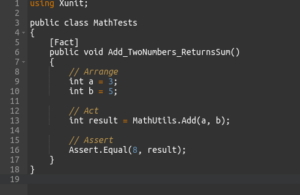
- Write Your First Test: Create a new test class and write your first test method using the
[Fact]attribute.
- Run Your Tests: Build your test project and run the tests using your preferred test runner (e.g., Visual Studio Test Explorer, .NET CLI, or ReSharper).
- Write More Tests: Continue writing tests to cover different scenarios, edge cases, and error conditions in your codebase.
Best Practices for Unit Testing with xUnit
To ensure effective and maintainable unit tests, consider following these best practices:
- Keep Tests Isolated and Independent: Ensure that each test is independent of others and does not rely on external dependencies or state.
- Name Tests Descriptively: Use descriptive names for test methods that clearly indicate the scenario being tested and the expected outcome.
- Use Arrange-Act-Assert Pattern: Structure your tests using the Arrange-Act-Assert pattern, where you set up the test environment, perform the action, and verify the expected result.
- Test Behaviour, Not Implementation: Focus on testing the behaviour and public API of your code rather than its internal implementation details.
- Refactor and Maintain Tests: Regularly review and refactor your tests to keep them concise, readable, and maintainable as your codebase evolves.
Advanced Techniques with xUnit
xUnit supports several advanced techniques and features to enhance your unit testing workflow:
- Parameterized Tests: Use
[InlineData]or[MemberData]attributes to define parameterized tests that execute with different input values. - Theory Tests: Write theory tests using the
[Theory]attribute to execute the same test logic with different data sets, improving test coverage and versatility. - Test Fixtures: Use test fixtures to share setup and teardown logic across multiple tests, reducing duplication and improving maintainability.
- Mocking and Stubbing: Use mocking frameworks like Moq or NSubstitute to create mock objects and stubs for testing code with external dependencies.
Conclusion
Unit testing with xUnit is an essential practice for ensuring the reliability, correctness, and maintainability of your codebase. By following best practices, leveraging advanced techniques, and integrating unit testing into your development workflow, you can build robust, high-quality software that meets the needs of users and stakeholders. Whether you’re a seasoned developer or new to unit testing, xUnit provides the tools and features you need to write effective tests and deliver successful projects.