



Introduction
Hello fellow developers! As AI tools like GitHub Copilot continue to revolutionise software development, it’s essential to know how to make the most of these powerful assistants. In this blog, we’ll explore how to maximise productivity using AI copilots by sharing tips and best practices. We’ll also delve into a practical example tailored for .NET developers to illustrate these concepts in action.
What is an AI Copilot?
An AI copilot, such as GitHub Copilot, is an AI-powered tool designed to assist developers by providing intelligent code suggestions in real-time. Leveraging advanced machine learning models trained on a massive dataset of public code, these copilots help you write code faster, better, and with greater efficiency.
Why Use an AI Copilot?
Boosted Productivity
The primary benefit of using an AI copilot is the significant boost in productivity. Copilot helps by suggesting code snippets and entire functions, reducing the time spent on writing repetitive code.
Enhanced Code Quality
Copilot can also improve the quality of your code. By suggesting best practices and optimised code, it helps prevent common errors and promotes writing clean, maintainable code.
Continuous Learning
For both new and experienced developers, Copilot is a fantastic learning tool. It introduces you to new programming patterns, best practices, and idioms you might not have encountered before.
Tips and Best Practices
1. Start with Clear Comments and Documentation
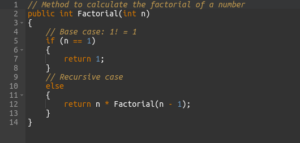
Clear comments and documentation can greatly enhance the effectiveness of your AI copilot. By understanding the context through well-written comments, the AI can provide more relevant and accurate suggestions.
Example:
2. Break Down Complex Problems
When faced with complex tasks, break them down into smaller, manageable functions. This makes it easier for the AI copilot to assist you with each part, and for you to maintain and understand your code.
Example: If you need to process user data and generate a report, you can break it down into:
FetchUserData()ProcessData()GenerateReport()
3. Leverage Copilot for Boilerplate Code
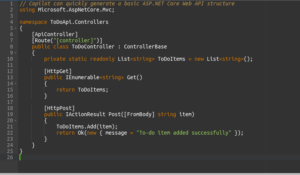
Boilerplate code is repetitive but necessary. Use your AI copilot to quickly generate boilerplate code, freeing up your time to focus on the unique aspects of your project.
Example:
4. Iterate and Refine Suggestions
While AI copilots provide helpful suggestions, they aren’t perfect. Use the suggestions as a starting point and refine them to better suit your specific needs. Don’t hesitate to modify or discard suggestions that don’t align with your requirements.
5. Use AI Copilot to Explore New Techniques
AI copilots can introduce you to new programming techniques and best practices. Take advantage of this opportunity to learn and experiment with different coding methods.
6. Regularly Update and Customize
Keep your AI copilot updated to leverage the latest features and improvements. Customize its settings to align with your coding style and preferences, ensuring you get the most relevant suggestions.
7. Collaborate with Copilot
Treat your AI copilot as a collaborative partner. Engage with the suggestions it provides, and don’t just passively accept them. Use it to brainstorm different approaches to solving problems and enhancing your codebase.
8. Maintain Code Reviews
Despite the efficiency of AI copilots, human oversight remains crucial. Maintain rigorous code reviews to ensure that the code generated or suggested by Copilot adheres to your project’s standards and requirements.
9. Optimize for Performance
AI copilots can suggest optimized code snippets. Use these suggestions to improve the performance of your applications, ensuring that your code is not only functional but also efficient.
10. Integrate with CI/CD Pipelines
Integrate your AI copilot’s workflow with Continuous Integration and Continuous Deployment (CI/CD) pipelines. This ensures that the code suggestions align with automated testing and deployment processes, maintaining a smooth development cycle.
Conclusion
Maximising productivity with AI copilots like GitHub Copilot involves more than just accepting code suggestions. By writing clear comments, breaking down problems, leveraging boilerplate generation, iterating on suggestions, exploring new techniques, and staying updated, you can significantly enhance your development workflow.