


1. Introduction
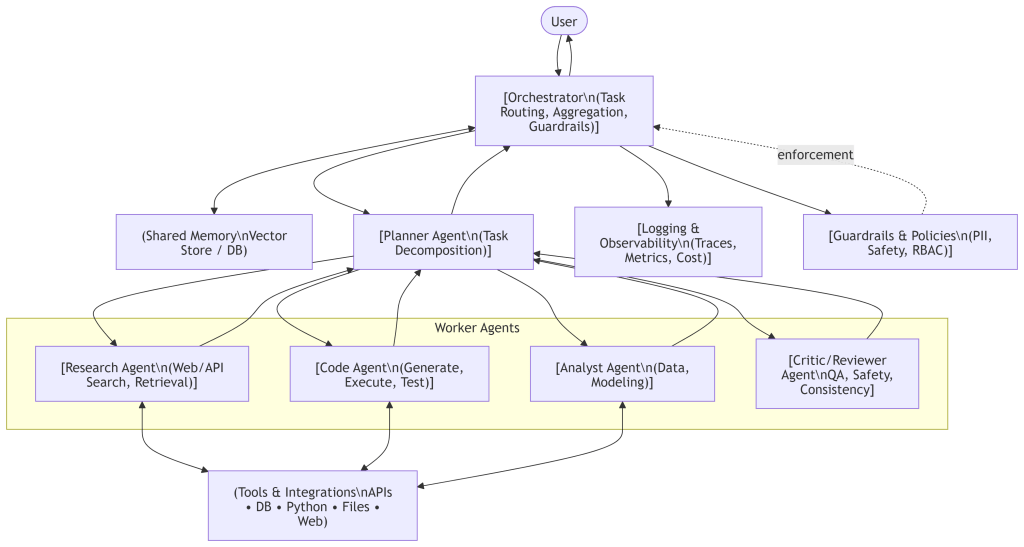
Multi‑Agent Orchestration coordinates multiple specialized AI agents—each with a distinct role, memory, and tools—to collaboratively solve complex tasks. An orchestrator governs how tasks are decomposed, routed, and verified, while a planner and worker agents execute and refine work in a controlled workflow.
2. Core Concepts
- Agent: An autonomous component (often LLM‑powered) with a role, policies/guardrails, and access to tools (APIs, databases, Python, search, etc.).
- Orchestrator: The controller that breaks down user intents, assigns tasks, manages conversation state, handles retries, and merges outputs.
- Planner Agent: Translates user intent into a plan (steps, owners, dependencies).
- Worker Agents: Specialists that complete tasks (e.g., Researcher, Coder, Analyst, Reviewer).
- Memory: Shared and/or per‑agent stores for context, decisions, artifacts, and tool outputs.
- Communication Protocol: Natural language or structured messages (JSON), often event‑ or graph‑driven.
3. Reference Architecture (Diagram)
4. Technology Stack (recommended)
- ASP.NET Core 8/9 — web API & hosting.
- Microsoft Semantic Kernel (SK) — LLM orchestration, plugins/tools, and agent patterns.
- Azure OpenAI (or OpenAI) — GPT models for Planner/Agents.
- Memory (choose one):
- Azure AI Search (vector + keyword)
- Azure Cosmos DB or PostgreSQL for structured state/artifacts
- Redis for short‑term cache & throttling
- Observability:
- OpenTelemetry + Application Insights
- Optional for scale:
- Microsoft Orleans for distributed, durable, actor‑style agents.
- Security/Guardrails:
- Input/Output filters, schema validation, role‑based access, content filtering via Azure AI Content Safety.
5. End‑to‑End Flow
- Request Intake (API/Controller) → Orchestrator receives the user goal and context.
- Planning → Planner agent (LLM) creates a structured, dependency‑aware plan (JSON).
- Execution → Planner dispatches steps to worker agents (Research, Code, Analyst).
- Tools → Agents call approved tools/plugins (APIs, search, Python sandbox).
- Review → Reviewer verifies correctness, safety, and contracts.
- Aggregation → Orchestrator merges results, updates Memory, returns response.
- Observability → All prompts, tool calls, tokens, cost, and latency are traced.
6. Data Contracts (strongly recommended)
- Inter‑agent messages: JSON schema with fields like
role,stepId,inputs,artifacts,status,citations,cost. - Tool outputs: Validated JSON with versioned schema.
- Memory records:
{ key, vector, metadata, ttl }.
This keeps the system deterministic and testable.
7. C# Implementation Sketch (Semantic Kernel + Azure OpenAI)
This is production‑friendly scaffolding you can adapt. It uses Semantic Kernel for LLM calls and a clean IAgent contract. Replace placeholders with your keys/endpoints.
// Program.cs
using Microsoft.SemanticKernel;
using Microsoft.SemanticKernel.ChatCompletion;
using Microsoft.Extensions.AI;
using Azure.AI.OpenAI;

var builder = WebApplication.CreateBuilder(args);

// 1) Configure Azure OpenAI (or OpenAI)
// Use AzureOpenAIClient for Azure; OpenAIClient for OpenAI
builder.Services.AddSingleton(new OpenAIClient(
    new Uri(builder.Configuration["AzureOpenAI:Endpoint"]!),
    new Azure.AzureKeyCredential(builder.Configuration["AzureOpenAI:ApiKey"]!)
));

builder.Services.AddSingleton<IChatCompletionService>(sp =>
{
    var client = sp.GetRequiredService<OpenAIClient>();
    // SK adapter over Azure OpenAI Chat Completions
    return new AzureOpenAIChatCompletionService(
        modelId: builder.Configuration["AzureOpenAI:Deployment"]!,
        client: client
    );
});

// 2) Register Semantic Kernel
builder.Services.AddKernel();

// 3) Register our agents and orchestrator
builder.Services.AddSingleton<PlannerAgent>();
builder.Services.AddSingleton<ResearchAgent>();
builder.Services.AddSingleton<CodeAgent>();
builder.Services.AddSingleton<AnalystAgent>();
builder.Services.AddSingleton<ReviewerAgent>();
builder.Services.AddSingleton<AgentOrchestrator>();

var app = builder.Build();

// Simple API endpoint
app.MapPost("/orchestrate", async (
    OrchestrationRequest req,
    AgentOrchestrator orchestrator) =>
{
    var result = await orchestrator.HandleAsync(req);
    return Results.Ok(result);
});

app.Run();

public record OrchestrationRequest(string Goal, Dictionary<string, object>? Context);

// ---------------- Core Contracts ----------------

public interface IAgent
{
    string Name { get; }
    Task<AgentResult> HandleAsync(AgentMessage message, CancellationToken ct = default);
}

public record AgentMessage(
    string Role,               // e.g., "research", "code", "analyze", "review"
    string Instruction,        // natural language task
    Dictionary<string, object>? Inputs = null,
    Dictionary<string, object>? Memory = null);

public record AgentResult(
    string StepId,
    string Status,             // "ok", "needs-info", "error"
    string Output,
    Dictionary<string, object>? Artifacts = null,
    IEnumerable<string>? Citations = null);

// ---------------- Orchestrator ----------------

public class AgentOrchestrator
{
    private readonly PlannerAgent _planner;
    private readonly IReadOnlyDictionary<string, IAgent> _agents;

    public AgentOrchestrator(
        PlannerAgent planner,
        ResearchAgent research,
        CodeAgent code,
        AnalystAgent analyst,
        ReviewerAgent reviewer)
    {
        _planner = planner;
        _agents = new Dictionary<string, IAgent>(StringComparer.OrdinalIgnoreCase)
        {
            ["research"] = research,
            ["code"]     = code,
            ["analyze"]  = analyst,
            ["review"]   = reviewer
        };
    }

    public async Task<object> HandleAsync(OrchestrationRequest request, CancellationToken ct = default)
    {
        // 1) Ask planner for a stepwise plan
        var plan = await _planner.CreatePlanAsync(request.Goal, request.Context, ct);

        var results = new List<AgentResult>();

        // 2) Execute steps in order (you can parallelize by dependency groups)
        foreach (var step in plan.Steps)
        {
            if (!_agents.TryGetValue(step.Role, out var agent))
                throw new InvalidOperationException($"No agent registered for role '{step.Role}'");

            var message = new AgentMessage(step.Role, step.Instruction, step.Inputs, step.Memory);
            var result  = await agent.HandleAsync(message, ct);
            results.Add(result);

            // Feed outputs back to planner for possible replanning or next steps
            await _planner.NotifyStepResultAsync(step.Id, result, ct);
        }

        // 3) Final aggregation by planner (could also live here)
        var final = await _planner.SummarizeAsync(request.Goal, results, ct);
        return new { plan, results, final };
    }
}

// ---------------- Planner ----------------

public class PlannerAgent
{
    private readonly IChatCompletionService _chat;

    public PlannerAgent(IChatCompletionService chat) => _chat = chat;

    public async Task<Plan> CreatePlanAsync(string goal, Dictionary<string, object>? context, CancellationToken ct)
    {
        var sys = """
        You are a Planner. Break the user's goal into 3-7 steps.
        Each step must have: id, role in ["research","code","analyze","review"],
        instruction (one sentence), and optional inputs/memory.
        Return strictly valid JSON with { "steps": [ ... ] }.
        """;

        var prompt = $"Goal: {goal}\nContext: {System.Text.Json.JsonSerializer.Serialize(context ?? new())}";
        var resp = await _chat.GetChatMessageContentAsync([new ChatMessageContent(AuthorRole.System, sys),
                                                           new ChatMessageContent(AuthorRole.User, prompt)], ct: ct);

        // Minimal JSON parsing with safe defaults
        var json = resp.Content?.ToString() ?? """{ "steps": [] }""";
        return System.Text.Json.JsonSerializer.Deserialize<Plan>(json) ?? new Plan([]);
    }

    public Task NotifyStepResultAsync(string stepId, AgentResult result, CancellationToken ct)
        => Task.CompletedTask; // Could trigger replanning or memory updates

    public async Task<string> SummarizeAsync(string goal, List<AgentResult> results, CancellationToken ct)
    {
        var sys = "Summarize the results concisely with citations when available.";
        var joined = string.Join("\n\n", results.Select(r => $"{r.StepId} ({r.Status}): {r.Output}"));
        var resp = await _chat.GetChatMessageContentAsync(
            [new ChatMessageContent(AuthorRole.System, sys),
             new ChatMessageContent(AuthorRole.User, $"Goal: {goal}\n\nResults:\n{joined}")], ct: ct);
        return resp.Content?.ToString() ?? string.Empty;
    }
}

public record Plan(List<PlanStep> Steps);
public record PlanStep(string Id, string Role, string Instruction,
    Dictionary<string, object>? Inputs, Dictionary<string, object>? Memory);

// ---------------- Example Worker Agents ----------------

public class ResearchAgent : IAgent
{
    public string Name => "ResearchAgent";
    private readonly IChatCompletionService _chat;
    public ResearchAgent(IChatCompletionService chat) => _chat = chat;

    public async Task<AgentResult> HandleAsync(AgentMessage message, CancellationToken ct = default)
    {
        // Typically you would call Azure AI Search or a web tool; here we use LLM + tool hint
        var sys = "You are a research specialist. Provide factual, cited summaries. Use bullet points.";
        var resp = await _chat.GetChatMessageContentAsync(
            [new ChatMessageContent(AuthorRole.System, sys),
             new ChatMessageContent(AuthorRole.User, message.Instruction)], ct: ct);

        return new AgentResult(Guid.NewGuid().ToString("N"), "ok", resp.Content?.ToString() ?? "", citations: new[] { "source:internal" });
    }
}

public class CodeAgent : IAgent
{
    public string Name => "CodeAgent";
    private readonly IChatCompletionService _chat;
    public CodeAgent(IChatCompletionService chat) => _chat = chat;

    public async Task<AgentResult> HandleAsync(AgentMessage message, CancellationToken ct = default)
    {
        var sys = "You write safe, minimal C# code. Return code only in fenced blocks.";
        var resp = await _chat.GetChatMessageContentAsync(
            [new ChatMessageContent(AuthorRole.System, sys),
             new ChatMessageContent(AuthorRole.User, message.Instruction)], ct: ct);

        return new AgentResult(Guid.NewGuid().ToString("N"), "ok", resp.Content?.ToString() ?? "");
    }
}

public class AnalystAgent : IAgent
{
    public string Name => "AnalystAgent";
    private readonly IChatCompletionService _chat;
    public AnalystAgent(IChatCompletionService chat) => _chat = chat;

    public async Task<AgentResult> HandleAsync(AgentMessage message, CancellationToken ct = default)
    {
        var sys = "You are a data analyst. Provide concise insights and simple tables.";
        var resp = await _chat.GetChatMessageContentAsync(
            [new ChatMessageContent(AuthorRole.System, sys),
             new ChatMessageContent(AuthorRole.User, message.Instruction)], ct: ct);

        return new AgentResult(Guid.NewGuid().ToString("N"), "ok", resp.Content?.ToString() ?? "");
    }
}

public class ReviewerAgent : IAgent
{
    public string Name => "ReviewerAgent";
    private readonly IChatCompletionService _chat;
    public ReviewerAgent(IChatCompletionService chat) => _chat = chat;

    public async Task<AgentResult> HandleAsync(AgentMessage message, CancellationToken ct = default)
    {
        var sys = "You review outputs for correctness, policy compliance, and clarity. Return pass/fail and notes.";
        var resp = await _chat.GetChatMessageContentAsync(
            [new ChatMessageContent(AuthorRole.System, sys),
             new ChatMessageContent(AuthorRole.User, message.Instruction)], ct: ct);

        return new AgentResult(Guid.NewGuid().ToString("N"), "ok", resp.Content?.ToString() ?? "");
    }
}
8. When to Use Multi‑Agent Orchestration
Choose it when your workload involves:
- Multi‑step tasks needing separate skills (e.g., research → coding → analysis → QA).
- Reliability requirements where review/guardrails are essential.
- Scale and evolution, where you’ll add more tools/agents over time.
9. Conclusion
Multi-Agent Orchestration is a powerful method for building intelligent, collaborative AI systems capable of handling complex, multi-step, and high-precision tasks. By combining specialized agents with a robust orchestration layer, organizations can build scalable, reliable AI workflows that surpass the capabilities of single-model solutions.