




What is DataHub?
DataHub is a modern data catalog that is built for end-to-end data observability, data discovery, and data governance. A data hub is a centralized system for data definition, delivery, and storage. The data hub can ingest all the data that is stored in the Databricks unity catalog, and the consumer can check the schema of the data that he wants to use for business analytics.
Advantages of DataHub
- Search all corners of the data stack
- Track end-to-end lineage
- Manage Entity Ownership
- Govern with Tags, Glossary Terms, and Domains
How to Integrate Datahub with Databricks Unity Catalog?
We are going to learn how to ingest our Databricks data to DataHub through yaml file.
1. Install Datahub Library
Locally, Install the Necessary Dependency for datahub and databricks.
Command:
- pip install ‘acryl-datahub[unity-catalog]’
2. Create Configuration Yaml file
Open a new Project in Visual Studio Code and create a yaml file(file_name.yaml) and specify the type of ingestion(unity-catalog) and databricks URL and token of the databricks account.

3. Configure Databricks data
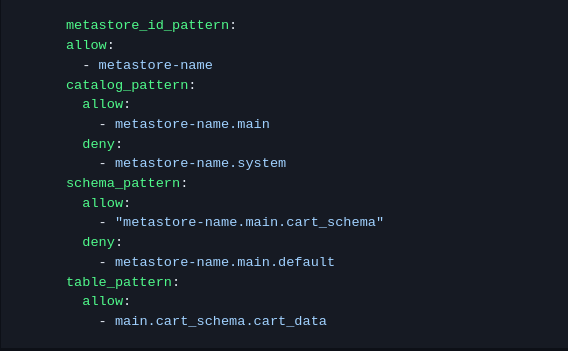
Now inside the config, specify the credentials of your Databricks account from where you want to ingest the data. Such as metastore_id_pattern, catalog_pattern, schema_pattern, table_pattern, and you can also specify allow and deny the data that you don’t want to ingest.
Example:
metastore_id_pattern: allow: metastore_id
4. Refer for more Configuration
Also, you can specify more terms in a yaml file. Refer below link for more configuration
Url : https://datahubproject.io/docs/generated/ingestion/sources/databricks/
5. Define Pipeline
Inside the same file, define the name of the pipeline.

6. Ingest Unity Catalog Data to DataHub
After that run the below command to ingest Databricks data to the Datahub platform. To ingest the data to Datahub assign your Datahub URL
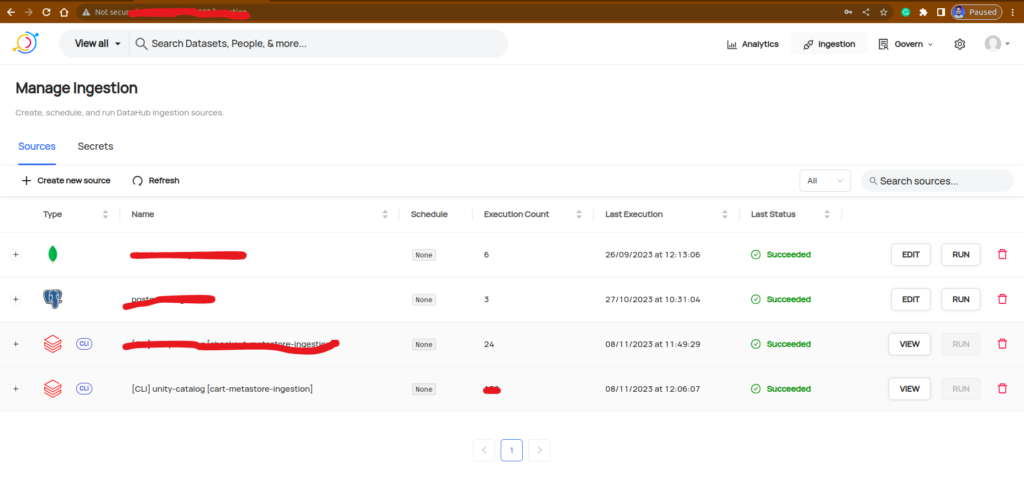
DATAHUB_GMS_URL=”datahub_platfom_url” datahub ingest -c file_name.yaml
Conclusion
DataHub is used for data observability, data governance, and data discovery. Integration with Databricks Unity Catalog involves a step-by-step approach. First, local installation of dependencies through pip is necessary, type of ingestion data, patterns such as schema, catalog, and table. The outcome is the seamless transfer of Databricks Unity Catalog data to DataHub, enhancing data discovery and governance capabilities across the organization’s data landscape.