



Platform Engineering at NashTech series:
- https://blog.nashtechglobal.com/platform-engineering-at-nashtech/
- https://blog.nashtechglobal.com/platform-engineering-introduce-a-new-nashtech-self-service-portal-accelerator/
- https://blog.nashtechglobal.com/platform-engineering-how-nashtech-self-service-portal-accelerator-work/ <= This part
- https://blog.nashtechglobal.com/platform-engineering-exploring-nashtech-self-service-portal-accelerator-practical-steps/
In the previous part, we have already introduced about NashTech Self-service Portal accelerator, if you haven’t read it, please come over and read through at https://blog.nashtechglobal.com/introduce-a-new-nashtech-self-service-portal-accelerator/
BackStage architecture
In overall architecture, it’s quite simple which builds with Nodejs, and popular back-end and front-end components. The architecture is as below.
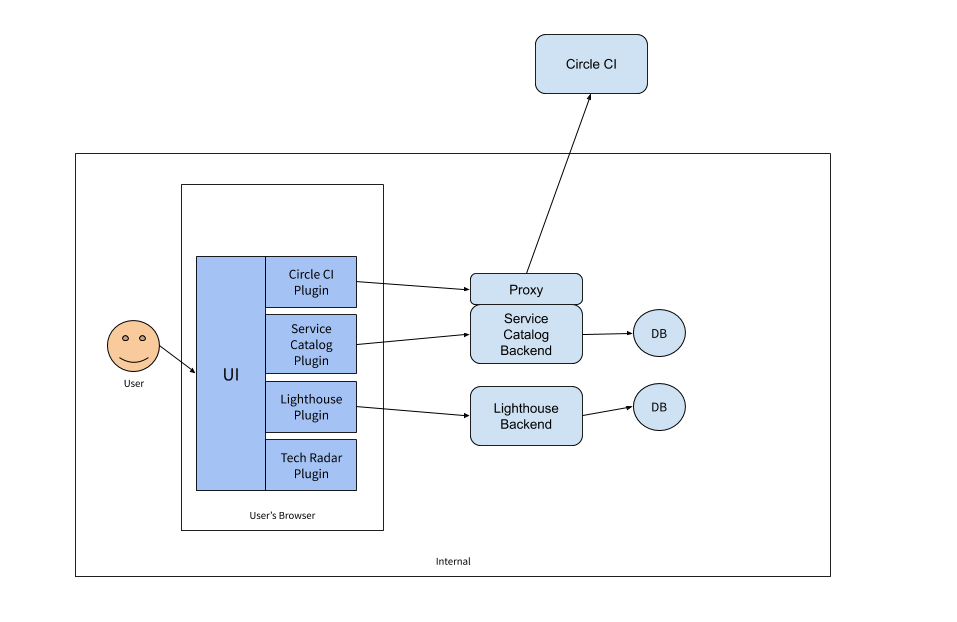
Figure 1: BackStage Architecture
The end user (developer) comes to the portal (UI), and then interacts with the UI, behind the scenes, it calls to bunch of plugins (for example, Circle CI, Service Catalog, Lighthouse, Tech Radar…). The plugin, in turn, will call to proxy (if it wants to interact and integrate with remote services), service catalog backend (our work normally is here, will talk more), Lighthouse backend (if it wants to process and store information in the internal db. – in this case it audits information).
So, we are ending up with the core packages of BackStage as below.
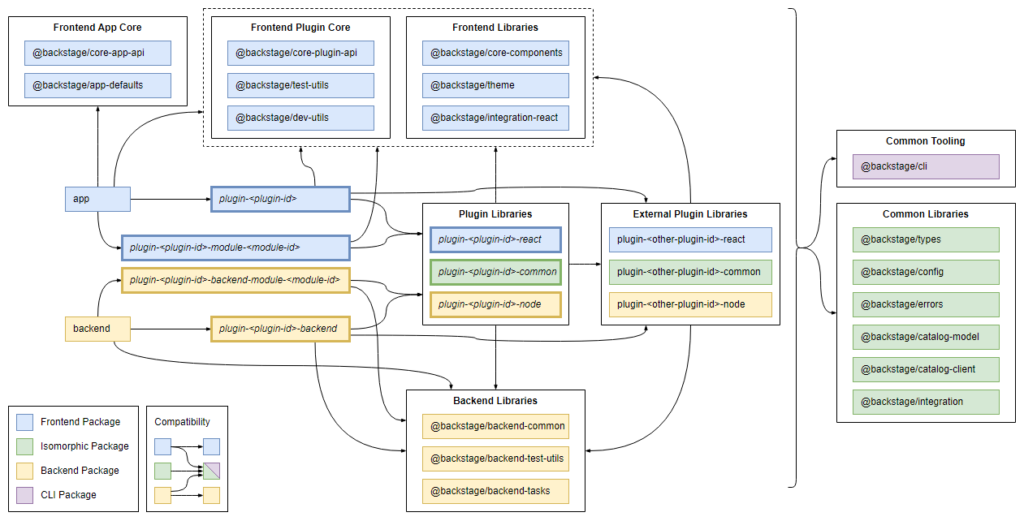
Figure 2: Core Packages of BackStage
See more at https://backstage.io/docs/overview/architecture-overview/#package-architecture
Our NashTech Self-Service Portal follows the same architecture above to develop our plugins, service catalog, and templates on BackStage. Let’s down to the rabbit hole in the next section. For more understanding, we are going to model the very popular problem that we face every day when we start a new project at NashTech, and that’s the Microservice software development lifecycle which we describe a lot above in this post.
Modeling a popular microservice software development lifecycle
We will talk about how to model the Microservice software development cycle. But first, we need to describe when we start with the project. Practically, when the project starts, we need to prepare SCM (source control management), then based on the business domain divide and organize the boundary of each domain. After that, we can scaffold a new service on its business domain. Then a technical architect or perhaps a DevOps guy will jump in to set up the CI/CD pipeline for this service (after spending a few days, testing the pipeline to make sure it works correctly). Now, a developer will check out the basic source code structure on her machine, start to work, and organize the code based on the business domain of the project. But now, she has got problems, because this service needs the database, and the message broker to work with, so she simply has to pull this kind of software onto her machine as well. Now, she can work on the environment of her machine. If everything goes well, then she commits the code into the source control, CI/CD pipeline will be triggered automatically, if every gate is passed, then the code and its configuration reside in the source control. Afterward, if we have a CD in there the source code needs to package into artifacts, combined with configuration and secrets as well as cloud resources (if cloud environment). Some tasks like database migrations, security scans, container scans, etc. also need to be aware of. And you can imagine that if there are 50 services or more, then you must do the same procedure again and again. Money doesn’t grow on trees.
What if we can model this process of microservice software development lifecycle, and re-use that model anytime when we need to create a service like that with the batteries included? And moreover, we can empower the developers to do that, instead of a technical architect or DevOps guys.
We will show you how can we do that with the NashTech Self-service Portal with the BackStage accelerator. But first, have a look at the BackStage System Model as below.
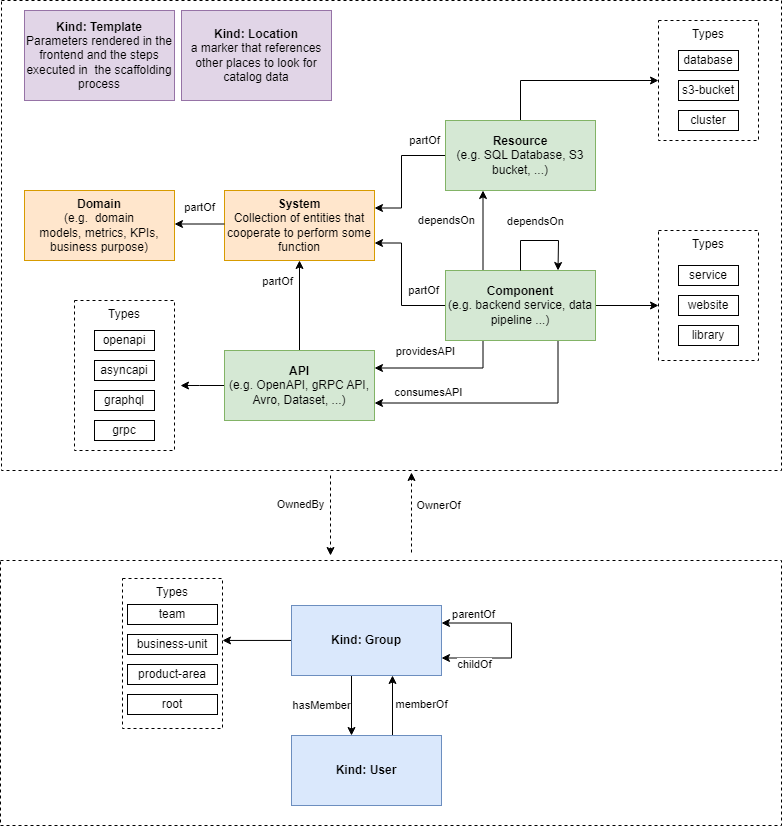
Figure 3: BackStage System Model
BackStage tries to model the typical project type with the needed data model as above. But if you notice, it is not enough for us to model what we describe above when starting a new microservice software development lifecycle. Luckily, we can extend and customize several parts for what we need. Let’s do that.
Step 1: Our system model for a new microservice software development lifecycle is as below.
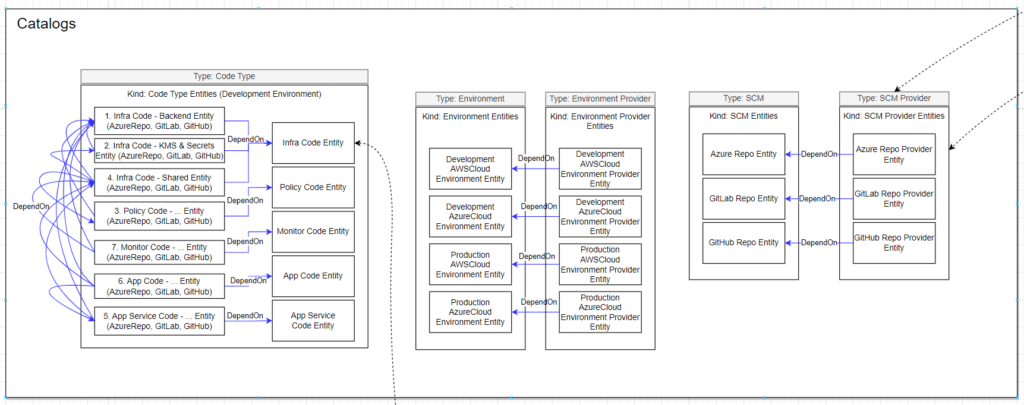
Figure 4: NashTech Self-service Portal Data Types
We divide the code type into 4 groups: application code (includes app code and app service code), infrastructure as code, policy as code, and monitoring code.
Because all code types above need to compile, build, and deploy into different environments we need to model it as well. In this step, we assume that the customer has 2 environments: development and production (in reality, there are Dev, QC, UAT, Staging, and Production, but luckily IDP is different in each project, and each customer so that we can customize and add as what we want). And we assume that we will deploy into Azure or AWS cloud platforms.
We will use Azure DevOps Git repositories, GitLab Git repositories, and GitHub Git repositories in this model.
Step 2: We create templates based on the model in step 1 as below.
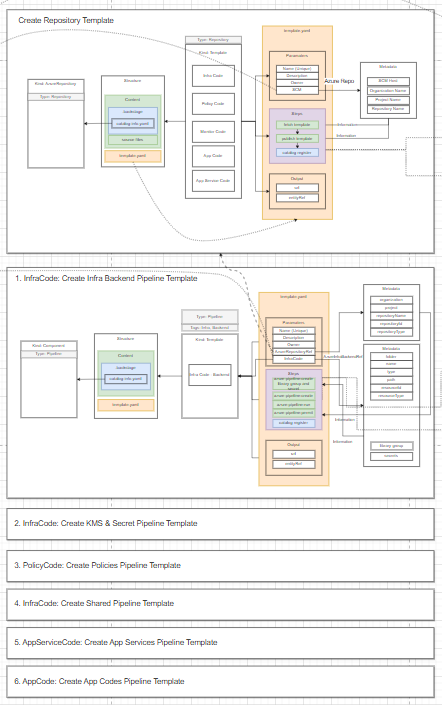
Figure 5: NashTech Self-service Portal Templates
Let’s jump into the template for scaffolding a new infrastructure backend:
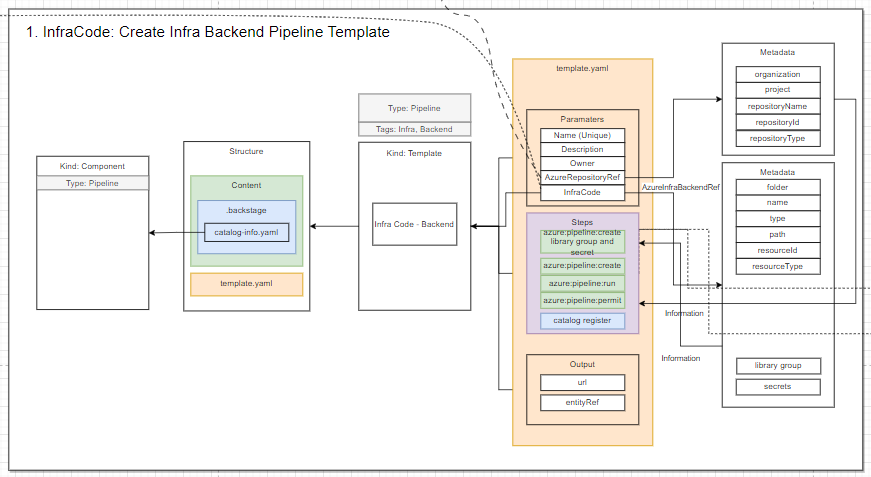
Figure 6: NashTech Self-service Portal – Infrastructure Backend template
The template above will allow the developer to create an infrastructure backend (CI/CD pipeline in Azure DevOps) on the UI.
Step 3: we create a plugin to allow rendering those models on UI with the BackStage UI component set (so we need to learn how can we render UI components with the BackStage convention. For example, a dropdown list to allow choose Azure or AWS cloud platform, and a checkbox to allow enable/disable DevSecOps configuration).
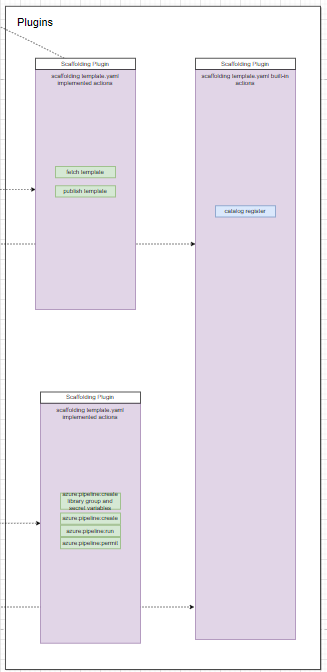
Figure 7: NashTech Self-service Portal plugins
Put it all together, and the whole model can be seen below.

Figure 8: Overall NashTech Self-service Portal model
In this post, we generalize what and how can we model the microservice software development lifecycle. And in the next post, you will see how we connect the dots, and materialize these works in the NashTech Self-service Portal accelerator. Stay stun!