



Introduction
Hello, .NET developers! Today, let’s dive into a fascinating topic: the practical use cases of AutoGen in .NET projects. AutoGen, short for Automatic Code Generation, is a technique that can significantly enhance productivity and streamline the development process. Whether you’re working on a small project or a large enterprise application, AutoGen can help you save time, reduce errors, and maintain a consistent codebase.
What is AutoGen?
AutoGen refers to the automatic generation of code based on predefined templates or patterns. In .NET projects, this can involve generating boilerplate code, configuration files, data models, and even entire service layers. Tools like T4 (Text Template Transformation Toolkit), Roslyn, and various third-party generators are commonly used to implement AutoGen in .NET.
Why Use AutoGen?
1. Consistency and Standardization
AutoGen ensures that code follows a consistent structure and adheres to coding standards. This is particularly useful in large teams where maintaining uniformity across different modules is crucial.
2. Time Savings
By automating repetitive tasks, AutoGen frees up developers to focus on more complex and value-added aspects of the project. This leads to faster development cycles and quicker time-to-market.
3. Error Reduction
Manual coding is prone to human error, especially when dealing with repetitive tasks. AutoGen minimizes this risk by generating error-free boilerplate code.
4. Scalability
As projects grow, the amount of boilerplate code can become overwhelming. AutoGen makes it easier to scale by automating the generation of repetitive code patterns, ensuring that your codebase remains manageable.
Practical Use Cases of AutoGen in .NET Projects
1. Generating Data Models from Database Schemas
One of the most common use cases of AutoGen is generating data models from existing database schemas. Tools like Entity Framework Core’s Scaffold-DbContext command can automatically create data model classes based on your database schema.
Example:
dotnet ef dbcontext scaffold “YourConnectionString” Microsoft.EntityFrameworkCore.SqlServer -o Models
This command generates entity classes and a DbContext class based on the tables and columns in your database, saving you the effort of manually writing these classes.
2. Creating API Controllers
Another practical use case is generating API controllers for CRUD operations. You can use scaffolding tools to automatically create controllers that handle basic Create, Read, Update, and Delete operations.
Example: Using Visual Studio, you can right-click on the Controllers folder, select Add -> Controller, and choose the API Controller with actions, using Entity Framework option. This generates a controller with all the necessary CRUD actions.
3. Generating Client-Side Code
AutoGen is also useful for generating client-side code. For instance, Swagger Codegen can generate client libraries for interacting with your API based on the OpenAPI (Swagger) specification.
Example:
swagger-codegen generate -i http://localhost:5000/swagger/v1/swagger.json -l csharp -o ClientLibrary
This command generates a .NET client library that you can use to interact with your API, saving you the effort of writing the client code manually.
4. Code Generation with T4 Templates
T4 (Text Template Transformation Toolkit) templates are a powerful feature in .NET for generating code. You can use T4 templates to generate repetitive code such as data access layers, DTOs (Data Transfer Objects), or even configuration files.
Example: Create a new T4 template file (e.g., MyTemplate.tt) and write the template code:
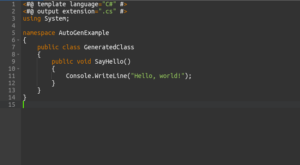
When you save the file, Visual Studio will automatically generate a .cs file based on the template.
5. Generating Documentation
AutoGen can also be used to generate documentation from your codebase. Tools like Sandcastle Help File Builder or DocFX can generate API documentation based on XML comments in your code.
Example:
docfx init
docfx build
This generates a static website with API documentation based on the comments in your code, helping you maintain up-to-date documentation effortlessly.
6. Code Analysis and Refactoring with Roslyn
Roslyn, the .NET compiler platform, allows you to create custom analyzers and code fixes. You can use Roslyn to automate code refactoring, enforce coding standards, and even generate new code based on analysis.
Example: Creating a Roslyn analyzer to enforce naming conventions:
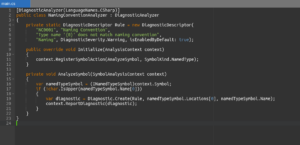
This example shows how you can create an analyzer to enforce naming conventions, helping to maintain consistency across your codebase.
Conclusion
AutoGen is a powerful technique that can significantly enhance productivity, maintain consistency, and reduce errors in .NET projects. By leveraging tools like Entity Framework Core, T4 templates, Swagger Codegen, and Roslyn, you can automate various aspects of your development process, from generating data models and API controllers to creating client-side code and documentation.
Incorporate AutoGen into your workflow to save time, improve code quality, and ensure your projects are scalable and maintainable. As you explore the possibilities of AutoGen, you’ll find it to be an invaluable tool in your .NET development toolkit.