


Introduction
React Native’s FlatList is a robust component for displaying lists in a mobile application. It provides the performance and flexibility as per your need. So, whether you are building a simple to-do-list or a complex social media feed it is there to help you out. In this blog, we will explore briefly about FlatList, it’s working, along with the key features. So, stick to this blog till the end to gain some good understanding of React Native FlatList.
What is FlatList?
React Native FlatList is a core component that is used for rendering and managing list of data efficiently. It is designed in such a way that even with thousands of items, it is highly performant. FlatList only displays the items that are currently visible on the screen. It reuses the components for items that are moved out the screen to ensure smooth scrolling and optimized memory usage.
How does FlatList work?
FlatList basically requires two main props to function, the first one is data, and the second one is renderItem. The data prop takes up an array of items that you want to display whereas the renderItem prop is a function that returns a React element that is to be rendered for every item in the list. Let’s see a basic example where we will be displaying cards with card title and description for every item in the list:
import React from 'react';
import { View, StyleSheet, FlatList, Text } from 'react-native';
const data = [
{ id: '1', title: 'Title 1', desc: 'Lorem ipsum dolor sit amet' },
{ id: '2', title: 'Title 2', desc: 'Lorem ipsum dolor sit amet' },
{ id: '3', title: 'Title 3', desc: 'Lorem ipsum dolor sit amet' },
];
const renderItem = ({ item }) => (
<View style={styles.cardContainer}>
<View style={styles.card} key={item.id}>
<Text style={styles.cardTitle}>{item.title}</Text>
<View style={styles.infoContainer}>
<Text style={styles.infoText}>{item.desc}</Text>
</View>
</View>
</View>
);
const App = () => {
return (
<View style={styles.container}>
<FlatList
data={data}
renderItem={renderItem}
keyExtractor={(item) => item.id}
horizontal={true}
/>
</View>
);
};
export default App;
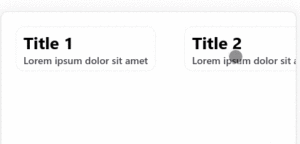
In the above example we have created an array of items containing card title and description that is to be rendered. We have also added some styling to give it a look of the card.
Key Features of FlatList
Performance
Flatlist is designed in a such a way that it is highly performant especially with large datasets. It works on a technique called “windowing” to display only the items that are currently visible of the screen and reuses the components of item that are moved off-screen. It helps reducing memory usage and also ensures a smooth scrolling experience.
Customization
FlatList provides a variety of props for customizing the appearance and behaviour of the list. For customizing the appearance of the item renderItem prop is used, you can also customize the loading indicator, empty list message and many more.
Scroll Control
FlatList provides props that can control the scrolling behaviour such as initialScrollIndex, scrollToIndex, and scrollToEnd, gives you the power to control the scroll programmatically to specific item or position.
List Item Keys
Similar to React, FlatList requires each item in the list to have a unique key prop and it helps to identify which items have changed, been added or been removed when the list is updated. This helps in improving performance.
Conclusion
React Native FlatList is very powerful in efficiently displaying a large dataset. The customization options, scroll control and performance makes it an ideal choice for a wide variety of mobile applications. Whether you are building a complex feed like social media feeds or a simple list it provides the tools you will need to create a smooth and engaging user experience. For more such blogs and updates follow Front-end Competency.
Follow NashTech Blogs for more amazing blogs.