


The rise of real-time agentic AI with Node.js is reshaping how applications interact with users. Unlike traditional AI models, which only generate static outputs, agentic AI systems actively perceive, plan, act, and observe in real-time. This enables them to not only respond faster but also execute tools, maintain memory, and handle dynamic workflows.
Node.js is particularly well-suited for this task because of its event-driven, non-blocking I/O model, which makes it ideal for real-time systems. Developers can combine AI models with Node.js’s real-time infrastructure—such as WebSocket or Socket.IO—to deliver interactive agent experiences.
Key Concepts Behind Real-time Agentic AI in Node.js
Event-driven architecture for Node.js AI agents
In real-time agentic AI with Node.js, event-driven design ensures that the system reacts instantly to user input, AI output, or external API responses. Instead of blocking processes, Node.js utilizes asynchronous events to maintain smooth and responsive interactions. This lightweight model allows AI agents to process multiple tasks concurrently while maintaining low latency.
Streaming responses and incremental inference in real time
Streaming enables AI agents to deliver partial outputs token by token, thereby reducing the perceived waiting time. At the same time, incremental inference allows the system to start reasoning before the final output is ready. Together, these techniques improve user experience by providing fast, interactive responses in real-time AI systems built with Node.js.
Tool execution and orchestration in agentic AI
One of the defining characteristics of agentic AI systems is their ability to go beyond text generation by executing tools. These tools can include API calls, database queries, file operations, or even external programs. In real-time agentic AI with Node.js, tool execution is orchestrated dynamically, allowing the agent to decide when and how to use the right tool.
Moreover, orchestration involves managing the order, timing, and dependencies of these tool calls. For example, the AI might need to retrieve weather data, analyze a dataset, and then provide a summary to the user. Thanks to Node.js’ non-blocking I/O, such multi-step operations can be performed concurrently, which reduces latency and improves throughput.
Additionally, tools can be integrated into the reasoning loop of the AI model. This means the agent first interprets the user request, then determines whether a tool is needed, and finally combines the tool’s output with the AI’s response. Therefore, users experience a more capable and autonomous system.
By orchestrating tool execution in a structured and event-driven manner, developers can significantly extend the scope of AI agents. As a result, real-time Node.js AI agents can act not only as conversational partners but also as interactive assistants capable of performing real-world tasks.
Memory and state management for real-time AI with Node.js
To maintain coherent conversations, real-time AI agents require memory. Node.js applications often utilize in-memory caches for short-term context and external databases for long-term data storage. This balance ensures that the agent can recall past interactions while adapting to new input efficiently.
Setting Up the Development Environment for Node.js AI Agents
Installing Node.js and dependencies for real-time AI
Ensure you have Node.js (version 18 or later) installed. Then create a project directory:
mkdir agentic-node && cd agentic-node
npm init -y
npm install express ws openai dotenv --save
express: HTTP serverws: WebSocket for real-time communicationopenai: API client for AI model access
Project structure for building agentic AI in Node.js
agentic-node/
├─ server.js
├─ agent.js
├─ planner.js
├─ executor.js
├─ events.js
├─ tools/
│  ├─ index.js
│  └─ weather.js
└─ .env
Choosing AI models and APIs for streaming agents
For this demo, we use OpenAI’s GPT models. You can replace them with other providers, such as Anthropic or Llama2.
Building a Real-time Agentic AI with Node.js (Planner + Executor Demo)
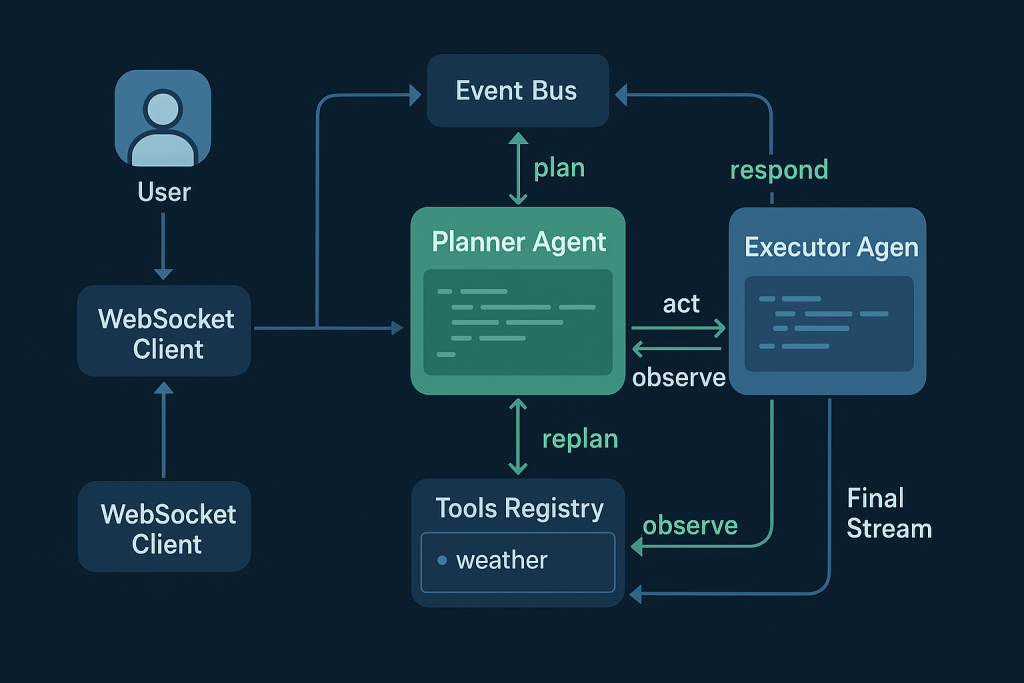
Step 1 — Initialize the Node.js project for agentic AI
mkdir agentic-node && cd agentic-node
npm init -y
npm i express ws openai dotenv --save
Tạo .env:
OPENAI_API_KEY=your_api_key
Structure:
agentic-node/
├─ server.js
├─ agent.js
├─ planner.js
├─ executor.js
├─ events.js
├─ tools/
│  ├─ index.js
│  └─ weather.js
└─ .env
Step 2 — Event bus for real-time visibility (Planner–Executor link)
// events.js
import { EventEmitter } from "events";
export const bus = new EventEmitter();

export const emit = (type, payload = {}) =>
  bus.emit(type, { type, ts: Date.now(), ...payload });
Step 3 — Tools registry (weather tool) for Node.js AI agents
// tools/weather.js
export async function getWeather({ city = "Hanoi" } = {}) {
  // Mock demo; thay bằng API thật nếu cần
  await new Promise(r => setTimeout(r, 200));
  return { city, tempC: 27, desc: "partly cloudy" };
}

// tools/index.js
import { getWeather } from "./weather.js";

export const tools = {
  weather: {
    description: "Get current weather by city",
    run: getWeather,
  },
};

export async function executeTool(name, params) {
  const tool = tools[name];
  if (!tool) throw new Error(`Unknown tool: ${name}`);
  return tool.run(params || {});
}
Step 4 — Planner agent: JSON plans and final synthesis
// planner.js
import OpenAI from "openai";
import { emit } from "./events.js";
import 'dotenv/config'

const client = new OpenAI({ apiKey: process.env.OPENAI_API_KEY });

const SYSTEM_PLANNER = `
You are a Planning Agent for a real-time agentic AI with Node.js.
Decide the next action as strict JSON only.
Schema:
{ "action": "tool" | "respond", "reason": "string", "tool"?: "weather", "params"?: { "city"?: string } }
- If external data is required (e.g., weather) → action="tool".
- After an observation, move to action="respond".
Return ONLY JSON.
`;

export async function getPlan({ userInput, context }) {
  const res = await client.chat.completions.create({
    model: "gpt-4o-mini",
    temperature: 0.2,
    messages: [
      { role: "system", content: SYSTEM_PLANNER },
      { role: "user", content: JSON.stringify({ userInput, context }) },
    ],
  });

  let plan;
  try { plan = JSON.parse(res.choices[0].message.content.trim()); }
  catch { plan = { action: "respond", reason: "fallback" }; }

  emit("planner.planCreated", { plan, userInput });
  return plan;
}

export async function getFinalStream({ userInput, context, observation }) {
  const SYSTEM_SYNTH = `
You are a Synthesizer Agent. Produce the final concise answer for the user.
Use the observation if present. Output plain text suitable for streaming.
`;
  const stream = await client.chat.completions.create({
    model: "gpt-4o-mini",
    temperature: 0.2,
    stream: true,
    messages: [
      { role: "system", content: SYSTEM_SYNTH },
      { role: "user", content: JSON.stringify({ userInput, context, observation }) },
    ],
  });

  emit("planner.finalStart", { observation });
  return stream;
}
Step 5 — Execution agent: run tools and create observations
// executor.js
import { executeTool } from "./tools/index.js";
import { emit } from "./events.js";

export async function runExecution(plan) {
  if (plan.action !== "tool") throw new Error("Executor handles tool actions only");
  emit("executor.start", { tool: plan.tool, params: plan.params });

  const result = await executeTool(plan.tool, plan.params);
  const observation = { tool: plan.tool, result };

  emit("executor.observation", { observation });
  return observation;
}
Step 6 — Orchestrator: plan → act → observe → stream response
// agent.js
import { getPlan, getFinalStream } from "./planner.js";
import { runExecution } from "./executor.js";
import { emit } from "./events.js";

export async function* handleAgentMessage(userInput) {
  const context = {}; // gắn memory/session state tại đây nếu cần

  // 1) Planner quyết định hành động
  const plan1 = await getPlan({ userInput, context });

  if (plan1.action === "tool") {
    // 2) Executor chạy tool
    const observation = await runExecution(plan1);

    // 3) Planner tổng hợp câu trả lời cuối cùng (stream)
    const finalStream = await getFinalStream({ userInput, context, observation });

    for await (const part of finalStream) {
      const chunk = part.choices?.[0]?.delta?.content || "";
      if (chunk) {
        emit("planner.finalChunk", { chunk });
        yield chunk;
      }
    }
    emit("planner.finalEnd", {});
  } else {
    // Không cần tool
    const finalStream = await getFinalStream({ userInput, context, observation: null });

    for await (const part of finalStream) {
      const chunk = part.choices?.[0]?.delta?.content || "";
      if (chunk) {
        emit("planner.finalChunk", { chunk });
        yield chunk;
      }
    }
    emit("planner.finalEnd", {});
  }
}
Step 7 — WebSocket server for real-time streaming in Node.js
// server.js
import "dotenv/config";
import express from "express";
import { createServer } from "http";
import { WebSocketServer } from "ws";
import { handleAgentMessage } from "./agent.js";
import { bus } from "./events.js";

const app = express();
const server = createServer(app);
const wss = new WebSocketServer({ server });

wss.on("connection", (ws) => {
  // Forward nội bộ Planner/Executor sang client để quan sát
  const forward = (evt) => ws.send(JSON.stringify({ __event: evt.type, ...evt }));
  ["planner.planCreated","executor.start","executor.observation","planner.finalStart","planner.finalChunk","planner.finalEnd"]
    .forEach(t => bus.on(t, forward));

  ws.on("message", async (msg) => {
    const text = msg.toString();
    for await (const chunk of handleAgentMessage(text)) {
      ws.send(chunk); // stream text chunks
    }
  });

  ws.on("close", () => {
    ["planner.planCreated","executor.start","executor.observation","planner.finalStart","planner.finalChunk","planner.finalEnd"]
      .forEach(t => bus.removeListener(t, forward));
  });
});

server.listen(3000, () => {
  console.log("Server running at http://localhost:3000");
});
Step 8 — Test scenarios and expected agent events
Start server
node server.js
Connect to Websocket
npx wscat -c ws://localhost:3000
Type and see the result.
Enhancing Real-time Agentic AI with Node.js for Production
Building a prototype is only the beginning. To operate effectively in production, a real-time agentic AI with Node.js must handle concurrency, errors, observability, and security at scale. Each of these factors contributes to reliability, user trust, and long-term maintainability.
Handling concurrency and scaling Node.js AI agents
When multiple users interact with an AI agent simultaneously, concurrency becomes a challenge. Node.js’ event loop helps, but additional scaling strategies are necessary. Using Redis or Kafka as message brokers, developers can queue tasks across multiple workers, ensuring that requests are processed fairly. Additionally, horizontal scaling with containers or Kubernetes enables agents to serve thousands of concurrent users. Therefore, designing for concurrency from the start ensures smooth operation under real-world traffic loads.
Error handling and retry strategies for reliable AI agents
No real-time system is free from failure. API calls may time out, network errors may occur, and external tools may fail. To mitigate these risks, developers can implement retry strategies with exponential backoff. This approach avoids overwhelming external services and gives systems time to recover. Furthermore, structured error logging helps identify recurring issues quickly. As a result, Node.js AI agents remain stable and reliable even under adverse conditions.
Observability with logging and OpenTelemetry in Node.js
Visibility into system behavior is critical in production. With structured logging and OpenTelemetry tracing, developers can monitor every stage of the agent’s workflow, from user request to AI inference and tool execution. Adding tracing spans for each step (request → model call → tool call → response) allows teams to diagnose performance bottlenecks. Consequently, observability not only improves reliability but also provides insights for optimization.
Security considerations for real-time AI with Node.js
Finally, security is essential when deploying real-time AI systems. Input validation is necessary to prevent prompt injection and malicious payloads. Additionally, rate limiting protects APIs from abuse, while authentication secures WebSocket connections against unauthorized access. In production, sensitive data should always be encrypted in transit and at rest. By addressing these concerns early, developers ensure that their Node.js AI agents are both safe and trustworthy.
Full Source Code Example of a Node.js Real-time Agent
Conclusion: Building Real-time Agentic AI with Node.js
Building real-time agentic AI with Node.js combines event-driven design, streaming inference, tool orchestration, and memory management into one cohesive system. With WebSocket for real-time communication and AI models providing reasoning, Node.js enables interactive, scalable, and production-ready agentic systems.
References
- https://platform.openai.com/docs/
- https://nodejs.org/en/docs
- https://opentelemetry.io/docs/
- https://redis.io/docs/