


In software testing, finding bugs is easy. What truly makes a great tester is the ability to understand why a problem happens in the first place. That’s where Root Cause Analysis (RCA) comes in. RCA helps teams look beyond the obvious symptoms to discover the deeper reasons behind defects, so they can be fixed permanently instead of temporarily patched.
What is Root Cause Analysis?
Root Cause Analysis (RCA) is a problem-solving approach that focuses on identifying the true reason behind an issue, not just its visible effect.

For example, imagine your company’s internal dashboard keeps freezing. Developers fix it by restarting the service, but the freeze happens again the next day. After RCA, the team discovers the real problem, a database query that runs without an index, slowing the entire system. Fixing that query removes the issue completely.
That’s the power of RCA — solving the cause, not the symptom.
Why RCA Matters in Testing
In testing, quick fixes can sometimes do more harm than good. You might resolve one bug, only for it to return in the next sprint. RCA helps you find the deeper issue so it doesn’t happen again.
Take a login feature, for example. Testers report that users occasionally can’t log in. The developer updates the login script, and it seems fine, for a while. Later, the same issue reappears. With RCA, you find out the real cause is an expired SSL certificate that wasn’t monitored properly. Once the renewal process is automated, the login problem disappears permanently.
By addressing the real cause, teams save time and improve product reliability.
How to Apply RCA in Testing
Using RCA is a simple but thoughtful process. It starts by clearly defining the problem, collecting the right data, and asking “why” several times until you reach the true reason.
First, describe the issue precisely, what happened, where it happened, and how it can be reproduced. For example: “The app crashes when the submit button is clicked on the checkout page.”
Next, gather as much context as possible: logs, screenshots, test data, and environment details. Maybe the crash only occurs on Android devices with slow Wi-Fi.
Then, start asking “Why?” multiple times. Why does the app crash? Because it tries to use data that hasn’t loaded. Why wasn’t the data loaded? Because the network call failed. Why did the network call fail? Because the app doesn’t handle timeout errors properly.
Once you’ve reached that point, you’ve likely found the root cause. The next step is to plan a fix that addresses it directly, in this case, by adding retry logic or proper timeout handling. After the fix is implemented, test again to verify it works and update your process to prevent similar issues later.
Common Techniques for RCA
When applying Root Cause Analysis in testing, two techniques stand out for their simplicity and effectiveness: the 5 Whys and the Fishbone Diagram (Ishikawa). Both help testing teams look beyond the surface of an issue to identify the true reason behind recurring problems. Choosing the right method depends on the nature and complexity of the defect being analyzed.
The 5 Whys Technique
The 5 Whys technique is a straightforward yet powerful approach. It begins with a clear statement of the problem, followed by repeatedly asking “Why?”, each answer leading to the next question. The goal is to continue until the underlying cause becomes clear, which typically occurs within five rounds of questioning.
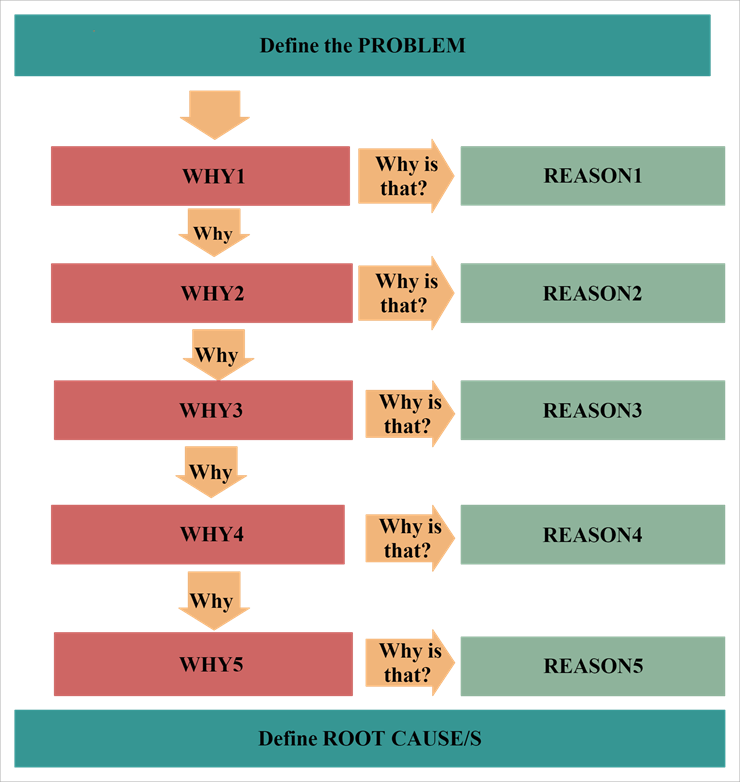
For example, consider this situation in a testing environment:
Problem: The test environment frequently becomes unavailable.
- Why does it happen? Because the database connection fails.
- Why does the connection fail? Because the database server runs out of memory.
- Why does the server run out of memory? Because old logs are never cleared.
- Why are logs not cleared? Because there is no automated log cleanup process.
- Why is there no cleanup process? Because the infrastructure configuration did not include one.
The root cause in this case is the missing log maintenance process. Once automated log cleanup is added, the issue no longer repeats, improving the stability of the test environment.
The Fishbone Diagram (Ishikawa)
The Fishbone Diagram, also known as the Ishikawa or Cause-and-Effect Diagram, is used when multiple factors might contribute to a problem. It helps visualize potential causes by categorizing them into logical groups. The diagram resembles the skeleton of a fish: the “head” represents the main problem, while the “bones” branching off represent major categories of potential causes.
Common categories include People, Process, Tools, Environment, and Data.
Each branch can then be expanded to explore detailed causes within that category.
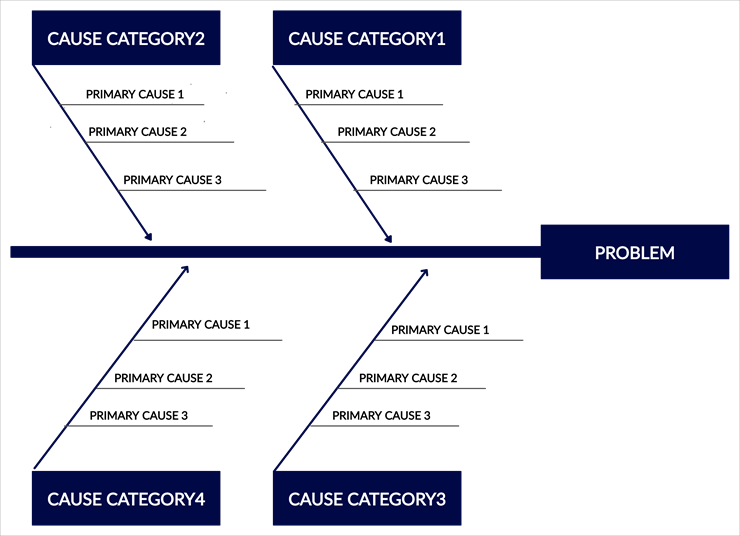
For example, imagine a situation where test execution results are inconsistent across different environments.
- Under People, the team might find that different testers use slightly different scripts.
- Under Process, there may be no standardized setup checklist.
- Under Tools, the automation framework might rely on varying library versions.
- Under Environment, the staging and production systems could be misaligned.
- Under Data, outdated or mismatched test data might be the issue.
After examining all possible causes, the team might identify that inconsistent library versions were responsible. Once the framework version is standardized, the problem no longer occurs.
Benefits of Using RCA
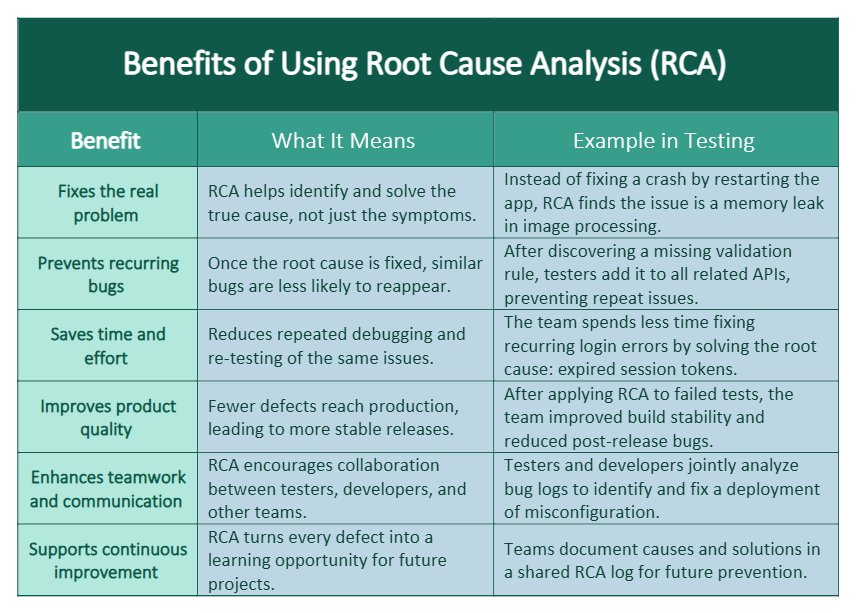
When testers consistently apply RCA, software quality improves across the board. Instead of firefighting the same bugs, teams learn from every issue and prevent new ones from forming.
Here’s a common scenario: after each deployment, the QA team notices that payment tests fail randomly. Instead of rerunning tests endlessly, they apply RCA and find that the issue is due to inconsistent test data in the staging environment. Once the data setup is standardized, the random failures stop, and testing becomes much smoother.
RCA turns recurring problems into learning opportunities and long-term improvements.
Challenges and Tips for Testers
Doing RCA well takes time, collaboration, and the right mindset. It’s not about blaming individuals but about improving systems and processes. Open communication between testers, developers, and product teams is key.
For instance, suppose a feature is released with a UI bug that everyone missed. Instead of pointing fingers, the team performs RCA and realizes the test checklist didn’t include that screen size. They update the checklist, preventing similar oversights in future releases.
That’s how RCA strengthens both quality and teamwork.
Conclusion
Root Cause Analysis isn’t just a technical exercise, it’s a mindset that helps teams build better, more reliable software. By digging into every issue and finding the real cause, testers can help prevent repetitive bugs, speed up releases, and increase confidence in every delivery.
Start small: pick one recurring problem, apply RCA, and share what you learn. You’ll quickly see the difference, fewer regressions, smarter fixes, and stronger collaboration.
References
Ministry of Testing – www.ministryoftesting.com
ISTQB Glossary – glossary.istqb.org
Software Testing Help – https://www.softwaretestinghelp.com/root-cause-analysis/