


As we know microservices architecture and data streaming, these things become the backbone of modern systems. Kafka is a popular and effective option for streaming data in real time. It also helps to building distributed data pipelines. However, when we talk about the sensitive data, security in such things is not optional.
This blog explores how to secure Kafka pipelines using OAuth2 and JWT with spring boot and confluent Kafka. We will also explore why security matters and how JWT and oauth2 help. This approach solves the critical problems like secure client authentication, fine grained access control and token-based session management. Also, with the help of this we can eliminate the need of hard-core credentials, this approach can make your Kafka infrastructure both robust and compliant.
What is Kafka?
Apache Kafka is used to send and receive message between different parts of a software system. It provides high performance and enables low latency, real time data streaming platform across a distributed system.
Think of it like a post office inside your software:
Why Kafka Security Matters?
Apache Kafka, by default, doesn’t enforce strict access control. This opens risks such as:
Unauthorized consumers can read the sensitive data
Problem: Kafka topics can carry highly sensitive data like user details, transaction records or authentication logs.
How to prevent: Implement authentication to verify who is connecting.
Producers can push malicious and distorted data
Problem: Anyone can send the messages to Kafka, they could send garbage or even dangerous payloads that can break downstream systems.
How to prevent: Authenticate producers and give limit access to particular topics.
Lack of Accountability in audit Logs
Problem: Without proper auditing, it is not easy to track that who can access which topic and who produced which data.
How to prevent: Enable Kafka audit logging specially on secure clusters.
OAuth2 and JWT – The Security Backbone
OAuth2 – It is an industry authorization protocols which can be used for web, browser, API and different type of resources or applications. We can utilize OAuth2 for both client-side and server-side.
JWT – It stands for Json Web Token. It encodes user identity and mainly used for APIs. JWT is very straightforward and simple to understand from the start.
How They work together?
1. OAuth2 authenticates the client, and they issue a JWT as a proof of security.
2. The client have this JWT when they are connecting to Kafka.
3. Kafka brokers utilize these tokens to authenticate and verify their customers
Architecture Overview
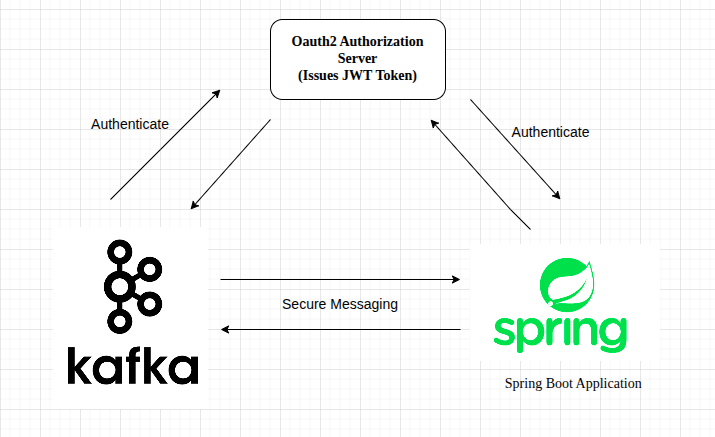
Component Responsibility
1. OAuth2 Authorization Server:
- This component act as the central identity provider.
- It is responsible for authenticate users and services. It also issues jwt access token for successful authentication. This handles client credentials and user-based authentication.
- It can be implemented using spring authorization server and Auth0, Okta, Azure AD etc.
2. Spring Boot Application:
- This component acts as a kafka client.
- Before accessing Kafka, it authenticates with OAuth2 server to get a JWT.
- It attaches the JWT token to Kafka Requests and sends/receive messages from Kafka securely.
3. Kafka (Confluent Kafka):
- It is configured with SASL/OAUTHBEARER mechanism.
- It uses a public key to verify the received JWT tokens. It also used for accepting and denying the connections based on token validity and claim.
- This component also handles the secure communication with authorized Spring clients.
Security Flow
In this architecture, OAuth2 and JWT are used to authenticate and authorize the communication between the spring boot application and Kafka(confluent). This security flow confirms that only trusted and authorised clients can produce and consume the message from Kafka. Here are the steps which simplified the secure communication is established:
Step1: Using client credentials, Spring Boot Application authenticates with the OAuth2 Authorization Server and it receives a signed json web token.
Step2: This application uses the SASL/OAUTHBEARER method to configure the Kafka client with the JWT.
Step3: Kafka broker which basically validates the JWT using the public keys and the endpoints which is provided by the authorization server that the token is valid or not.
Step4: If the JWT token is valid, secure messaging communication begins between the Spring boot application and Kafka; otherwise, access is denied.
Setting Up OAuth2 for Kafka
Configure Kafka Broker
Kafka needs to be configured to use OAuth2 authentication.
# server.properties

listener.name.sasl_oauth2_plain.oauthbearer.sasl.login.callback.handler.class=org.apache.kafka.common.security.oauthbearer.OAuthBearerLoginCallbackHandler

listener.name.sasl_oauth2_plain.oauthbearer.sasl.jaas.config= \
  org.apache.kafka.common.security.oauthbearer.OAuthBearerLoginModule required \
  oauth.token.endpoint.uri="${OAUTH_TOKEN_URI}" \
  oauth.client.id="${OAUTH_CLIENT_ID}" \
  oauth.client.secret="${OAUTH_CLIENT_SECRET}";

sasl.enabled.mechanisms=OAUTHBEARER
security.inter.broker.protocol=SASL_PLAINTEXT
sasl.mechanism.inter.broker.protocol=OAUTHBEARER
This configuration secures the Kafka broker using the OAuthBearer SASL mechanism. The OAuth2 credentials (client_id, client_secret, and token endpoint URI) are fetching dynamically through environment variables.
Spring Boot Kafka Producer with OAuth2 Token
@Bean
public KafkaTemplate<String, String> kafkaTemplate() {
    Map<String, Object> props = new HashMap<>();
    props.put("bootstrap.servers", "localhost:9092");
    props.put("security.protocol", "SASL_PLAINTEXT");
    props.put("sasl.mechanism", "OAUTHBEARER");

    props.put("sasl.jaas.config", "org.apache.kafka.common.security.oauthbearer.OAuthBearerLoginModule required;");
    props.put("sasl.login.callback.handler.class", "org.apache.kafka.common.security.oauthbearer.OAuthBearerLoginCallbackHandler");

    return new KafkaTemplate<>(new DefaultKafkaProducerFactory<>(props));
}
This code implementation configures a Kafka producer in a spring boot application for authentication using the OAuthBearer SASL mechanism. This code also enables the SASL_PLAINTEXT as the security protocol.
Spring Boot OAuth2 Token Acquisition
Use spring-security-oauth2-client to fetch the JWT:
@Autowired
private OAuth2AuthorizedClientService authorizedClientService;

public String getAccessToken() {
    OAuth2AuthenticationToken auth = (OAuth2AuthenticationToken) SecurityContextHolder.getContext().getAuthentication();
    OAuth2AuthorizedClient client = authorizedClientService.loadAuthorizedClient(
        auth.getAuthorizedClientRegistrationId(), auth.getName());

    return client.getAccessToken().getTokenValue();
}
This method retrieves the current user’s OAuth2 access token and uses OAuth2AuthorizedClientService for loading the authorized client from the Spring Security Context.
Conclusion
Secure Kafka pipelines using OAuth2 and JWT with spring boot and confluent Kafka is not just a good practice, we can say like it is a important part when we are handling with sensitive data and critical applications problems. By integrating OAuth2 and JWT with Spring boot and confluent (Kafka), we add a strong and powerful layer of authentication and authorization to our data streaming architecture. This secure approach enables secure client authentication with need of the hardcoded credentials, and we can apply fine grained access control over Kafka topics.
With the help of this setup, our Kafka infrastructure become more robust, safe and compliant. As your systems grow, this type of security foundation will help you maintain confidence and our data will be safe from end to end.
References
https://kafka.apache.org/documentation
https://blog.nashtechglobal.com/introduction-to-apache-kafka-security-%f0%9f%94%92/