



In today’s digital world, keeping data safe is super important because threats keep changing. If security is breached, it can mess up how a business works, ruin its reputation and expose important information. It’s not just about having basic protection like firewalls and antivirus software anymore. To stay safe, companies really need to keep a close eye on their security using something called metrics.
Understanding Security Posture
Security posture refers to the strength and effectiveness of an organization’s overall security measures. It includes everything from network infrastructure and data handling practices to employee training and incident response capabilities. Tracking security posture involves evaluating and measuring various facets of security; thus, it enables organizations to gain insights into vulnerabilities and potential risks.
Importance of Security Metrics
These metrics offer specific numerical insights into a company’s security status. By utilizing these figures, businesses can make informed choices concerning security investments, safety improvements, and critical areas. Additionally, by providing vital data points, they illuminate strengths, weaknesses, and areas in need of enhancement. Serving as a guide, these metrics empower organizations; consequently, they can make informed decisions on resource allocation, risk mitigation strategies, and investments in security technologies.
Key Metrics for Enhanced Protection
- Incident Response Metrics: Measuring the time taken to detect, respond, and resolve security incidents is crucial; consequently, it helps assess the efficiency of incident response processes.
- Vulnerability Metrics: Tracking the number of vulnerabilities discovered, their severity levels, and the speed of mitigation efforts provides insights into an organization’s vulnerability management; consequently, facilitating proactive measures and enhancing overall cybersecurity resilience.
- Compliance Metrics: Ensuring alignment with industry regulations and standards through metrics tracking not only showcases a commitment to data protection and regulatory compliance but also reinforces an organization’s dedication to maintaining a secure and compliant operational environment.
- User Behavior Metrics: Assessing the effectiveness of security awareness programs and monitoring user adherence to security policies helps gauge the human element’s impact on security posture.
Crafting an Effective Metrics Strategy
Indeed, the genuine strength of metrics is unveiled through their capacity to generate actionable insights. Consistent analysis of metrics data empowers organizations to pinpoint trends, identify anomalies, and promptly initiate proactive measures to fortify their security posture. Moreover, these insights among teams nurture a culture of shared responsibility for security.
Leveraging Metrics for Continuous Improvement
The true power of metrics lies in their ability to drive actionable insights. Regular analysis of metrics data enables organizations to identify trends, detect anomalies, and implement proactive measures to strengthen their security posture. Additionally, sharing these insights across teams fosters a culture of collective responsibility for security.
Uncovering Vulnerabilities with Selenium, Java, and ZAP Tool
Step 1 : Launch OWASP Zap and find the API key
To obtain the API key for your application, navigate to the designated section. Tools > Options > API
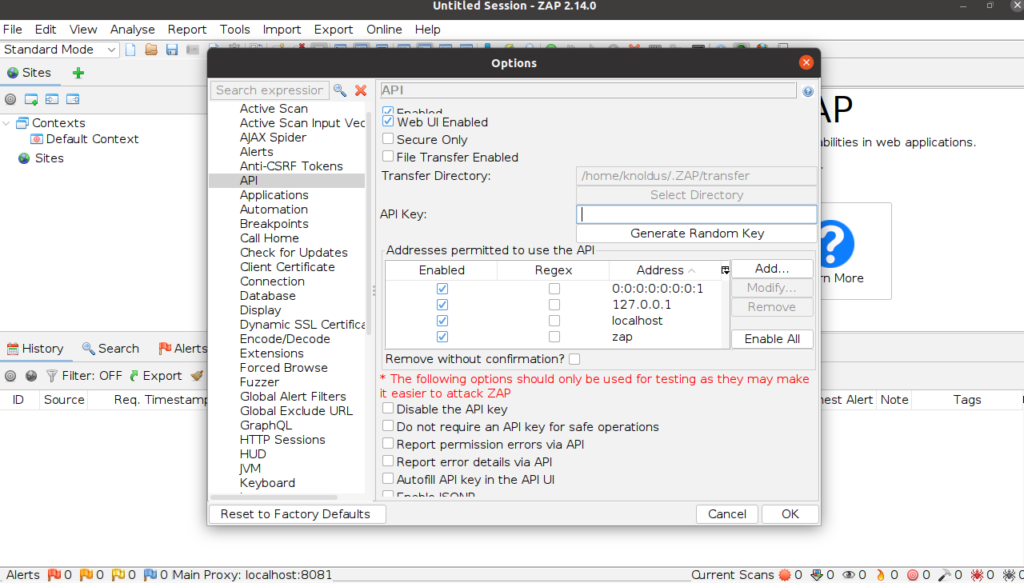
Step 2 : Add dependency in pom.xml
<dependency>
            <groupId>org.zaproxy</groupId>
            <artifactId>zap-clientapi</artifactId>
            <version>1.11.0</version>
</dependency>
<dependency>
            <groupId>org.zaproxy</groupId>
            <artifactId>zap</artifactId>
            <version>2.12.0</version>
</dependency>
Step 3 : Add @BeforeMethod to start a proxy Zap server
static final String proxy_address_zap = "localhost";
static final int proxy_port_zap = 8081;
WebDriver driver;
static String appUrl = "your_app_url";

@BeforeMethod
public void startUp(){
        ChromeOptions options = new ChromeOptions();
        options.addArguments("--ignore-certificate-errors");
        String proxyUrl = proxy_address_zap + ":" + proxy_port_zap;
        Proxy proxyServer = new Proxy();     //An instance of the Proxy class is created. This class represents the proxy configuration for Selenium WebDriver.
        proxyServer.setHttpProxy(proxyUrl)
                .setSslProxy(proxyUrl);  //This method sets the HTTP and SSL proxy for the proxyServer instance.
        options.setCapability(CapabilityType.PROXY, proxyServer);
        driver = new ChromeDriver();
        driver.manage().window().maximize();
    }
Step 4 : Create a method to start spider scan for your web application
static final String proxy_apiKey_zap = "your_api_key";
private static ClientApi api;

 public static void spiderScan(String webAppUrl, String zapAddress, int zapPort) throws ClientApiException {
        api = new ClientApi(zapAddress, zapPort, proxy_apiKey_zap); //Instance of ClientApi class, which represents the client for interacting with the ZAP API
        ApiResponse apiResponse = api.spider.scan(webAppUrl, null, null, null, null);  //The api object (OWASP ZAP client) calls the spider.scan() method to initiate a spider scan on a web application
        logger.info("apiResponse : " + apiResponse.getName());
    }
Step 5 : Generate report for your scan to see vulnerabilities
public static void getReports(String webAppUrl) throws ClientApiException, IOException {
        byte[] bytes = api.core.htmlreport();

        // getting the alert messages and just printing those.
        ApiResponse messages =  api.core.messages(webAppUrl,"0","99999999");
        logger.info("messages : " + messages);

        // storing the bytes in to html report.
        String str = new String(bytes, StandardCharsets.UTF_8);
        File newTextFile = new File("security_report.html");
        FileWriter fw = new FileWriter(newTextFile);
        fw.write(str);
        fw.close();
    }
Step 6 : Call your methods in @Test method
@Test
    public void testLoginSpiderSecurity() throws ClientApiException {
        loginToWebApp(); //A method to login to our web application. This contains your selenium code to automate login to the application.
        Utility.spiderScan(appUrl, proxy_address_zap, proxy_port_zap);
    }
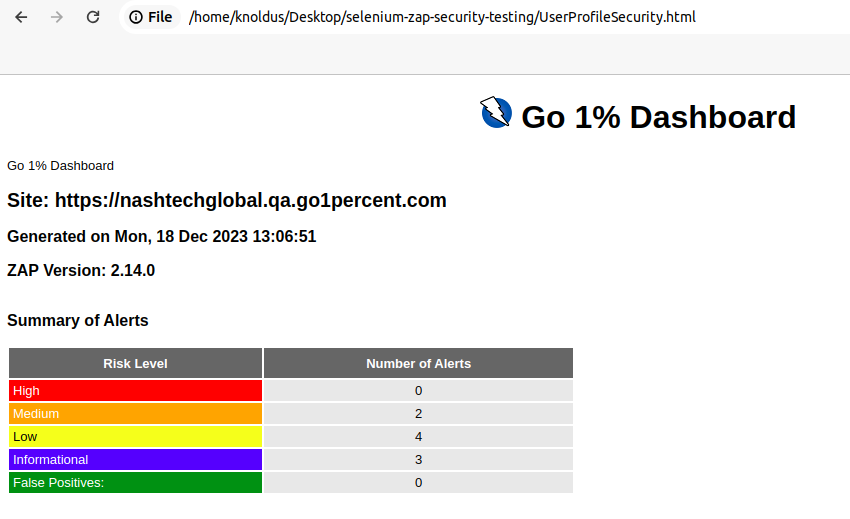
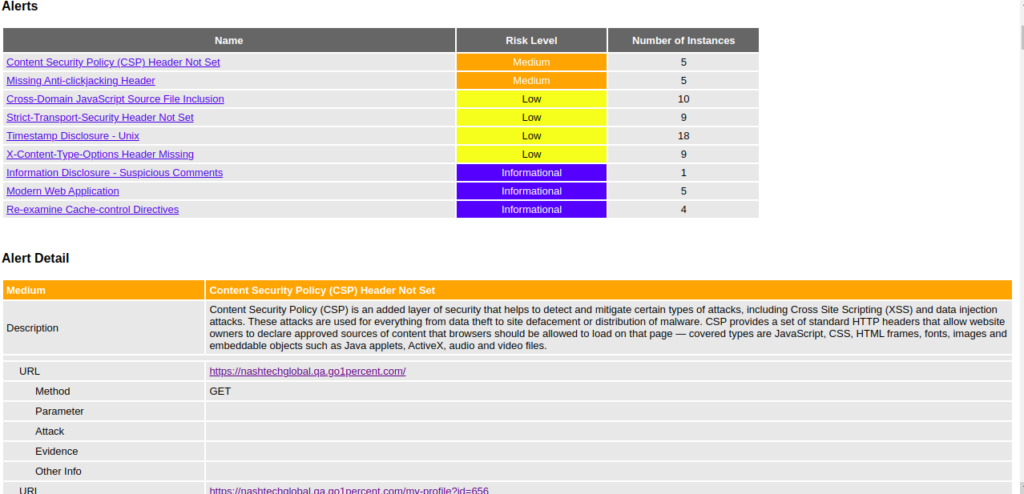
You can review the generated reports to find out what weaknesses exist in your application.
Conclusion
In a world where cyber threats are omnipresent, consequently, relying solely on reactive measures is insufficient. However, tracking security posture through effective metrics is a proactive approach that empowers organizations to stay ahead of potential risks. By harnessing the insights derived from security metrics, businesses can bolster their defenses, mitigate vulnerabilities, and create a resilient security infrastructure that safeguards their digital assets in an ever-changing threat landscape.