


Security testing is the process of verifying that an application or system is secure from potential threats and vulnerabilities. Security testing helps to ensure the confidentiality, integrity, and availability of the data and resources of the application or system. OWASP Top 10 is a standard awareness document that represents a broad consensus about the most critical security risks to web applications. In this post, I will share three first items of OWASP Top10
1. Injection
It is one of the most common attacks as it can bring serious and harmful consequences to your system and sensitive data. A malicious user can use SQL injection to add/inject content into an application to modify its behavior. Injection vulnerability can lead to the disclosure/leaking of sensitive information, data integrity issues, and elevation of privileges.
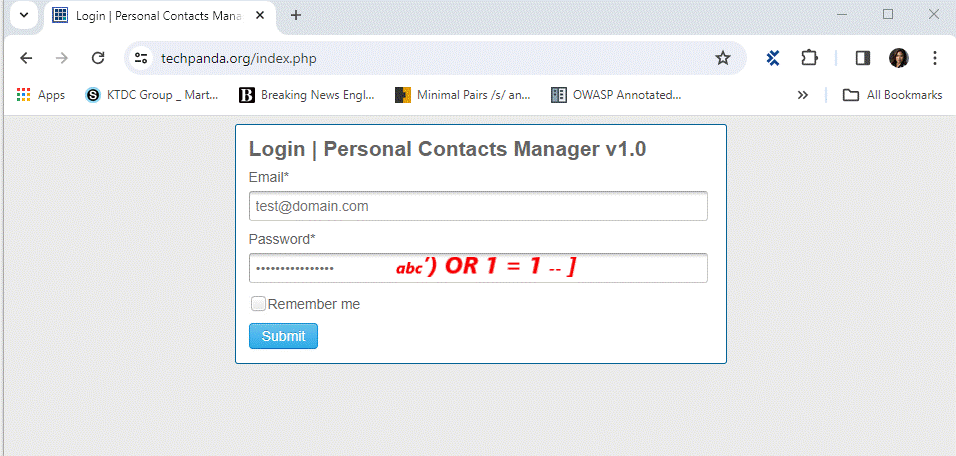
Ex: A hacker can then insert the following input
- Step 1: Enter test@domain.com as the email address
- Step 2: Enter abc’) OR 1 = 1 — ] as password
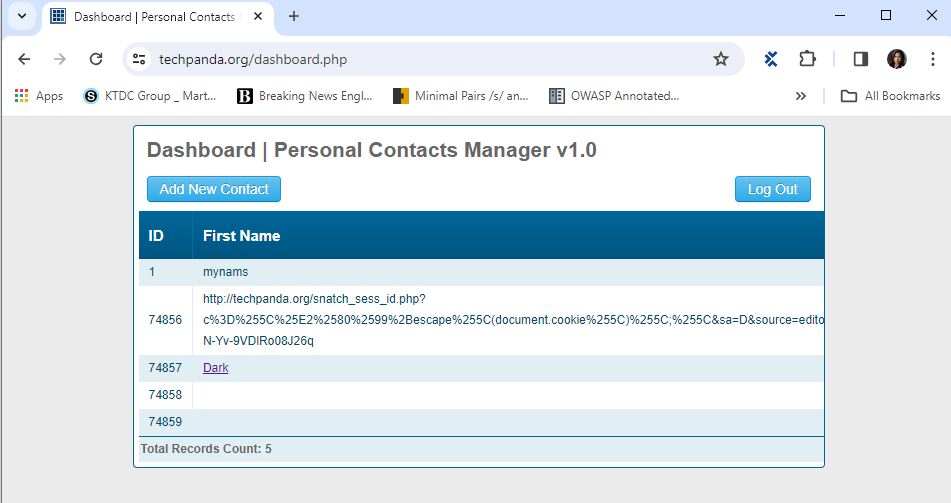
- Step 3: Sumit above inputting data that the generated SQL statement will be as follows.
SELECT * FROM users WHERE email = ‘test@domain.com‘AND password = md5(‘abc’) OR 1 = 1 — ]’);
That is the same below statement so the data is attacked by SQL Injection Select * from users where True
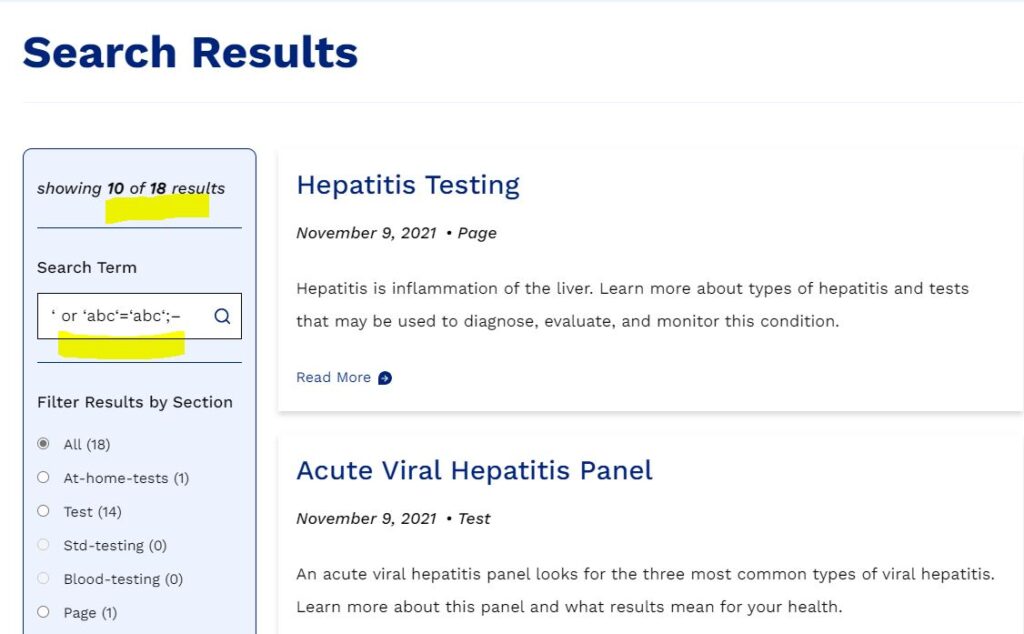
There are more below sample codes to make the query always true
- ‘ or ‘abc‘=‘abc‘;–
– , <“ or 1=1;–
– ‘ or 1=1;–
– ‘ or ‘ ‘=‘ ‘;–>
1.1 Vulnerable parts can be included
- Login fields
- Search fields
- Comment fields
- Any other data entry and saving fields
- Website links
1.2 How to Prevent against SQL Injection Attacks
An organization can adopt the following policy to protect itself against SQL Injection attacks
- User input should never be trusted: It must always be sanitized before it is used in dynamic SQL statements.
- Stored procedures: these can encapsulate the SQL statements and treat all input as parameters.
- Prepared statements: prepared statements to work by creating the SQL statement first and then treating all submitted user data as parameters. This has no effect on the syntax of the SQL statement.
- Regular expressions: these can detect potential harmful code and remove it before executing the SQL statements.
- Database connection user access rights: only necessary access rights for connecting accounts to the database. This can help reduce what the SQL statements can perform on the server.
- Error messages: these should not reveal sensitive information and where exactly an error occurred. Simple custom error messages such as “Sorry, we are experiencing technical errors. The technical team has been contacted. Please try again later” instead of displaying the SQL statements that caused the error.
2. Broken authentication & session management
It is a type of security vulnerability that occurs when an application fails to properly protect the identity and session of its users. This can allow an attacker to compromise or impersonate valid users and access their data and privileges.
- Authentication: access control from logins via user ID and password to prevent hackers/users who don’t have permission
- Session Management: request and response transactions associated with the same user, ability to establish variables – such as access rights and localization settings for the duration of the session.
2.1 What should be verified to determine broken authentication and session management?
- The Session identifier is secured for the cookie: The application exclusively uses HTTPS and the cookie is marked as “secure” by setting the cookie’s “secure” flag. Any transmission of the cookie over a non-secure channel or the failure to mark the cookie as secure represents a Session Management vulnerability.
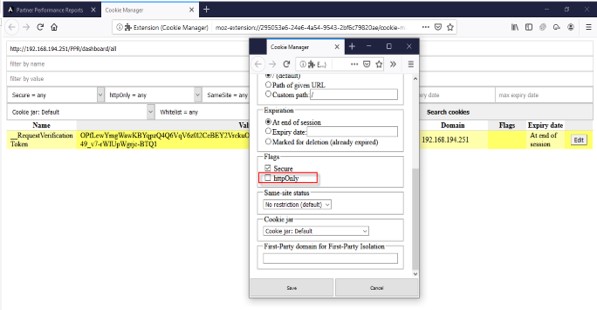
- The Session Identifier is a cryptographically strong random number generator: ensure that session identifiers are generated using a cryptographically strong random number generator and produce sufficiently long strings that defy prediction
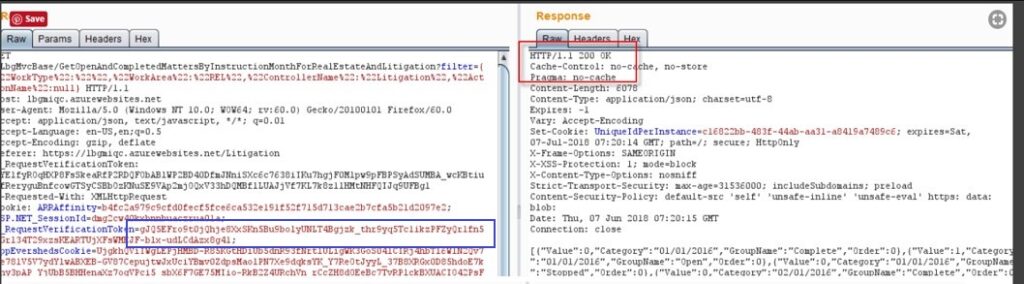
- The session must end after the user logs out successfully: perform the following sequence of tasks
– Log into the application
– Perform any action that requires previous authentication
– Log out of the application. If the application returns a response other than the login page or error message, this represents a Session Management vulnerability because the user can still interact with the application following logout
- The session must be destroyed user session once they have finished or timeout:
Make a session timeout by performing the below sequence of tasks:
– Log into application
– Go get a cup of tea or go somewhere in time to make sure a time interval is greater than the inactivity interval
– When you return, try to perform an activity that requires previous authentication. If the action is successful, this represents a Session Management Vulnerability
Closing The Browser Means You’re Done: an attacker could open the browser and replay a URL from the Browser History to re-animate the previous user’s session. This is an easy scenario to test
– Log into the application
– Perform an action that requires previous authentication, and capture the request in a web-proxy
– Close and re-open the browser
– Replay the captured request. If the request is not rejected, this behavior represents a Session Management Vulnerability
You can use various tools and techniques to test for broken authentication and session management, such as Burp Suite or ZAP, to intercept and manipulate requests and responses, or Web browsers, such as Chrome or Firefox, to inspect and modify cookies and local storage.
2.2 Prevent broken authentication and session management
You need to convince the application to implement the following best practices.
• Use strong and unique passwords and enforce a password policy
• Implement multi-factor authentication and prevent brute force attacks
• Rotate session IDs after successful login and invalidate them after logout or timeout
• Do not expose session IDs in URLs or cookies and use secure and HTTP-only flags
• Use HTTPS for all authenticated pages and encrypt all data in transit and at rest
• Log all authentication failures and alert administrators when suspicious activities are detected
• Do not use default or hard-coded credentials and disable unused accounts
3. Cross-site scripting (XSS)
It is a type of security vulnerability that occurs when an attacker injects malicious code, usually in the form of a script, into a web page or application. The malicious code can then access or modify the data, cookies, session tokens, or other sensitive information of the victim’s browser or perform actions on their behalf
Cross-site scripting (XSS) attacks occur when the data is included in dynamic content that is sent to a web user without being validated for malicious content or Data enters a Web application through an untrusted source, most frequently a web request. There are two types of XSS Cross-site scripting
3.1 Server XSS
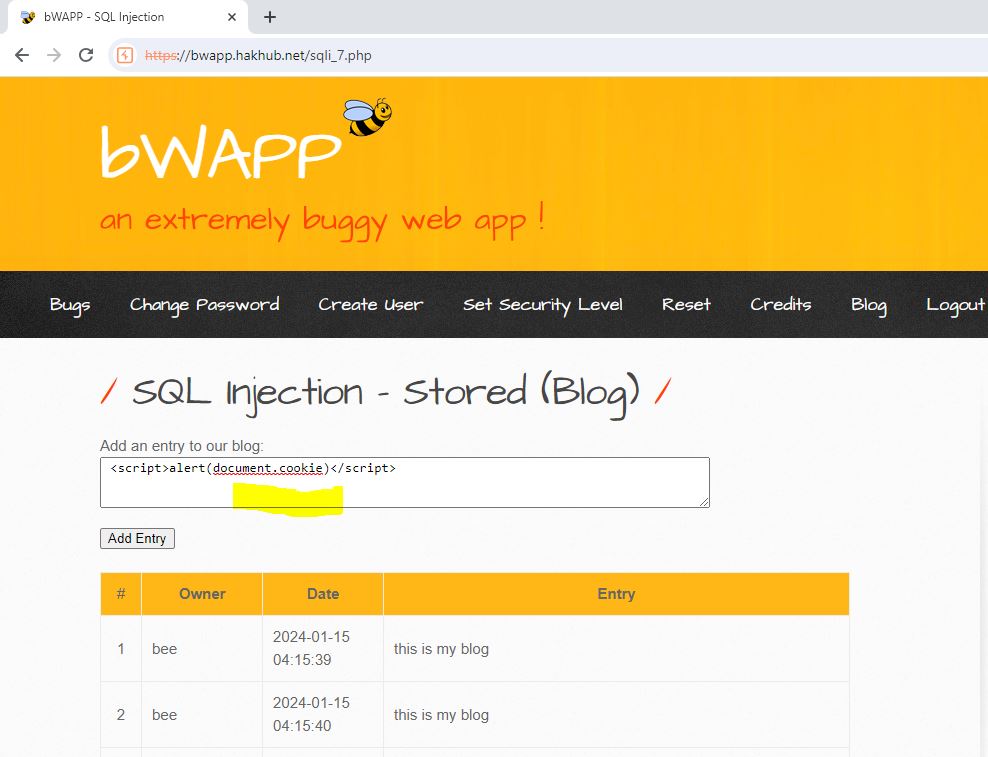
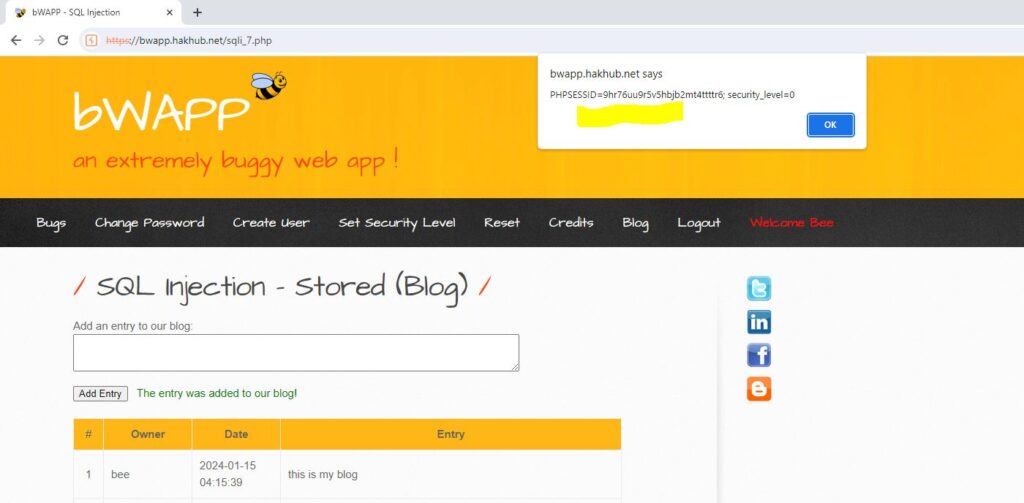
Server XSS occurs when untrusted user-supplied data is included in an HTTP response generated by the server. The source of this data could be from the request, or from a stored location. As such, you can have both Reflected Server XSS and Stored Server XSS.
In this case, the entire vulnerability is in server-side code, and the browser is simply rendering the response and executing any valid script embedded in it.
For example: enter the text <script>alert(document.cookie)</script> and submit it to the server site that is displaying an error message because it is missing to prevent an XSS attack
3.2 Client XSS
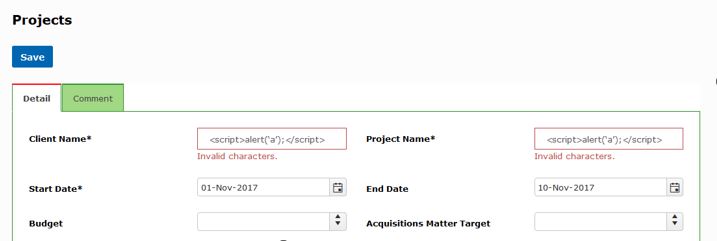
Client XSS occurs when untrusted user-supplied data is used to update the DOM with an unsafe JavaScript call. A JavaScript call is unsafe if it can be used to introduce valid JavaScript into the DOM. The ultimate source of the data could have been from a request, or from a stored location on the client or the server. As such, you can have both Reflected Client XSS and Stored Client XSS.
For example: enter the text <script>alert(‘a’);</script> on text fields and submit that displayed validation message because it prevented XSS attack in a client site by current code. If not it will save invalid data and display unexpected messages like the above when viewing the current record
4. Conclusion
In conclusion, we need to verify security issues with OWASP Top 10 because of the below reasons
– It is a standard awareness document for both developers and web application security testers.
– It helps us to identify and prioritize the most common and severe security risks to our web application or system. It provides us with guidance and best practices on how to prevent, detect, and mitigate these security risks.
– It also helps us to improve the quality, functionality, and performance of our web application or system. It can protect our reputation, customer trust, and business value from
Reference link:
- https://affinity-it-security.com/how-to-test-for-session-management-vulnerabilities/