



Automation API testing involves automating the process of testing APIs to ensure they function correctly according to their requirements. This typically includes verifying aspects such as response status codes, response bodies, and adherence to defined schemas or specifications. Automated testing helps streamline the testing process, increase test coverage, and improve the reliability of software applications. In this article, I’d like to share how I’ve reduced the effort required for implementing testing scripts.
1. Solution for Generating Scripts Automatically
Here is a popular workflow for implementing automation testing scripts for API testing.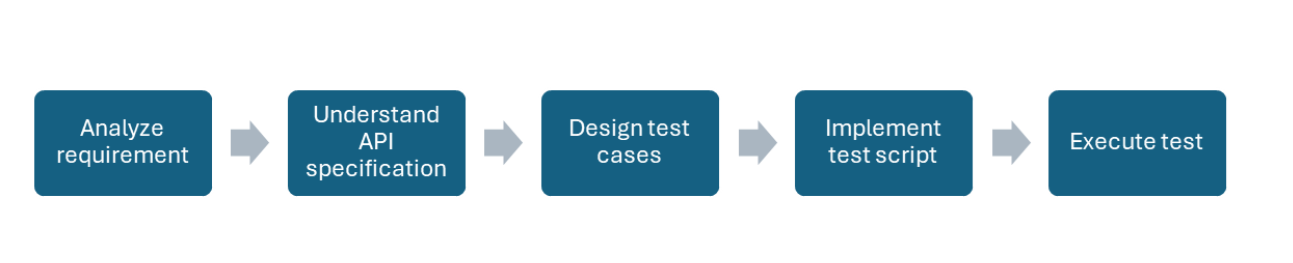 First, we need to clearly understand the business requirements for the API. The API specification is usually defined in structured documents/tools like WADL, WSDL, or Swagger in JSON/XML format. After designing test cases, we implement the test script using a chosen API testing tool such as RestSharp, Rest-Assured, or Karate. While implementing the test script isn’t difficult, it can be time-consuming. Instead of manually implementing the test script, we can create an application to handle the following tasks:
- Read the API specification file: Parse the information related to the API, such as endpoints, methods, parameters, and bodies.
- Generate the script: Create the script for calling the API based on the parsed information.
This approach helps save effort in implementing scripts for each API.
2. Sample Project
In this section, I’ll share a sample project where I created an application to generate test scripts.
2.1 Project Requirements
Let’s say we need to implement API automation testing for a project using Swagger as the API specification tool and Karate as the automation tool.
2.1.1 Swagger
Swagger is a popular framework for describing APIs using a standardized and language-agnostic format. It provides tools for developers to design, document, and consume RESTful APIs. With Swagger, developers can create a detailed specification of their API, including endpoints, request and response formats, authentication methods, and more. This specification can be used to generate interactive documentation, client SDKs, and server stubs, making it easier to work with and understand APIs.
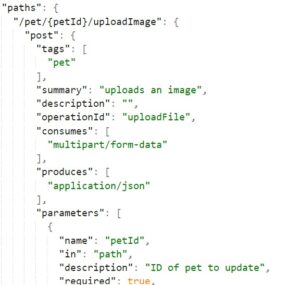
You can see from this file, we can get the endpoint, method, and parameter of the API. We can write a program to retrieve this API information automatically.
2.1.2 Karate
Karate is a powerful open-source tool for testing web services, including RESTful APIs. It allows you to write test cases in a simple, readable syntax using the Gherkin format. Here is a sample for creating a user with Karate.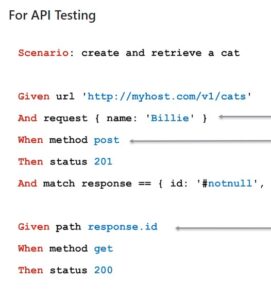
For this project, we need to read the JSON file for the API specification and implement the API call with Karate.
2.2 Application Implementation
I created an application in Java to generate the Karate script from the Swagger file.
2.2.1 How the Application Works
The application performs the following steps to generate the test script:
public static void main(String[] args) throws IOException {
    Map<String, RequestInfo> scenarios = getDataFromSwagger();
    createDirectory("template");
    writeDataToFileCommon("template", scenarios);
    writeDataToFileSetUpAndAssertion("template", scenarios);
}
- getDataFromSwagger: This function parses the JSON file and saves information like endpoints, descriptions, methods, and parameters into a map.
private static Map<String, RequestInfo> getDataFromSwagger() {
    Map<String, RequestInfo> scenarios = new HashMap<>();
    openAPI = new OpenAPIV3Parser().read("swagger.json");
    openAPI.getPaths().forEach((key, item) -> {
        RequestInfo requestInfo = new RequestInfo(item, key);
        scenarios.put(requestInfo.getScenario(), requestInfo);
    });
    return scenarios;
}
- writeDataFileCommon: This function generates scripts for single APIs. The generated files can be utilized for test cases.
private static void writeDataToFileCommon(String directory, Map<String, RequestInfo> scenarios) {
    for (RequestInfo requestInfo : scenarios.values()) {
        writeData(directory, requestInfo.getScenario(), "@ignore", true);
        writeData(directory, requestInfo.getScenario(), "Feature: Skeleton of request", true);
        writeData(directory, requestInfo.getScenario(), "   Background:", true);
        writeData(directory, requestInfo.getScenario(), "     * url baseUrls", true);
        writeData(directory, requestInfo.getScenario(), "   " + requestInfo.getAnnotation(), true);
        writeData(directory, requestInfo.getScenario(), "   Scenario: " + requestInfo.getScenarioName(), true);
        writeData(directory, requestInfo.getScenario(), "   " + requestInfo.getSummary(), true);
        writeData(directory, requestInfo.getScenario(), "      * path " + """ + requestInfo.getPath() + """, true);
        for (String param : requestInfo.getParameterQueries()) {
            writeData(directory, requestInfo.getScenario(), "      * param " + param + " = " + param, true);
        }
        writeData(directory, requestInfo.getScenario(), "      * method " + requestInfo.getMethod().toUpperCase(Locale.ROOT), true);
        writeData(directory, requestInfo.getScenario(), "      * if (responseStatus != status) karate.log('State of " + requestInfo.getMethod() + " response: ' + responseStatus + ' ' + response)", true);
        writeData(directory, requestInfo.getScenario(), "      * match responseStatus == status", true);
    }
}
- writeDataToFileSetUpAndAssertion: This function generates the test cases file, calling the previously generated files for API execution and response verification.
private static void writeDataToFileSetUpAndAssertion(String directory, Map<String, RequestInfo> scenarios) {
    for (RequestInfo requestInfo : scenarios.values()) {
        writeData(directory, requestInfo.getScenario(), "Feature: " + CaseFormat.LOWER_CAMEL.to(CaseFormat.UPPER_CAMEL, requestInfo.getTag()), false);
        writeData(directory, requestInfo.getScenario(), "   " + requestInfo.getAnnotation(), false);
        writeData(directory, requestInfo.getScenario(), "   Scenario: " + requestInfo.getScenarioName(), false);
        writeData(directory, requestInfo.getScenario(), "   " + requestInfo.getSummary(), false);
        writeData(directory, requestInfo.getScenario(), "      * table RequestParam", false);
        writeData(directory, requestInfo.getScenario(), "         | Sr.No | Scenario|" + requestInfo.getTableParamHeader() + " status |", false);
        writeData(directory, requestInfo.getScenario(), "         | 1 | '" + (requestInfo.getSummary().length() < 50 ? requestInfo.getSummary() : StringUtils.left(requestInfo.getSummary(), 50) + "...") + "'|  " + requestInfo.getTableParamType() + "200|", false);
        writeData(directory, requestInfo.getScenario(), "      * def jsonResponse =  call read('classpath:api/" + requestInfo.getTag() + "/common/" + requestInfo.getScenario() + "Common.feature" + requestInfo.getAnnotation() + "') RequestParam", false);
        writeData(directory, requestInfo.getScenario(), "      * karate.log(jsonResponse)", false);
    }
}
2.2.2 How to Use the Application
- Clone the source code from the following location: GitLab Repository
- Install Java, Gradle, and an IDE such as IntelliJ.
- Import the project into the IDE.
- Update the Swagger file location in the
getDataFromSwaggerfunction. - Execute the application.
- The generated file will be in the “template” folder. You can change the generated script folder in the Main function.
Conclusion
In this article, I shared a quick sample for generating test scripts. While there is room for improvement, it demonstrates how we can develop an application to automatically generate test scripts based on the API specification file. This approach significantly reduces the effort required for automation script implementation.