


Spring Cloud Camel AWS Integration has become a key solution for teams looking to simplify microservice communication, database access, and event-driven messaging using Amazon Web Services. In today’s world of cloud-native applications, our ability to connect different systems quickly and reliably can determine the success of our software.
At times, we need to route data from a REST API to a database, or trigger an action using a message queue — all without managing the complexity of underlying servers. That’s why combining Spring Cloud, Apache Camel, and AWS offers us a robust foundation to create microservices that are efficient, resilient, and easy to manage.
In this blog, we’ll walk through how we can build and deploy a Spring-Cloud Apache Camel app using AWS Fargate, while integrating Amazon RDS (for database) and Amazon SQS (for messaging). No deep AWS or Kubernetes knowledge required — we’ll keep it simple, practical, and beginner-friendly.
Understanding Spring Cloud Camel AWS Integration: Key Tools and Services (ECS, Fargate, RDS, SQS)
Spring Cloud
Think of Spring Cloud like a city planner. It helps us manage services, configurations, and traffic (requests) in a cloud application. It provides tools like load balancing, service discovery, and centralised configuration so we don’t have to write them from scratch.
Real-world analogy: Imagine we have different delivery centres (services) — Spring Cloud gives us maps, communication tools, and rules to coordinate their tasks efficiently.
Apache Camel
Apache Camel is our delivery truck that knows all the routes — it moves data from one place to another with defined logic. We tell it: “Take data from A, transform it, and send it to B.”
Example: REST API receives customer info → transform JSON → insert into a database → send confirmation to a queue.
AWS Fargate
Fargate lets us run Docker containers without managing servers. It’s like using Uber instead of owning a car — we focus only on our app, AWS takes care of the engine, gas, and maintenance.
Amazon ECS (Elastic Container Service)
ECS is like our container parking and launching area. It keeps track of all our app containers, health checks, and scaling.
Amazon RDS
RDS is a fully managed database (MySQL/PostgreSQL) that takes care of backups, patching, and high availability — we just use it like a regular SQL database.
Amazon SQS
SQS is our post office. We send messages there, and someone picks them up when they’re ready. It’s great for decoupling — if one part of the app is slow, it doesn’t block others.
Spring Cloud Camel AWS Integration Architecture: Full Connection Overview
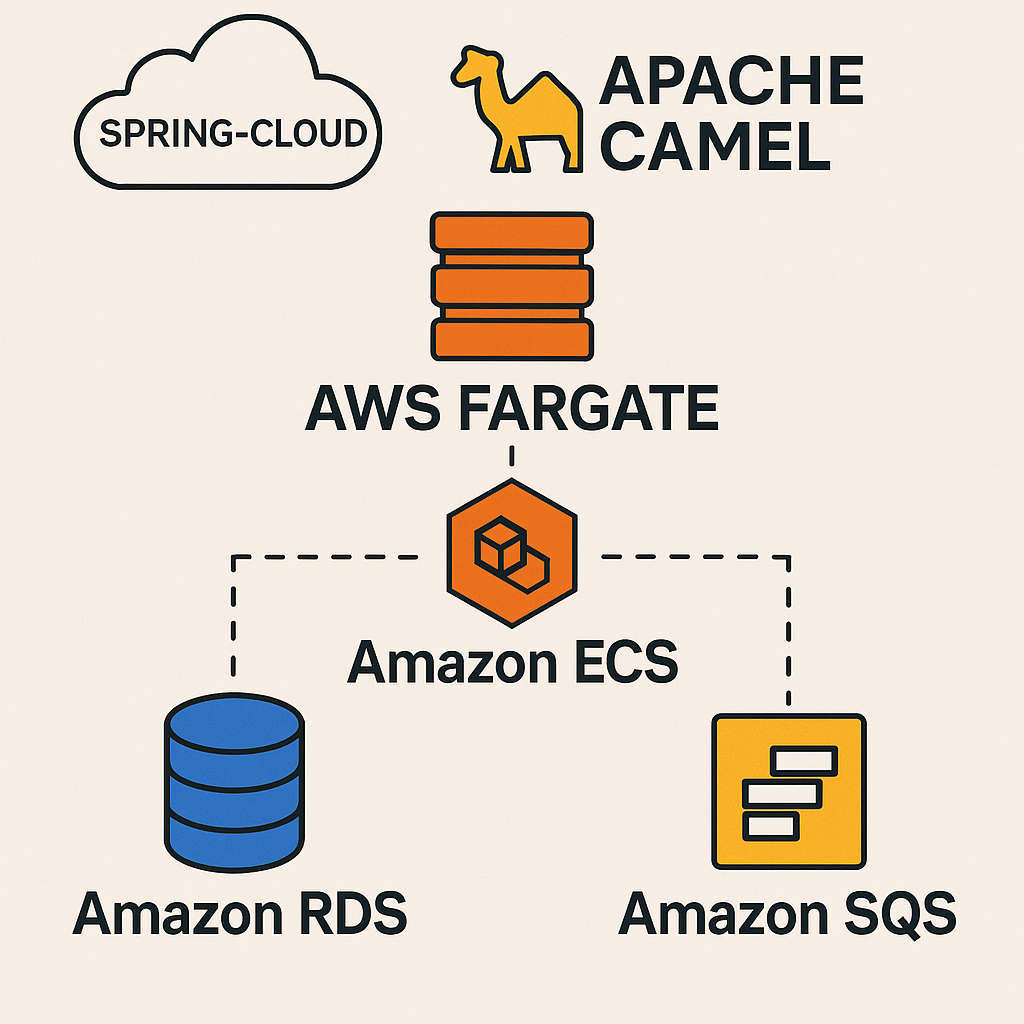
We’ll architect a simple microservices-based system leveraging the core components of Spring Cloud Camel AWS Integration.
- REST API using Spring Boot + Apache Camel
- Database (RDS) to store incoming data
- Queue (SQS) to send out events or triggers
- AWS Fargate to host everything
- ECS to manage the Fargate tasks
Step-by-Step Guide to Spring Cloud Camel AWS Integration Using Spring Boot
Step 1: Build a Spring Boot Microservice Integrated with Apache Camel
Objective: Create a simple REST API that stores data in RDS and sends a message to SQS.
Technologies: Java 17, Spring Boot, Apache Camel, Spring Data JPA
Sample Route Configuration:
@Component
public class MyCamelRoute extends RouteBuilder {
    @Override
    public void configure() {
        from("rest:post:/register")
            .unmarshal().json(JsonLibrary.Jackson, User.class)
            .process(exchange -> {
                User user = exchange.getIn().getBody(User.class);
                // Persist to DB using service
                userService.saveUser(user);
                exchange.getIn().setBody("User saved");
            })
            .to("aws2-sqs://user-events?amazonSQSClient=#sqsClient");
    }
}
Expected Output:
POST /register
{
  "name": "John Doe",
  "email": "john@example.com"
}

Response: "User saved"
Step 2: Integrate Amazon RDS
Amazon RDS is a fully managed cloud service that enables us to easily configure, run, and scale relational databases without dealing with infrastructure complexities. Instead of installing MySQL or PostgreSQL on our local machine or a virtual server, we let AWS manage it, including backups, patching, and scaling.
After creating a MySQL or PostgreSQL instance on AWS RDS, we’ll receive an endpoint like:
our-rds-endpoint.rds.amazonaws.com
Objective: Persist user data to a MySQL/PostgreSQL RDS instance.
Spring Boot Configuration (application.yml):
spring:
  datasource:
    url: jdbc:mysql://<rds-endpoint>:3306/usersdb
    username: admin
    password: secret
  jpa:
    hibernate:
      ddl-auto: update
How Spring Cloud Camel AWS Integration Connects to RDS: Configuration Explained
url: Specifies the JDBC address used by Spring Boot to locate and connect to the configured RDS database instance.usernameandpassword: These are the authentication credentials that allow the application to access the database, defined when the RDS instance was initially set up.ddl-auto=update: Tells Hibernate to synchronise the database schema with the application’s entity definitions by automatically creating or modifying tables as required.
Entity Class Example:
@Entity
public class User {
    @Id @GeneratedValue
    private Long id;
    private String name;
    private String email;
}
Expected Output:
Check RDS using SELECT * FROM user; — Should show John Doe’s record.
Step 3: Send a Message to Amazon SQS
Managing Message Queues in Spring Cloud Camel AWS Integration Using Amazon SQS
What is Amazon SQS?
Amazon Simple Queue Service (SQS) is a message queue service that allows applications to communicate and process tasks asynchronously. It decouples our services so one can send a message and move on, while another picks it up later and processes it.
This is great for things like:
- Email sending
- Notification dispatching
- Data processing pipelines
- Background jobs
Apache Camel comes with a component called camel-aws2-sqs to work with Amazon SQS.
Sending Messages to SQS in Apache Camel
We can create a Camel route that listens to a custom endpoint (like direct:sendToQueue) and sends the message to an SQS queue.
from("direct:sendToQueue")
.to("aws2-sqs://queue-name?accessKey=XXX&secretKey=YYY®ion=us-east-1");
How It Works:
direct:sendToQueue: A local Camel endpoint we trigger programmatically.aws2-sqs://queue-name: The target queue name in AWS.accessKey&secretKey: AWS credentials (better to use IAM Roles for production).region: The AWS region (likeus-east-1).
Receiving Messages from SQS in Apache Camel
Camel can also poll SQS queues and process messages using routes like this:
from("aws2-sqs://queue-name?accessKey=XXX&secretKey=YYY®ion=us-east-1")
.log("Received Message: ${body}");
Each time a message arrives in the queue, this route logs its content. We can extend it to:
- Trigger workflows
- Call other APIs
- Insert data into RDS
SQS Configuration (Camel):
@Bean
public AmazonSQS sqsClient() {
    return AmazonSQSClientBuilder.standard()
        .withRegion("us-east-1")
        .build();
}
Expected Message in Queue:
{
  "event": "UserRegistered",
  "email": "john@example.com"
}
Check the message in the AWS SQS dashboard under Messages Available.
Step 4: Dockerize the App
Dockerfile:
FROM openjdk:17
COPY target/my-camel-app.jar app.jar
ENTRYPOINT ["java","-jar","/app.jar"]
Build and Tag:
docker build -t my-camel-app .
Step 5: Push Docker Image to AWS ECR
aws ecr create-repository --repository-name my-camel-app
aws ecr get-login-password | docker login ...
docker tag my-camel-app <your-ecr-url>
docker push <your-ecr-url>
Step 6: Deploy on AWS Fargate via ECS
Steps:
- Create a new ECS Cluster.
- Define a Task Definition with:
- Image: your ECR URL
- CPU/Mem: 512/1GB
- Env Vars: RDS URL, username, SQS queue name
- Launch Service using Fargate launch type.
- Assign an IAM role that grants permissions to interact with both Amazon SQS and RDS securely.
- Expose via Application Load Balancer if public access is needed.
Result: Application deployed with no EC2 servers involved. Accessible via REST API.
Step 7: Observe Logs and Metrics
Enable CloudWatch Logs in ECS Task Definition. Use this for debugging and monitoring.
Step 8: Automate with CI/CD (Optional)
Use GitHub Actions or AWS CodePipeline to deploy when you push to Git.
Expected End-to-End Output:
- POST
/register→ Saves user in RDS + sends message to SQS - The database stores user
- SQS receives an event
- App logs in CloudWatch confirm steps
Conclusion
In this complete guide, we walked through how our Spring Cloud Camel AWS Integration project brings together containerised microservices, seamless database connectivity, and robust message handling using AWS services to develop a highly scalable, cloud-optimised solution tailored for modern microservice ecosystems., a cloud-first integration application powered by Spring Cloud, Apache Camel, and essential AWS components like Fargate, RDS, ECS, and SQS.
Here’s a quick recap of what we accomplished:
- Built a Spring Boot app that uses Camel to define message routes.
- Created a REST API to receive user data.
- Integrated the application with Amazon RDS to persist data efficiently, ensuring both reliability and security in storage.
- Integrated with Amazon SQS for asynchronous message handling.
- Dockerized and deployed the app to AWS Fargate using ECS, eliminating the need to manage servers.
- Explored best practices for monitoring, CI/CD, and security.
With this architecture, we gain high availability, scalability, and loose coupling — key features for modern microservices.
References
https://reflectoring.io/spring-camel
https://www.tutorialspoint.com/amazonrds/index.htm
https://docs.aws.amazon.com/AWSSimpleQueueService/latest/SQSDeveloperGuide/sqs-getting-started.html