


1. Introduction
Nowdays, data-driven world, real-time data synchronization is no longer a luxury — it’s a necessity. Whether you’re building event-driven systems or keeping microservices in sync, Change Data Capture (CDC) offers a powerful way to stream database changes as they happen.
In this post, we’ll walk through how to use Debezium — an open-source CDC platform — in combination with Kafka Connect to capture changes from Microsoft SQL Server and stream them into Apache Kafka. By the end of this guide, you’ll have a working setup that turns your SQL Server into a real-time event source.
2. What is CDC and How Debezium Works?
What is CDC (Change Data Capture)?
Change Data Capture (CDC) is a technique used to track and capture changes (INSERT, UPDATE, DELETE) made to data in a database, in near real-time. Instead of constantly polling the entire table for changes, CDC provides an efficient way to extract only the delta — the actual rows that have changed.
In Microsoft SQL Server, CDC is a built-in feature that, when enabled, automatically records changes to specified tables into special system tables using transaction log data. These change tables store historical versions of rows, along with metadata about the operation type and timestamp.

How Debezium Works with Kafka Connect
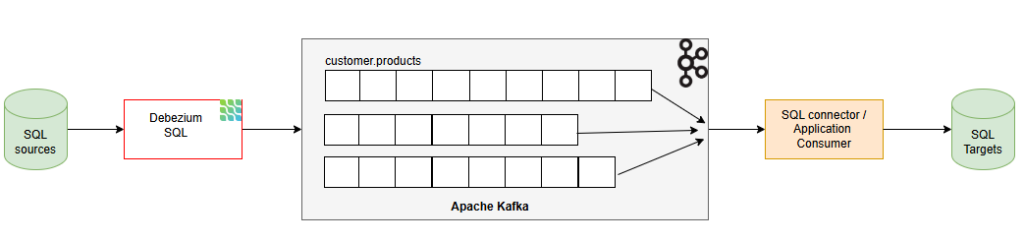
Debezium is an open-source CDC platform built on top of Kafka Connect, supporting multiple databases including SQL Server. It captures data changes from the transaction log and emits JSON events (insert/update/delete) to corresponding Kafka topics.
When used with SQL Server, Debezium:
- Connects via a preconfigured connector
- Reads the transaction log to detect changes
- Publishes change events to Kafka
- Manages offsets and schema history for consistency
3. System Requirements
Before setting up CDC with Debezium, Kafka, and SQL Server, ensure your environment meets the following requirements:
- Docker
- Docker compose
- Linux/Ubuntu
- SQL databases: source-db and target-db (required version 2016 SP 1 or later)
- Debezium, Kafka, Zookeeper, Kafka Connect
- Kafka 2.7 ++ or later
- Kafka Connect: same as Kafka version (2.x or 3.x)
- Debezium Source Connector, Sink Connector (or custom application consumer)
4. Setup
SSH to Linux/Ubuntu then following below steps:
4.1 Download & Setup resources by docker compose
version: '3.8'
services:
  zookeeper:
    image: confluentinc/cp-zookeeper:7.4.0
    environment:
      ZOOKEEPER_CLIENT_PORT: 2181
    ports:
      - "2181:2181"
  kafka:
    image: confluentinc/cp-kafka:7.4.0
    depends_on:
      - zookeeper
    ports:
      - "9092:9092"
    environment:
      KAFKA_BROKER_ID: 1
      KAFKA_ZOOKEEPER_CONNECT: zookeeper:2181
      KAFKA_ADVERTISED_LISTENERS: PLAINTEXT://kafka:9092
      KAFKA_LISTENER_SECURITY_PROTOCOL_MAP: PLAINTEXT:PLAINTEXT
      KAFKA_OFFSETS_TOPIC_REPLICATION_FACTOR: 1
  connect:
    image: debezium/connect:2.5
    ports:
      - "8083:8083"
    environment:
      BOOTSTRAP_SERVERS: kafka:9092
      GROUP_ID: 1
      CONFIG_STORAGE_TOPIC: connect-configs
      OFFSET_STORAGE_TOPIC: connect-offsets
      STATUS_STORAGE_TOPIC: connect-status
      KEY_CONVERTER: org.apache.kafka.connect.json.JsonConverter
      VALUE_CONVERTER: org.apache.kafka.connect.json.JsonConverter
      CONNECT_KEY_CONVERTER_SCHEMAS_ENABLE: "false"
      CONNECT_VALUE_CONVERTER_SCHEMAS_ENABLE: "false"
      CONNECT_PLUGIN_PATH: /kafka/connect
    depends_on:
      - kafka
  source-sqlserver:
    image: mcr.microsoft.com/mssql/server:2019-latest
    environment:
      SA_PASSWORD: "Debezium@123"
      ACCEPT_EULA: "Y"
    ports:
      - "1433:1433"
  target-sqlserver:
    image: mcr.microsoft.com/mssql/server:2019-latest
    environment:
      SA_PASSWORD: "Debezium@123"
      ACCEPT_EULA: "Y"
    ports:
      - "1434:1433"
4.2 Setup database source SQL and enable CDC for database, table
CREATE DATABASE inventory;
GO
USE inventory;
GO
CREATE LOGIN debezium WITH PASSWORD = 'Debezium@123';
GO
CREATE USER debezium FOR LOGIN debezium;
GO
ALTER ROLE db_owner ADD MEMBER debezium;
GO
CREATE TABLE dbo.products (
  id INT PRIMARY KEY,
  name NVARCHAR(255),
  description NVARCHAR(512),
  weight DECIMAL(10,2)
);
GO
EXEC sys.sp_cdc_enable_db;
GO
EXEC sys.sp_cdc_enable_table
  @source_schema = N'dbo',
  @source_name = N'products',
  @role_name = NULL;
GO
NOTED:
Microsoft does not noble, but we can use jammy (22.04) to install.
Remove old repo: sudo rm /etc/apt/sources.list.d/mssql-release.list
Add repo Ubuntu 22.04 (jammy)
curl https://packages.microsoft.com/keys/microsoft.asc | sudo apt-key add -
echo "deb [arch=amd64] https://packages.microsoft.com/ubuntu/22.04/prod jammy main" | sudo tee /etc/apt/sources.list.d/mssql-release.list
sudo apt-get update
Install mssql-tools and odbc
sudo ACCEPT_EULA=Y apt-get install -y mssql-tools unixodbc-devAdd mssql-tools to PATH
echo 'export PATH="$PATH:/opt/mssql-tools/bin"' >> ~/.bashrc
source ~/.bashrc
sqlcmd -?
5. Register Debezium SQL Server Source Connector
curl -X POST http://localhost:8083/connectors \
  -H "Content-Type: application/json" \
  -d '{
    "name": "sqlserver-source-connector",
    "config": {
      "connector.class": "io.debezium.connector.sqlserver.SqlServerConnector",
      "database.hostname": "source-sqlserver",
      "database.port": "1433",
      "database.user": "sa",
      "database.password": "Debezium@123",
      "database.names": "inventory",
      "database.server.name": "sqlserver1",
      "table.include.list": "dbo.products",
      "topic.prefix": "sqlserver1",
      "database.history.kafka.bootstrap.servers": "kafka:9092",
      "database.history.kafka.topic": "schema-changes.inventory",
      "decimal.handling.mode": "double",
      "key.converter.schemas.enable": "false",
      "value.converter.schemas.enable": "false",
      "database.encrypt": "false"
    }
  }'
6. Using Sink Connector to push data to target SQL database
curl -X POST http://localhost:8083/connectors \
  -H "Content-Type: application/json" \
  -d '{
    "name": "jdbc-sink-connector",
    "config": {
      "connector.class": "io.debezium.connector.jdbc.JdbcSinkConnector",
      "tasks.max": "1",
      "topics": "sqlserver1.dbo.products",
      "connection.url": "jdbc:sqlserver://target-sqlserver:1433;databaseName=inventory",
      "connection.user": "sa",
      "connection.password": "Debezium@123",
      "auto.create": "true",
      "auto.evolve": "true",
      "insert.mode": "upsert",
      "pk.mode": "record_key",
      "pk.fields": "id",
      "delete.enabled": "true",
      "dialect.name": "SqlServerDatabaseDialect",
      "table.name.format": "${topic}",
      "key.converter": "org.apache.kafka.connect.json.JsonConverter",
      "value.converter": "org.apache.kafka.connect.json.JsonConverter",
      "key.converter.schemas.enable": "false",
      "value.converter.schemas.enable": "false"
    }
  }'
7. Conclusion
In this guide, we walked through the full process of setting up Change Data Capture (CDC) for SQL Server using Debezium and Apache Kafka. From enabling CDC on your database to configuring Kafka Connect and deploying the Debezium connector, you now have a powerful, real-time data streaming pipeline.