


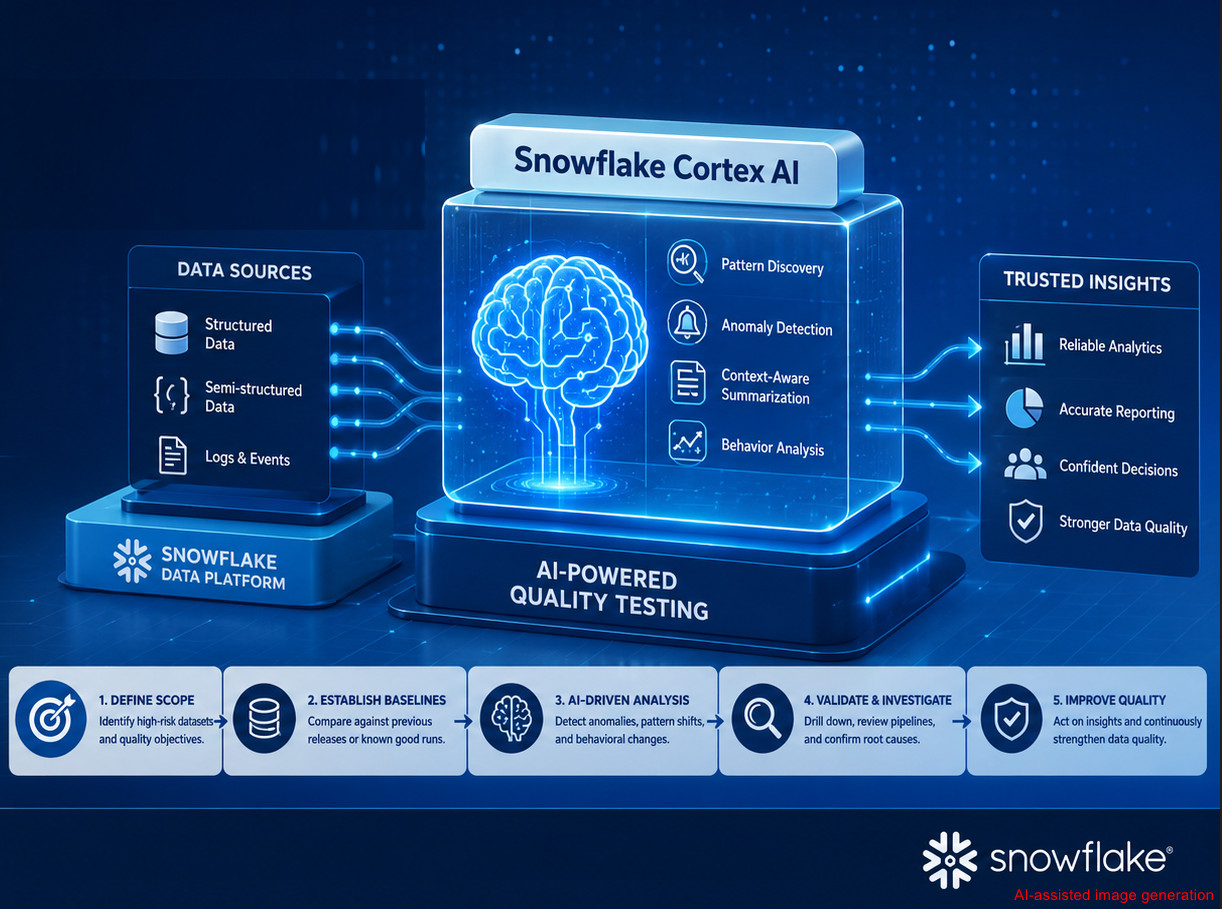
As enterprise data platforms grow in scale and complexity, traditional data testing approaches—based on predefined rules and static assertions—are no longer sufficient on their own. Modern analytics ecosystems ingest massive volumes of structured and semi-structured data, generate continuously evolving insights, and change rapidly with each release. In many cases, these changes outpace the ability of manual or rule-based tests to detect quality risks effectively.
Snowflake Cortex AI introduces a new paradigm: AI-powered insight generation and anomaly detection directly within the data platform itself. While Cortex AI is often associated with analytics and data science teams, it offers significant value for our testing teams – especially those responsible for validating data pipelines, analytical outputs, and AI-enabled capabilities. In this blog, we explore how Snowflake Cortex AI can enhance data quality testing. We will examine why traditional testing alone is no longer enough, outline tester-focused Cortex AI use cases, and explain how testing teams can integrate Cortex AI into their existing test strategies without architectural disruption.
1. What Is Snowflake Cortex AI?
Snowflake Cortex AI is a built-in capability within the Snowflake platform that allows us to apply AI and large language models (LLMs) directly to our data using SQL and natural language interfaces. Unlike traditional machine learning platforms, Cortex AI does not require:
– External infrastructure
– Model training or deployment
– Data movement outside Snowflake
From the testing perspective, Cortex AI enables:
– AI-driven exploration of very large datasets
– Pattern discovery and anomaly detection beyond static rules
– Context-aware summarization of pipeline logs and events
– Scalable quality checks embedded directly at the data layer
Rather than replacing existing test automation or data quality frameworks, Cortex AI acts as a data-aware test accelerator, enhancing testers’ ability to analyze behavior, detect regressions, and uncover hidden data risks that deterministic rules may miss
2. Why consider Snowflake Cortex AI?
Traditional data testing relies on schema validation, constraint checks, and expected versus actual comparisons to ensure data conforms to predefined technical and business rules. While these deterministic methods are essential and remain a foundation of data quality assurance, they struggle to detect unknown edge cases, silent data drift, or subtle behavioral changes as data volume, variety, and velocity increase. As a result, data issues may remain unnoticed despite meeting formal rules, only surfacing after they impact downstream analytics, machine learning models, or business decisions.
Snowflake Cortex AI complements these approaches by enabling exploratory, behavior-focused testing at scale and early detection of regressions between releases or pipeline runs. By analyzing patterns, relationships, and contextual signals directly within the data, Cortex AI helps testing teams uncover hidden risks that deterministic rules may miss, making it especially valuable for analytics-driven platforms where data accuracy directly affects business outcomes.
3. How to Use Snowflake Cortex AI for Testing?
The following steps outline how we can prepare the environment and begin applying Cortex AI as part of an AI-driven data testing strategy.
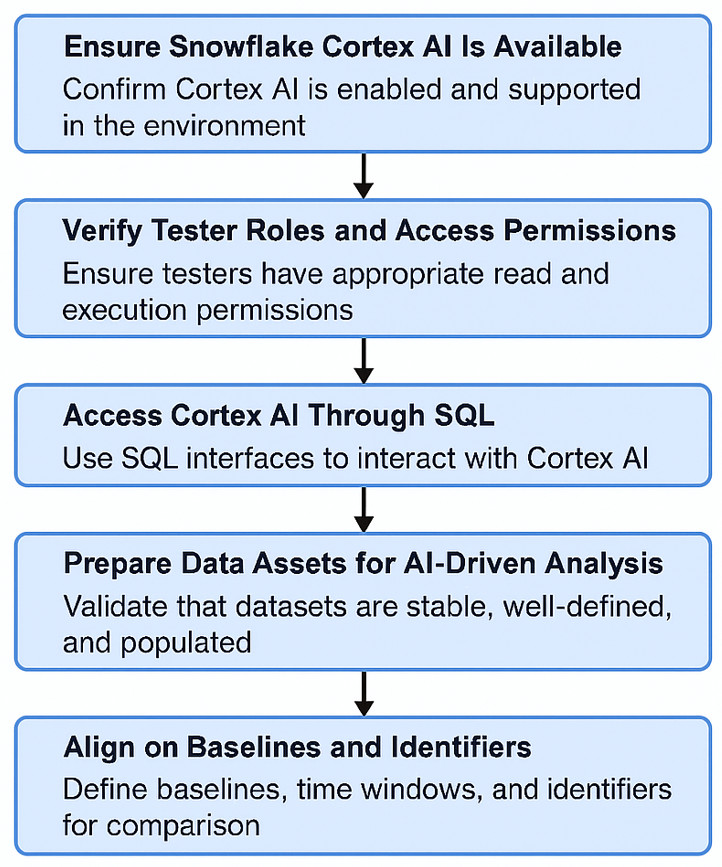
3.1. Ensure Snowflake Cortex AI Is Available
Snowflake Cortex AI operates natively within Snowflake—there is no separate AI service to deploy. To proceed:
– The Snowflake account must have Cortex AI enabled
– The environment must support AI functions under the CORTEX namespace (or a company-specific abstraction layer)
– The account must be in a region where Cortex AI is supported
Once enabled, Cortex AI becomes available directly within standard SQL execution contexts
3.2. Verify the roles and access permissions
Do not need administrative privileges, but appropriate permissions are required. Minimum access typically includes:
– Select access to curated analytical datasets
– Read access to historical snapshots, release data, or pipeline run metadata
– Permission to execute CORTEX.* functions
– Read-only access to ingestion, transformation, and pipeline logs
This ensures that we can perform AI-driven analysis safely—without modifying production data.
3.3. Access Cortex AI Through SQL
There is no separate UI or console for Cortex AI. If we can run SQL in Snowflake, and then we can use Cortex AI. Cortex AI is accessible via:
– Snowflake Web UI worksheets
– SQL clients using JDBC/ODBC
– Orchestrated jobs in CI/CD pipelines
All interaction occurs through SQL-like query patterns, making adoption straightforward for us, already familiar with SQL-based validation and test automation.
3.4. Prepare Data Assets for AI-Driven Analysis
Before executing Cortex AI queries, ensure that the target datasets are:
– Stable and consistently populated
– Well defined from a business perspective
Common candidates include:
– Engagement and event tracking tables
– Reach, frequency, and KPI aggregates
– Audience segmentation outputs
– Ingestion, transformation, and pipeline execution logs
These datasets should ideally be exposed through curated tables or views that represent business-level behavior, rather than raw ingestion data.
3.5. Align on Baselines and Identifiers
Cortex AI relies heavily on comparative context. We should agree upfront on:
– What defines a “previous release.”
– How a last known good run is identified
– Standard time windows used for comparison
Typical identifiers include: release_id, run_id, snapshot names, and date time ranges. These identifiers are passed directly into Cortex AI queries and anchor the AI analysis to meaningful baselines.
4. Real-World Case Study
Note: To ensure project confidentiality and data security, all real project-related information used in this case study has been anonymized and replaced with representative data.
The following approach outlines a practical quality-assurance workflow, demonstrated through a real-world Market Research and Audience Measurement project.
The project operates in the Market Research, Media Analytics, and Audience Measurement domains, where the platform measures audience reach, frequency, and engagement across digital channels. It combines survey data, panel data, and large-scale behavioral event streams to deliver analytics dashboards and actionable insights for analysts, marketers, and media planners. Architecturally, the system relies on event ingestion and enrichment pipelines that feed into Snowflake, handling both structured and semi-structured data, with downstream models generating KPIs and audience segments.
From a testing perspective, we are responsible for validating data ingestion and transformations, ensuring the accuracy and stability of audience metrics, and detecting behavioral regressions across releases. However, despite extensive SQL-based validations and reconciliation checks, data quality issues were often detected late, during analyst reviews or client-facing discussions.
Traditional testing approaches, such as schema validation, completeness checks, and KPI threshold monitoring, proved insufficient for identifying deeper issues like segment-specific regressions, silent behavioral drift, and cross-dimensional inconsistencies
4.1 Quality Assurance Workflow: Step-by-Step
To address the challenges above, Snowflake Cortex AI was introduced into the testing workflow through the following steps:
4.1.1 Define Testing Scope & Data Focus
• Identify high-risk quality assurance objectives where AI adds value, such as Audience behavior shifts, segment level regressions, metric stability across releases
• Select high-value, behavior-driven datasets, such as Engagement events, reach & frequency aggregates, audience segments KPIs, ingestion and transformation logs
• Outcome: Cortex AI targets behavioral risk, not basic validation.
• Ask Cortex AI using a SQL-like Query Pattern, such as
SELECT EXAMPLE.CORTEX.IDENTIFY_HIGH_RISK_DATASETS(
candidate_tables => [
‘EXAMPLE.AUDIENCE_ENGAGEMENT_EVENTS’,
‘EXAMPLE. AUDIENCE_KPI_FACTS’,
‘EXAMPLE.REACH_FREQUENCY_DAILY’,
‘EXAMPLE.EVENT_INGESTION_LOGS’
],
evaluation_criteria => [
‘variance’,
‘distribution_change’,
‘segment_sensitivity’
]
) AS qa_focus_recommendations;
4.1.2 Establish Baselines for Comparison
• Define a stable reference point, such as the previous release, last known good run, or prior time window
• Compare against, such as the current release, the latest data refresh.
• Outcome: This context allows us to distinguish expected market changes from true regressions. Ask Cortex AI using a SQL-like Query Pattern, such as
WITH baseline AS (
SELECT *
FROM EXAMPLE_AUDIENCE_ENGAGEMENT_EVENTS
WHERE run_id = (
SELECT MAX(run_id)
FROM EXAMPLE_PIPELINE_RUNS
WHERE status = ‘GOOD’
)
),
current AS (
SELECT *
FROM EXAMPLE_AUDIENCE_ENGAGEMENT_EVENTS
WHERE run_id = ‘CURRENT_RUN’
)
SELECT
CORTEX.EXAMPLE_ANALYZE_DISTRIBUTION_CHANGE(
baseline_data => (SELECT * FROM baseline),
current_data => (SELECT * FROM current),
metrics => [‘session_duration’, ‘event_count’],
dimensions => [‘platform’, ‘region’]
) AS run_comparison;
4.1.3 Run AI-Driven Exploration & Anomaly Detection
• Use Cortex AI to analyze patterns instead of fixed thresholds, such as audience distribution shifts, segment-specific metric changes, unexpected spikes, drops, or skews.
• Treat AI results as investigation signals, early warning indicators, not automatic failures
• Outcome: Stronger regression detection in naturally variable audience data. Ask Cortex AI using a SQL-like Query Pattern such as
SELECT
CORTEX.EXAMPLE_COMPARE_DISTRIBUTIONS(
baseline_query => ‘
SELECT platform, region, session_duration
FROM EXAMPLE_AUDIENCE_ENGAGEMENT_EVENTS
WHERE event_date BETWEEN ”YYYY-MM-DD” AND ”YYYY-MM-DD”
‘,
current_query => ‘
SELECT platform, region, session_duration
FROM EXAMPLE_AUDIENCE_ENGAGEMENT_EVENTS
WHERE event_date BETWEEN ”YYYY-MM-DD” AND ”YYYY-MM-DD”
‘,
dimensions => [‘platform’, ‘region’],
metric => ‘session_duration’
) AS audience_distribution_analysis;
4.1.4 Validate Findings & Analyze Pipelines
• Validate AI findings with targeted checks, such as SQL drill downs, upstream ingestion, and transformation review.
• Use Cortex AI, such as summarizing ingestion errors, clustering recurring pipeline failures, and reducing manual log inspection.
• Outcome: This step ensures AI insight translates into actionable test results. Ask Cortex AI using a SQL-like query pattern, such as
SELECT
event_date,
AVG(session_duration) AS avg_session_duration,
COUNT(*) AS event_count
FROM EXAMPLE_AUDIENCE_ENGAGEMENT_EVENTS
WHERE device_type = ‘MOBILE’
AND region = ‘LATAM’
AND event_date BETWEEN ‘YYYY-MM-DD’ AND ‘YYYY-MM-DD‘
GROUP BY event_date
ORDER BY event_date;
4.2 Case Study Conclusion
Market research and audience measurement platforms present unique data quality challenges: scale, complexity, and behavior-driven insights. Traditional testing remains necessary but insufficient on its own. Snowflake Cortex AI enables us to:
– Detect silent regressions
– Validate audience behavior at scale
– Monitor analytics quality continuously
By embedding AI-driven insight directly into the data platform, we evolve from rule enforcer to strategic quality intelligence partner, supporting more reliable research outcomes and data-driven decision making.
5. Conclusion
As modern data ecosystems become increasingly complex, traditional validation approaches based solely on static rules and deterministic assertions are no longer sufficient to ensure data quality at scale. Snowflake Cortex AI introduces a more intelligent and adaptive approach to testing by enabling us to analyze data behavior, identify anomalies, and detect quality risks earlier in the development lifecycle, all within the existing Snowflake environment.
By leveraging Cortex AI, we can gain deeper visibility into data patterns, improve regression testing capabilities, and reduce the maintenance burden caused by brittle validation logic. More importantly, it shifts the focus of data quality testing from simply verifying data structure to understanding the meaning, consistency, and reliability of the data itself.
Rather than replacing traditional testing practices, Snowflake Cortex AI acts as a powerful test accelerator that enhances existing quality strategies. By adopting this approach can build more resilient, scalable, and trustworthy data platforms – providing greater confidence in analytics, reporting, and AI-driven decision-making.