


What are Large Language Models
Large language models symbolize systems trained on extensive datasets of human text, capable of effectively understanding and processing this textual information in a human-like manner.
Among the notable applications/models that many might have encountered are GPT-4,Azure Open AI ,Chat GPT, Bing Chat, and Bard, to mention a few.
These models have truly transformed the landscape of use of AI in application and have open a lot of new opportunity to solve many different types of challenges and have made human to you their language in a effective manner to get the answers that they need from the machine.
Need of AI Orchestrator
When utilizing large language models (LLMs), we work with plain text, often referred to as prompts. These prompts enable LLMs to grasp user intentions and generate relevant responses accordingly.
While immensely beneficial for addressing straightforward and general inquiries, LLMs sometimes encounter scenarios demanding more than just a single prompt to achieve the desired outcome.
There are numerous situations where a multi-step approach becomes necessary, requiring more nuanced input beyond a single query to accomplish the intended task effectively.
1) When you want data for reference
2) Many Times calls to do task one by one
3) Use previous history to maintain the context
4) Use different plugins and other AI tools to interaction much easier
These all things are a lot harder to just do a single API call and also might require much complex and structured setup to do a certain task easily and there comes the need of a Tool or SDK that can easily manage and use tools like Semantic memory , History , Tools and many other features in a easy way.
Semantic Kernel : Orchestrate Your AI App
Numerous frameworks and tools facilitate AI orchestration, among which the Semantic Kernel stands out prominently.
This is a Easy Plug and Play type AI orchestrator that enable us to make fully driven AI Application over LLMs and even integrate various things using LLMs in current application in a clean and easy manner and make use of multiple language support Mainly C# , Python and Java
We would Mainly be using C# in this Blog.
We can easily use the Latest and Stable Nuget Package in our existing .Net Application using Following Commands
dotnet add package SemanticKernel --version 1.0.0Features of Semantic Kernel
- Prompt Templating: – This is the way to make Prompts that can easily be used as a template and can then be modified Using Basic Parameters
- Semantic / Native Functions: – These are the Building Blocks of you application that can be used to join together or can be used separately to perform so specific task.
- Planners: – A powerful way to not only organize but also to automate the task using various function while utilizing the LLM itself.
- Persona:- Give your application the power of personality so you can judge, predict and set the behaviour in a better way.
- Prompt Chaining: – A prompt can not only be a single text but also be used to chain together by using various components to make a good and unitality type prompt that can be used in an easier fashion.
- Semantic Memory: – We all have used search that used word matching, but this is the new way to search using Semantic Ie with the meaning that make the application be more human like memory.
- Plugin Making / Integration: – There are many already prebuild plugins and these can also be used in your application and be a part of a much open community to not only make but also make ones.
- Using Pre and Post Hooks: – You can easily modify the function that comes into the prompt and also to change the output of the result from the LLMs.
Prompt Templating in Semantic Kernel
Prompt tempting allows you to define templates in Semantic Kernel that can be filled with parameters to generate responses.
These templates act as prompts that the AI agent can use to gather more context or request additional information from the user.
For example, you may have a template called “Greetings” that says “Hello! My name is {agent name}. How can I help you today?”. When this template is executed, it will fill in the {agent name} parameter with the actual name of the AI agent.
Templates are defined using a simple JSON format. Each template has a unique name that is used to reference it. It also contains the text of the template which can include parameter placeholders wrapped in curly braces.
This allow us to use them inside a Function to have parameters be input and use effectively in many situations like
- Insertion of Question asked by the User
- To input data / history in the prompt to use it effectively
- Gather Data and other parameters to get Dates ,latest info from Plugins and Systems etc
Code Sample
// Create a Semantic Kernel template for chat
var cookingPrompt = kernel.CreateFunctionFromPrompt(
    @"I want to cook a very delicious recipe using the ingredients that suite my taste
    Ingrident: {{ingridents}}
 Taste:{{taste}}
    Assistant: "
);
//This is a prompt template that can be used in a way that it will make the user to easily make his Ingredient and taste be set as a parameters
//Using the Prompt Template we can use it inside a function or change it according to our wish
Function In Semantic Kernel
Functions in programming serve to solve problems by receiving specific inputs, allowing for their reuse. Similarly, AI functions operate in a comparable manner.
Leveraging Language Model Models (LLMs) and Intent Prompts, these AI functions adeptly identify which functions to employ and when. They seamlessly integrate into Planners, enabling the execution of assigned tasks efficiently.
In Semantic Kernel there are mainly broad 2 ways that functions can be classified
Native Functions
There are several tasks that a LLMs can’t do on its own and may require code to help it out it is when Native functions comes into Picture that helps LLMs to do many basic to advance task with ease and make our application better and some these cases are
- Retrieve the Data from a database.
- Know the Current Time
- Perform complex Math
- Memorization like Semantic Data [Vector Database]
The best part about Semantic Kernel is that many of these Native Function that we might need in our Application are already pre build and be called in Semantic Kernel easily Like Math , Github etc Functions
Code Sample
[KernelFunction, Description("Take the square root of a number")]
public static double Sqrt(
    [Description("The number to take a square root of")] double number1
)
{
    return Math.Sqrt(number1);
}
//A Simple way to get root
Semantic Functions
We’ve observed certain functionalities where LLMs might not excel, necessitating the use of Native functions to supplement them. At times, utilizing other LLMs aside from the primary ones becomes essential for executing specific tasks.
For instance, when we require a translation service, leveraging LLMs within a script capable of multiple languages enhances the feasibility and efficiency of running tasks sequentially. This method involves calling LLMs repeatedly with prompts, facilitating smoother task execution.
These Semantic Functions also come with feature to use the Prompt Template be there and make them use and Combined with Hooks to take the input and output manipulation be in a better way and make the process to get our desired result in a better way.
Code Sample
public class Semantic
{
    private IKernel _kernel;
    private ISKFunction historySummary;
    private string historyPrompt;
    private readonly IConfiguration _config;

    public Semantic(IConfiguration config)
    {
        _config = config;
        string model = _config["ModelDeploymentID"];
        string endpoint = _config["EnpointOfModel"];
        string key = _config["ModelKey"];

        _kernel = Kernel.Builder
            .WithAzureChatCompletionService(model, endpoint, key, true)
            .Build();

        historyPrompt = @"[Role]
You are an assistant that helps to easily summarize the historical chat of a person in very few words without losing the context and main sense.
ChatHistory:{{$history}}
Output:";

        historySummary = _kernel.CreateSemanticFunction(
            historyPrompt,
            maxTokens: 3000,
            functionName: "historySummaryFunc",
            skillName: "historySummarySkill",
            description: "This can be used to summarize the conversation");
    }

    public async Task<string> Summarizer(string history)
    {
        try
        {
            var context = new ContextVariable();
            context["history"] = history;
            var result = await _kernel.RunAsync(context, historySummary);
            return result.Result;
        }
        catch (Exception ex)
        {
            return ex.Message;
        }
    }
}
Planners In Semantic Kernel
We have already seen the Power of Function it can enable us to easily do lot of task and using them we can not only add the functions to LLMs but also enable LLMs to do a specific task that we want.
These function are quite good and also very powerful but then comes the problem that how to use them like many add features , many uses LLMs and many provide Prompts chaining Possibility but as the scope become larger so does the use and flow of these functions / skills so we come with a problem that how we can automate them to solve our specific use case.
Planners use LLMs to create plans for solving tasks, utilizing functions’ details such as their names, parameters, and descriptions to devise solutions.
Action Planner
The Name suggests a strong focus on goals, aiming to solve problems by identifying the most suitable functions from its arsenal to achieve the desired outcome. It simplifies function calling, making it dynamic and effortless.
However, its simplicity lies in concentrating on just 1-2 functions at a time, allowing for a step-by-step approach.
Code Sample
// Initialize a new instance of the ActionPlanner class
ActionPlanner planner = new ActionPlanner(kernelInstance);

// Use ActionPlanner to select the most appropriate function for a specific goal
Plan result = await planner.CreatePlanAsync(goal);
// Execute the selected function with the provided instructions and rationale
await plan.InvokeAsync();
Sequential Planner
We’ve discovered that the Action planner lacks the capability to transition smoothly between functions, which proves highly beneficial for situations requiring more intricate solutions. Utilizing the Sequential Planner becomes essential to reach optimal outcomes in such cases.
This is a Planner that make a plan leveraging the LLM to not only find correct function but make a sequence / steps in a way how they can pass from one to other in a easier fashion.
Code Sample
// Instantiate a new SequentialPlanner with a kernel instance and optional config or prompt
SequentialPlanner planner = new SequentialPlanner(kernelInstance);

// Create a plan asynchronously based on the provided goal
Plan plan= await planner.CreatePlanAsync(goal);

// Execute the generated plan and pass outputs between steps as needed
await kernel.RunAsync(plan);
Prompt Chaining in Semantic Kernel
When utilizing functions, they serve a valuable purpose, although certain functions have the capability to interconnect one prompt with another.
This amalgamation results in a more intricate prompt, and by leveraging a Planner, one can automate this sequence in alignment with specific goals, ultimately yielding desired outcomes. This iterative process of transferring prompts or inputs from one function to another is commonly referred to as Prompt Chaining.

Code Sample
using Microsoft.SemanticKernel;
using Microsoft.SemanticKernel.Connectors.OpenAI;

public class Program
{
    public static void Main(string[] args)
    {

  string model = ""
        string endpoint = "";
        string key = "";

        IKernel kernel =  Kernel.Builder
            .WithAzureChatCompletionService(model, endpoint, key, true)
            .Build();

        var jokeFunc = kernel.RegisterNativeFunction("JokeGenerator", "tell_joke");
        var poemFunc = kernel.RegisterNativeFunction("PoemGenerator", "continue_poem");

        var jokePrompt = $@"Generate a fuuny joke about {{jokeTopic}}: {{JokeGenerator.tell_joke}}";
        var poemPrompt = @"A Short poem: {{jokeResult}} {{PoemGenerator.continue_poem 5}}";

        Console.Write("Enter joke topic: ");
        var jokeTopic = Console.ReadLine();
        var jokeResult = kernel.Invoke(jokePrompt, new KernelArguments() { { "jokeTopic", jokeTopic } });

        var poemArgs = new KernelArguments() { { "jokeResult", jokeResult } };
        var poemResult = kernel.Invoke(poemPrompt, poemArgs);

        Console.WriteLine(poemResult);
    }
}
Output
Input Question : I want a joke over weather

Joke Generated :
Why did the weather report go to school?

Because it wanted to become a little "brighter" and learn how to "cloud" the judgment of meteorologists!

Poem Output:
It studied winds that whispered tales,
And gathered clouds in airy trails.
To grasp the secrets of the sky,
And understand when storms drew nigh.

In classrooms filled with lightning spark,
It sought to learn the weather's arc.
To cast a veil upon the sun,
Or paint the sky when day was done.

With lessons learned from dawn till night,
It aimed to forecast with insight.
To tease the rain or clear the haze,
And mystify in myriad ways.

So, off it went to meteor's school,
To master all the weather's rule.
To be a force that's ever clever,
And in forecasts, play forever.
Persona
In software development, the concept of a “persona” plays a pivotal role in shaping how an AI agent interacts with users. Think of a persona as the personality and behavioral guidelines for the AI.
It goes beyond merely defining whether the agent is friendly, sarcastic, or helpful; it significantly influences how the AI responds to specific situations or stimuli. For instance, by crafting a persona, developers can instruct the AI to seek assistance if it encounters uncertainties or to provide more detailed explanations when guiding users through complex tasks.
In practical terms, implementing a persona involves embedding a system prompt, often termed as a ChatHistory object, within the AI application. This object encapsulates the persona, carrying the essence of all prior interactions between the AI and the user.
For instance, in our example scenario, employing the persona within the ChatHistory prompts the AI to inquire more, ensuring it gathers comprehensive information before executing a task. Ultimately, this approach cultivates a more informed and nuanced AI response, tailored to user preferences and conversational context.
Semantic Memory using Vector Databases
Memory is really important for any application may it be a normal or a AI powered application and for LLMs the things we make to make our memory better and also provide language support using Embedding and Semantic Memory.
Vector Databases in AI applications involve mapping each word or line into a high-dimensional vector space, enabling machines to readily comprehend and utilize the information.
The idea is that similar words or data will have similar vectors, and different words or data will have different vectors. This helps us measure how related or unrelated they are, and also perform operations on them, such as adding, subtracting, multiplying, etc. Embedding are useful for AI models because they can capture the meaning and context of words or data in a way that computers can understand and process.
With semantic kernel we can not only save , use and also interact with the Vector Database with many native Support of Popular databases like Chroma DB , Quadrant, Pinecone Etc
Code Sample
using Microsoft.SemanticKernel.Connectors.AI.OpenAI;
using Microsoft.SemanticKernel.Connectors.Memory.Qdrant;
using Microsoft.SemanticKernel.Memory;
using Microsoft.SemanticKernel.Plugins.Memory;
using System;
using System.Collections.Generic;
using System.Threading.Tasks;

namespace GPT.Qdrant
{
    public partial class Qdrant
    {
        private const string requestCollection = "", queryCollection = "";
    private ISemanticTextMemory kernel;
    private readonly IConfiguration _configuration;

    public Qdrant(IConfiguration configuration)
    {
        _configuration = configuration;

        string URL = _configuration["QdrantSettings:Url"] ?? "";
        int SIZE = Convert.ToInt32(_configuration["QdrantSettings:Size"] ?? "1536");
        string AzureEndpoint = _configuration["AzureSettings:Endpoint"] ?? "";
        string ApiKey = _configuration["AzureSettings:ApiKey"] ?? "";

        kernel = new MemoryBuilder()
            .WithAzureTextEmbeddingGenerationService("text-embedding-ada-002", AzureEndpoint, ApiKey)
            .WithQdrantMemoryStore(URL, SIZE)
            .Build();
    }
        public async Task<IList<string>> GetCollection() => await kernel.GetCollectionsAsync();

        public async Task DeleteCollection(string collection, string key) => await kernel.RemoveAsync(collection, key);

        public async Task<string> CheckInQdrant(string request, float threshold = 0.945f)
        {
            try
            {
                var results = kernel.SearchAsync(requestCollection, request, limit: 1, minRelevanceScore: threshold);

                bool isEmpty = true;
                string sqlQuery = null;
                await foreach (var r in results)
                {
                    isEmpty = false;
                    string id = r.Metadata.Id;
                    MemoryQueryResult? lookup = await kernel.GetAsync(queryCollection, id);
                    sqlQuery = lookup.Metadata.Text;
                }
                if (isEmpty == true) return null;
                else return sqlQuery;
            }
            catch (Exception ex)
            {
                return null;
            }
        }

        public async Task SaveInQdrant(string request, string sql_query)
        {
            try
            {
                string id = Guid.NewGuid().ToString();
                var x = await kernel.SaveInformationAsync(requestCollection, id: id, text: request);
                var y = await kernel.SaveInformationAsync(queryCollection, id: id, text: sql_query);
            }
            catch { }
        }
    }
}
Plugins in Semantic Kernel
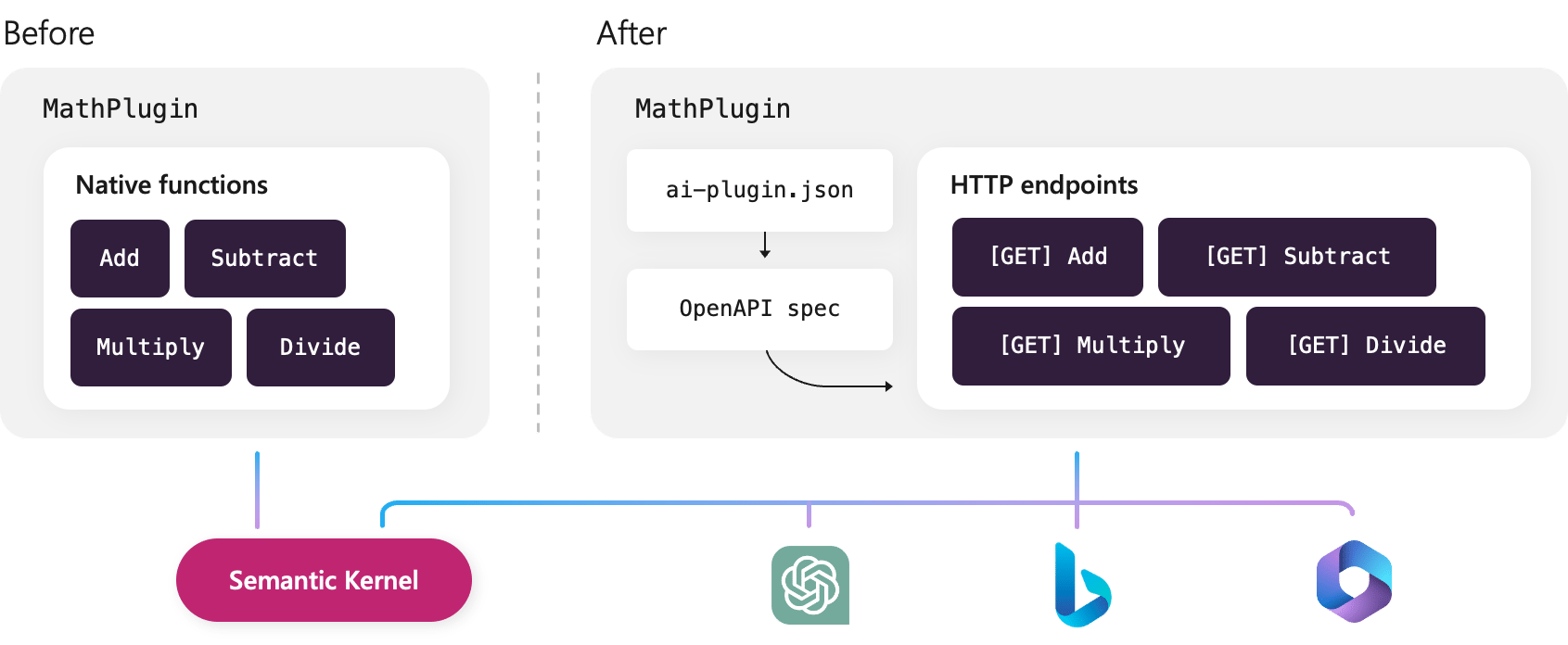
We have seen that have made complex and very useful function that can solve many tasks like getting data from our DB , Math operation and many more situations.
With Semantic kernel and Azure Functions we can easily deploy and use it in any place that support Open AI plugins by realizing as our own by just exposing these functions/ skills using good HTTPS Connection
Pre And Post Hooks
This is one of the latest feature in semantic kernel that allow to unlock the power of adjusting the input and output of the functions that we have in our own way
When we are Dealing with AI Skills/Functions the input and the output are something that we always need to verify or even modify sometimes that might be difficult with many simple / existing functions but this allows you to easily modify the output and the input in you own way
The Pre Hook feature facilitates effortless modification or validation of incoming inputs. It allows users to easily alter or validate the incoming data, streamlining the process for input manipulation or validation.
Post Hook enables user to change the output that could be the modification / validation or other things from the output.
The most advantageous aspect of these Pre and Post hooks lies in their ability to apply not only to functions but also to their capacity to combine with planners, enabling seamless automation.
Conclusion
Utilize the Semantic Kernel as an excellent tool for your application by integrating it and initiating the setup using the Official Github Repo as a starting point.