


In the era of big data and advanced analytics, Databricks has emerged as a leading platform for simplifying data processing and analysis. This blog post delves into the seamless integration of Databricks with Java, exploring the capabilities, advantages, and practical applications of this powerful combination.
What is Databricks?
Databricks is a cloud-based big data analytics platform that unifies data engineering, data science, and machine learning. It is built on top of Apache Spark, an open-source distributed computing system, providing a collaborative environment for data scientists and engineers to work with large-scale datasets.
Java and Databricks Integration:
Integrating Java with Databricks opens up a world of possibilities for developers and data scientists. Java, being a versatile and widely-used programming language, can leverage the distributed computing capabilities of Databricks to process and analyze massive datasets efficiently.
Key Components of Databricks with Java:
1. Databricks Runtime:
Databricks Runtime is the foundation of the Databricks platform. It includes Apache Spark and other components optimized for performance and reliability. Java applications seamlessly integrate with Databricks Runtime, enabling the execution of distributed data processing tasks.
2. Databricks Workspace:
Databricks Workspace provides a collaborative environment for teams to work on data projects. Java developers can utilize the integrated notebook interface to write and execute Java code directly within the Databricks environment.
3. Cluster Configuration:
Databricks allows the configuration of clusters with specific runtime versions and libraries. Java libraries and dependencies can be easily incorporated into the cluster settings, ensuring compatibility with Java-based applications.
Getting Started with Java on Databricks:
1. Setting Up Databricks Cluster:
Create a Databricks cluster with the required runtime version, specifying the number of worker nodes based on the processing needs.
# Example Databricks CLI command to create a cluster
databricks clusters create --cluster-name my-java-cluster --spark-version 3.0.x --num-workers 5
2. Creating a Java Notebook:
Within the Databricks Workspace, create a new notebook and choose the language as Java. This notebook serves as the development environment for writing and executing Java code.
// Sample Java code in Databricks notebook
public class DatabricksJavaExample {
    public static void main(String[] args) {
        System.out.println("Hello, Databricks with Java!");
    }
}
3. Importing Java Libraries:
Import external Java libraries by specifying Maven coordinates or uploading JAR files directly into the Databricks environment. This step enables the use of Java libraries for data processing and analytics.
// Maven coordinates example in Databricks notebook
%scala
spark.conf.set("spark.jars", "com.example:my-java-library:1.0.0")
4. Java Code Execution:
Write Java code in the notebook to interact with large datasets, perform data transformations using Spark APIs, and leverage machine learning libraries available in the Databricks environment.
// Example Java code for data processing in Databricks notebook
import org.apache.spark.sql.Dataset;
import org.apache.spark.sql.Row;

public class DataProcessingExample {
    public static void main(String[] args) {
        // SparkSession creation
        SparkSession spark = SparkSession.builder().appName("DataProcessingExample").getOrCreate();

        // Load a dataset
        Dataset<Row> inputDataset = spark.read().csv("/path/to/input/dataset.csv");

        // Perform data transformations
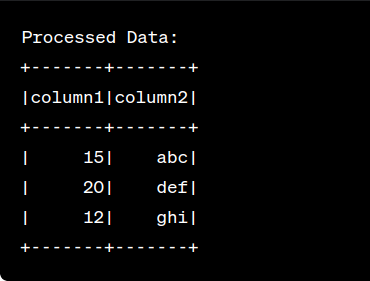
        Dataset<Row> processedData = inputDataset.select("column1", "column2").filter("column1 > 10");

        // Show the result
        processedData.show();
    }
}
After running the code you will see the following output :
Advantages of Using Java with Databricks:
1. Scalability:
- Java applications running on Databricks can seamlessly scale across distributed clusters, handling massive datasets with ease.
2. Versatility:
- Java’s versatility allows developers to build custom data processing solutions, integrate with external systems, and implement complex algorithms within the Databricks environment.
3. Collaboration:
- Databricks Workspace facilitates collaboration among data scientists and Java developers, fostering an integrated approach to data science and engineering tasks.
Conclusion:
The integration of Java with Databricks brings forth a powerful combination for organizations aiming to harness the potential of big data analytics. Developers can leverage Java’s robustness and Databricks’ distributed computing capabilities to build scalable and efficient data processing solutions. As the landscape of data science continues to evolve, the synergy between Java and Databricks paves the way for innovative and impactful data-driven applications.
Reference:
For further insights, please Check my profile.