



You may see CORS errors a lot during software development process. This happens when we stand in our website and make a request to different origin (website, API). There are several ways to bypass this error. But today I will explain detail about CORS, why we need it and which solution should we apply to our application.

1. What is CORS ?
CORS (Cross-origin Resource Sharing) is a HTTP mechanism that allows resource sharing from one origin to a different origin in a secure way. To put it simple, it checks whether a website can make requests to different origin (it could be a website, API…)
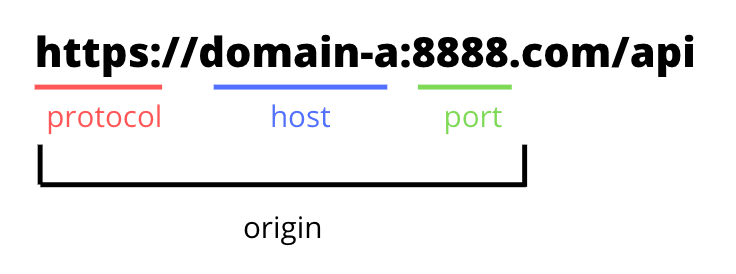
An origin is constituted by Schema, Hostname, Port. We occurs CORS when 2 URLs have a different Schema or Hostname or Port
2. Why we need CORS?
First, we have to acknowledge that SOR (Same-origin policy) is a mechanism that permits scripts contained in a first web page to access data in a second web page but only if both of web pages have the same origin. Browsers by default implement this policy to prevents malicious scripts on other pages from obtaining access to data from our web pages via attacks likes CSRF.
But that means it also restricts access to other resources needed for the web page (e.g: APIs, images, …), that’s why we have CORS – it checks whether the server will permit requests from other origins to make sure that the cross-origin requests are safe, therefore obtain access to data. And we engineer can decide which origin need to be allowed.
3. How does CORS work?
First, our browser have security mode that enabled CORS policy so whenever a website tries to make a cross-origin request, the browser will automatically add these CORS headers to the our request or preflight request:
Origin – indicates the origin that caused the request
Access-Control-Request-Method – let the server know which HTTP methods will be used when the actual request is made
Access-Control-Request-Headers – let the server know which HTTP headers the client might send when the actual request is made
And then the server will return a response with some of these CORS headers to allow or block the request:
Access-Control-Allow-Origin – indicates whether the response can be shared with requesting code from the given origin
Access-Control-Max-Age – indicates how long the results of a preflight request can be cached
Access-Control-Allow-Methods – specifies one or more methods allowed when accessing a resource in response to a preflight request
Access-Control-Allow-Headers – includes the Access-Control-Request-Headers to indicate which HTTP headers can be used during the actual request
* Preflight Request
If the preflight request is needed, the browser will send preflight request first to check whether if the CORS protocol is understood and a server is aware using specific methods and headers. After that, browser will send the main request to the server.
Preflight request is sent to server automatically by the browser if the request has any of these 3 conditions. If the request doesn’t meet any above conditions, browser will send directly our request.
Conditions:
1. Uses methods other than GET, POST, or HEAD.
2. Includes headers other than Accept, Accept-Language or Content-Language.
3. Has a Content-Type header value other than application/x-www-form-urlencoded, multipart/form-data, or text/plain.
For example: a client might be asking a server if it would allow a DELETE request, before sending a DELETE request:
OPTIONS /resource/foo

Access-Control-Request-Method: DELETE

Access-Control-Request-Headers: x-requested-with

Origin: https://foo.bar.org
If the server allows it, then it will respond to the preflight request with:
HTTP/1.1 204 No Content

Connection: keep-alive

Access-Control-Allow-Origin: https://foo.bar.org

Access-Control-Allow-Methods: POST, GET, OPTIONS, DELETE

Access-Control-Allow-Headers: X-Requested-With

Access-Control-Max-Age: 86400
After the preflight request is finished, client will send the main request (which is the DELETE) to server.
CORS is a HTTP mechanism, specifically as it relates request headers and response header. CORS will help us to let the browser know we allow server to response back to HTTP requests. A common use case is Frontend can’t interact with Backend server. Why? Because the response’s header doesn’t include request’s origin. Therefore, CORS does not block the request – it blocks the response. Specifically, a CORS error occurs when the Access-Control-Allow-Origin from response header doesn’t include request’s origin.
For example: https://domain-a.com can’t get resources from https://domain-b.com if the response from domain-b doesn’t return Access-Control-Allow-Origin: httlps://domain-a.com or Access-Control-Allow-Origin: * (* means all domains)
4. 3 ways to handle CORS:
We have many ways to resolve this CORS problems but I suggest we should choose reasonable way base on specific circumstance:
1. Ask Backend to add request origin to response header
Since the response header doesn’t include the request’s origin, we will have to change the response header by adding origin to the list of origin access permission from server, or simply add * to allow every origin (* is not recommended)
This is the best way to fix the problem because we can control who can access the resource and it doesn’t require any other works from clients.
2. Use a middleware – Proxy server
If we can’t access directly to the origin, we can ask somebody to do it for us and then receive the response from that person. That person is middleware. Middleware will be in charge for sending the request for us, get the response, add header to the response and finally send it back to our browser.
And because we need to go through middleware so sometime it can takes more time for the request. You can create your own middleware or use library called Cors-anywhere, or extension Requestly.
3. Disabled Browser security mode or using Extension
Most modern browsers do not allow you to completely disable CORS via settings or extensions so these solutions are not highly recommended 🙁 but it maybe be useful whenever you can’t change the server settings for some reasons. This solution only suitable for development environment.
Disable via Extensions: Allow CORS, CORS Unblock,…
Disable via Brower settings: https://stackoverflow.com/questions/3102819/disable-same-origin-policy-in-chrome