



Introduction
In today’s data-driven world, having the ability to efficiently analyze vast amounts of data is crucial for businesses and organizations. Google BigQuery stands out as a serverless, highly scalable, and cost-effective multi-cloud data warehouse designed to handle large-scale data analytics. This blog aims to delve into the features, advantages, and practical uses of Google BigQuery, offering a comprehensive guide for data professionals and enthusiasts.
What is Google BigQuery?
Google BigQuery is a serverless, fully managed cloud-based data warehouse offered by Google Cloud Platform (GCP) that enables lightning-fast SQL queries using the processing power of Google’s infrastructure. It is built to handle massive datasets effortlessly, providing a robust platform for data analytics and machine learning. Unlike traditional data warehouses that require extensive infrastructure management, BigQuery handles everything behind the scenes. This allows you to focus on what truly matters: analyzing your data and extracting valuable knowledge.
Key Features
- Serverless Architecture: BigQuery’s serverless nature means you don’t have to worry about infrastructure management, allowing you to concentrate on data analysis.
- Scalability: BigQuery automatically scales to handle your data, regardless of size, making it ideal for both small and enterprise-level datasets.
- Real-Time Analytics: The platform supports real-time data ingestion and analysis, essential for applications needing up-to-the-minute insights.
- Cost-Effectiveness: With a pricing model based on the amount of data processed, BigQuery offers a cost-efficient solution for data analytics.
- SQL Support: BigQuery supports standard SQL, making it accessible for anyone with SQL knowledge.
- Integration with Google Cloud: Seamless integration with other Google Cloud services like Google Data Studio, Google Sheets, and AI Platform enhances its functionality.
- Speed: Leveraging Google’s cutting-edge infrastructure, BigQuery delivers blazing-fast query speeds, enabling you to get answers in seconds, not hours.
Advantages of Google BigQuery
- Speed: BigQuery’s in-memory analysis capabilities ensure rapid query execution, even with extensive datasets.
- Simplicity: Its serverless design simplifies operations, removing the need for resource provisioning or server management.
- Flexibility: Supporting both batch and streaming data, BigQuery caters to a variety of analytical needs.
- Security: BigQuery provides robust security features, including data encryption and identity/access management.
- Machine Learning: BigQuery ML allows the creation and deployment of machine learning models directly within the platform using SQL.
Getting Started with Google BigQuery
Step 1: Set Up Your Project
- Create a Google Cloud Project: Navigate to the Google Cloud Console and create a new project.
- Enable BigQuery API: In the APIs & Services dashboard, enable the BigQuery API for your project.
Step 2: Load Data
Loading data into Google BigQuery can be done in several ways, depending on the source of your data and your specific requirements. Here are the most common methods:
1. Loading Data from a Local File
Supported File Formats:
- CSV
- JSON
- Avro
- Parquet
- ORC
Steps to Load Data:
- Open the BigQuery Console:
- Go to the Google Cloud Console and select BigQuery from the navigation menu.
- Create a Dataset:
- In the BigQuery UI, click on your project name, then click on “Create dataset” and specify a Dataset ID.
- Create a Table:
- Click on the dataset you created, then click on “Create table”.
- Upload the File:
- In the “Source” section, choose “Upload” and select the file from your local system.
- Configure the Schema:
- You can either auto-detect the schema or manually specify it.
- Create the Table:
- Click on “Create Table” to load the data.
2. Loading Data from Google Cloud Storage (GCS)
Steps to Load Data:
- Upload File to GCS:
- Go to the Google Cloud Storage Console, create a bucket, and upload your file.
- Open BigQuery Console:
- Navigate to BigQuery in the Google Cloud Console.
- Create a Dataset:
- Create a new dataset if you don’t already have one.
- Create a Table:
- Click on your dataset, then “Create table”.
- Select Source:
- Choose “Google Cloud Storage” and provide the URI of your file (e.g.,
gs://your-bucket-name/your-file-name).
- Choose “Google Cloud Storage” and provide the URI of your file (e.g.,
- Configure the Schema:
- Auto-detect or manually specify the schema.
- Create the Table:
- Click on “Create Table” to load the data.
3. Streaming Data into BigQuery
Using BigQuery API:
- You can use the
tabledata.insertAllmethod to stream data in real-time.
Example Using Python Client Library:
pythonCopy codefrom google.cloud import bigquery

# Initialize client
client = bigquery.Client()

# Define the table
table_id = "your-project.your_dataset.your_table"

# Define the data to insert
rows_to_insert = [
    {"column1": "value1", "column2": "value2"},
    {"column1": "value3", "column2": "value4"},
]

# Insert data
errors = client.insert_rows_json(table_id, rows_to_insert)
if errors:
    print("Encountered errors while inserting rows: {}".format(errors))
else:
    print("Rows successfully inserted.")
Step 3: Run Queries
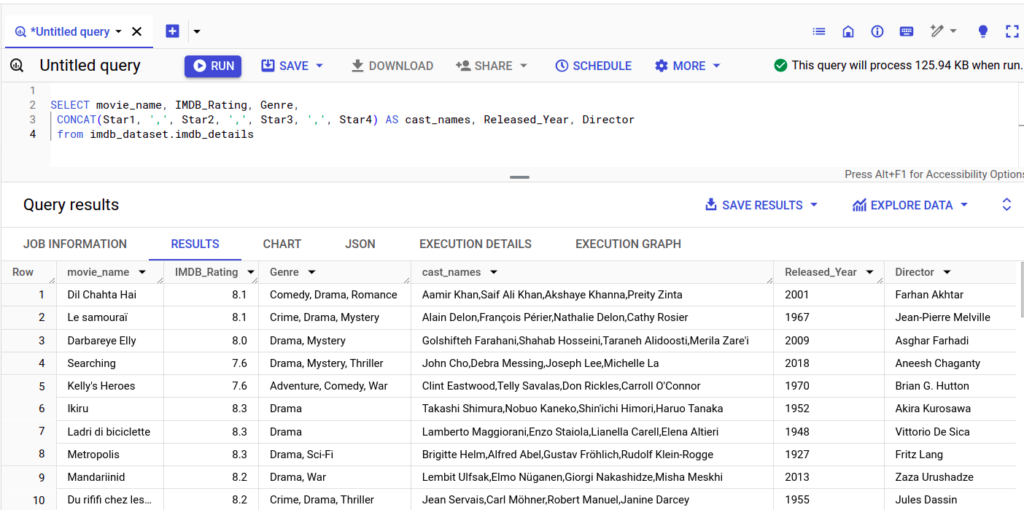
- Write SQL Queries: Utilize standard SQL to write queries in the BigQuery Console. Leverage BigQuery’s powerful SQL capabilities for data analysis.
- Optimize Performance: Implement techniques like partitioning and clustering to enhance query performance and reduce costs.
Practical Applications
- Business Intelligence: Integrate BigQuery with tools like Google Data Studio to create interactive dashboards and reports.
- Real-Time Analytics: Analyze streaming data in real-time for immediate insights into business operations.
- Machine Learning: Develop and deploy machine learning models using BigQuery ML for predictive analytics.
- Data Integration: Combine BigQuery with other Google Cloud services and third-party tools to build a comprehensive data ecosystem.
Conclusion
Google BigQuery is a powerful, versatile data warehousing solution that enables organizations to fully exploit their data’s potential. Its serverless architecture, scalability, and integration with Google Cloud services make it a top choice for various analytical applications. By leveraging BigQuery’s robust features, businesses can gain deeper insights, drive innovation, and make informed, data-driven decisions.