



Introduction
Artificial Intelligence (AI) has emerged as a game-changer, transforming industries and revolutionizing user experiences. In the realm of .NET development, integrating AI capabilities has become increasingly accessible, thanks to dedicated frameworks and tools provided by Microsoft and the open-source community. In this blog, we’ll explore the best practices, essential tools, and real-world case studies to harness the power of AI in .NET applications effectively.
Understanding AI in .NET:
Understanding AI in .NET involves exploring the various libraries, frameworks, and tools available in the .NET ecosystem for implementing artificial intelligence (AI) solutions. .NET developers can leverage several resources to build AI-powered applications, ranging from traditional machine learning algorithms to deep learning models.
Here’s a breakdown of key components for understanding AI in .NET:
1. ML.NET
- ML.NET aims to be accessible for .NET developers, enabling them to integrate machine learning into their applications using familiar languages like C# or F#.
- It offers a comprehensive suite of APIs and tools for various machine learning tasks, including data preparation, model training, evaluation, and deployment.
- ML.NET supports both traditional machine learning algorithms (e.g., decision trees, SVMs, linear regression) and newer approaches like deep learning via TensorFlow integration.
- Developers can extend ML.NET’s capabilities by creating custom machine learning components or integrating third-party libraries.
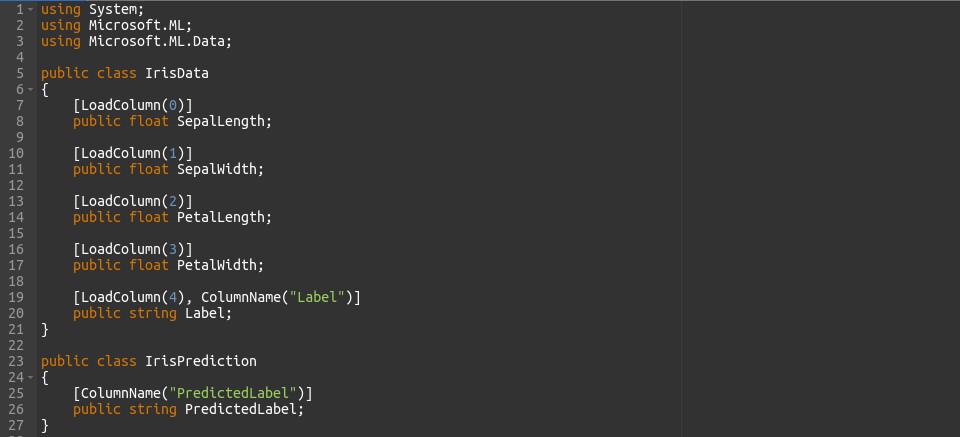
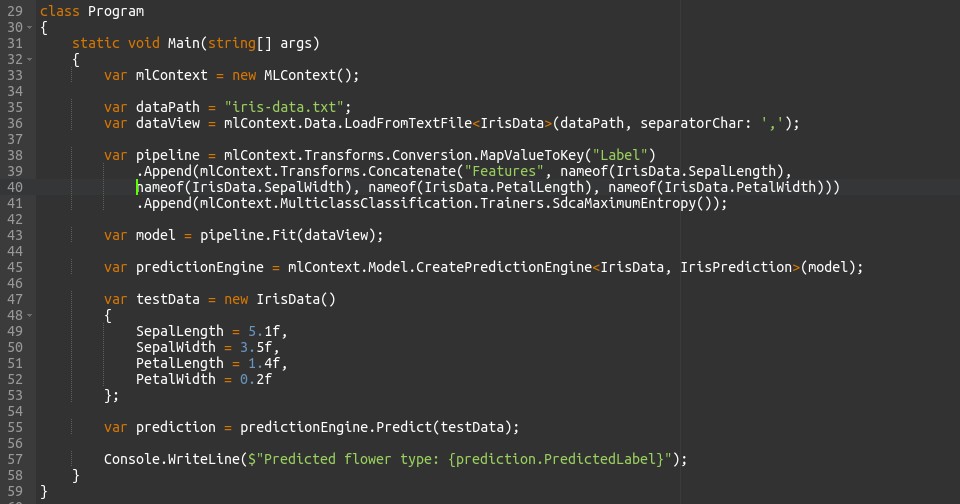
- We create classes IrisData and IrisPrediction to represent the data schema and prediction results.
- Data gets loaded from a CSV file using the LoadFromTextFile method.
- Using ML.NET’s API, we set up a data preprocessing and training pipeline. This pipeline involves assigning numeric keys to the label column and merging input features.
- We train the pipeline using the provided training data.
- A prediction engine gets generated to forecast outcomes for new data.
- Finally, we utilize sample data to make a prediction and display the projected label.
2. TensorFlow.NET
- TensorFlow.NET serves as a bridge between the TensorFlow ecosystem and the .NET platform, empowering .NET developers to utilize TensorFlow for deep learning tasks.
- It provides bindings for TensorFlow’s C API, enabling seamless integration with .NET applications.
- TensorFlow.NET supports TensorFlow’s vast array of pre-trained models, tools for training, optimization techniques, and distributed computing capabilities.
- Developers can build and train deep learning models using TensorFlow’s high-level APIs (e.g., Keras) or low-level APIs for maximum flexibility.
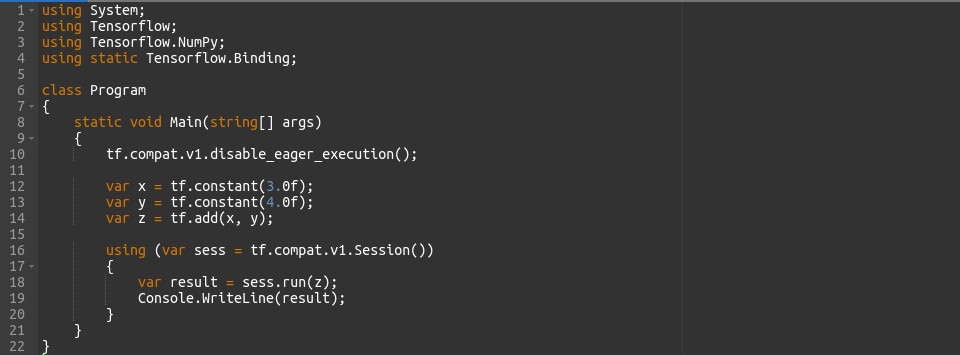
- We utilize TensorFlow.NET to construct a computation graph.
- Constants x and y get defined with values 3.0 and 4.0, respectively.
- By employing the tf.add function, we sum up these constants to establish a new TensorFlow operation z.
- A TensorFlow session is created and executed to run the computation graph, resulting in the addition of x and y, and then the result is printed.
3. CNTK (Microsoft Cognitive Toolkit)
- CNTK, developed by Microsoft Research, emphasizes scalability, performance, and flexibility in deep learning.
- While predominantly written in C++, CNTK offers .NET bindings, allowing .NET developers to leverage its capabilities.
- It features efficient implementations of various deep learning algorithms, including feedforward networks, CNNs, RNNs, etc.
- CNTK supports distributed training across multiple machines, making it suitable for large-scale neural networks.
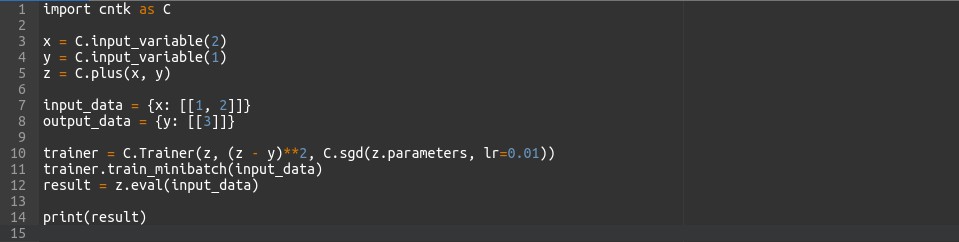
- Given CNTK’s absence of a direct .NET API, we present this example in Python.
- It showcases the process of defining variables, operations, and a trainer within CNTK.
- Input and output data are outlined.
- The model undergoes training using the designated optimizer.
- A prediction is executed and showcased.
4. ONNX (Open Neural Network Exchange)
- ONNX is an open-source format for representing deep learning models, allowing interoperability between different deep learning frameworks.
- .NET developers can leverage ONNX Runtime, a cross-platform, high-performance inference engine, to deploy ONNX models within their applications.
- ONNX enables developers to train models in one framework (e.g., TensorFlow) and deploy them in production environments using .NET, promoting flexibility and model portability.
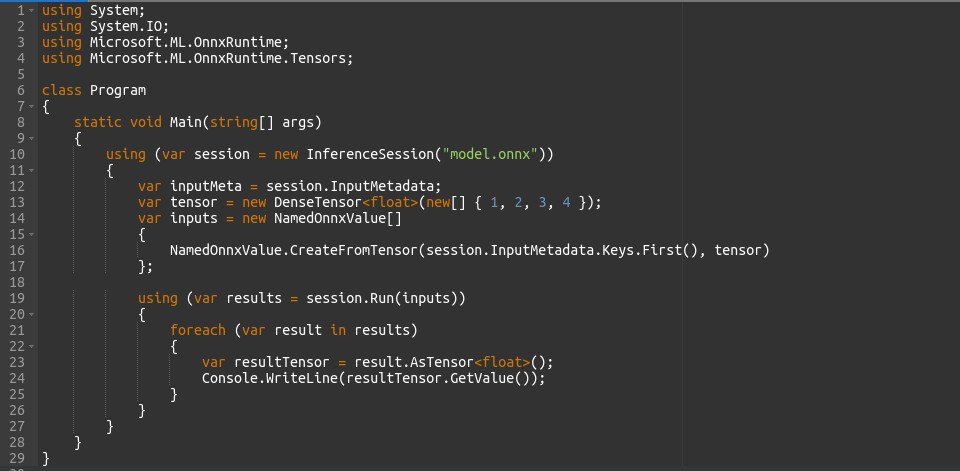
- We employ ONNX Runtime to load a pre-trained ONNX model.
- Input data is organized and forwarded to the model.
- The model executes inference, and the outcomes are exhibited.
5. Azure Cognitive Services
- Azure Cognitive Services provide a variety of pre-built AI models and APIs hosted on Microsoft Azure.
- .NET developers can seamlessly integrate these services into their applications using SDKs and REST APIs.
- Cognitive Services encompass a wide range of AI capabilities, such as computer vision, NLP, speech recognition, etc.
- Leveraging Azure Cognitive Services allows .NET developers to incorporate advanced AI features with minimal effort, reducing the need for custom model development.
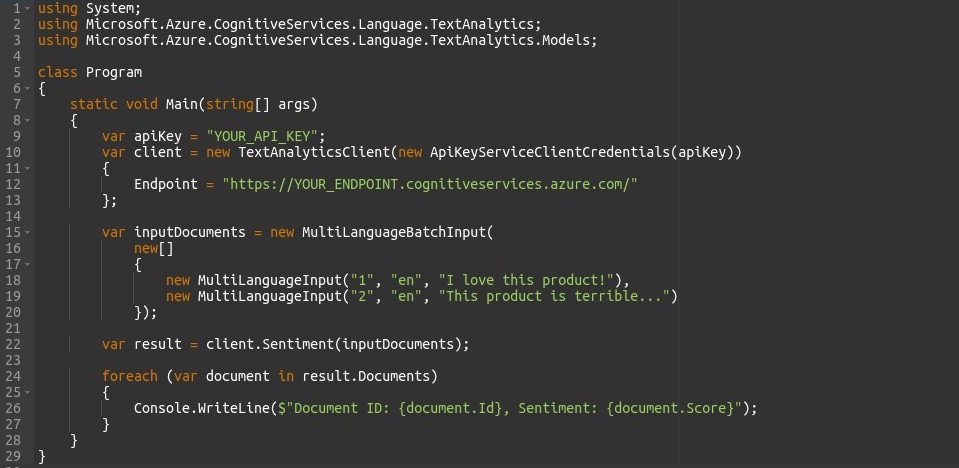
- This instance illustrates the utilization of Azure Cognitive Services Text Analytics API to scrutinize the sentiment of text documents.
- An API key and endpoint are utilized to instantiate a TextAnalyticsClient.
- Input documents are formulated and dispatched to the API for sentiment analysis.
- The sentiment scores for each document are showcased.
6. Custom Implementations
- Developers can implement custom AI solutions using libraries like Accord.NET or SharpAI.
- Accord.NET offers a plethora of tools and algorithms for statistical data processing, ML, and computer vision in .NET.
- SharpAI provides neural network models and utilities tailored for .NET, simplifying the implementation of custom deep learning solutions.
- Custom implementations enable developers to address specific requirements or use cases not covered by pre-built libraries or services, offering flexibility and customization options.
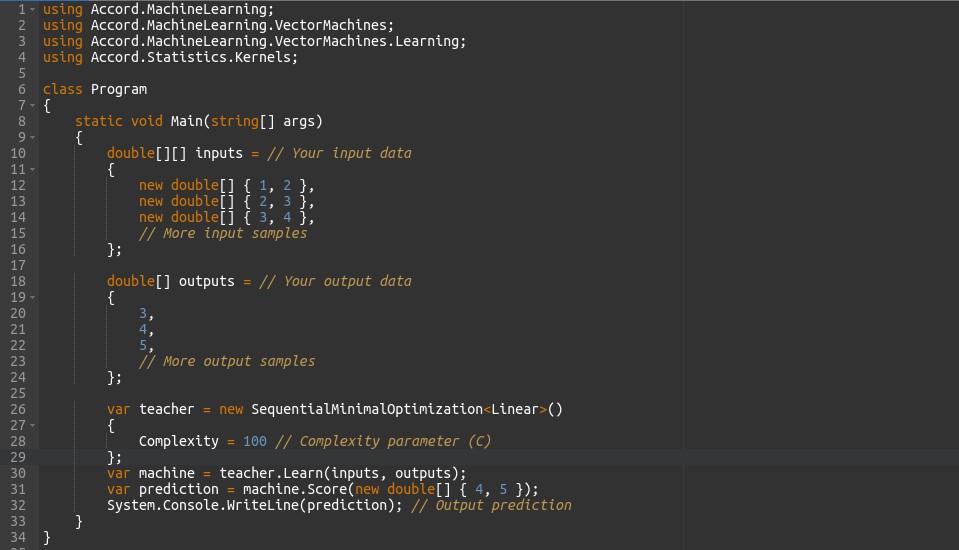
- In this scenario, Accord.NET is employed to conduct linear regression.
- Input and output data are designated.
- A sequential minimal optimization (SMO) algorithm is engaged to train a linear regression model.
- The trained model is employed to make predictions on new data, and the result is then exhibited.
Best Practices for AI Integration
Integrating AI into applications requires careful planning and consideration of various factors to ensure successful implementation. Here are some best practices for AI integration:
1. Clearly Establish Objectives
Start by definitively outlining the goals and anticipated outcomes of embedding AI into your application. Pinpoint specific challenges or tasks where AI can provide solutions or enhancements.
2. Understand Data Prerequisites
AI models rely heavily on data. Ensure access to top-notch, pertinent data for training and validating your AI models. Take into account data privacy, security, and compliance prerequisites.
3. Begin with Small-Scale Initiatives, Evolve
Start with modest, manageable AI initiatives or prototypes. Evolve gradually and broaden the scope based on feedback and results. Initiating with smaller projects allows for learning and adaptation without major resource commitments upfront.
4. Choose Suitable Algorithms
Opt for algorithms and methodologies that best align with your problem domain and data attributes. Consider factors like interpretability, scalability, and efficiency when selecting algorithms.
5. Evaluate Model Performance Diligently
Establish robust evaluation standards to gauge the performance of AI models. Employ suitable metrics and validation methods to assess accuracy, precision, recall, and other pertinent metrics.
6. Prioritize Model Interpretability
Aim for interpretability and transparency in models, particularly in domains necessitating explainable decision-making. Understand the reasoning behind AI model predictions or decisions to foster trust and accountability.
7. Address Bias and Equitability
Stay mindful of potential biases in data and AI models that may result in unjust outcomes or biases. Implement measures to detect, mitigate, and rectify bias throughout the AI development lifecycle.
8. Monitor and Sustain Models
Continuously monitor AI models in production to ensure they maintain expected performance over time. Implement mechanisms for model retraining, updates, and versioning to uphold accuracy and relevance.
9. Seamlessly Integrate with Applications
Seamlessly integrate AI capabilities into your application’s user interface and workflow. Ensure AI features enhance user experience and productivity without introducing unnecessary complexity.
10. Offer User Input and Control:
Provide users with insight into AI-driven features and allow them to provide feedback or control AI behaviour when applicable. Transparency and user empowerment foster trust and acceptance of AI technologies.
11. Invest in Skills and Infrastructure
Invest in equipping your team with the necessary skills and building infrastructure to support AI development and deployment. Foster a culture of innovation and collaboration to maximize the impact of AI initiatives.
12. Adhere to Ethical and Responsible Practices
Prioritize ethical considerations and responsible AI practices throughout the development and deployment process. Uphold principles of fairness, accountability, transparency, and privacy to ensure AI positively benefits society.
(Note:- By following these best practices, organizations can effectively integrate AI into their applications and unlock value from their data while mitigating risks and maximizing benefits.)
Tools for AI Development in .NET
1. ML.NET
ML.NET stands out as an open-source, cross-platform framework tailored for .NET developers keen on crafting, training, and deploying machine learning models using C# or F#.
2. TensorFlow.NET
This gem binds TensorFlow, Google’s powerhouse in machine learning, with the .NET environment. It hands .NET developers the reins to wield TensorFlow’s prowess in deep learning, seamlessly integrating it into their C# or F# projects.
3. CNTK (Microsoft Cognitive Toolkit)
Enter the Microsoft Cognitive Toolkit, another top-tier deep learning framework that syncs up with .NET development. It flaunts efficient implementations of popular deep learning algorithms and boasts scalability and performance.
4. Accord.NET
If you’re in the market for a .NET framework drenched in scientific computing and machine learning capabilities, Accord.NET’s got your back. Its arsenal includes libraries for stats, numerical optimization, and a plethora of machine learning algorithms.
5. NumSharp
For .NET aficionados craving a taste of NumPy’s numerical computing magic, NumSharp is the go-to library. It empowers .NET devs to flex their array manipulation and mathematical muscle, indispensable for AI and machine learning endeavours.
6. Microsoft Azure Cognitive Services
Azure swoops in with Cognitive Services, pre-built AI solutions encompassing computer vision, natural language processing, speech recognition, and more. Seamlessly integrate these services into your .NET apps using Azure SDKs and APIs.
7. Microsoft Bot Framework
Crafting conversational AI agents (aka chatbots) just got easier with the Microsoft Bot Framework. It equips developers with the tools needed to build, test, and deploy bots across various channels, from the web to mobile and messaging platforms.
8. NumSharp
NumSharp is a .NET library that provides functionalities similar to NumPy, a popular Python library for numerical computing. It allows .NET developers to perform array operations and mathematical computations efficiently, which are essential for AI and machine learning tasks.
Case Studies
1. Sentiment Analysis in Customer Support
Objective: Classify customer support tickets into spam and non-spam categories.

- We define a model pipeline using ML.NET. The pipeline consists of two main steps:
- Featurizing text data: This step converts the text data from customer support tickets into numerical features that the machine learning model can understand.
- Training a binary classification model: We use the Stochastic Dual Coordinate Ascent (SDCA) logistic regression algorithm to train the model. This algorithm is suitable for binary classification tasks.
- Once the pipeline is defined, we train the model using historical data (trainData).
- After training, we evaluate the model’s performance using a separate set of test data (testData). The Evaluate method computes metrics such as accuracy, precision, recall, and F1 score, which help assess the model’s effectiveness in distinguishing between spam and non-spam tickets.
2. Image Classification in E-commerce
Objective: Automatically classify product images based on attributes like color, style, and category.

- We utilize the Azure Cognitive Services SDK for .NET to analyze product images.
- Using the AnalyzeImageAsync method, we submit a product image (specified by the imageUrl parameter) to the Computer Vision service.
- The service then analyzes the image and returns insights such as objects detected, image descriptions, and relevant tags.
- These insights can be used to automatically categorize product images based on attributes like color, style, and category, enabling features such as search by image and automatic tagging of products.
Conclusion
In wrapping up, integrating AI into .NET applications presents abundant prospects for innovation and efficacy. By adhering to best practices, harnessing tools like ML.NET and Azure Cognitive Services, and gleaning insights from practical case studies, developers can unlock AI’s game-changing potential.
From automating tasks to enriching user experiences, AI empowers developers to craft intelligent, user-centric applications. Embracing AI nurtures innovation and drives business value in the dynamic realm of software development.
As AI continues to evolve, developers wield the tools and ingenuity to shape the technological landscape, delivering impactful solutions within .NET applications.