


Introduction

New version of React.js promises to come in the near future. But have everyone’s projects been upgraded to React 18, the stable version published for a while. And what is your experiments with it? In this post, I will tell you my experience of using React 18 for my project. There is a bug while running with React 18 for my code. I will explain what the bug is in this discussion. And hope someone would give me some advice. But let review what React 18 brings to us.
Firstly, we should take an overview of the evolution of React.js. You can see that React.js is going to the target of being a Full-Stack framework like Angular.js or SvelteKit.js
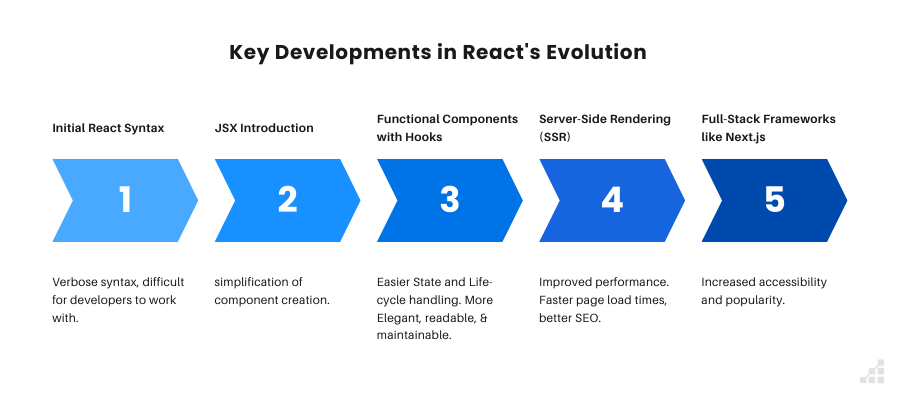
The featured added to React 18 also follow the chart above. What we often expect from breaking change version are performance and developer experience. Now let review them.
React 18 outstanding features

Strict Mode Enhancements: React 18 adds stricter checks in development mode, such as intentional double-invoking of certain lifecycle methods and useEffect to help surface issues early. This ensures that components are resilient when concurrent rendering is enabled. Catches potential issues in development before they become problems in production.
Concurrent Rendering: React 18 now is smarter in rendering. It can prioritize, pause and resume an update. This allows React to prepare multiple UI updates in the background without freezing the UI, making applications feel more responsive.
Automatic Batching: developer sometimes use setTimeout with purpose of synchronizing the event handlers but they were not batched together, leading to multiple renders. React 18 automatically batches updates, even in asynchronous code. This helps reduce renders, better performance.
Behind-the-scenes that allows React to prepare multiple versions of your UI at the same time. Also, a platform update to React’s core rendering model. One of the key features of Concurrent React is that rendering can be interrupted. React can start rendering an update, pause in the middle, then resume later. Additionally, Concurrent React can remove UI parts from the screen, then add them back later without changing its state.
function handleEventClick() {
    // React 18 batches 2 updates into a single render  action_cause_rendering_1;  action_cause_rendering_2;
}
useTransition hook and startTransition: these are new features use for prioritization the non-urgent update. The first one is used in functional component and the second one is used for both class component and functional component.
useTransition must be inside functional component. It primarily used for mananaging non-urgent state transitions and tracking whether the transition is in progress. It can display the loading state via a property called isPending boolean.
import { useTransition } from 'react';
const [isPending, startMyTransition] = useTransition();
// Start the transition (mark the update as non-urgent)
    startMyTransition(() => {
      // Simulate a non-urgent state update, like filtering data
      const filtered = someData.filter(item => item.includes(value));
      setFilteredData(filtered);
    });
startTransition is the same with useTransition but it does not have isPending to show the something in progress. You can replace startMyTransition with startTransition without much change in functionality.
import { startTransition } from 'react';

// Start the transition (mark the update as non-urgent)
    startTransition(() => {
      // Simulate a non-urgent state update, like filtering data
      const filtered = someData.filter(item => item.includes(value));
      setFilteredData(filtered);
    });
useId hook: allows developers to generate unique IDs on both the client and server sides. This helps avoid issues with mismatches between the server-rendered content and the client-rendered content in scenarios like hydration. But keep in mind useId specific or react hook in general does not use in condition or loop. Let have the look at full code of the example having useId
import { useState, useTransition, useId, startTransition } from 'react';
    const someData = [...'your name here'];

function ExampleComponent() {
  const [text, setText] = useState('');
  const [filteredData, setFilteredData] = useState([]);
  const [isPending, startMyTransition] = useTransition();  // Hook to manage the transition state
  const id = useId();
  const handleInputChange = (event) => {
    const value = event.target.value;
    setText(value);

    // Start the transition (mark the update as non-urgent)
    startMyTransition(() => {
      // Simulate a non-urgent state update, like filtering data
      const filtered = someData.filter(item => item.includes(value));
      setFilteredData(filtered);
    });
  };

  return (
    <>
      <input type="text" value={text} onChange={handleInputChange} />
      {isPending ? <p>Loading...</p> : <ul>{filteredData.map((item, index) => <li key={`${id}-${index}`}>{item}</li>)}</ul>}
    </>
  );
}
Root API render: React 18 introduces a new API for creating root components using createRoot instead of ReactDOM.render. This new root API enables concurrent features and provides a more flexible rendering approach. It enables better control over how components are rendered, especially in the context of concurrent rendering.
import { createRoot } from 'react-dom/client';

const root = createRoot(document.getElementById('root'));
root.render(<App />);
So, let back to my issue. My project has been using React for many years. From a few pages at first, it has now grown into two systems with hundreds of pages. The data size is also very large at more than 40 GB. We have a React ecosystem that includes the MUI system. That library provides all the wrappers for MUI components with custom styles. My client recently published a breaking version of that library. And it is definitely React 18 with new features. The project relies heavily on MUI DataTable and a few pages that use other components including DataGrid.
We didn’t have any problems with React 17 in rendering MUI DataTable. But when the project was upgraded to React 18. Everything changed. We noticed that there are some user interface issues. That is, the header columns look weird when we load new data for the table. It should have destroyed the current one and displayed the new one. But the columns were shrunk, and the table was still there. So, it leaves a strange visual for the user.
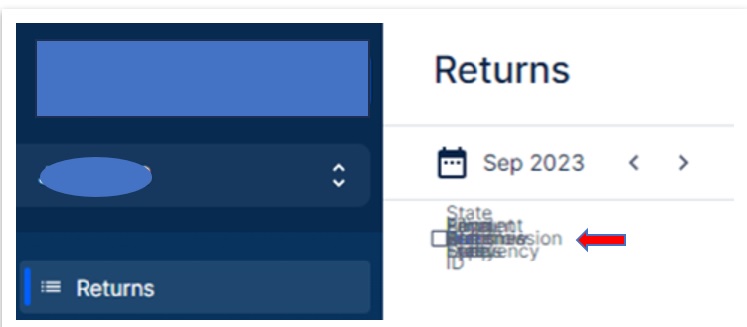
But if we move to React 17, the weird visual will be gone.
There could be the big differences in React between version 17 and version 18.
Try to find the root cause
Coming back to my project, I suspect that React Autobatching might be the root of the above problem. But I can’t be sure now because we’ve done a lot of customization on the MUI panel. It takes a long time to dig into the source code. But we have a way to solve this problem using CSS.
display: tableWidth ? 'table' : 'hidden'Here with the tableWidth prop, the table should be hidden from UI when it does not have any data. The issue is solved.
Another solution is giving up the cool new features of React 18 and back to use React 17 rendering mechanism
// React 18 with previous version of rendering (equal to React 17)

import { render } from 'react-dom';

const container = document.getElementById('app');

render(<App tab="home" />, container);


// React 18 rendering with new features

import { createRoot } from 'react-dom/client';

const container = document.getElementById('app');

const root = createRoot(container); // createRoot(container!) if you use TypeScript

root.render(<App tab="home" />);
Final words
React 19 is coming soon. From the blog posts around the network, I can hear that it will focus on React Server Components, introduce new hooks for greater developing experience and further improve performance. By being deeply involved in React 18, we can realize what it has to offer early and look forward to the new features of React 19. Anyway, as developers, I would like to find out the real root cause of the problem I am facing soon. Because it helps us avoid repeating the problems and take advantage of most of the advanced features of React 18. If anyone has ever encountered the same problem, feel free to leave a comment to share your thoughts.

References:
React v18.0 – React
medium.com
https://www.scalablepath.com/react/react-18-release-features