




Why Do We Need Local LLMs
Latest trends in AI have brought the power of LLMs and made use of many different like Open AI, Azure, Antropedia, and some open source model tools like Hugging Face but these all run on a different server, and here comes the use of Local LLMs.
These LLMs are good specially in the case of production environment but have many issues like
- Cost: LLMs can get costly as they are charged per token basis and also third party by nature
- Flexibility: They are much harder to Finetune and also custom in nature to use your own training data easily
- Security: Though most of them are big and have the nature to be security first they are still third-party
- Restrictions: There are many things like the total no of tokens, some foul words, etc that are limited by these platforms.
- Dependency: Though they are highly available they still offer dependencies on these companies
Using Local LLMs can easily solve many of these problems.
Approach One: LM Studio
Local LLMs are good and also very powerful and offer many great features but making them like making them use your services/resources of your devices could be tough and also very time-consuming in nature to not only start but also use them as a chat UI or even as APIs
LM Studio solves this issue it makes you use any supported device it may be your Mac/Linux/Windows device to just download these LLMs and then use your dedicated tools like CPUs, RAM, And GPUs that make it able to run them without worrying about the specs and the configuration in great details that make it very easy UI to do chat like we do in BARD, ChatGPT or BING AI.
We don’t only get a great deal of the chat UI but also make use of it as an API that makes it easy to integrate with many other AI orchestrators like Semantic Kernel or Langchain and make it powerful for us to easily use in our existing AI application.
Install LM Studio
Installing LM Studio via the LM Studio Homepage is easily achievable based on your specific OS requirements, be it Linux, Mac OS, or Windows.
Installation involves placing files on these operating systems, noting that it accommodates low-spec devices with a minimum of 8GB RAM and doesn’t necessitate a high-end GPU.
Additionally, it enables CPU-only operation by supporting GGUF format and remains compatible with both Nvidia and AMD GPUs.
It’s important to note that many LLMs may not be supported in LM Studio.
After Installation, we would get a great UI that has both some Listed common LLMs and also has a requirement of RAM mentioned that makes it easy to see which support and which will not work
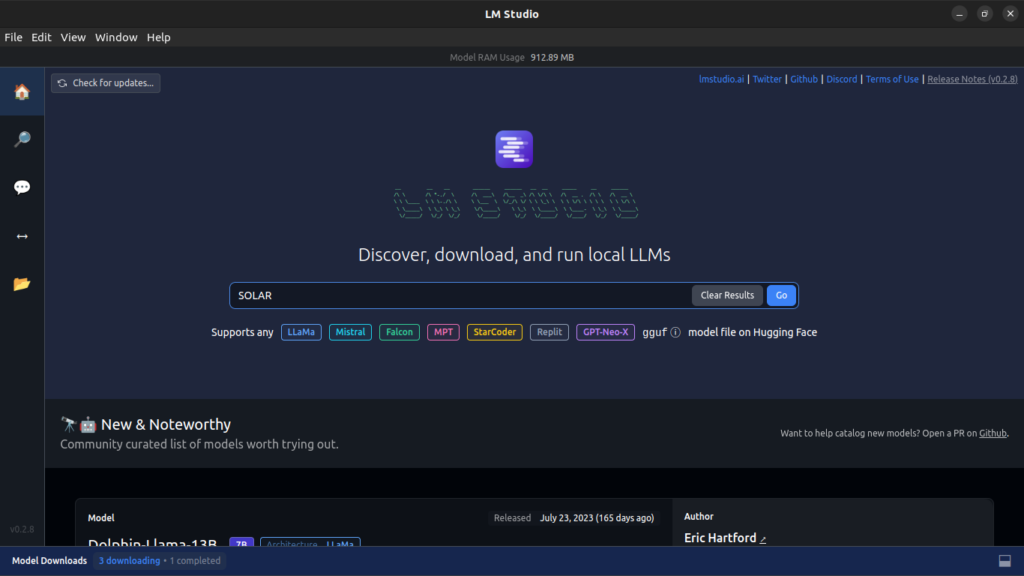
Select your Custom LLMs from Hugging Face
Hugging Face hosts a variety of Language Models (LLMs), providing numerous options for testing and running them. It stands out as one of the major platforms for discovering LLMs and obtaining their Quantized models tailored to your systems.
We can easily search the Hugging face either by using the link of the hugging face or also using them easily a better way is to use the keyword by clicking on the search icon [Note many models might not have a quantized version that may support your OS and Specification]
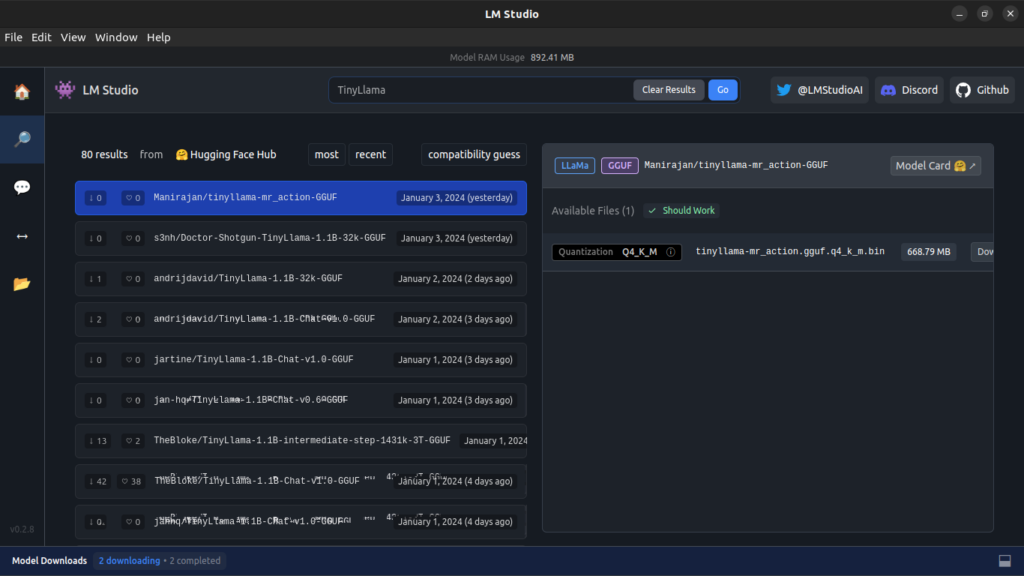
After this, you get the model that you like and just hit on download and install the one that you need
Use of Chat UI
After you have downloaded your favorite/desired model now you can use its own chat interface to load the model and the best part like other apps it allows you many options like How many threads, you want to use GPU, Use system prompts, and many options that could be very useful to cater your use case or make the run time of the Model Greater.
Using Tinyllama in this demo
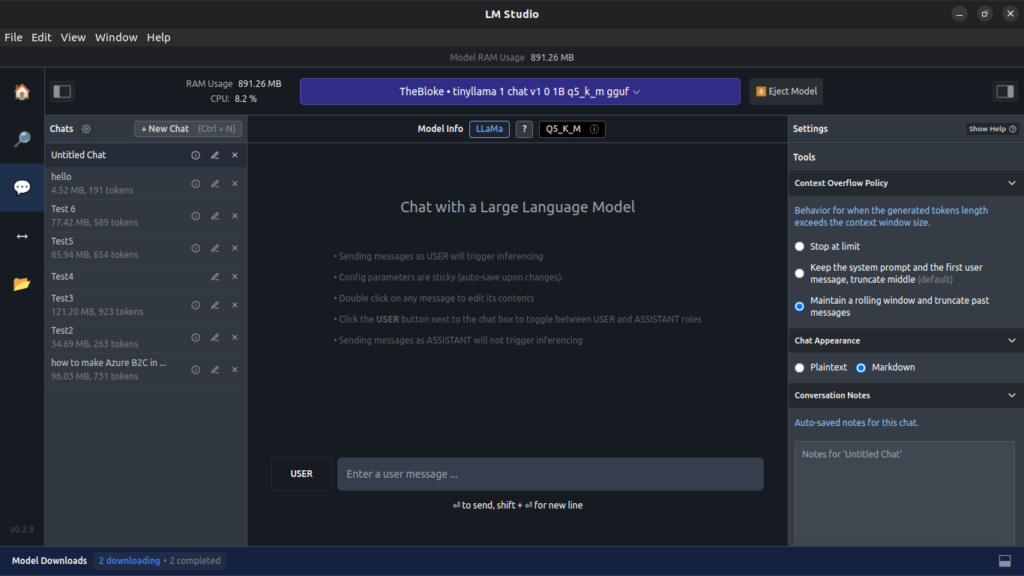
Chat Sample
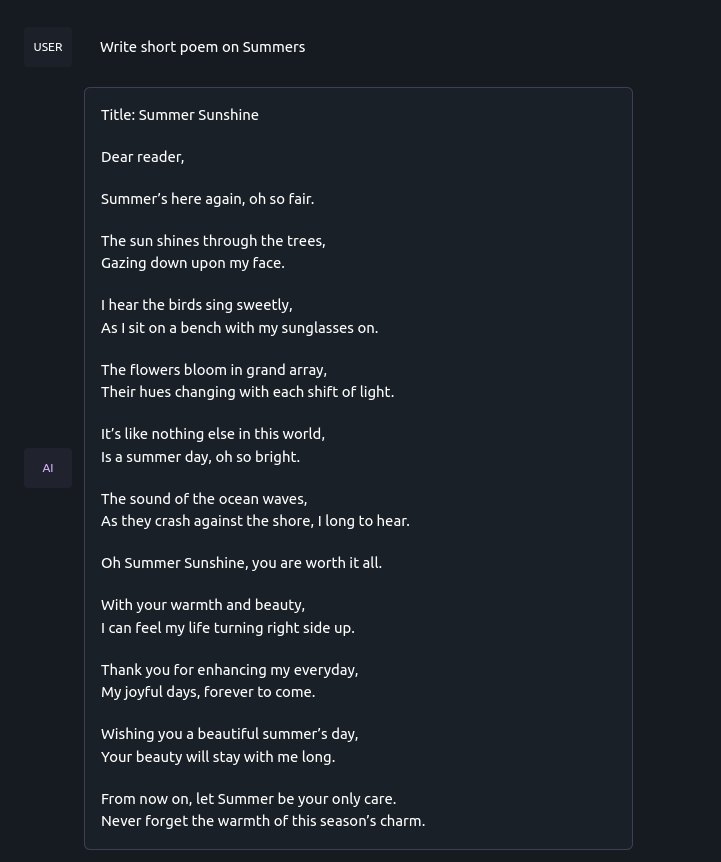
Use of APIs in LM Studio
Chat interface is good but what about using these LLMs in your application yes this also provides an easy API that you can use and in many machines can also make public etc to use it in development settings too and be a great case for your own AI applications
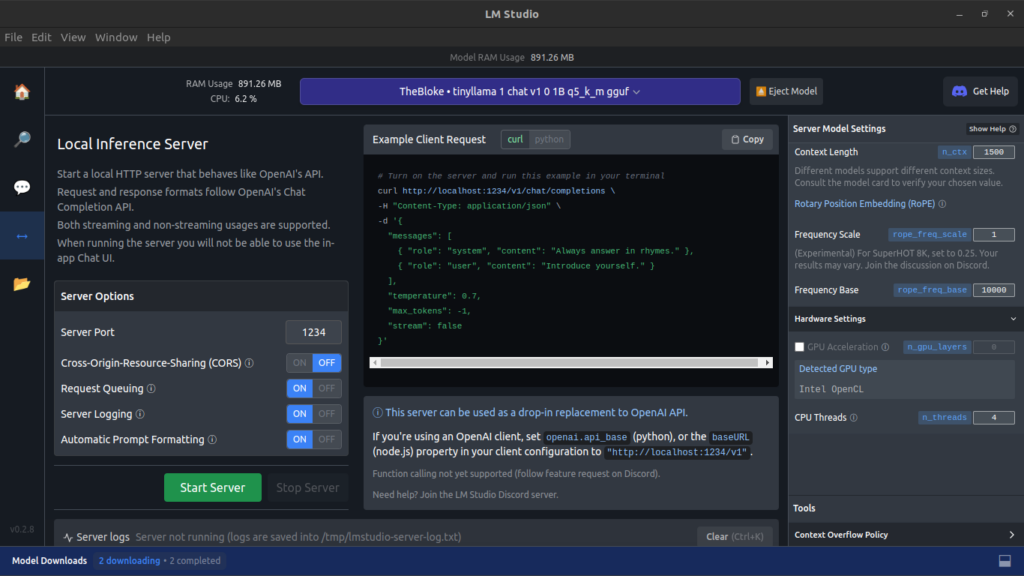
Clicking on the Server Icon in LM Studio exposes the curl command and the required format for calling it. Additionally, it provides the formats used in the Server for use within your application.
It also provides many other server-level Features like CORS, Port Selection, Logging, etc that can be very useful when you are using it with a Proper Curl to test and use inside your application.
Integration with AI Orchestrators
Using Curl etc is good and can be interesting but this can get better with the very popular AI Orchestrator that makes the use inside the application not only easy but also introduces many key features that can be very useful in nature when building and testing a robust application.
Use in Application with Semantic Kernel
Semantic kernel is a great way to use LLMs and also has native support to use these local LLMs by just initializing the kernel and then using as we do with Open AI or Azure Open AI APIs that we generally use and the same goes with this using their hugging face support.
Using .Net for Semantic Kernel
Code Sample
public class OllamaTextGeneration : ITextGenerationService
{
    private readonly string _apiUrl;
    private readonly int _maxToken;
    private readonly double _temperature;
    private readonly string _model;

    public OllamaTextGeneration(string apiUrl, int maxToken, double temperature, string model)
    {
        _apiUrl = apiUrl;
        _model = model;
        _maxToken = maxToken;
        _temperature = temperature;
    }

    public IReadOnlyDictionary<string, object?> Attributes => new Dictionary<string, object?>();

    public async IAsyncEnumerable<StreamingTextContent> GetStreamingTextContentsAsync(
        string prompt,
        PromptExecutionSettings? executionSettings = null,
        Kernel? kernel = null,
        [EnumeratorCancellation] CancellationToken cancellationToken = default)
    {
        string resultText = "Not implemented";

        foreach (string word in resultText.Split(' ', StringSplitOptions.RemoveEmptyEntries))
        {
            await Task.Delay(50, cancellationToken);
            cancellationToken.ThrowIfCancellationRequested();

            yield return new StreamingTextContent($"{word} ");
        }
    }

    public async Task<IReadOnlyList<TextContent>> GetTextContentsAsync(
        string prompt,
        PromptExecutionSettings? executionSettings = null,
        Kernel? kernel = null,
        CancellationToken cancellationToken = default)
    {
        string resultText;

        Console.WriteLine(prompt);

        var chatRequest = new OllamaRequest
        {
            model = _model,
            temperature = _temperature,
            num_predict = _maxToken,
            prompt = prompt,
            stream = false
        };

        string jsonPayload = JsonConvert.SerializeObject(chatRequest, Formatting.Indented);

        using (HttpClient client = new HttpClient())
        {
            try
            {
                HttpRequestMessage request = new HttpRequestMessage(HttpMethod.Post, _apiUrl);
                request.Content = new StringContent(jsonPayload, Encoding.UTF8, "application/json");

                HttpResponseMessage response = await client.SendAsync(request, cancellationToken);

                if (response.IsSuccessStatusCode)
                {
                    string responseBody = await response.Content.ReadAsStringAsync();
                    dynamic responseObject = JsonConvert.DeserializeObject(responseBody);
                    resultText = responseObject.response;
                }
                else
                {
                    resultText = $"Failed to make the request. Status code: {response.StatusCode}";
                }
            }
            catch (HttpRequestException e)
            {
                resultText = $"Error: {e.Message}";
            }
        }

        return new List<TextContent>
        {
            new TextContent(resultText)
        };
    }
}

public class OllamaRequest
{
    public string model { get; set; }
    public double temperature { get; set; }
    public int num_predict { get; set; }
    public string prompt { get; set; }
    public bool stream { get; set; }
}
Use in Application with Lang Chain
Local LLMs have native support in Langchain, making it straightforward to use once we create its Custom LLM class. This Custom LLM class allows seamless integration within various applications such as agents and numerous other features of Langchain.
Using Python in this use case
Code Sample
from langchain.chains import LLMChain
from langchain.prompts import PromptTemplate
from typing import Any, List, Mapping, Optional
import requests
import json
from langchain.callbacks.manager import CallbackManagerForLLMRun
from langchain.llms.base import LLM
#Change the Url according to the Server
URL = "http://localhost:1234/v1/chat/completions"
class CustomLLM(LLM):
    n: int
    url = URL
    @property
    def _llm_type(self) -> str:
        return "custom"

    def _call(
        self,
        prompt: str,
        stop: Optional[List[str]] = None,
        run_manager: Optional[CallbackManagerForLLMRun] = None,
    ) -> str:
        if stop is not None:
            raise ValueError("stop kwargs are not permitted.")

        payload = json.dumps({
          "messages": [
            {
              "role": "user",
              "content": prompt
            }
          ],
          "temperature": 0,
          "max_tokens": -1,
          "stream": False
        })
        headers = {
          'Content-Type': 'application/json'
        }

        response = requests.request("POST", self.url, headers=headers, data=payload)
        return response.json()['choices'][0]['message']['content']

    @property
    def _identifying_params(self) -> Mapping[str, Any]:
        """Get the identifying parameters."""
        return {"n": self.n}

def AnswerQuestionStepByStep(Question):
    llm = CustomLLM(n=10)
    template = """Question: {question}
    Answer: Let's think step by step."""
    prompt = PromptTemplate(template=template, input_variables=["question"])
    llm_chain = LLMChain(prompt=prompt, llm=llm)
    result=llm_chain.run(Question)
    return result

result=AnswerQuestionStepByStep("What is the capital of France?")
print(result)
Approach Two: Ollama
Some other open-source tools like Ollama may not have the same interface as Ollama and this is also a very good tool.
With the main process, it doesn’t provide an easy interface like LM Studio but has better Server support where you can pull many of their designed LLMs and just pull and then at the time of the API call define which to use and it will use it.
Startup
With the help of Docker Compose easily use LLM of choice.
version: "3.8"
services:
  ollama:
    image: ollama/ollama
    container_name: ollama
    ports:
      - "5000:11434"
    volumes:
      - ./ollama:/root/.ollama
    restart: always
After this, your Ollama is set up and now with simple commands of using to pull can pull any one of the models and then run it using the curl
Docker Command
docker exec -it ollama ollama pull <model name> Curl
curl --location 'http://localhost:3000/api/generate' \
--header 'Content-Type: application/json' \
--data '{
  "model": "<model_name>",
  "temprature":0.7,
  "num_predict":200,
  "prompt": "You are a chatting system that try to solve the Query and Information mentioned in a proffesional way and be precise in nature \r\n \r\n ```Query:what is cargo in rust   \r\nInformation:Use General Information Only```",
  "stream": false
}
Integration with AI Orchestrator
Similar to LM Studio, Ollama can also be integrated with both Semantic Kenel and Lang Chain to run Local LLMs.
With the help of code samples can easily integrate them both into the choice of AI Orchestrator
Use in Application with Semantic Kernel
public class OllamaTextGeneration : ITextGenerationService
{
    private readonly string _apiUrl;
    private readonly int _maxtoken;
    private readonly double _temprature;
    private readonly string _model;

    public OllamaTextGeneration(string apiUrl, int maxtoken, double temperature, string model)
    {
        _apiUrl = apiUrl;
        _model = model;
        _maxtoken = maxtoken;
        _temprature = temperature;
    }
    public IReadOnlyDictionary<string, object?> Attributes => new Dictionary<string, object?>();
    public async IAsyncEnumerable<StreamingTextContent> GetStreamingTextContentsAsync(string prompt, PromptExecutionSettings? executionSettings = null, Kernel? kernel = null, [EnumeratorCancellation] CancellationToken cancellationToken = default)
    {
        string LLMResultText = "Not implemented";
        foreach (string word in LLMResultText.Split(' ', StringSplitOptions.RemoveEmptyEntries))
        {
            await Task.Delay(50, cancellationToken);
            cancellationToken.ThrowIfCancellationRequested();
            yield return new StreamingTextContent($"{word} ");
        }
    }

    public async Task<IReadOnlyList<TextContent>> GetTextContentsAsync(string prompt, PromptExecutionSettings? executionSettings = null, Kernel? kernel = null, CancellationToken cancellationToken = default)
    {
        // Doing the HTTP call to the Local LLM Server
        string LLMResultText;
        Console.WriteLine(prompt);
        // Create an instance of the ChatRequest class
        var chatRequest = new OllamaRequest
        {
            model = _model,
            temperature = _temprature,
            num_predict = _maxtoken,
            prompt = prompt,
            stream = false
        };
        // Serialize the ChatRequest object to JSON
        string jsonPayload = JsonConvert.SerializeObject(chatRequest, Formatting.Indented);
        // Create an HttpClient instance
        using (HttpClient client = new HttpClient())
        {
            try
            {
                // Create HttpRequestMessage and set the Content-Type header
                HttpRequestMessage request = new HttpRequestMessage(HttpMethod.Post, _apiUrl);
                request.Content = new StringContent(jsonPayload, System.Text.Encoding.UTF8, "application/json");
                // Send the request
                HttpResponseMessage response = await client.SendAsync(request, cancellationToken);
                // Check if the request was successful (status code 200-299)
                if (response.IsSuccessStatusCode)
                {
                    string responseBody = await response.Content.ReadAsStringAsync();
                    dynamic responseObject = JsonConvert.DeserializeObject(responseBody);
                    LLMResultText = responseObject.response;
                }
                else
                {
                    LLMResultText = "Failed to make the request. Status code: " + response.StatusCode;
                }
            }
            catch (HttpRequestException e)
            {
                LLMResultText = "Error: " + e.Message;
            }
        }
        return new List<TextContent>
    {
        new TextContent(LLMResultText)
    };
    }
}
public class OllamaRequest
    {
        public string model { get; set; }
        public double temperature { get; set; }
        public int num_predict { get; set; }
        public string prompt { get; set; }
        public bool stream { get; set; }
    }
Use in Application with Lang Chain
from langchain.chains import LLMChain
from langchain.prompts import PromptTemplate
from typing import Any, List, Mapping, Optional
import requests
import json
from langchain.callbacks.manager import CallbackManagerForLLMRun
from langchain.llms.base import LLM
#Change the Url according to the Server
URL = "http://localhost:3000/api/generate"
class CustomLLM(LLM):
    n: int
    url = URL
    @property
    def _llm_type(self) -> str:
        return "custom"

    def _call(
        self,
        prompt: str,
        stop: Optional[List[str]] = None,
        run_manager: Optional[CallbackManagerForLLMRun] = None,
    ) -> str:
        if stop is not None:
            raise ValueError("stop kwargs are not permitted.")

        payload = json.dumps({
   "model":"tinnyllama",
          "prompt": prompt,
          "temperature": 0.7,
          "num_predict": -1,
          "stream": false
        })
        headers = {
          'Content-Type': 'application/json'
        }
        //Can change the model name according to our need
        response = requests.request("POST", self.url, headers=headers, data=payload)
        return response.json()['choices'][0]['message']['content']

    @property
    def _identifying_params(self) -> Mapping[str, Any]:
        """Get the identifying parameters."""
        return {"n": self.n}

def AnswerQuestionStepByStep(Question):
    llm = CustomLLM(n=10)
    template = """Question: {question}
    Answer: Let's think step by step."""
    prompt = PromptTemplate(template=template, input_variables=["question"])
    llm_chain = LLMChain(prompt=prompt, llm=llm)
    result=llm_chain.run(Question)
    return result

result=AnswerQuestionStepByStep("What is the capital of France?")
print(result)
Conclusion
Integrating Local Language Models goes beyond testing, offering a powerful way to enhance production settings. By seamlessly incorporating a variety of Finetuned LLMs, applications can benefit from advanced language processing capabilities. This dynamic combination empowers developers to create intelligent applications, optimizing user experiences and workflows with precision and ease.