


Introduction
.NET 9 brings significant updates and new features that empower developers to build modern, high-performance applications with greater ease. This latest version of .NET continues to enhance performance, streamline developer productivity, and improve the framework’s integration with cloud and containerized environments. Let’s dive into the key highlights of .NET 9.
New Features and Improvements in .NET 9
.NET 9 introduces a variety of enhancements that streamline the development process. One of the most exciting improvements is source generators. These powerful tools automatically generate code at compile time, which reduces repetitive tasks, minimizes errors, and improves overall productivity. This feature is particularly useful for automating the creation of boilerplate code.
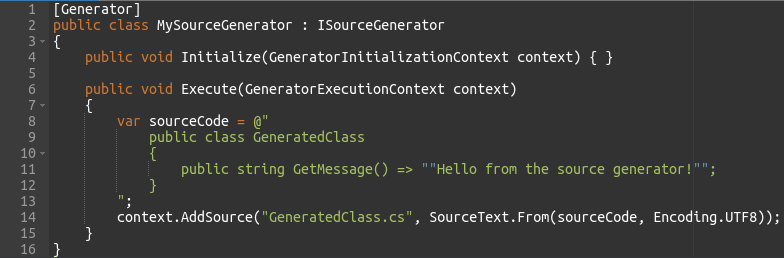
- Source Generators: By marking the class with the [Generator] attribute, we tell the compiler to treat it as a source generator. The Execute method is where the actual code generation happens. Here, we define a class called GeneratedClass that contains a method GetMessage that returns a simple message.
- With this approach, you avoid manually writing repetitive code, which not only reduces errors but also improves maintainability. The generated code integrates seamlessly into the project during the compilation process.
- By leveraging source generators, developers can significantly reduce boilerplate code, increase productivity, and focus more on the unique aspects of their applications. This feature ultimately saves time, improves consistency, and reduces human errors.
Performance Optimizations
.NET 9 focuses heavily on performance improvements. These optimizations target several core areas, including Just-In-Time (JIT) compilation, Garbage Collection (GC), and startup times. As a result, applications built on .NET 9 will be faster, more memory-efficient, and launch more quickly than their predecessors.
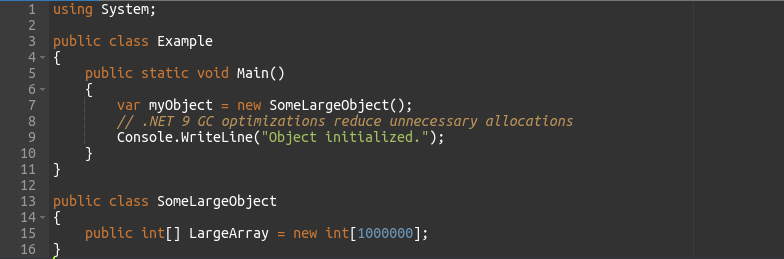
- Garbage Collection (GC): In .NET 9, GC is optimized to handle large objects (like LargeArray) more efficiently. When objects are no longer in use, they are cleaned up more quickly, resulting in less memory waste. This is particularly important for large applications or those running in resource-constrained environments.
- These optimizations lead to a noticeable reduction in memory consumption and a smoother user experience. This is especially valuable when dealing with large datasets or when performance is critical.
- .NET 9’s performance improvements provide applications with faster execution times, lower memory consumption, and improved scalability, ensuring they run efficiently even under heavy loads.
Enhanced Support for Cross-Platform Development
With .NET 9, cross-platform development is easier than ever before. .NET MAUI (Multi-platform App UI) allows developers to build applications that run on Windows, macOS, Android, and iOS from a single codebase. This unified approach drastically reduces the time and effort required to support multiple platforms.
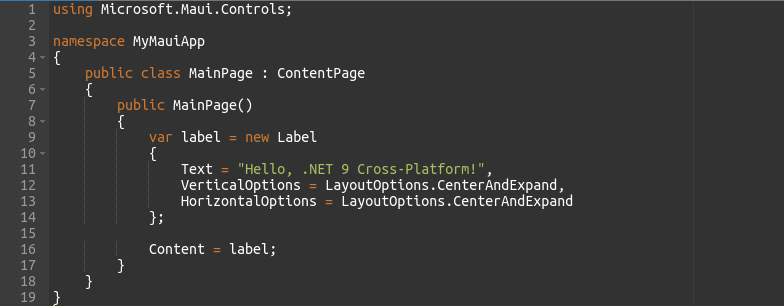
- .NET MAUI: In this example, the Label control is used to display text on the screen. The benefit of using .NET MAUI is that this same code will run on all major platforms without modification. The framework takes care of rendering the UI appropriately on each platform.
- Cross-Platform Efficiency: Developers no longer need to write separate code for each platform. .NET MAUI automatically adapts the code, ensuring a consistent user experience across devices.
- This support for cross-platform development simplifies the development process, saving time and reducing the complexity of maintaining multiple codebases. It ensures that developers can deliver consistent experiences to users, regardless of their device or operating system.
New APIs and Language Features (C# 11 Updates)
C# 11 introduces several exciting language features that enhance productivity and simplify the development process. List patterns, enhanced interpolated strings, and improved pattern matching allow for cleaner, more expressive code.
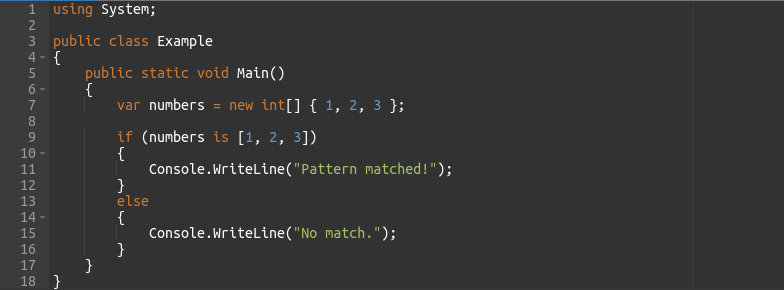
- List Patterns: With C# 11, pattern matching for arrays and lists has been enhanced. The line
numbers is [1, 2, 3]matches the array directly against the pattern[1, 2, 3]. If the match succeeds, the message “Pattern matched!” is printed. - Simplicity and Readability: This new syntax significantly reduces the need for manual looping or complex if conditions when working with arrays or lists. It’s much more concise and readable.
- C# 11’s language updates make code more concise and readable, improving maintainability and simplifying complex operations, especially when working with collections.
.NET MAUI (Multi-platform App UI) Advancements
.NET 9 further enhances .NET MAUI, adding better performance, new UI controls, and improving hot reload functionality. These updates make building and testing cross-platform applications faster and more efficient.
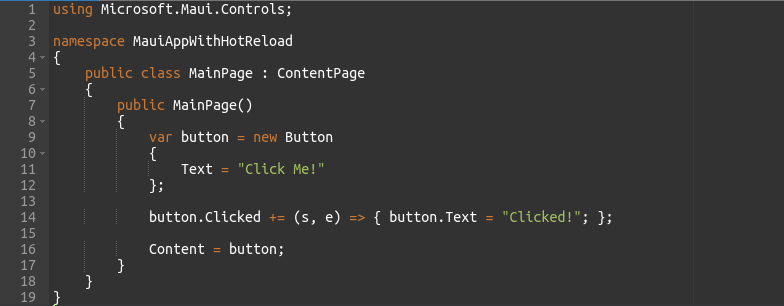
- Hot Reload: Hot reload allows developers to modify their code (such as changing the Button text) and see the results instantly without restarting the app. This makes it easier to iterate quickly and see changes in real-time.
- Rapid Development: The ability to make changes and immediately see them on the screen accelerates the development cycle and improves the overall user experience during development.
- .NET MAUI’s improvements, particularly the hot reload feature, dramatically speed up the development process. Developers can quickly see UI changes without interrupting their workflow, increasing efficiency and making testing easier.
Migration from Previous Versions to .NET 9
Migrating to .NET 9 is straightforward, thanks to the .NET Upgrade Assistant. This tool automates the migration process, handling the conversion of project files, dependencies, and code to ensure compatibility with the latest version of .NET.
- 1. Install the .NET Upgrade Assistant:

- 2. Upgrade your project:

- 3. Follow the prompts to complete the upgrade process.
- The Upgrade Assistant tool reduces the manual effort needed to migrate from older .NET versions to .NET 9. It automates key tasks, ensuring a smoother transition with minimal risk of errors. As a result, developers can adopt new features and optimizations without worrying about breaking their existing code.
Conclusion
.NET 9 brings a wealth of improvements that enhance productivity, performance, and development efficiency. With features like source generators, performance optimizations, cross-platform support through .NET MAUI, C# 11 updates, and hot reload, .NET 9 enables developers to build better applications faster. Additionally, the Upgrade Assistant simplifies the migration process, ensuring that transitioning to .NET 9 is smooth and seamless.
Incorporating these features into your development workflow can help you create high-performing, scalable applications with less effort and fewer errors. Ultimately, .NET 9 empowers developers to focus on building innovative solutions, while the framework takes care of much of the heavy lifting.