



In our last blog post, A Beginner’s Guide to Setup Amazon Bedrock, we went through a step‑by‑step guide to setup Amazon Bedrock. We also, came to know about Amazon Bedrock’s test playgrounds, where we can get a hands-on Amazon Bedrock without writing any code.
Although, playgrounds are a great place to start with a service. But, when we have to build repeatable workflows, we’ll eventually have to write some code. For instance, create different versions of prompts, test different model(s), and fine-tune the model parameters as per User feedback.
In this article, we will continue learning Amazon Bedrock and know how to engineer prompts programmatically using Amazon SageMaker Unified Studio (JupyterLab) and boto3.
Environment Setup (Amazon SageMaker Unified Studio)
Although, we can run a local environment as well, but using Amazon SageMaker Unified Studio allows us to work fully in the cloud.
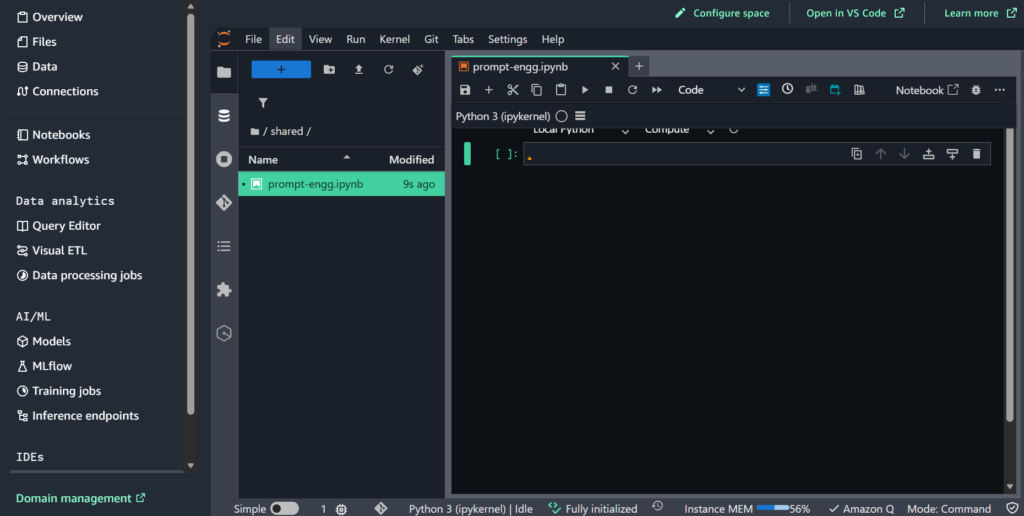
- In AWS, open SageMaker Unified Studio and create a JupyterLab space.
- Select instance type – ml.t3.medium as it is more than sufficient for our Bedrock API experiments. However, if required, more compute intensive instances can also be selected for a higher price.
- Next, open JupyterLab space.
- At last, select the latest Python 3 (ipykernel) for creating notebook(s), as it is apt for our prompt‑only work.
Where does Amazon Bedrock fits in?
Before we move on to creating some code examples for prompt(s) in Amazon SageMaker Unified Studio, let’s understand where does the Amazon Bedrock fits in. As per the basis the diagram shown below, Amazon Bedrock provides a runtime and acts like a collection of different model providers. Like Anthropic Claude, AWS Nova, Cohere Command, and many more.

Amazon Bedrock Model Request Examples
I. Messages API (Amazon Nova)
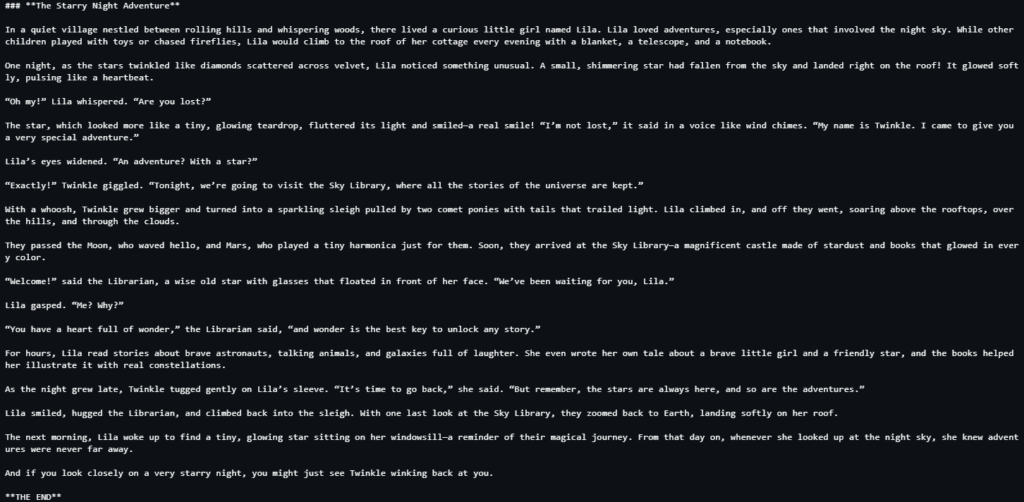
Updated Amazon Nova models expect a messages array.
For Reference
import json

import boto3
from botocore.config import Config

# Configure the request
request_body = {
    "messages": [
        {
            "role": "user",
            "content": [{"text": "Write a short story. End the story with 'THE END'."}],
        }
    ],
    "system": [{"text": "You are a children's book author."}],  # Optional
    "inferenceConfig": {  # Optional
        "maxTokens": 1500,
        "temperature": 0.7,
        "topP": 0.9
    },
}

bedrock = boto3.client(
    "bedrock-runtime",
    config=Config(read_timeout=3600),
)

# Invoke the model
response = bedrock.invoke_model(
    modelId="us.amazon.nova-2-lite-v1:0", body=json.dumps(request_body)
)
response_body = json.loads(response["body"].read())

# Extract the text response
content_list = response_body["output"]["message"]["content"]
for content in content_list:
    if "text" in content:
        print(content["text"])
Response
II. Code Interpreter (Amazon Node Code Interpreter)
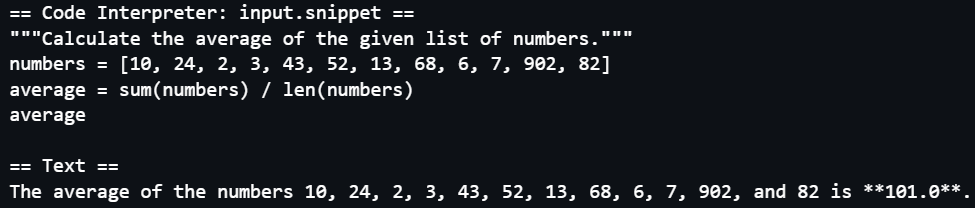
Amazon Nova’s built‑in system tool allows the model execute Python code in an isolated sandbox. This is great for data analysis, calculations, and quick scripting. When nova_code_interpreter is active, the model can generate a Python snippet, invoke it in a sandbox, and return structured results. The result can be one of the following – stdOut, stdErr, exitCode, or isError.
Reference
import boto3
from botocore.config import Config

# Define the list of tools the model may use
tool_config = {"tools": [{"systemTool": {"name": "nova_code_interpreter"}}]}

# Create the Bedrock Runtime client, using an extended timeout configuration
# to support long-running requests.
bedrock = boto3.client(
    "bedrock-runtime",
    config=Config(read_timeout=3600),
)

messages = [
    {
        "role": "user",
        "content": [
            {
                "text": "What is the average of 10, 24, 2, 3, 43, 52, 13, 68, 6, 7, 902, 82?"
            }
        ],
    }
]

# Invoke the model
response = bedrock.converse(
    modelId="us.amazon.nova-2-lite-v1:0", messages=messages, toolConfig=tool_config
)

# Extract the text and the code the was executed
content_list = response["output"]["message"]["content"]
for content in content_list:
    if "text" in content:
        print("\n== Text ==")
        print(content["text"])

    elif "toolUse" in content and content["toolUse"]["name"] == "nova_code_interpreter":
        print("\n== Code Interpreter: input.snippet ==")
        print(content["toolUse"]["input"]["snippet"])
Response
In-Summary
Working programmatically with Amazon Bedrock allows version control, cleaner & faster experiments, and multiple iterations of prompt testing. However, the biggest challenge is figuring out each provider’s (Amazon, Anthropic, Cohere, etc.) payload schema, since, it is different for each provider. But once we internalize those patterns, we can swap models and compare outputs quickly.